
Ruijie RG-WS6108 Series Manuel d'installation et d'exploitation

Ruijie RG-WS6108 Wireless Controllers
Hardware Installation and Reference Guide
Document Version: V1.2
Date: 2023.12.12
Copyright © 2023 Ruijie
Networks

Copyright
Copyright © 2023 Ruijie Networks
All rights are reserved in this document and this statement.
Any reproduction, excerption, backup, modification, transmission, translation or commercial
use of this document or any portion of this document, in any form or by any means, without the
prior written consent of Ruijie Networks is prohibited.
Trademark and are owned by Ruijie Networks.
All other trademarks or registered trademarks mentioned in this document are owned by their
respective owners.
Disclaimer
The products, services, or features you purchase are subject to commercial contracts and
terms. Some or all of the products, services or features described in this document may not be
within the scope of your purchase or use. Unless otherwise agreed in the contract, Ruijie
Networks does not make any express or implied statement or guarantee for the content of this
document.
Due to product version upgrades or other reasons, the content of this document will be
updated from time to time. Ruijie Networks reserves the right to modify the content of the
document without any notice or prompt.
This manual is for reference only. Ruijie Networks endeavors to ensure content accuracy and
will not shoulder any responsibility for losses and damages caused due to content omissions,
inaccuracies or errors.

I
Preface
Intended Audience
This document is intended for:
Network engineers
Technical support and servicing engineers
Network administrators
Technical Support
Ruijie Networks Website: https://www.ruijienetworks.com/
Technical Support Website: https://ruijienetworks.com/support
Case Portal: https://caseportal.ruijienetworks.com
Community: https://community.ruijienetworks.com
Technical Support Email: service_rj@ruijienetworks.com
Live Chat: https://www.ruijienetworks.com/rita
Conventions
1. Conversions
Convention
Description
Bold font
Commands, command options, and keywords are in bold
font.
Italic font
Arguments for which you supply values are in italic font.
[ ]
Elements in square brackets are optional.
{ x | y | z }
Alternative keywords are grouped in braces and separated
by vertical bars.
[ x | y | z ]
Optional alternative keywords are grouped in brackets and
separated by vertical bars.
&<1-n>
The argument before the sign (&) can be input for
consecutive 1- n times.
//
Double slashes at the beginning of a line of code indicate
a comment line.

II
2. Signs
The signs used in this document are described as follows:
Warning
An alert that calls attention to important rules and information that if not understood or followed
can result in data loss or equipment damage.
Caution
An alert that calls attention to essential information that if not understood or followed can result
in function failure or performance degradation.
Note
An alert that contains additional or supplementary information that if not understood or
followed will not lead to serious consequences.
Specification
An alert that contains a description of product or version support.
3. Note
The manual offers configuration information (including model, port type and command line
interface) for indicative purpose only. In case of any discrepancy or inconsistency between the
manual and the actual version, the actual version prevails.

i
Contents
Preface.................................................................................................................................................. I
1Product Overview.............................................................................................................................. 3
1.1 Product Appearance..................................................................................................................3
1.2 LED Indicators...........................................................................................................................3
1.3 Technical Specifications...........................................................................................................4
2Preparation for Installation................................................................................................................ 7
2.1 Precautions................................................................................................................................7
2.2 Preparing Installation Site..........................................................................................................7
2.2.1 Temperature and Humidity Requirements.....................................................................8
2.2.2 Cleanness Requirements ..............................................................................................8
2.2.3 Static Discharge Damage Prevention ...........................................................................9
2.2.4 Anti-Interference Requirements.....................................................................................9
2.2.5 Installation Site Requirements.....................................................................................10
2.3 Installation Tools......................................................................................................................10
3Installing Wireless Controller .......................................................................................................... 11
3.1 Installation Flowchart...............................................................................................................11
3.2 Mounting Wireless Controller ..................................................................................................11
3.2.1 Mounting RG-WS6108 in Cabinet...............................................................................11
3.2.2 Mounting RG-WS6108 on Workbench........................................................................12
3.3 Installing Power Cable.............................................................................................................12

ii
3.4 EMS & Secure Grounding.......................................................................................................12
3.5 Connecting Console ................................................................................................................13
3.6 Verification...............................................................................................................................13
4Configuration Guide.................................................................................................................... - 15 -
4.1 Setting up Configuration Environment................................................................................ - 15 -
4.2 Powering on Wireless Controller........................................................................................ - 16 -
4.2.1 Verification Before Power-on.................................................................................. - 16 -
4.2.2 Power-on................................................................................................................. - 17 -
4.2.3 Verification After Power-on ..................................................................................... - 17 -
4.2.4 Startup Process ...................................................................................................... - 17 -
4.3 Configuring Wireless Controller.......................................................................................... - 18 -
5Troubleshooting............................................................................................................................... 19
5.1 Power Troubleshooting............................................................................................................19
5.2 System Troubleshooting..........................................................................................................19
Hardware Installation and Reference Guide Product Overview
1 Product Overview
The RG-WS6108 wireless LAN controller is introduced by Ruijie Networks to provide powerful
access control capability for medium-large-sized wireless networks.
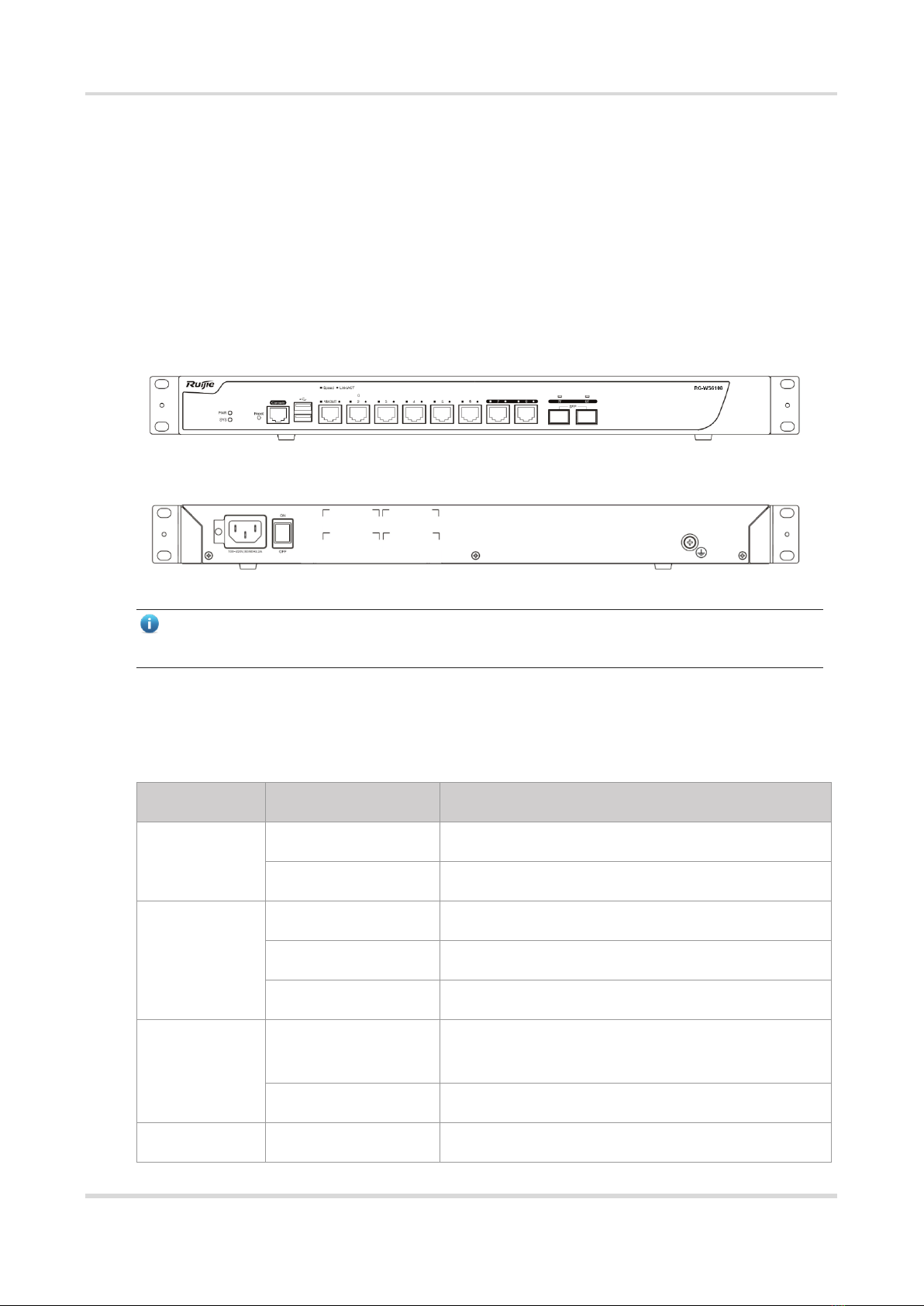
1.1 Product Appearance
Figure 1-1 Front Panel of RG-WS6108
Figure 1-2 Rear Panel of RG-WS6108
Note
The nameplate is at the bottom of the wireless controllers.
1.2 LED Indicators
LED
State
Meaning
PWR
Off
The power module is NOT in the position or fails.
Solid green
The power module is operational.
SYS
Blinking green
The system is being initialized.
Solid green
The initialization process is complete.
Solid red
The system sends out an alarm.
1-8 Gigabit
copper ports
(link/ACT)
Solid green
The copper port is connected at 10/100/1000
Mbps.
Blinking green
The copper port is receiving or transmitting data.
Solid orange
The copper port is connected at 1000 Mbps.

Hardware Installation and Reference Guide Product Overview
1-8 Gigabit
copper ports
(speed)
Off
The copper port is connected at 10/100 Mbps.
7F-8F
Gigabit fiber
ports
Solid green
The fiber port is connected.
Blinking green
The fiber port is receiving or transmitting data.
1.3 Technical Specifications
Dimensions and
Weight
RG-WS6108
Physical
Dimensions (W x D
x H)
440 mm x 200 mm x 43.6 mm (excluding foot pad) (17.32 in. x 7.87
in. x 1.72 in.)
Rack Height
1RU
Weight
Net weight: 2.9 kg (6.39 lbs)
Port Specification
RG-WS6108
Fixed Service Port
Six 10/100/1000Base-T Ethernet ports with auto-negotiation. Port 1
can serve as a management port.
Two combo ports. When the electrical port works,
10/100/1000Base-T auto-negotiation is supported.
Fixed
Management Port
One RJ45 console port
Two USB ports
Status LED
One system status LED
One power status LED
10 service port status LEDs
Button
One power switch
One reset button

Hardware Installation and Reference Guide Product Overview
Power Supply
and Consumption
RG-WS6108
Max. Power
Consumption
40 W
Input Voltage
100 V AC to 240 V AC,50 Hz to 60 Hz
Output Voltage
12 V/3.33 A
Environment and
Reliability
RG-WS6108
Temperature
Operating temperature: –10°C to +40°C (14°F to 104°F)
Storage temperature: –40°C to +70°C (–40°F to +158°F)
At a height between 3000 m (9842.52 ft.) to 5000 m (16404.20 ft.)
above the sea level, every time the altitude increases by 166 m
(544.62 ft.), the maximum temperature decreases by 1°C (1.8°F).
Humidity
Operating humidity: 10% to 90% RH (non-condensing)
Storage humidity: 5% to 95% RH (non-condensing)
Safety regulations
GB 4943.1
CE Marked, EN/IEC 62368-1 (replacing EN/IEC 60950-1)
Low Voltage Directive 2014/35/EU
EMC regulations
EN 300 386, EN301 489,
EN 55032 Class A, EN 55035,
EN 61000-3-2, EN 61000-3-3,
EN 61000-4-2, EN 61000-4-3,
EN 61000-4-4,EN 61000-4-5,
EN 61000-4-6, EN 61000-4-8, EN 61000-4-11
MTBF
≥200, 000 hours

Hardware Installation and Reference Guide Product Overview
Note
A combo port consists of an optical port and an electrical port. The optical port and
electrical port cannot work at the same time. If one port is enabled, the other is
disabled. You can select the port type as required.
Due to the variety of USB flash drives, not all of them are supported. A USB flash
drive with the FAT32 file system format is recommended.
Caution
Please avoid vibration and shock when moving and using the device.
Warning
The circuit breaker in the power module cannot be removed.
This is a Class A product. In a domestic environment, this product may cause radio
interference. In this case, users are advised to take proper measures against the
interference.
Autres manuels pour RG-WS6108 Series
1
Table des matières
Autres manuels Ruijie Contrôleurs

Ruijie
Ruijie RG-WS6024 Series Manuel d'installation et d'exploitation

Ruijie
Ruijie RG-WS5708 Series Manuel d'installation et d'exploitation

Ruijie
Ruijie RG-WS6512 Manuel d'installation et d'exploitation

Ruijie
Ruijie RG-WS6108 Series Manuel d'installation et d'exploitation

Ruijie
Ruijie RG-WS6816 Series Manuel d'installation et d'exploitation


