Rocktron VersaTUNE Manuel utilisateur


Your Rocktron VersaTune has been designed to comply with the following Standards and Directives as set forth by
the European Union:
Council Directive(s): 89/336/EEC, 73/23/EEC, 76/769/EC, 1994/62/EC, 2000/
53/EC, 2002/95/EC
Standard(s): EN55022, EN50082-1, EN60065
This means that this product has been designed to meet stringent guidelines on how much RF energy it can emit,
and that it should be immune from other sources of interference when properly used. Improper use of this equipment
could result in increased RF emissions, which may or may not interfere with other electronic products.
To insure against this possibility, always use good shielded cables for all audio input and output connections. This will
help insure compliance with the Directive(s).
Inputs
Outputs
Front Panel Tuning Range
Calibration Range
Mute Switches
Other Switches
Size
Weight
Input Impedance
Output Impedance
Power Consumption
Tunings List
Two On Front Panel
Two on Back Panel
Two on Back Panel
+-50 Cents
436hz - 445hz
Manual Switch Front Panel
Optional Footswitch Jack on back panel
Input Selector
Precision Mode
Note Selector
Tuning Window Up
Tuning Window Down
482mm x 125mm x 45mm
19” x 5” x 1.75”
2.25 kg
5lbs
≥1.5MΩ
≤1KΩ
≤1W
126 Tuning Variations
SPECIFICATIONS

PRECAUTIONS
NOTE: IT IS VERY IMPORTANT THAT YOU READ THIS SECTION TO PRO-
VIDE YEARS OF TROUBLE FREE USE. THIS UNIT REQUIRES CAREFUL HAN-
DLING.
• Allwarningsonthisequipmentandintheoperatinginstructionsshouldbe
adhered to and all operating instructions should be followed.
• Donotusethisequipmentnearwater.Careshouldbetakensothatobjects
do not fall and liquids are not spilled into the unit through any openings.
• Thepowercord/adaptershouldbeunpluggedfromtheoutletwhenleft
unused for a long period of time.
• Donotblockanyventilationopenings(ifapplicable).Installinaccor-
dance with the manufacturer’s instructions.
• Donotinstallnearanyheatsourcessuchasradiators,heatregisters,stoves
orotherapparatus(includingampliers)thatproduceheat.
• Onlyusedattachments/accessoriesspeciedbythemanufacturer.
• Donotusethisproductwithanycase,stand,tripod,bracketortablethat
isnotspeciedbythemanufacturer.Insurethatthecase,stand,tripod,
bracketetc.isproperlyadjustedandsetup(followallinstructions).Extra
careandcautionshouldbetakentoavoidtipoverandinjury.
• Unplugthisapparatusduringlightningstormsorwhenunusedduringlong
periods of time.
Referallservicetoqualiedservicepersonnel.Servicingisrequiredwhentheapparatushasbeen
damagedinanyway,suchaspowersupplyorplugisdamaged,liquidhasbeenspilledorobjectshave
fallen into the apparatus or if the apparatus has been exposed to rain or moisture, does not operate nor-
mally or has been dropped.
DO NOT ATTEMPT TO SERVICE THIS EQUIPMENT. THIS EQUIPMENT
SHOULDBESERVICEDBYQUALIFIEDPERSONNELONLY.DONOTMAKE
ANY INTERNAL ADJUSTMENTS OR ADDITIONS TO THIS EQUIPMENT AT
ANY TIME. DO NOT TAMPER WITH INTERNAL ELECTRONIC COMPONENTS
AT ANY TIME. FAILURE TO FOLLOW THESE INSTRUCTIONS MAY VOID THE
WARRANTYOFTHISEQUIPMENT,ASWELLASCAUSINGSHOCKHAZARD.
OPERATING TEMPERATURE
Do not expose this unit to excessive heat. This unit is designed to operate between
32° F and 104° F (0° C and 40° C). This unit may not function properly under extreme
temperatures.

Introduction
Congratulations on your purchase of the Rocktron VersaTune Rack Tuner.
The VersaTune Rack Tuner is a versatile true-bypass Guitar/Bass rack tuner for live and studio use. The
large “NOTE” display and bright LEDs provide the perfect amount of light for on-stage tuning. Over a
hundred different tunings can be viewed in the display window including standard guitar/bass tunings,
alternate tunings, drop tunings and opening tunings. Additional features include two front & rear panel
inputs, two rear panel outputs, input selector switch, +-60 Cents tuning LEDs, Precision Switch for ul-
tranetuning,strobe,MuteSwitchonfrontpanelandMUTEjackonrearpanel,Calibrationswitchand
NOTE selection switch.
Want to tune your guitar a half step down? Wanted to tune your guitar to DADGAD? Need to tune a
Mandolin, Dobro, Pedal Steel Guitar or other types of instruments? Well, the VersaTune can help you to
adjusttothesetunings.TheVersaTunetuningsdisplaywindowshowsyouhow!Up() and down ()
arrows appear in the display window next to the note to show “how” to tune to a particular tuning from
standard A440 tuning. For example, to tune a guitar down a half step from standard A440, the window
will show a “down” () arrow next to the note you are tuning down to. Start by tuning the low E string
down to D# or Eb as the window will show “down arrow” D#, (meaning to tune that string down to D#
or Eb) . Continue with the same process for other strings.
Use the Up/Down buttons to select different tunings from standard guitar and bass tunings to a wide range
of alternate tunings and tunings for different types of instruments. Additional tunings for 7-String Guitar,
5-String and 6-String bass are included. Tunings for other instruments such as dobro, mandolin family,
banjo,pedalsteel,classicalinstrumentsandotherstringinstruments(Bouzouki,Banduria,Dulcimer,Re-
quinto, etc) are also included.
Letyourcreativejuicesowandtrysomeofthesedifferenttunings!

Front Panel Features
INPUT JACK 1 - (CH1) using a standard 1/4” cable, plug your guitar or bass in here. This Jack pro-
videstheoutputtoOUTPUTJACK1onthebackpanel.SeetheOUTPUTJACK1descriptioninthe
“Rear Panel Features” on the following pages for more details.
INPUT JACK 2- (CH2) using a standard 1/4” cable, plug your guitar or bass in here. This Jack pro-
videstheoutputtoOUTPUTJACK2onthebackpanel.SeetheOUTPUTJACK2descriptioninthe
“Rear Panel Features” on the following pages for more details.
NOTE: The VersaTune has two inputs and outputs so that you can plug two different
instrumentsintoitatthesametime,yetgototwodifferentampliers.
INPUT SELECTOR BUTTON & LEDS - use this selector switch to determine which input will be
“active.” Note that when you select Input 1 (CH1 LED will be “lit”) Output Jack 1 on the back panel
will be active as well thus sending the signal to whatever is plugged into Output Jack 1. When you
select Input 2 (CH2 LED will be “lit”) Output Jack 2 on the back panel will be active as well thus send-
ing the signal to whatever is plugged into Output Jack 2. Note that it is not possible to send the Input 1
to Output 2 or the Input 2 to Output 1.
PRECISION BUTTON & LED - For Ultra Fine tuning use the Precision Button. This button in-
creases the sensitivity of the tuner to allow you to “FINE” tune your instrument. To enter “PRECI-
SION MODEL” press the Precision Button. In “PRECISION MODE” the LED colors change so now
the “IN TUNE” or (0) LED will now be RED and the out of tune LEDs will be GREEN. Please see the
section “USING THE VERSATUNE” for more details on this function.
STROBE BUTTON - To turn ON or OFF “strobe” tuning press this button. To learn how to use the
“strobe” function, see section called “STROBE TUNING” later in this manual.
NOTE BUTTON-Thisbuttonallowsyoutoselectaspecicnotetotune.Thisisanidealfunction
when using the tuner to intonate an instrument. Press the button once and the NOTE DISPLAY WIN-
DOWwillshow“0”(Zero).ThiswillshowthattheVersaTuneisinstandardtuningmode.Totune
onlyaspecicnotepresstheNOTEbuttonagain,theNOTEDISPLAYWINDOWwillshow“A”.
Pressing the button several more times will scroll through the notes A#, B, C, C#, D, D#, E, F, F#, G,
G# and then back to “0”. At any time you can “PRESS AND HOLD” the NOTE Button to return to
“0” which is the standard tuning mode.
CALIBRATION BUTTON - This button is used to calibrate the tuner to match a relative pitch of any
instrument or audio source (like an old piano or tape player). For details on this function - see section
titled “Calibration.”
1
2
3
4&5
6
7
8

MUTE BUTTON - Use this button to MUTE the output for silent tuning. When MUTE is active, the MUTE
LED (Point 4) will be “ON” or “LIT”. This button mutes both Output 1 and Output 2. MUTE LED - This
LEDworksinconjunctionwiththeMUTEBUTTON.WhentheinputisMUTED,theMUTELEDwillbe
Lit.Nosoundwillbepassedthrougheitheroutput.ThisLEDalsoworksinconjunctionwiththeMUTE
FTSW(footswitch)jackonthebackpanel.
UP BUTTON-Thisbuttonisusedinconjunctionwiththe“TUNINGSWINDOW”-seepoint14.Pressthis
button to move UP through the lists of tunings.
DOWN BUTTON-Thisbuttonisusedinconjunctionwiththe“TUNINGSWINDOW”-seepoint14.Press
this button to move DOWN through the lists of tunings.
NOTE DISPLAY - This window will show you the note that is being played.
SHARP INDICATOR - This indicator (#) will “light” if the note being played is “SHARP”
TUNINGS WINDOW - This window shows you over a hundred different types of tunings and is used as a
guidetohelpyoutuneyourinstrumenttothedesiredtuning.ThiswindowisusedinconjunctionwiththeUP
Button (point 10) and the DOWN Button (Point 11) to select the desired tuning you would like displayed in
the window. For more information see section called “TUNINGS WINDOW” later in this manual.
ON/OFF SWITCH - This is the power “ON/OFF” switch for the VersaTune.
TUNING LEDS SHARP/FLAT LEDS - When the note being played is IN TUNE the GREEN LED in the
center of the LED panel will light. The RED LEDs show you if your note is Sharp or Flat. RED LEDs to the
right of the GREEN LED are sharp and the string should be tuned down. The farther right the LED is away
from the GREEN IN TUNE LED the more the note is SHARP. RED LEDs to the left of the GREEN LED are
atandthestringshouldbetunedup.ThefartherlefttheLEDisawayfromtheGREENINTUNELEDthe
morethenoteisat.
In PRECISION MODE the LEDs are opposite. The IN TUNE LED will be RED and the out of tune LEDs
are GREEN. The GREEN LEDs show you if your note is Sharp or Flat. GREEN LEDs to the right of the
RED LED are sharp and the string should be tuned down. The farther right the LED is away from the RED
INTUNELEDthemorethenoteisSHARP.GREENLEDstotheleftoftheREDLEDareatandthestring
shouldbetunedup.ThefartherlefttheLEDisawayfromtheREDINTUNELEDthemorethenoteisat.
9
10
11
12
13
14
15
16
Front Panel Features...continued...

Back Panel Features
POWER CHORD/FUSE Receptacle - plug the included power chord to this receptacle. Make sure you
follow all precautions in this manual and any local regulations.
MUTE FT SW Jack - Using an option RTS footswitch (not included) will MUTE both Outputs of the
VersaTune to allow you to tune in silence. When the MUTE is on the MUTE LED on the front panel will be
Lit. No sound will be passed through either output.
INPUT JACK 1 - (CH1) using a standard 1/4” cable, plug your guitar or bass in here. This Jack provides
theoutputtoOUTPUTJACK1onthebackpanel.SeetheOUTPUTJACK1(Point6)formoredetails.
Note,whenthisjackisusedtheInputJack1onthefrontpanelisdisabled.
OUTPUT JACK 1 - (CH1) using a standard 1/4” cable, plug from here in your next device in your signal
chain(amp,rackeffectsprocessor,preamp,etc.).ThisjackprovidestheoutputfromtheeitherINPUT1
Jacks.
INPUT JACK 2- (CH2) using a standard 1/4” cable, plug your guitar or bass in here. This Jack provides
theoutputtoOUTPUTJACK2onthebackpanel.SeetheOUTPUTJACK2(Point4)formoredetails.
Note,whenthisjackisusedtheInputJack2onthefrontpanelisdisabled.
OUTPUT JACK 2 - (CH1) using a standard 1/4” cable, plug from here in your next device in your signal
chain(amp,rackeffectsprocessor,preamp,etc.).ThisjackprovidestheoutputfromtheeitherINPUT2
Jacks.
NOTE: The VersaTune has two inputs and outputs so that you can plug two different
instrumentsintoitatthesametime,yetgototwodifferentampliers.Thebackpanel
inputsdisablesthefrontpanelinputs.
1
2
3
4
5
6

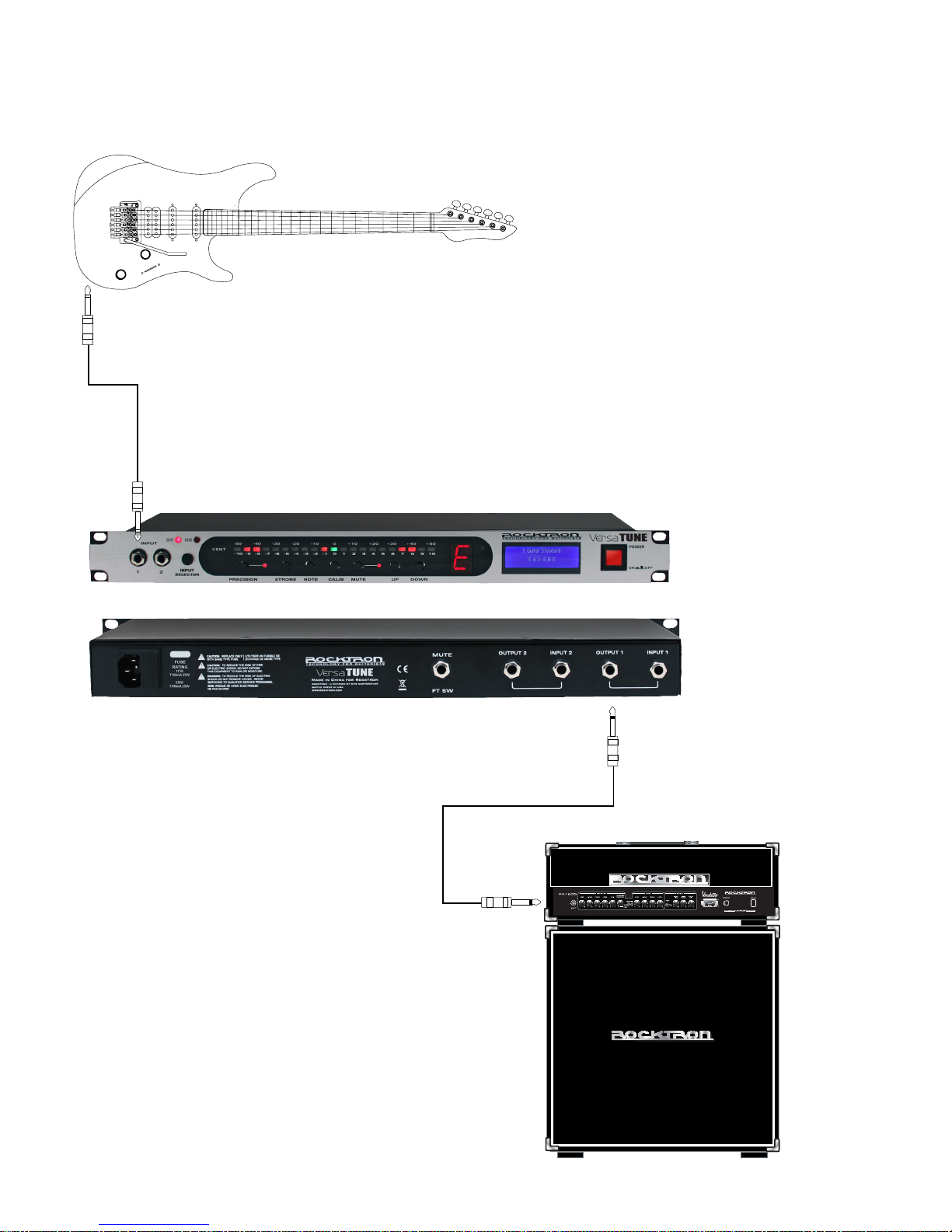
Connections - One Guitar - Front Panel
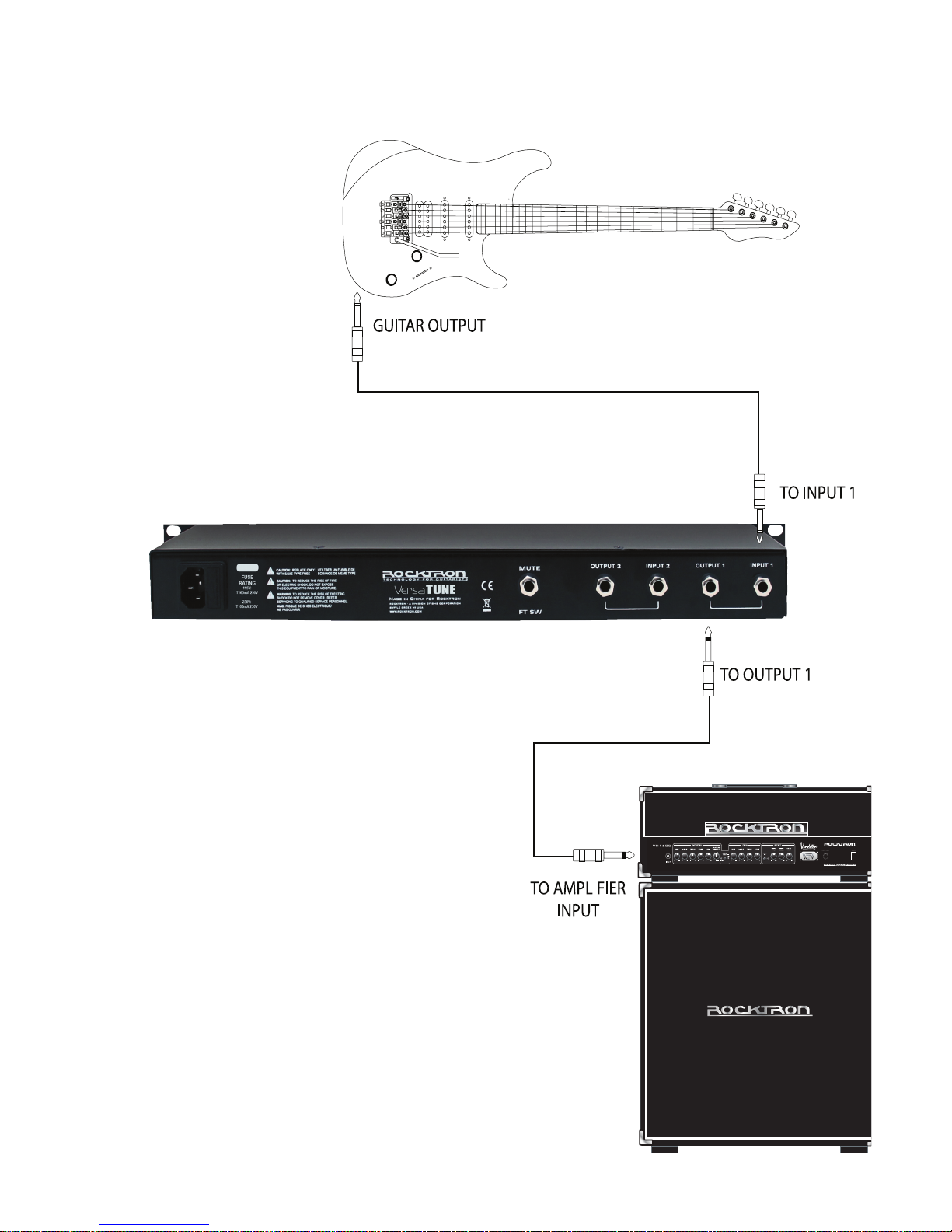
TO INPUT 1
TO OUTPUT 1
TO AMPLIFIER
INPUT
GUITAR OUTPUT
FRONT PANEL
BACK PANEL

Connections - One Guitar - Back Panel

Connections - Two Guitars - Front Panel
Table des matières
Autres manuels Rocktron Tuner