Robotics Technologies Bus-Cam HD-4 Manuel utilisateur

Bus-Cam® HD-4/8
High Definition Digital Video Recorder
Installation Manual
User Manual
Thank you for choosing Bus-Cam HD-4/8 High Definition Video Recorder. This manual is applicable
for both 4 and 8 channel disk models; the only difference is in the number of channels. Please read
this Manual carefully to ensure that you can use the device correctly and safely. The contents of this
manual are subject to change without notice. All Material is Copyright© 2015 2016 Robotics
Technologies, Inc. All Rights Reserved.

Warnings
This device is NOT waterproof; to prevent fire or electric shock, please do NOT p t any container
with water on the device or nearby. Do not expose the device to moist re, or extreme
temperat res.
Important notice:
1 Please read over all precautions.
2 Please keep this manual for future reference.
3 Please note all warning information.
4 Please strictly follow the instructions in this manual while operating.
5 NEVER locate or operate this device in a wet environment.
6 Please do NOT use abrasive chemicals, cleaning solvents or strong detergents to clean the unit. Wipe with
a soft and dry cloth.
7 Please do NOT block any ventilation openings.
8 Please keep the device far away from hot and high temperature environments.
9 Install the device with the included accessories.
10 Please take care to secure the device properly, and avoid dropping from a high place.
11 Call for qualified service personnel when repairs are needed.
12 The HD-4/8 can only be installed horizontally. Installing vertically or o t of the horizontal
co ld inj re personnel or damage the device and/or its components.
2

Table of Contents
WARNINGS...................................................................................................................................................................................... 2
INTRODUCTION................................................................................................................................................................................. 5
Product Description....................................................................................................................................................................5
Standard Components and Features..........................................................................................................................................5
Optional Components and Features...........................................................................................................................................5
PRODUCT MAIN FEATURES...................................................................................................................................................................5
VIDEO AND AUDIO............................................................................................................................................................................5
GPS TIME SYNCHRONIZATION & TIME ZONE............................................................................................................................................5
POWER MANAGEMENT.......................................................................................................................................................................6
RECORDING MODE.............................................................................................................................................................................6
SPEED AND VEHICLE STATUS RECORDING..................................................................................................................................................6
G-SENSOR....................................................................................................................................................................................... 6
HARD DISK......................................................................................................................................................................................6
SD CARD.........................................................................................................................................................................................6
MULTIPLE MEDIA PLAYERS SUPPORTED....................................................................................................................................................6
PRODUCT IMAGES..............................................................................................................................................................................7
Front Panel.................................................................................................................................................................................7
FRONT PANEL LEDS...........................................................................................................................................................................8
Display the Status of the HD-4/ ................................................................................................................................................
Rear panel..................................................................................................................................................................................9
INITIAL SET UP............................................................................................................................................................................... 0
Tamper-proof Case Mounting..................................................................................................................................................10
POWER CONNECTIONS...................................................................................................................................................................... 2
Use the Ignition Switch to Activate Recording.........................................................................................................................12
Record Automatically Upon Power-up.....................................................................................................................................12
CAMERA CONNECTIONS..................................................................................................................................................................... 3
SENSOR HARNESS CONNECTION.......................................................................................................................................................... 3
GPS CONNECTION (OPTION)............................................................................................................................................................. 4
EVENT BUTTON AND CABLE CONNECTION (OPTION)................................................................................................................................. 4
CONNECT THE HD-4/8 TO A PC USING A NETWORK............................................................................................................................... 5
Download and install the VLC player into your computer........................................................................................................15
Connecting the HD-4/ to Your Network.................................................................................................................................15
Use a Web Browser to Access Live View or Menu Settings......................................................................................................15
BASIC OPERATION AND MENU SYSTEM................................................................................................................................................. 6
Hard Disk Formatting...............................................................................................................................................................16
To format:.................................................................................................................................................................................16
RECORDING SETUP........................................................................................................................................................................... 7
CAMERA SETUP............................................................................................................................................................................... 8
ALARMS SETUP............................................................................................................................................................................... 9
MOTION DETECTION SETUP...............................................................................................................................................................20
POWER SETUP................................................................................................................................................................................2
VEHICLE PARAMETER SETUP...............................................................................................................................................................22
3

GPS PARAMETERS SETUP (IF EQUIPPED)................................................................................................................................................23
G-SENSOR PARAMETER SETUP............................................................................................................................................................24
SCHEDULE RECORDING SETUP............................................................................................................................................................. 25
NETWORK SETTINGS......................................................................................................................................................................... 26
3G NETWORK SETUP (IF EQUIPPED).....................................................................................................................................................27
DATE AND TIME SETUP.....................................................................................................................................................................28
UPGRADE THE FIRMWARE..................................................................................................................................................................29
RESET THE HD-4/8.........................................................................................................................................................................30
USER MANAGEMENT........................................................................................................................................................................30
SPECIFICATIONS...............................................................................................................................................................................3
LIST OF STANDARD ACCESSORIES..........................................................................................................................................................33
TROUBLESHOOTING..........................................................................................................................................................................34
4

Introd ction
The Bus-Cam HD-4/8 series mobile digital video recorder is a compact, full featured H.264 1080p/720p
recording system that uses a hard disk as a storage device. The recorder unit and associated accessories are
specifically designed for operation in a mobile environment.
The HD-4/8 system, used in conjunction with the cameras, records up to eight channels of full motion video
and audio data to a hard disk. The firmware driven menu system provides a simple method for configuring the
unit’s operation as well as searching for and viewing previously recorded AV records.
Prod ct Description
The HD-4/8 unit consists of the following major components:
Standard Components and Feat res
Extruded aluminum case (the case is anodized in black).
Front and rear panels.
Motherboard.
Power cables.
Power input 2 amp fuses (2).
Tamper proof and lockable security enclosure.
Panel lock with (2) keys for locking the security enclosure.
Hard disk or Solid State Disk (customer supplied).
Removable SD card, Class 10, minimum (customer supplied).
Optional Components and Feat res
GPS speed and location data overlay.
Extension cable for easy connection and installation.
Prod ct Main Feat res
Embedded operating system, assuring reliability and system integrity.
Records up to four/eight channels of full motion color video with corresponding audio tracks.
H.264 High Profile video compression.
Total Recording resource up to 120 1080P frame/second.
Lockable security enclosure.
Front panel USB2 port for recording to a flash card as an optional storage device.
Ignition sense that provides DVR power on in recording mode when the vehicle is started.
Power off delay record when the vehicle is shut down, with operator selected delay times.
Video And A dio
H.264 High Profile video compression, real time recording 1080p30, 720p30 and 540p30 for each channel.
Frame rate adjustable for each channel.
Audio compression:16bit 48KHz AAC codec. This codec offers high compression with high quality audio.
1080P resolution for each channel, which means each channel supports 1920x1080 @30fps.
Supports 4/8 channels real time 1080P video and 4/8 channels audio recording.
Real time live HD video and audio through WiFi, supports Windows, Android and iOS
Recorded HD video and audio real time playback over WiFi
5

GPS Time Synchronization & Time Zone
Synchronizes the DVR system time with GPS automatically
Supports All Time Zones Worldwide
Supports DST (Daylight Saving Time)
Power Management
Reliable power management, wide voltage: +8V~+32VDC; The power input is protected against short
positive transients (1500 watts peak pulse power capability with a 10 x 1000 uS waveform); The power
input is protected against negative voltage. Applicable for vehicles with +12V or +24V battery.
The recorder provides each camera with stable +12V DC power; the DVR can detect short circuits in the
power supply.
Can use ignition to control the power.
DVR can monitor battery voltage after Ignition off, and automatically enter sleep mode when the voltage is
below a reliable operating level.
Recording mode
Continuous record.
Supports schedule recording.
Supports alarm recording.
Speed and Vehicle stat s recording
Record vehicle speed and vehicle ID with audio and video.
Supports 5 sensors: Can be connected to speed, ignition, brake, backup, right turn, left turn light etc.
Over speed alarm and trigger recording with separate log files
G-Sensor
X, Y, Z axis accelerometer
Recorded G Sensor Values can provide reference for data analysis in accident re creation
Combined Recording can be triggered when G Sensor values go beyond a preset threshold
Hard Disk
Supports hard disks up to 2 Terabytes.
Note: The inside height of the hard disk case is 0.40”. Choose a drive with maxim m height less
than 0.375”, for proper fit.
SD card
Supports SDHC card within 32GByte.
Supports SDXC card more than 64GByte (Maximum 2048GByte)
Supports hot plug when the DVR system is not recording or remote operation (remote copying or playing
back)
Note: Removing the SD card d ring recording or operating (remote copying or playing back),
co ld corr pt the SD card. While recording, the yellow light on the front panel will be on. Make
s re that the Yellow Light is off before removing the SD Card.
M ltiple Media Players s pported
You may use our PC Playback Software or any of the following third party (free) media players to play back the
recorded files.
VLC media player (version1.0.0 or above);
Storm player (Version 2009 or above);
WinAmp (Version 5.531 or above).
6

Prod ct Images
Front Panel
1: USB Host Port: Can be used as a secondary recording device, such as a flash memory card. This port cannot
be used as a direct access link to a PC, however.
2: SD Card Slot
3: Stop Button: To stop recording
4: 3G Status indicator
5: For inject the SIM card
6: SIM Card Slot (Only for models support 3G/4G)
7: LANC Port: For connection to an Event button and status indicator Network Port (RJ45).
8: Status Lights (1: Power; 2: Run; 3: Alarm; 4: Record; 5: System)
9: Lock and power switch for the Hard Drive (must be locked to record)
10: Hard drive tray
11: LAN port (RJ45)
7

Front Panel LEDs
Display the Stat s of the HD-4/8
System (Yellow) Stat s / Description
Solid On All channels are recording
Blinking Interval of 2 seconds: The number of flashes within
the interval indicates the inactive camera count. For
example, 3 blinks per interval = 3 inactive cameras.
Off No active cameras / Not Recording
3G (Yellow) Stat s/Description
On 3G mode is working normally.
Blinking No SIM card, or no 3G service
Off No 3G module installed (3G is not available)
PWR (Green) RUN (Green) Stat s/Description
Always On Blinking DVR is on & running
Blinking with RUN by turns Blinking with PWR by turns Ignition is not enabled and DVR is OFF.
Blinking together with RUN Blinking together with PWR Ignition sense is not enabled & DVR is
running. Unit will turn OFF when “Delay
Time” setting is reached.
Blinking every 3 seconds Off Use the key to turn off the DVR.
ALARM (Red) Stat s/Description
On Alarm input when BEEP is set as “ON”. Audible alarm (beep) when enabled.
Off No alarm.
8

REC (Red) Description
On Reading/Writing data from/to the hard disk or SD Card.
Off Not Reading/Writing – inactive.
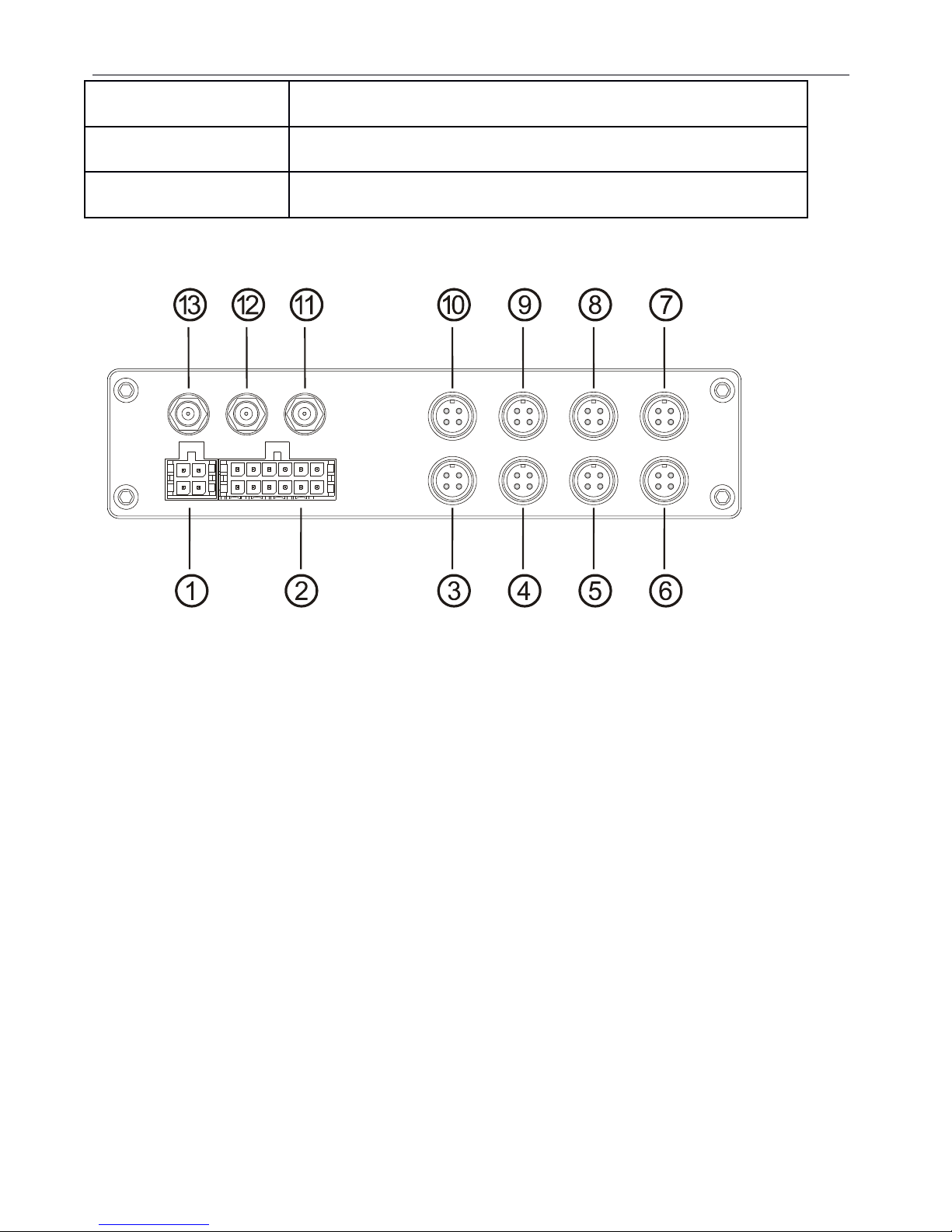
Rear panel
1: Power, Ground and ACC input.
2: 1x speed sensor, 3x sensors inputs, 1x RS232 port(for GPS) and 1x 5V DC output
3: AV input 1(including audio input 1, video input 1 and power output for camera 1)
4: AV input 2(including audio input 1, video input 1 and power output for camera 2)
5: AV input 3(including audio input 1, video input 1 and power output for camera 3)
6: AV input 5(including audio input 1, video input 1 and power output for camera 4)
7: AV input 6(including audio input 1, video input 1 and power output for camera 5)
8: AV input 7(including audio input 1, video input 1 and power output for camera 6)
9: AV input 8(including audio input 1, video input 1 and power output for camera 7)
10: AV input 4(including audio input 1, video input 1 and power output for camera 8)
11: WiFi antenna connector (Main)
12: WiFi antenna connector (Auxiliary)
13: 3G antenna connector
9

The rear panel sockets are Molex Micro Fit 3.0 (Model No.: Molex 0430450200). The definitions of all sockets
are indicated below:
Initial Set Up
Tamper-proof Case Mo nting
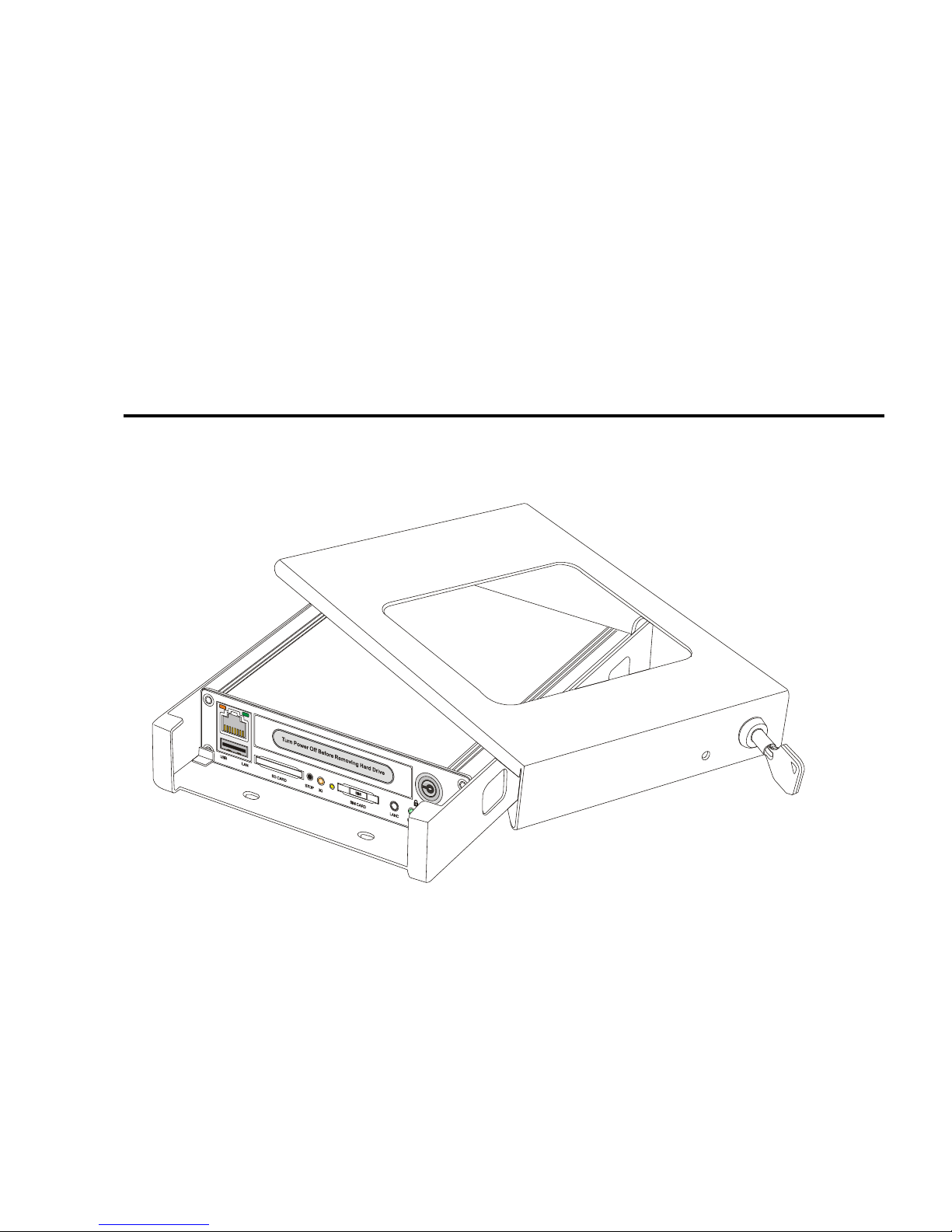
1) Use a power drill and the supplied screws to secure the bottom cover of the tamper proof case to the
desired location inside the vehicle.
10
Ce manuel convient aux modèles suivants
1
Table des matières
Autres manuels Robotics Technologies DVR