
Rexel Auto+ 500X Mode d’emploi

start here
démarrez ici
starten sie hier
iniziare qui
begin hier
empieza aquí
comece aqui
buradan başlayın
ξεκινήστε εδώ
start her
aloita tästä
start her
börja här
rozpocznij tutaj
začněte zde
kezdés itt
начинать здесь
SHREDDERS
AUTO+500X&500M™

1
2
min
2
3

4
6
5
9
8
7


GB instruction manual 6
F manuel d’utilisation 14
D bedienungsanleitung 22
I manuale d’istruzioni 30
NL gebruiksaanwijzing 38
E manual de instrucciones 46
P manual de instruções 54
TR kullanım kılavuzu 62
GR οδηγίες 70
DK brugsvejledning 78
FI käyttöopas 86
NO bruksanvisning 94
S bruksanvisning 102
PL instrukcja obsługi 110
CZ návod k obsluze 118
H használati útmutató 126
RUS руководствo по зкcплyатации 134
SHREDDERS
AUTO+500X&500M™

GB
6register this product online at www.accobrands.com
To guard against injury, the following basic safety precautions must be observed in the set-up of this
product.
• Ensure the machine is plugged into an easily accessible power outlet, and ensure the cable is not
likely to trip up a passer by.
• Any attempt to repair this unit by unqualied personnel will invalidate the warranty. Please return to
supplier.
• Unplug your shredder before moving it or when it is not in use for an extended period of time.
• Do NOT operate with a damaged power supply cord or plug, after it malfunctions, or after it has
been damaged in any manner.
• Do NOT overload electrical outlets beyond capacity as this can result in re or electrical shock.
• The socket-outlet should be near the equipment and should be easily accessible.
• Do NOT alter the attachment plug. The plug is congured for the appropriate electrical supply.
• Do NOT use near water.
• Do NOT use aerosol dusters or cleaners.
• Do NOT spray anything into the shredder.
• Do NOT load the auto-feed chamber with unopened junk mail, magazines, bound documents etc.
Although this shredder has been designed to comply with UL 60950-1 EN 60950-1 safety standards
including the “probe accessibility tests”, do not operate the shredder near children or pets.
autofeed technology
The Auto+ 500X and 500M has been designed to automatically shred up to 500 sheets from the
auto-feed chamber and up to 9/10 sheets through the manual feed slot. The auto-feed mechanism
has been designed to handle paper fastened with staples and paper clips and to only pull a few
sheets of paper into the cutting mechanism to minimise the risk of paper jams.
GB
AUTO+ 500X&500M™SHREDDERS 7
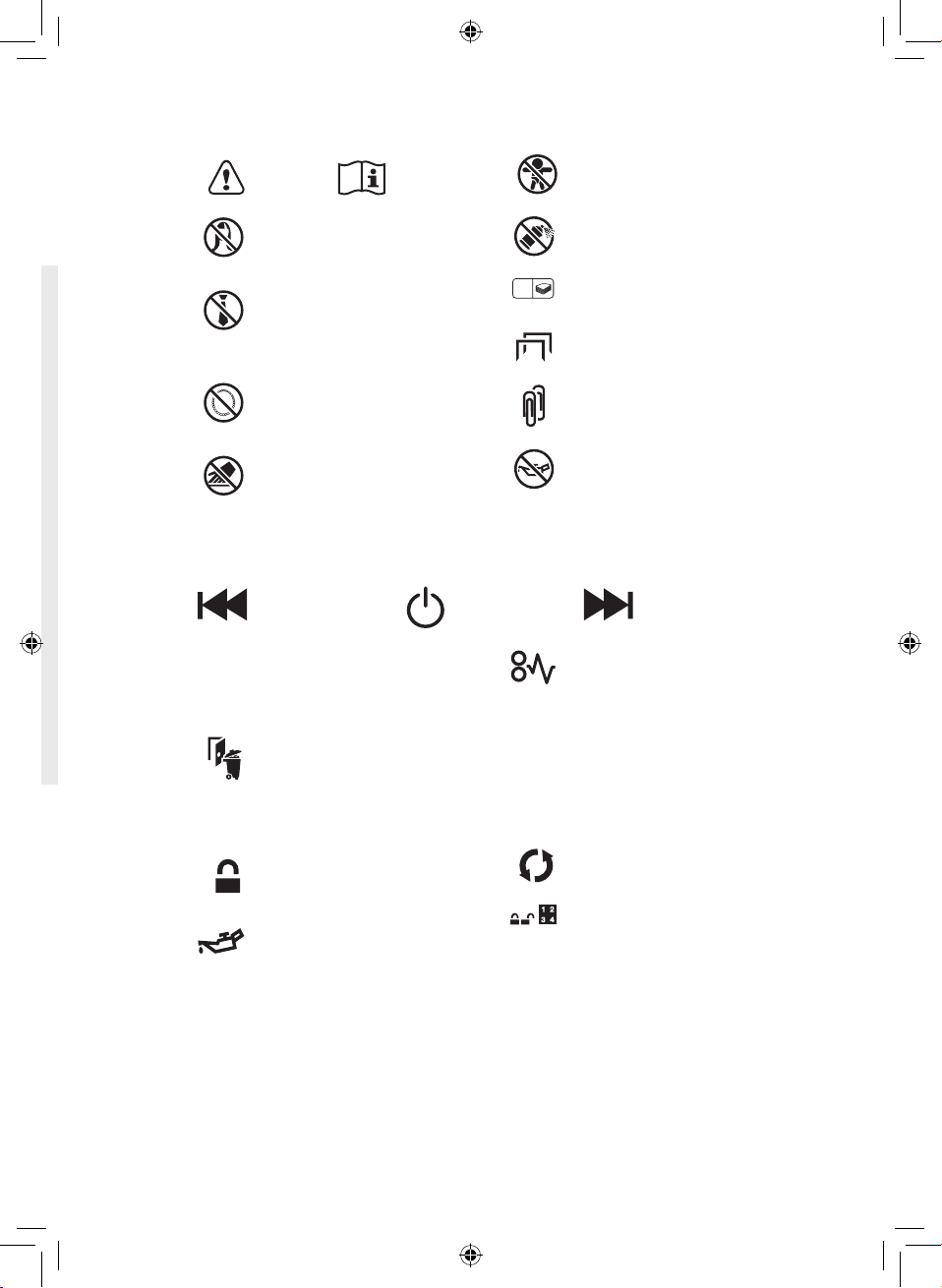
control panel and indicators
Jam Free indicator – This alerts
the user when too much paper is
fed into the manual feed slot (see
section on Jam Free Technology).
U
C
Paper Loading Door/Bin Door
Open or Bin Full indicator –
This means either:
• Loading door is open
• Bin is open
• Bin is full
Lock indicator – This means the
paper loading door is locked (during
shredding).
Oil level indicator
Oiling in Operation indicator
Paper jam indicator – This means
there is a paper jam in the auto feed
chamber.
If this symbol is ashing the
shredder is attempting to clear a
paper jam automatically.
If this symbol is permanently
illuminated red please follow the
instructions under ‘Rare Occasion
of Jamming’.
Continuous Jam Boost
Auto
Reverse
Loading Door Locking
Mechanism – PIN Password
Buttons – Enter a four digit code
to lock the loading door during
shredding.
warning symbols
Sheet capacity of manual feed
entry slot.
10
This means no aerosols.
This means keep children away
from shredder.
This means you should be careful
because long hair can become
entangled in the cutting head.
This means don’t reach into the
feed opening of the cutting head.
This means be careful of loose
jewellery which could become
entangeld in the cutting head.
This means no oil lubrication,
use Rexel oil sheets only.
This means be careful of ties and
other loose clothing which could
become entangled in the cutting
head.
This means the shredder can
accept small paperclips.
This means the shredder can
accept small staples.
Safety First

GB
8register this product online at www.accobrands.com
Auto+ 500X/500M shredding capability
Auto+ 500X/500M CAN shred the following:
• 500 sheets
• Stapled paper, 25mm within the corner
• 26/6 and 24/6 or smaller staples
• Small sized paper loaded centrally
• 500 sheets
• Paper clip paper, 25mm within the corner (500X through manual feed slot ONLY)
• Capable of shredding small/medium paper clips (max. wire thickness = 0.9 mm)
• >80/100gsm paper (through manual feed slot ONLY)
• A3 folded in half max. 2 sheets
• 500 sheets
• 80 gsm paper
- A4 - 210mm x 297mm
- A5 - 148mm x 210mm
- A3 single sheet folded in half to make A4
Auto+ 500X/500M CAN shred (through the manual feed slot):
Thick paper or
card.
Multiple folded
sheets (e.g. A3
sheets folded in
half).
Unopened mail
(e.g. junk mail).
Glossy paper or
a sheet covered
with print on both
sides.
Auto+ 500X/500M CANNOT shred the following:
Large clips.
Check the length
of the paperclip
is not longer than
32mm.
Heavy duty
staples. Check
the staple leg
length is not
greater than
6mm.
Bound
documents
Bulldog clips
Magazines or
other documents
bound by multiple
staples or clips.
Adhesive labels.
Plastic sheets,
laminated
documents,
plastic folders.

GB
AUTO+ 500X&500M™SHREDDERS 9
1. initial setup
The shredder is designed to automatically lubricate the cutting mechanism as required to ensure
the product continues to work to its maximum performance and to extend the product life. Please
follow the operation instruction before turning on the shredder for the rst time. The 60ml bottle
of oil* is sucient to allow the shredder to start for the rst time and to operate continuously for
about one hours shredding before the reservoir will need relling. When the ‘Oil Rell’ indicator is
illuminated ( ), ip up the oil reservoir cap and rell the oil reservoir using a bottle of standard
Rexel oil (1760049)*. The automatic oiling operation ( ) last approximately two seconds and
you will hear the distribution pump during this time. Auto-oiling operates after 15 minutes of
shredding time.
bin or loading door open safety function
As a safety precaution, if the bin or loading door is opened during shredding, the shredder will stop
and the bin full indicator will illuminate ( ).
jam free technology in manual feed slot
Sensors in the paper feed area measure the thickness of paper about to be shredded. The
ability to shred or not is communicated through red and green lighting. Green means that the
stack of paper is within the shredders sheet capacity and OK to shred. Red means that you
have too much paper, remove some sheets in order to shred.
Given that you are unable to shred more sheets of paper than the shredder is capable of
shredding, paper jams are prevented.
This prevents wasting time reversing paper and unblocking jams not to mention the mess it
can create.
intelligent help
1 In the unlikely event of the shredder jamming, the Auto+ 500X and 500M will stop shredding,
and the jam icon will blink in orange.
2 The shredder will illuminate the FWD ( ) and REV ( ) buttons in the sequence necessary
to clear the jam.
3 If the jam cannot be intelligentally cleared, the jam icon ( ) will illuminate in red. At this point
open the auto feed chamber to clear any jammed material.
* ACCO Brands Europe accepts no liability for product performance or safety when other types or brands of lubricants are used on
any part(s) of this machine.
automatic jam clearance
Intelligent Jam Clearance: In the unlikely event of the shredder jamming, the Auto+ 500X and 500M
will automatically reverse and forward the engine three times to clear a jam. During this operation
the Paper Jam indicator will ash ( ).

GB
10 register this product online at www.accobrands.com
2. operation
1 After unpacking the product pull out the shredder bag frame and remove the CD shard tray,
which sits on top of the bag frame. Store this tray on the product as shown and use when you
shred CDs.
2 Lift up the loading door and open oil ap.
3 Remove oil cap and ll up the reservoir using the 60ml bottle of oil provided. Replace the cap.
4 Connect the shredder to mains supply.
5 Check that the on/o switch at the back of the machine is switched to the ‘ON’ position.
6 Press and hold down the Auto button ( ) for 5 seconds to start the pump and prime the
system. Only required when the product is used for the rst time.
7 To load the shredder, simply lift the loading door handle to open the loading door and insert
documents. You can open the door further to 90 degrees for easier access if required Load up to
500 sheets at a time into the feed chamber.
Do not ll above the MAX level, this could damage the shredder.
8 The shredder will start the shredding cycle automatically ONLY after closing the loading door.
If there is paper in the Autofeed chamber after rst attempt, open and re-close the paper loading
door a second time.
Attention: If required you can now lock the loading door by entering a 4 digit code (see Locking
the Paper Loading Door section).
9 If you only have up to 9/10 sheets to shred, you can use the manual feed slot, provided the auto
feed chamber is empty.
10 Insert paper to be shredded into the feed area. The shredder will detect the paper and start
automatically.
11 If the shredder is left in auto mode for more than 2 minutes without being used, the shredder will
automatically turn back to sleep mode in order to save power.
12 The shredder will automatically ‘wake up’ from sleep mode when paper is inserted into the
shred mouth or you open the loading door. There is no need to press the Auto button ( ).
3. reverse function
1 Should you wish to reverse paper out whilst shredding, a reverse button ( ) has been tted for
your convenience.
2 Reverse the paper out then turn the machine o using the ON/OFF switch at the rear of the
shredder. Remove the paper from the manual feed slot (if being used) or open the loading door,
remove the remaining stack of paper, then pull the jammed paper free of the cutting mechanism.
3 To resume shredding, turn the shredder on using the ON/OFF switch at the rear of the shredder.
Return the switch to the auto position ( ).
Autres manuels pour Auto+ 500X
1
Ce manuel convient aux modèles suivants
1
Table des matières
Langues :
Autres manuels Rexel Broyeur


