
Reliance S160 Manuel utilisateur

S160
CDMA 1X Digital Mobile
Phone
Quick Guide
Copyright © 2010 by ZTE Corporation
All rights reserved.
No part of this publication may be excerpted, reproduced, translated or utilized in any form
or by any means, electronic or mechanical, including photocopying and microfilm, without
the prior written permission of ZTE Corporation.
The manual is published by ZTE Corporation. We reserve the right to make modifications
on print errors or update specifications without prior notice. The information on the
package is only for your reference. Images are for you reference only. Please check the
product model before purchasing.
ZTE Corporation
NO. 55, Hi-tech Road South, ShenZhen, P.R.China
Postcode: 518057
Http://www.zte.com.cn Service Hotline: +86-755-26779999

1
Contents
Know your Phone.................................................3
Key Instruction.....................................................4
Interface Icons......................................................6
Insert and Remove SIM Card...............................7
Remove and Install the Battery............................7
Charge the Battery...............................................8
Power on/ off Your Phone.....................................9
Make and Answer a Call......................................9
Menu Tree...........................................................10
Voice Mail ..........................................................11
Text Input............................................................11
Message..............................................................12
Menu Functions..................................................13
Phone Lock.........................................................17
PIN Code and PUK Code ..................................17
Warning and Maintenance.................................18

2
Warranty Terms..................................................21
Limitation of Liability ........................................22

3
Know
y
ourPhone
Navigation
End key
Right select key
Earpiece
LCD screen
Charger connector
0~9 Number key
Microphone
Left select key
Send key
OK key

4
Key Instruction
Key Function Description
Make or answer a call.
Press Send key in standby mode to enter recent call list.
End an active call or reject a call.
Long press to Power on/Power off.
Exit from any interface to idle mode.
Enter main menu in standby mode.
Switch to the options of submenu.
Enter Contacts menu in standby mode.
Switch to the options of right submenu.
Erase character(s) while editing.
Cancel operation, exit to previous menu.
Enter My Menu in standby mode.
Press OK key to confirm the commands and options
selected.
Confirm the selected character while character inputting.

5
Up/Down key
Scroll the cursor up and down.
Used as selection key up and down for keying in commands
and selecting options shown on the display.
In standby mode, press Down key to play Games, press Up
key to write message.
Used as direction key in games.
Left /Right key
Scroll the cursor left and right.
Used as selection key to scroll cursor left and right for keying
in commands and selecting options shown on the display.
In standby mode, press Left key to enter R Mobile World
menu, press Right key to view Profile.
Adjust volume in conversation.
Used as direction key in games.
~
Key in numbers or characters.
Make a Speed Dial call.
Hold 0 key to input international prefix ”+” in standby mode.
# key:
Hold # key in standby mode to enable/disable vibration.
Press # key to select text mode when edit text.

6
* key:
Hold * key in standby mode to lock phone’s keypad.
Press * key to enter Symbols mode in text input mode.
Interface Icons
Icon Indication
Signal strength
Roaming
New message
Ring + Vibration
Vibration
Silence All
Alarm
Battery indicator
7
Insert and Remove SIM Card
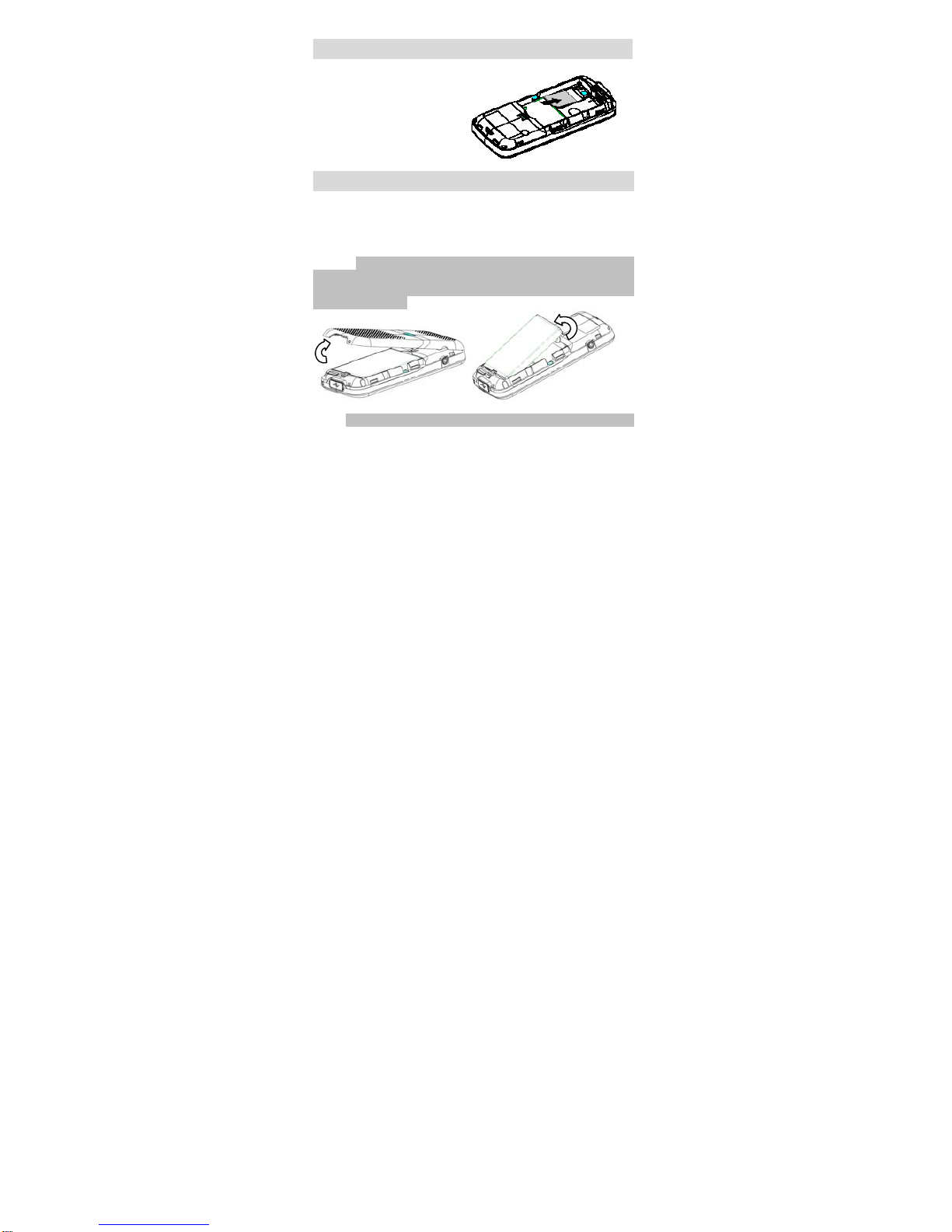
Power off the phone, remove
the battery and other external
power.
Insert SIM card into SIM slot,
or remove SIM card out of slot,
as shown in picture.
RemoveandInstalltheBattery
The attached Li-ion battery along with the phone can be used after
unpacking. For first three times, please charge the battery completely for
optimum performance.
Remove: 1. Put finger on the bottom finger grip, and then lift the back-cover
of the phone up to release and remove as indicated in fig (1). 2. Put finger
on the top finger grip, and then lift up the battery to remove the battery as
indicated in the fig (2).
(1) (2)
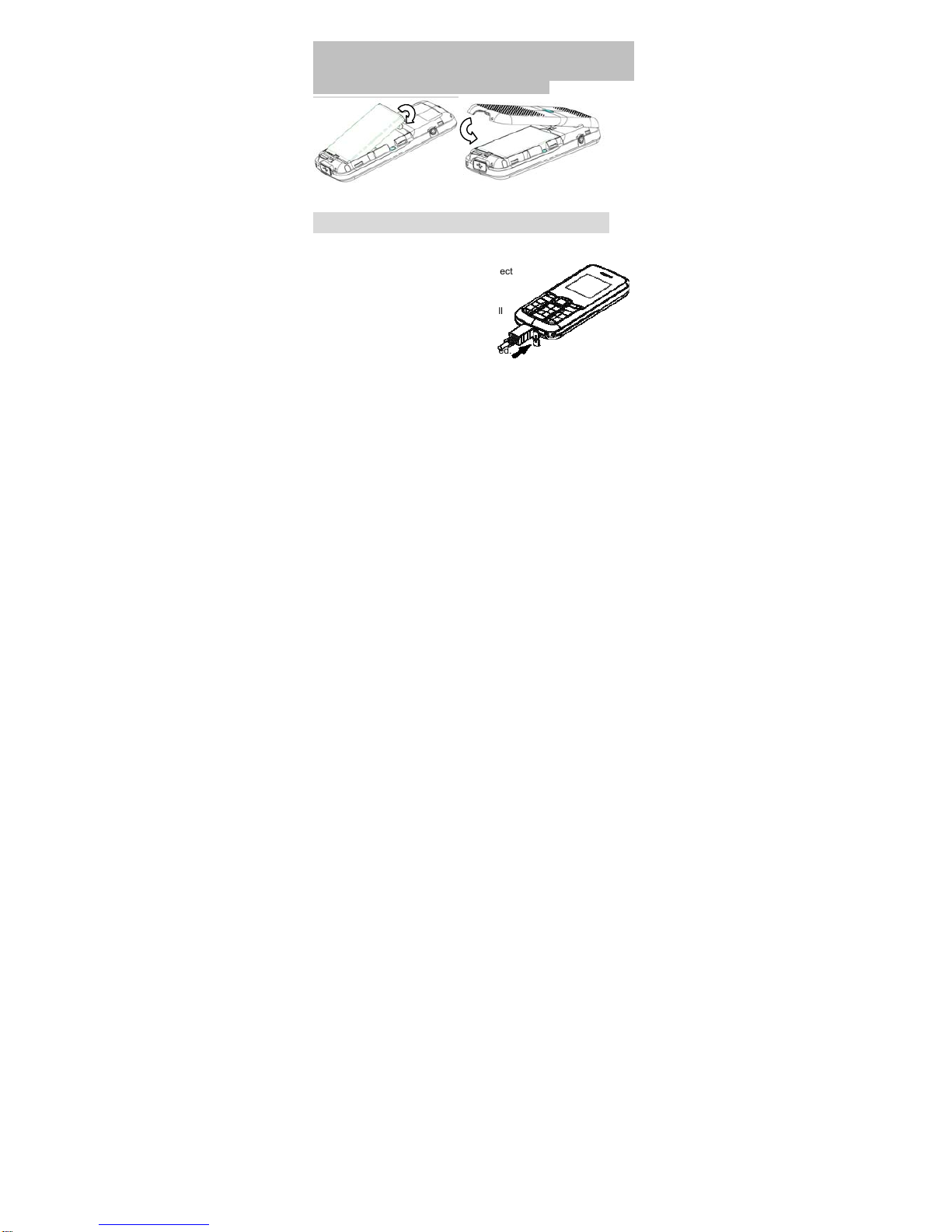
Install: 1. Replace the battery into the battery slot, to be noted that the lower
8
end of the battery firstly inserted as shown in fig (3). 2. Put the back-cover
of the phone flatly upon the body of phone. Direct the back cover towards the
locking catches on the top/sides of the phone and push the back-cover of the
phone to lock the cover into its place as shown in fig (4).
(3) (4)
ChargetheBattery
Pull out rubber jacket from the charger jack
on the bottom of the handset and connect
the charger. (Note: The side with arrow
should be upright while connecting).
Connect the charger to a standard wall
AC socket.
When the “charging animation” on the
screen stops, the charging is completed.
The charging takes usually 2-3 hours.
During charging, it is a normal phenomenon that the battery, phone
and charger may get heated.
After the completion of charging, disconnect the charger from the
phone and AC socket.

9
Poweron/offYourPhone
Please hold End key to power on/off the phone. The phone will
automatically search for the network.
Besides sending and receiving calls in standby mode, you can also do:
¾Press Left select key to enter main Menu.
¾Press Right select key to enter Contacts menu.
¾Press OK key to enter My Menu.
¾Press Up key to write new message.
¾Press Down key to play Games.
¾Press Left key to enter R Mobile World menu.
¾Press Right key to enter Profile menu.
¾Press Send key to enter recent call list.
¾Hold # key to enable/disable vibration.
¾Hold * key to lock the keypad.
Note: To “press” key in this manual means to press the key and release
it. To “hold” key means to keep the key pressed for two seconds or more.
Make and Answer a Call
¾Make a call
Enter the phone number
Press Send key to make the call.
Press End key to end the call.
¾Answer a call
Press Send key to answer the call.
Press End key to end the call.
Ce manuel convient aux modèles suivants
1
Table des matières
Autres manuels Reliance Téléphone portable


