
Reka 82981 Manuel utilisateur
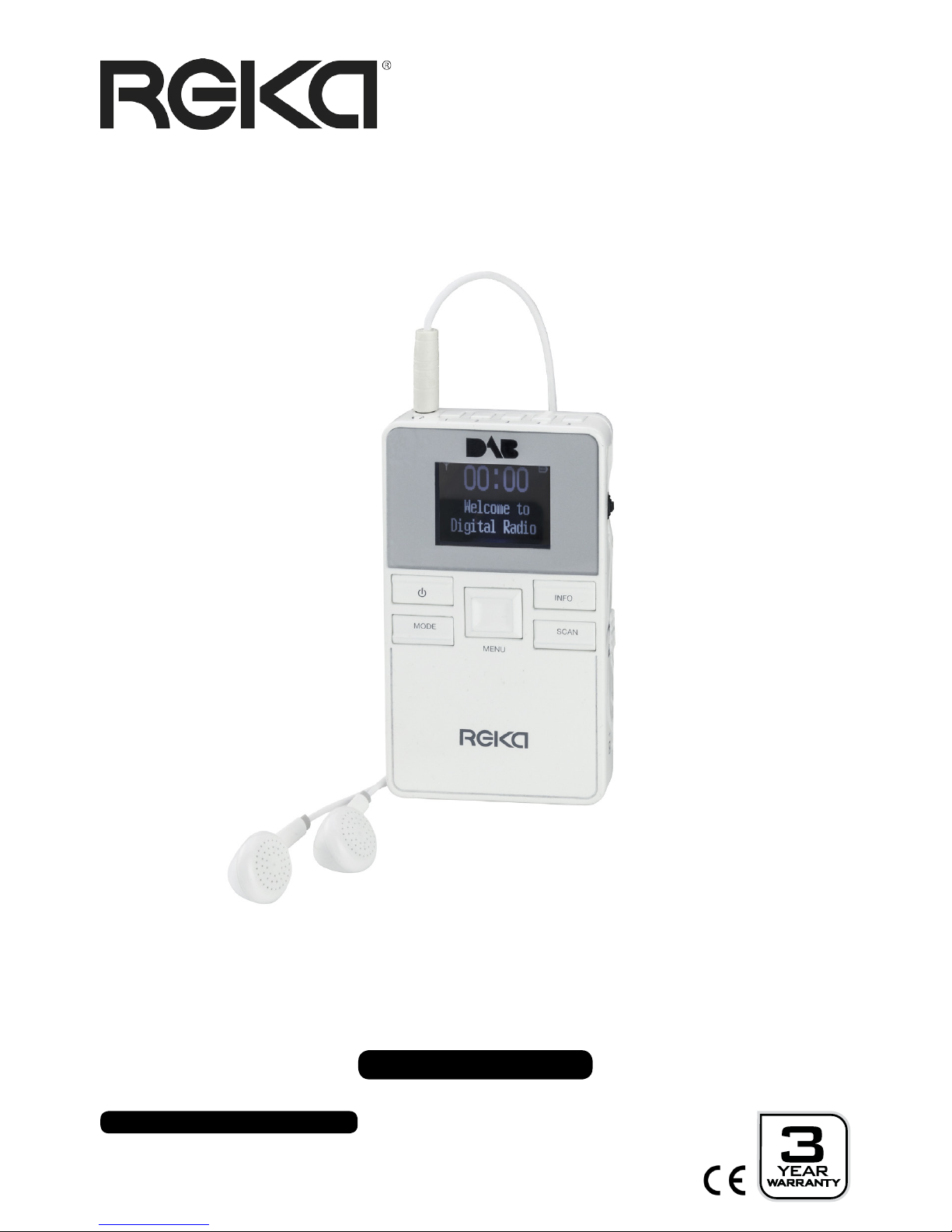
USER GUIDE
Portable DAB & FM Sports Radio
MODEL NUMBER: 82981
After Sales Support
UK/N.IRELAND HELPLINE NO:
REP.IRELAND HELPLINE NO:
WEBSITE:
EMAIL:
01270 508538
1800 995 036
www.quesh.co.uk

Welcome Section
General Information & Safety
Instructions
Contents & Features
General Layout
Control Method
• Buttons
• Toggle Switch
Lanyard
• Fitting The Lanyard
Checking The Adaptor
• Adaptor Information
• Mains Wall Socket USB Ports
Charging
• Charging The Radio
Key Lock
• Using The Key Lock
On/Off/Standy
Turning On/Off
• Turning On
• Turning Off
• Power Save
DAB
•DAB Mode
• Tune In A Station
• DAB Scan
• Preset Store
• Preset Recall
• DAB Menu
• Full Scan
• System (See Page 16.)
• Prune
• DRC
• Manual Tune
After Sales Support
UK/N.IRELAND HELPLINE NO:
REP.IRELAND HELPLINE NO:
WEBSITE:
EMAIL:
01270 508538
1800 995 036
www.quesh.co.uk
1.
2.
3.
4.
5.
6.
7.
8-12.
Contents
FM
• FM Mode
• Tune In A Station
• Storing A Preset
• Recall A Preset
• FM Menu
• Scan Setting
• System (See Page 16.)
• Audio Setting
System
• System Settings
• Time
• Time - Set Time/Date
• Time - Set Date Format
• Time - Set Time Format
• Time - Auto Update
• SW Version
• Factory Reset
• Language
• Inactive Standby
• Backlight
• Backlight - Time Out
• Backlight - Dim Level
• Backlight - On Level
Info
• Information Details
FAQ’s
Specications
13-16.
16-23.
24.
25.
27.

After Sales Support
UK/N.IRELAND HELPLINE NO:
REP.IRELAND HELPLINE NO:
WEBSITE:
EMAIL:
01270 508538
1800 995 036
www.quesh.co.uk
Welcome Section
Congratulations!
You have made an excellent choice with the purchase of this quality
REKA®product.
By doing so you now have the assurance and peace of mind which
comes from purchasing a product that has been manufactured to
the highest standards of performance and safety, supported by the
high quality standards of Quesh Ltd.
We want you to be completely satised with your purchase, so this
REKA® product is backed by a comprehensive manufacturer’s
3 year warranty and outstanding after sales service through our
dedicated helpline.
We hope you enjoy using this product for many years to come.
If you require technical support or in the unlikely event that your
purchase is faulty, please telephone our helpline for immediate
assistance. Faulty product claims made within the 3 year warranty
period will be repaired or replaced free of charge provided that you
have a satisfactory proof of purchase (keep your receipt safe).
This does not affect your statutory rights. However be aware that the
warranty will become null and void if the product is found to have
been deliberately damaged, misused and/or disassembled.
1
After Sales Support
UK/N.IRELAND HELPLINE NO:
REP.IRELAND HELPLINE NO:
WEBSITE:
EMAIL:
01270 508538
1800 995 036
www.quesh.co.uk
2
General Information &
Safety Instructions
This radio is powered by an internal 700mAh rechargeable lithium battery.
Do not dispose of batteries in your household waste.
Please contact your local authority for details on safe disposal.
Do not expose this radio to damp or moist conditions.
• Never throw batteries into a re or expose to excessive heat sources.
• If batteries are swallowed, please seek immediate medical attention.
• Always ensure correct +/- battery polarity when installing batteries.
• Do not recharge non-rechargeable batteries.
Equipment, which is marked with the WEEE logo
(as shown on the left), should not be thrown away with your household waste.
Contact your local authority waste disposal department, as they will be able to
provide details of the recycling options available in your area.
Electrical and electronic equipment (WEEE) contains materials, parts and
substances, which can be dangerous to the environment and harmful to
human health if the waste of electrical and electronic equipment (WEEE) is not
disposed of correctly.
Equipment, which is marked with the WEEE logo
(as shown on the left), should not be thrown away with your household waste.
Contact your local authority waste disposal department, as they will be able to
provide details of the recycling options available in your area
Battery Care
To get the best out of the battery, fully charge and use until at for the rst 5-6
times. Then use until at and fully charge at least once a month.
Prolonged storage without charge may cause damage to the battery and result in
poor to no charge. It is recommended you fully charge the battery every 6 months
for long term storage to keep the battery in good condition.
The EU Declaration of Conformity
can be downloaded from www.quesh.co.uk.
Contents & Features
3
After Sales Support
UK/N.IRELAND HELPLINE NO:
REP.IRELAND HELPLINE NO:
WEBSITE:
EMAIL:
01270 508538
1800 995 036
www.quesh.co.uk
Contents
1 x Pocket DAB & FM Radio
1 x Charge Cable
1 x Headphones
1 x Lanyard
Features
• Up to 6 hours play time
• DAB receiver (174MHz - 240MHz)
• FM receiver (87.5MHz - 108.00MHz)
• Stores 5 FM presets
• Stores 5 DAB presets
• Rechargeable 700mAH Li-Ion battery
• Auto adjusting clock
• LCD backlight display
• Inactive Standby
• Dimable Display
NO USER SERVICEABLE PARTS INSIDE
DAB in Ireland
To check coverage and available services in Ireland please got to:
http://www.digitalradio.ie/can-i-get-dab/
To prevent possible hearing damage, do not
use at high volume levels for long periods.
Layout
After Sales Support
UK/N.IRELAND HELPLINE NO:
REP.IRELAND HELPLINE NO:
WEBSITE:
EMAIL:
01270 508538
1800 995 036
www.quesh.co.uk
4
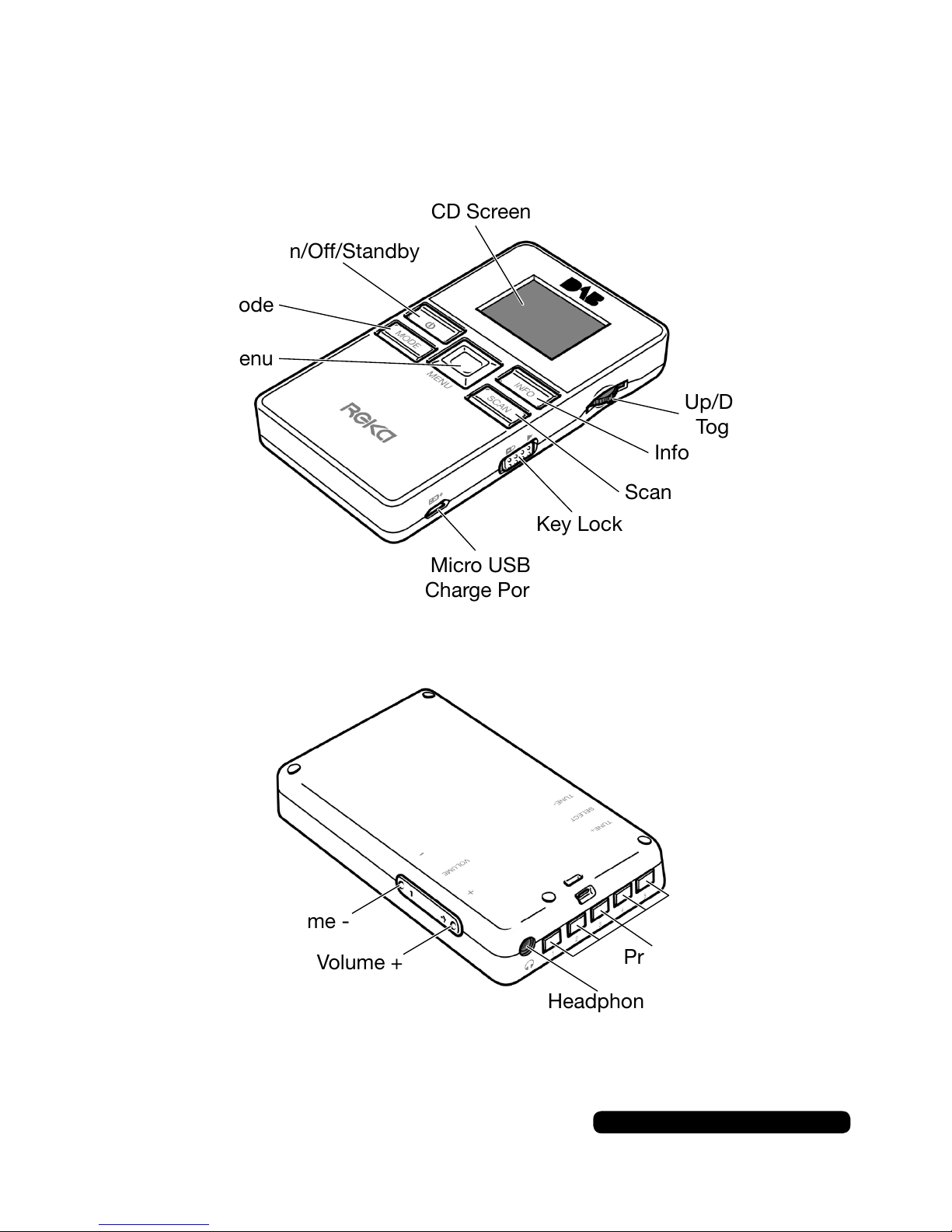
Mode
On/Off/Standby
LCD Screen
Menu
Key Lock
Micro USB
Charge Port
Up/Down/Select
Toggle Switch
Scan
Info
Volume -
Volume + Presets
Headphone Port
5
After Sales Support
UK/N.IRELAND HELPLINE NO:
REP.IRELAND HELPLINE NO:
WEBSITE:
EMAIL:
01270 508538
1800 995 036
www.quesh.co.uk
Lanyard
Fitting The Lanyard
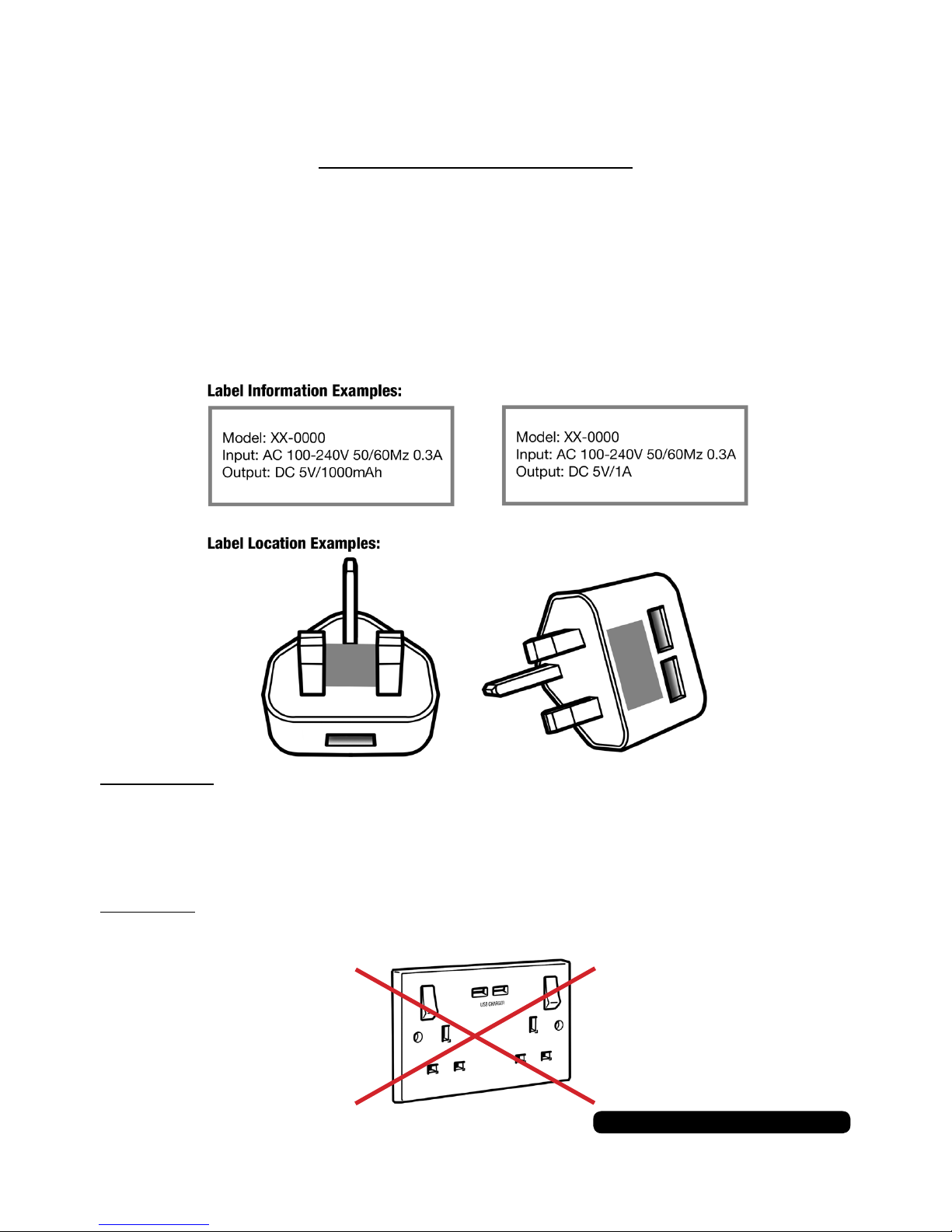
The radio is provided with a lanyard. To t the lanyard unclip the
bottom loop from the main body. Thread it through the mounting
hole at the top of the radio located on the back, then thread the clip
through the loop to secure it in place.
Control Method
Buttons
All the buttons are just a quick press to use unless stated in a
process described in this guide.
Toggle Switch
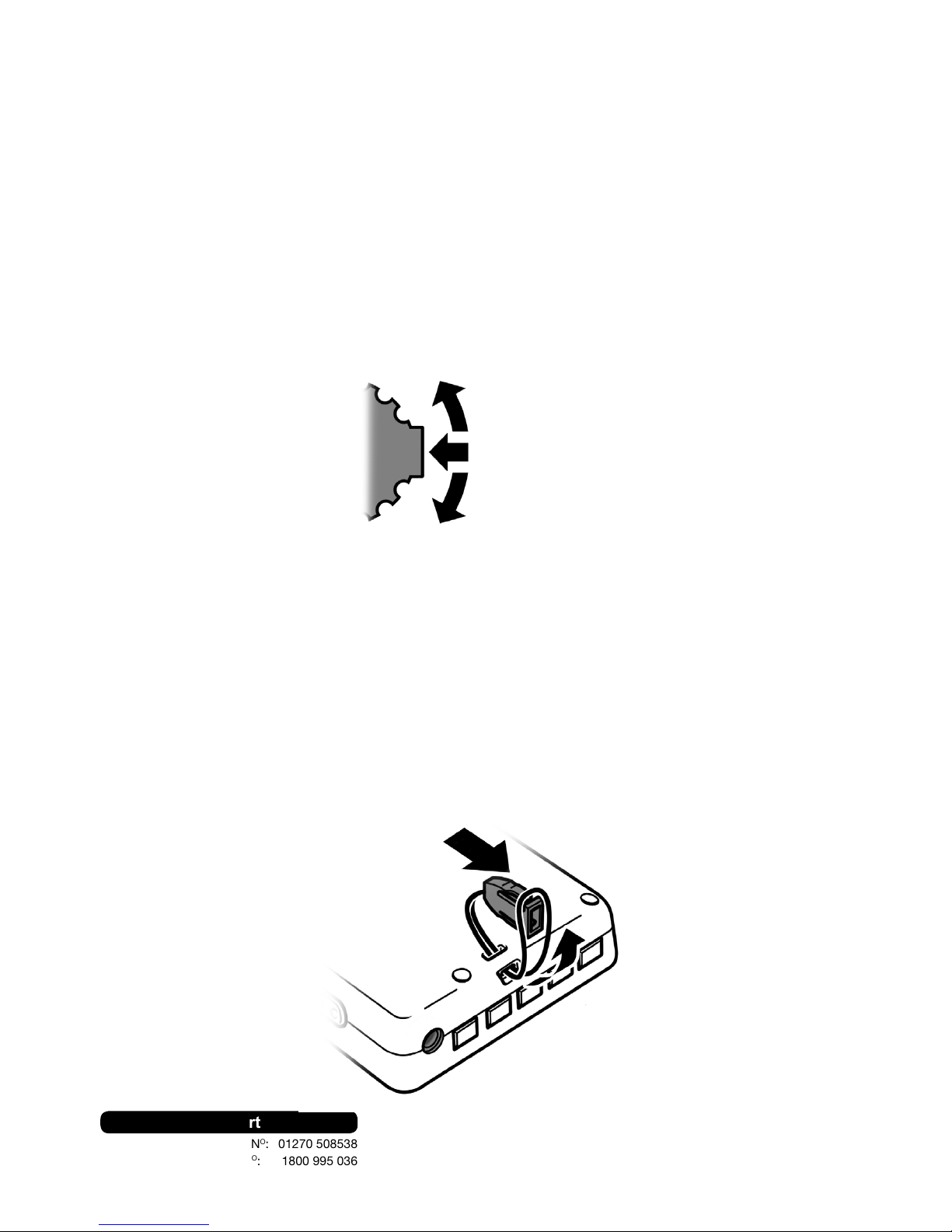
The general navigation and selection is done with the toggle switch.
Push up or down to cycle through options and press the toggle to
select a displayed option.
Select
Tune + / Up
Tune - / Down
Checking The Adaptor
Adaptor Information
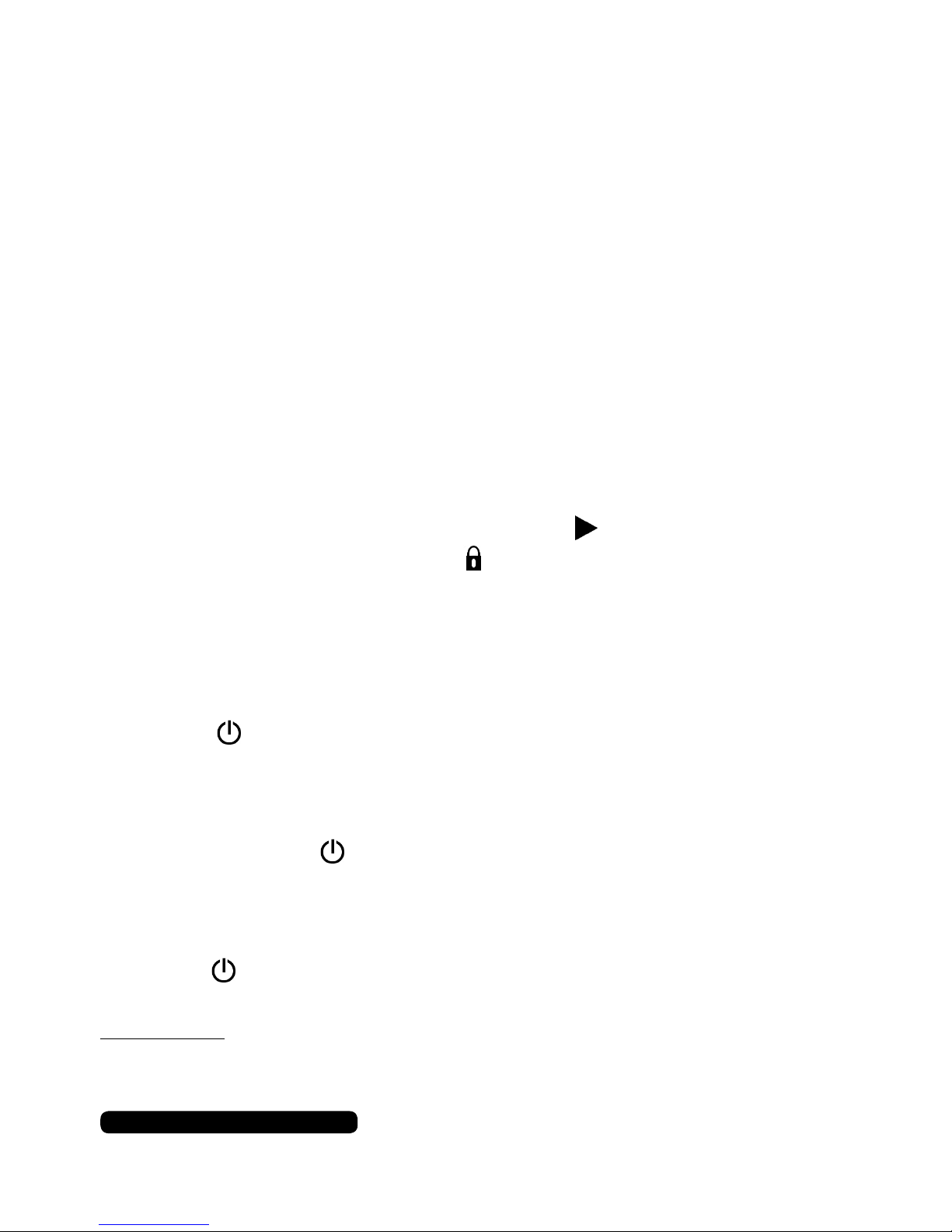
Before using a USB mains adaptor please check the “Output”
information on the plug face label. For this device 5V/1A or
5V/1000mAh is the maximum output required to charge the battery.
Using a stronger output can damage the battery and/or product and
void the warranty.
Please note:
Tablets and some large smart phones use 2.1A or 2100mAh outputs and above
and these are not suitable for this product.
READ BEFORE USE
Mains Wall Socket USB Ports
DO NOT use the USB outlets on a mains wall socket. This will harm
the battery and/or product and void the warranty.
After Sales Support
UK/N.IRELAND HELPLINE NO:
REP.IRELAND HELPLINE NO:
WEBSITE:
EMAIL:
01270 508538
1800 995 036
www.quesh.co.uk
6
Charging
Charging The Radio
Using a 5V/1A USB mains adaptor or a PC or Laptop USB port,
connect the charge cable to the USB power output and the micro
USB end to the charge port on the radio. It can take approximately 2
hours to fully charge the battery. The charge indicator on the screen
will show 3 bars once fully charged.
You can use the radio whilst it is being charged.
On/Off/Standby
7
After Sales Support
UK/N.IRELAND HELPLINE NO:
REP.IRELAND HELPLINE NO:
WEBSITE:
EMAIL:
01270 508538
1800 995 036
www.quesh.co.uk
Turning The Radio On
Press the button once to turn the radio on or to wake it out of
standby mode.
Turning The Radio Off
Press and hold the button until the screen shows ‘Bye Bye’ and
turns itself off.
Standby Mode
Press the button once to put the radio into standby mode.
Please Note:
The date and time is automatically set once the radio is turned on and it is receiving
a DAB signal.
Key Lock
Using The Key Lock
There is a key lock feature that will disable all the key functions on
this radio. Slide the switch on the side to position to unlock the
radio and slide the switch to the position to lock the buttons.
After Sales Support
UK/N.IRELAND HELPLINE NO:
REP.IRELAND HELPLINE NO:
WEBSITE:
EMAIL:
01270 508538
1800 995 036
www.quesh.co.uk
8
DAB
DAB Mode
Once the radio is turned on it is usually in DAB mode. If it is not,
press the ‘MODE’ button to change the radio to DAB.
Tune In A Station
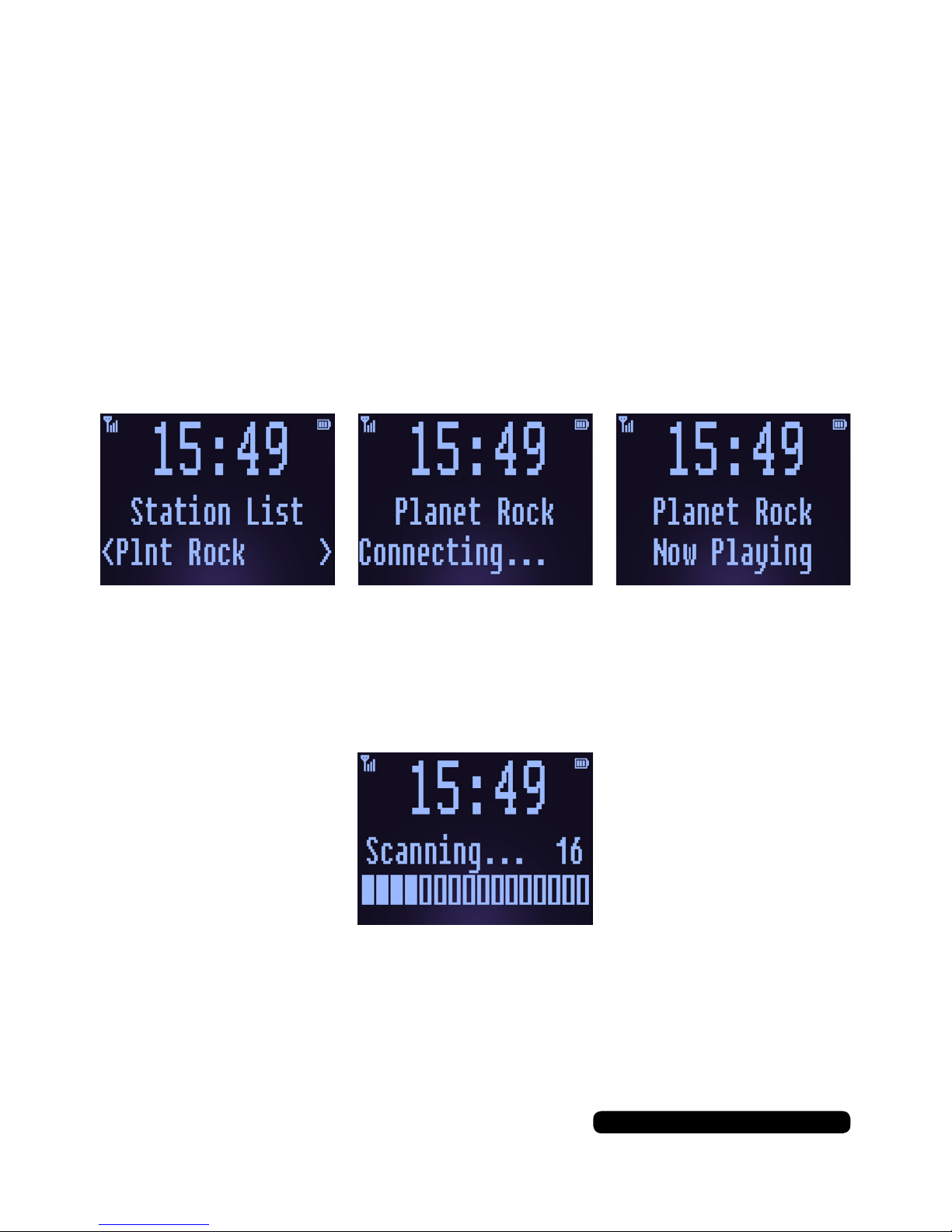
All the available stations are displayed in alphabetical order in the
station list. To select a station use the toggle switch to cycle though
the available stations and press the toggle switch to tune in the
station displayed on the screen.
DAB Scan
If you have moved to a different location, have poor audio or bad
interference it is advisable to rescan the available stations. To do this
press the ‘SCAN’ button to refresh the station list.
The number on the right of the scanning screen is the total number
of available stations found and added to the station list. Once the
radio has completed the scan it will automatically tune into the rst
alphabetically listed station.
Table des matières
Autres manuels Reka Radio


