REED R2100 Manuel utilisateur

reedinstruments
www com
Model R2100
Thermal Imager
Instruction
Manual
Pantone 534 Blue
Pantone 123 Yellow
Pantone 485 Red
Pantone 123 Yellow
Pantone 534 Blue
Black Rich Black -
20/20/20/100
Blue - 100/80/30/5
Yellow - 0/27/100/0
Red - 10/100/100/5
Yellow - 0/27/100/0
Blue - 100/80/30/5
Only if you REALLY need them:
Pantone 534 Blue - 100/80/30/5
Pantone 485 Red - 10/100/100/5
Pantone 123 Yellow - 0/27/100/
1.888.475.5235info@REED-Direct.com REED-Direct.com

reedinstruments
www com
2
Pantone 534 Blue
Pantone 123 Yellow
Pantone 485 Red
Pantone 123 Yellow
Pantone 534 Blue
Black Rich Black -
20/20/20/100
Blue - 100/80/30/5
Yellow - 0/27/100/0
Red - 10/100/100/5
Yellow - 0/27/100/0
Blue - 100/80/30/5
Only if you REALLY need them:
Pantone 534 Blue - 100/80/30/5
Pantone 485 Red - 10/100/100/5
Pantone 123 Yellow - 0/27/100/
Table of Contents
Safety ............................................................................................ 3
Features ......................................................................................... 4
Specications .............................................................................4-5
Instrument Description ...............................................................6-7
Operating Instructions ..............................................................8-10
Main Menu ................................................................................... 11
Measurement Menu ...............................................................11-16
Image Menu ............................................................................16-22
Camera Menu .............................................................................. 23
Photo Browser ............................................................................. 24
Video Browser .............................................................................25
Settings Menu ........................................................................26-29
Factory Settings .......................................................................... 30
Battery Instructions ..................................................................... 31
For service on this or any other REED product or information on other
REED products, contact REED Instruments at [email protected]
1.888.475.5235info@REED-Direct.com REED-Direct.com

reedinstruments
www com
3
Pantone 534 Blue
Pantone 123 Yellow
Pantone 485 Red
Pantone 123 Yellow
Pantone 534 Blue
Black Rich Black -
20/20/20/100
Blue - 100/80/30/5
Yellow - 0/27/100/0
Red - 10/100/100/5
Yellow - 0/27/100/0
Blue - 100/80/30/5
Only if you REALLY need them:
Pantone 534 Blue - 100/80/30/5
Pantone 485 Red - 10/100/100/5
Pantone 123 Yellow - 0/27/100/
Safety
• To prevent eye damage and personal injury, do not look into the laser
• Do not point laser directly at people or animals or indirectly off
reective surfaces
• Do not disassemble or do modications to the Thermal Imager
• Do not point the Thermal Imager (with or without the lens cover) at
intensive energy sources as this can damage the Thermal Imager
• Do not use the Thermal Imager in a temperature higher than 50°C
(122°F) or lower than -20°C (-4°F)
• Only use the correct equipment to charge the battery
• Do not disassemble or do a modication to the battery
• Do not put the battery in or near a re, or in direct sunlight, or other
high-temperature locations
• Always charge the battery between 0 to 50°C (32 to 122°F)
• Do not get water or salt water on the battery, or permit the battery to
get wet
• Clean the case with a damp cloth and a weak soap solution
• Do not use abrasives, isopropyl alcohol, or solvents to clean the case
or lens/screen
• Do not clean the infrared lens too vigorously, this can damage the
anti-reective coating
• Remove the battery from the Thermal Imager if not in use for an
extended period of time
• Store the Thermal Imager in cool and dry environment
1.888.475.5235info@REED-Direct.com REED-Direct.com

reedinstruments
www com
4
Pantone 534 Blue
Pantone 123 Yellow
Pantone 485 Red
Pantone 123 Yellow
Pantone 534 Blue
Black Rich Black -
20/20/20/100
Blue - 100/80/30/5
Yellow - 0/27/100/0
Red - 10/100/100/5
Yellow - 0/27/100/0
Blue - 100/80/30/5
Only if you REALLY need them:
Pantone 534 Blue - 100/80/30/5
Pantone 485 Red - 10/100/100/5
Pantone 123 Yellow - 0/27/100/
Features
• 3.5" colour TFT LCD capacitive touch screen with sun visor
• High thermal sensitivity (NETD) of <80mK
• Built-in laser and white LED ashlight
• Built-in visible light digital camera
• Includes 7.5mm (29.8 x 22.6° FOV) lens
• 20X continuous zoom
• Infrared and visual images, picture-in-picture, as well as visual image
with infrared overlay
• Three spot, three area with min/max and average, two-line and
isothermal measurement analysis
• Automatic lens recognition identies the temperature calibration data
associated with each of the interchangeable lenses
• Automatic hot/cold spot indicator
• Choice of six colour palettes including custom
• Automatic image capture
• Save images with voice annotations
• Video recording with voice annotations
• Micro SD memory card extension possible
Specifications
IR Resolution: 160 x 120 pixels
Field of View: 29.8 x 22.6°
Detector Type: Uncooled microbolometer
Thermal Sensitivity (NETD): < 0.08°C @ 30°C (86°F)/80 mK
Image Capture Frequency: 50Hz
Focus: Manual
Temperature Range: -20 to 400°C (-4 to 752°F)
Accuracy: ±2°C (±3.6°F) or ±2% of reading
Storage Medium: 4GB micro SD card continued ...
1.888.475.5235info@REED-Direct.com REED-Direct.com

reedinstruments
www com
5
Pantone 534 Blue
Pantone 123 Yellow
Pantone 485 Red
Pantone 123 Yellow
Pantone 534 Blue
Black Rich Black -
20/20/20/100
Blue - 100/80/30/5
Yellow - 0/27/100/0
Red - 10/100/100/5
Yellow - 0/27/100/0
Blue - 100/80/30/5
Only if you REALLY need them:
Pantone 534 Blue - 100/80/30/5
Pantone 485 Red - 10/100/100/5
Pantone 123 Yellow - 0/27/100/
Digital Camera Resolution: 640 x 480 pixels
Digital Lens Data: FOV 62.3°
Video Format: MPEG-4, 640x480 @ 30fps,
on memory card >60 minutes
Image Format: JPEG, on memory card >1000 pictures
Interface: USB-mini, audio, composite video
(PAL and NTSC), Micro SD slot
Drop Test: 2m
Encapsulation: IP65
Laser: < class 2
Operating Temperature: -20 to 50°C (-4 to 122°F)
Storage Temperature: -40 to 70°C (–40 to 158°F)
Operating/Storage Humidity: 10 to 90%RH
Power Supply: 7.4V lithium polymer rechargeable
battery
Battery Life: 4.5 hours
Dimensions: 243 x 103 x 160mm (9.57 x 4.05 x 6.29")
Weight: 920g (32.45oz) (including battery)
Includes: 7.5mm lens, lens cap, micro SD memory
card, video output cable, headset, USB
cable, hood, tripod stand, shoulder
strap, two batteries, charger, AC
adapter, software CD(Multiple language)
and hard carrying case
Optional Accessories: 20.6° 11mm Replacement Lens (RL-11)
10.4° 22mm Replacement Lens (RL-22)
6.9° 33mm Replacement Lens (RL-33)
Spare Battery (R2100-7.4V)
REED Instruments offers certied thermography training. Contact REED
Instruments at info@reedinstruments.com for complete information, dates
and locations.
1.888.475.5235info@REED-Direct.com REED-Direct.com

reedinstruments
www com
6
Pantone 534 Blue
Pantone 123 Yellow
Pantone 485 Red
Pantone 123 Yellow
Pantone 534 Blue
Black Rich Black -
20/20/20/100
Blue - 100/80/30/5
Yellow - 0/27/100/0
Red - 10/100/100/5
Yellow - 0/27/100/0
Blue - 100/80/30/5
Only if you REALLY need them:
Pantone 534 Blue - 100/80/30/5
Pantone 485 Red - 10/100/100/5
Pantone 123 Yellow - 0/27/100/
Instrument Description
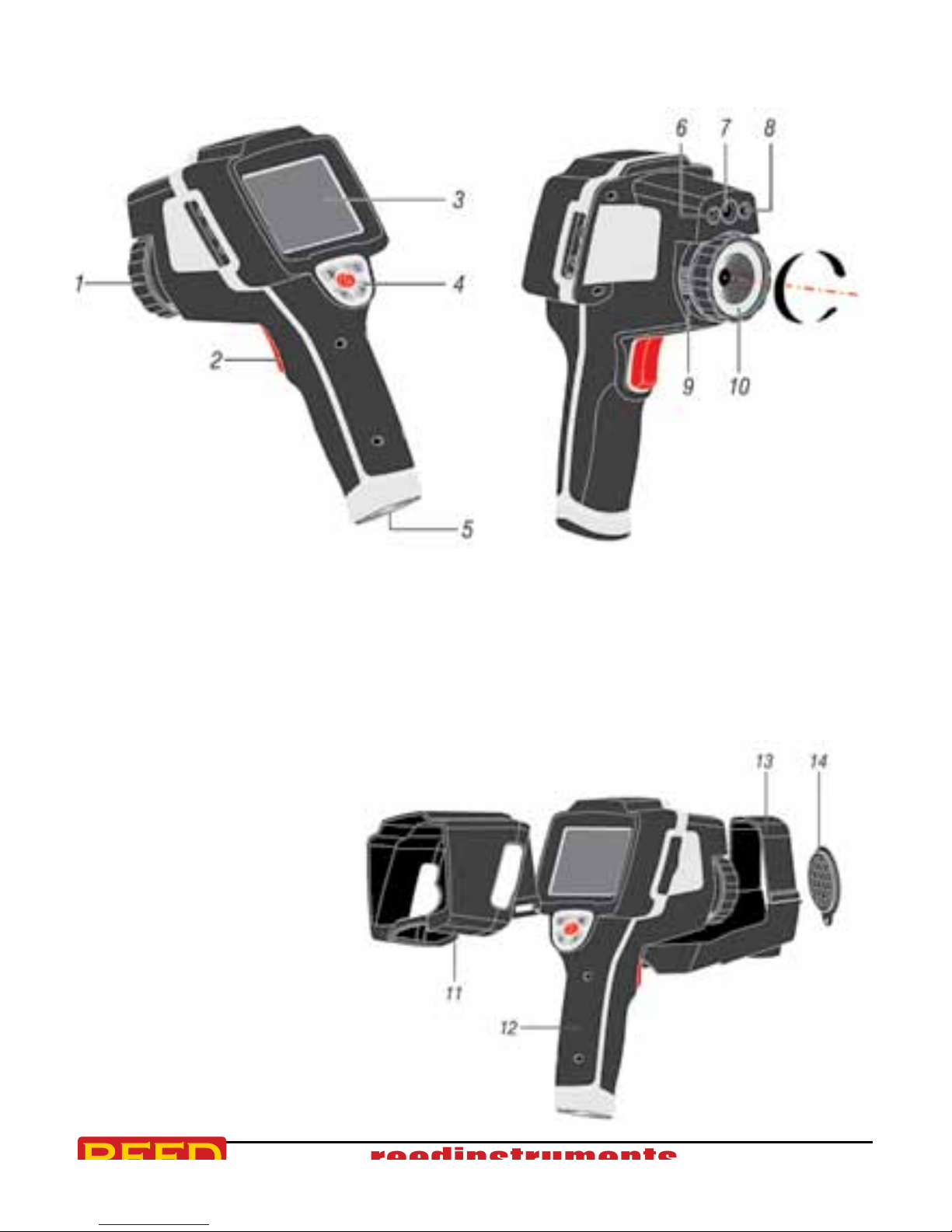
1. Infrared Camera Lens
2. Trigger
3. LCD Display
4. Button Panel
5. Battery Compartment
6. LED Light
7. Visual Camera
8. Laser Pointer
9. Infrared Camera Lens Lock
10. Infrared Camera Lens
11. Hood
12. Thermal Imager
13. Tripod Base
14. Lens Cap
continued ...
1.888.475.5235info@REED-Direct.com REED-Direct.com

reedinstruments
www com
7
Pantone 534 Blue
Pantone 123 Yellow
Pantone 485 Red
Pantone 123 Yellow
Pantone 534 Blue
Black Rich Black -
20/20/20/100
Blue - 100/80/30/5
Yellow - 0/27/100/0
Red - 10/100/100/5
Yellow - 0/27/100/0
Blue - 100/80/30/5
Only if you REALLY need them:
Pantone 534 Blue - 100/80/30/5
Pantone 485 Red - 10/100/100/5
Pantone 123 Yellow - 0/27/100/
Button Panel Description
Display Description
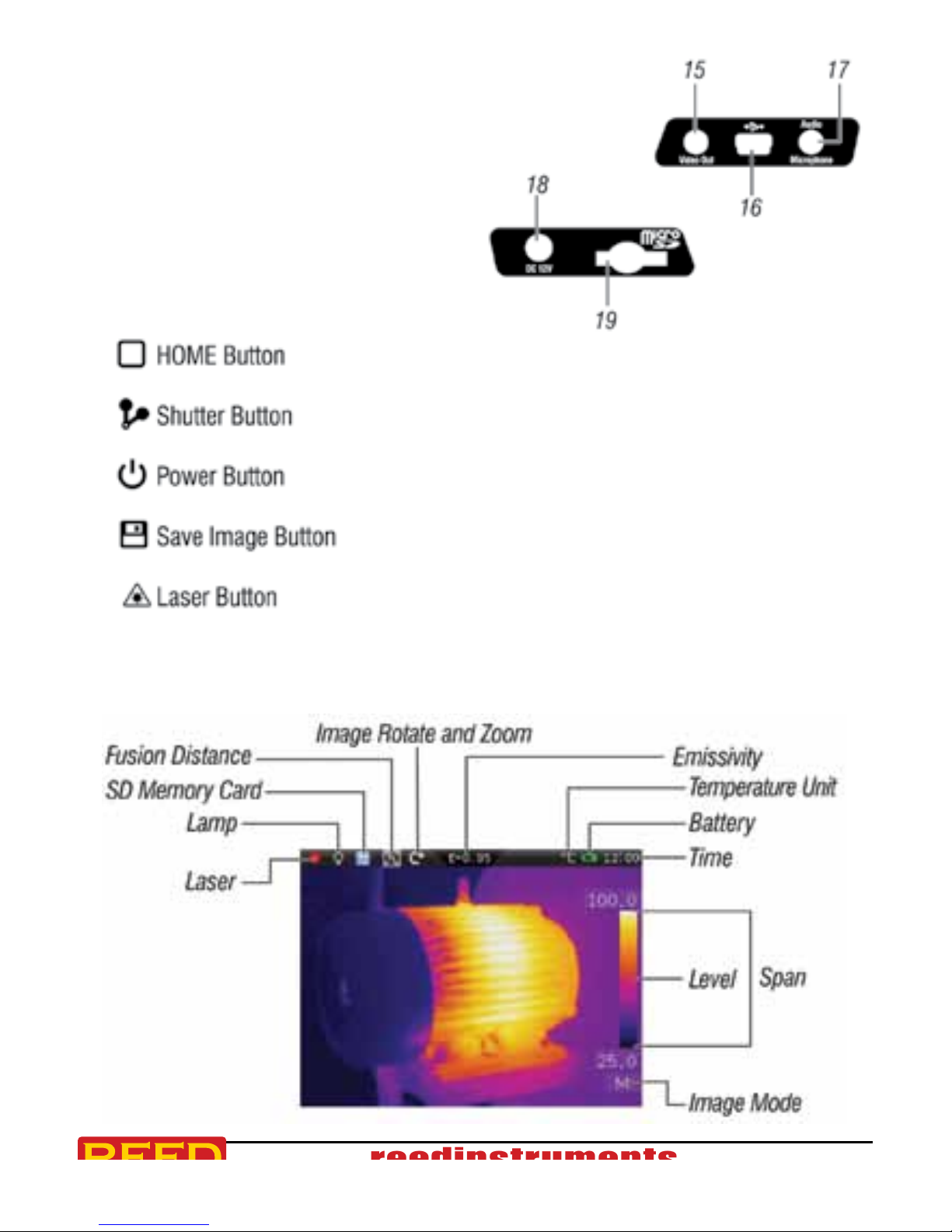
15. Video Output
16. USB Cable Connection
17. Audio/Microphone
18. AC Adapter/
Charger Input Terminal
19. MicroSD Slot
1.888.475.5235info@REED-Direct.com REED-Direct.com

reedinstruments
www com
8
Pantone 534 Blue
Pantone 123 Yellow
Pantone 485 Red
Pantone 123 Yellow
Pantone 534 Blue
Black Rich Black -
20/20/20/100
Blue - 100/80/30/5
Yellow - 0/27/100/0
Red - 10/100/100/5
Yellow - 0/27/100/0
Blue - 100/80/30/5
Only if you REALLY need them:
Pantone 534 Blue - 100/80/30/5
Pantone 485 Red - 10/100/100/5
Pantone 123 Yellow - 0/27/100/
Operating Instructions
Before you use the Thermal Imager for the rst time, charge the battery
for a minimum of 1.5 hours. To charge the battery, refer to the "Battery
Instructions" section of this manual.
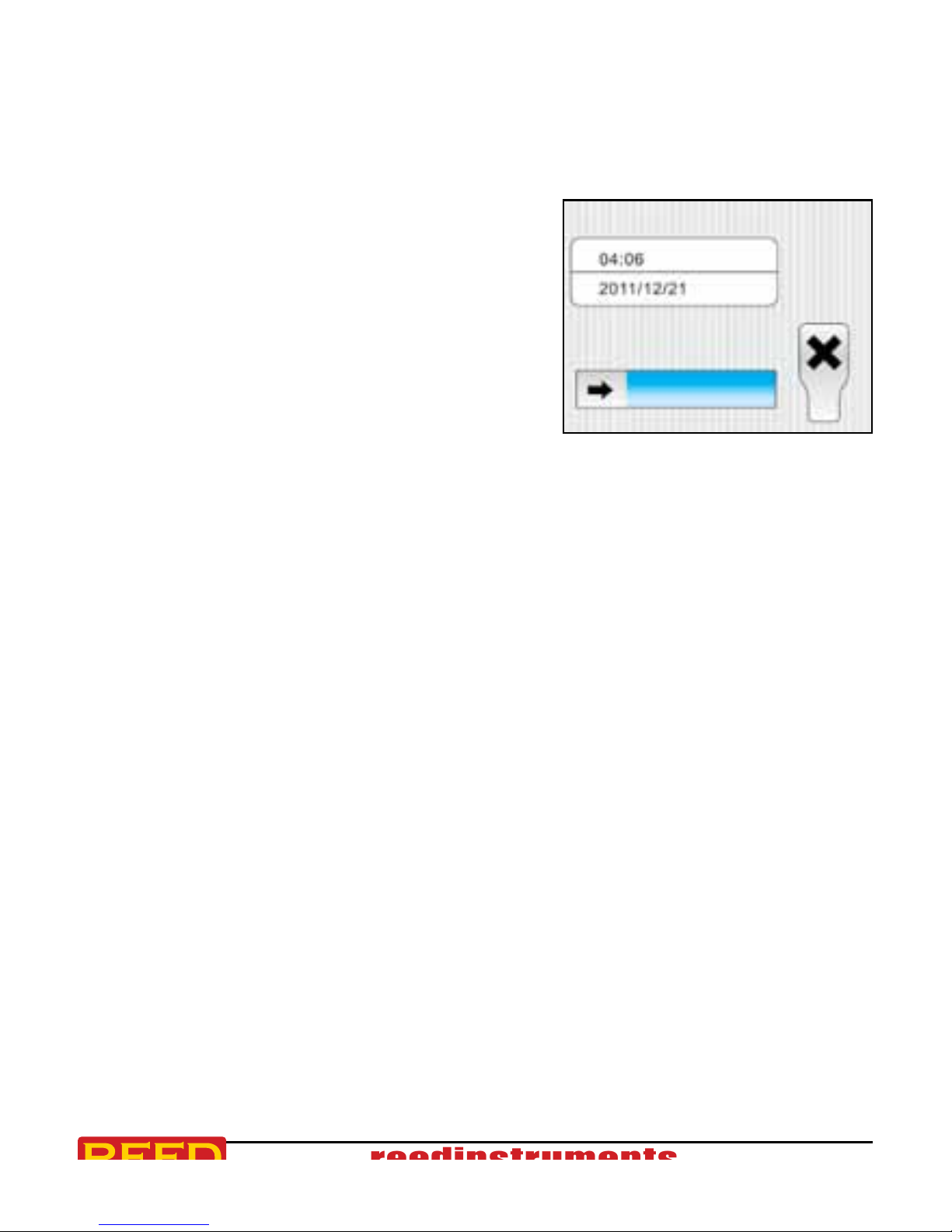
To turn the Thermal Imager on or off,
press and hold the Power Button for three
seconds. You can also turn the Thermal
Imager off by pressing the Power Button,
and sliding the arrow icon to the right.
Focus
Correct focus is important in all imaging applications. Without the correct
focus, the image can be blurry and the radiometric data will be inaccurate.
Out-of-focus infrared images are frequently unusable or of little value. This
Thermal Imager has focus-free in manual mode. To adjust the focus rotate
the IR lens.
Shutter
A shutter is pivoted into the ray path in order to make a temperature
reference available for image correction. The self calibration shutter in this
Thermal Imager can be set to Manual or Auto. To manually activate the
shutter, press the Shutter Button. To activate or adjust the shutter Auto
Mode please refer to the Settings Menu section of this manual.
Optical Lens
Rotate the Lens Lock counter-clockwise to remove the optical lens.
The optical lens that is supplied with the Thermal imager has the
following specications:
Focal Length: 7.5mm Horizontal FOV: 29.8°
IFOV: 3.33mrad Vertical FOV: 22.6°
1.888.475.5235info@REED-Direct.com REED-Direct.com

reedinstruments
www com
9
Pantone 534 Blue
Pantone 123 Yellow
Pantone 485 Red
Pantone 123 Yellow
Pantone 534 Blue
Black Rich Black -
20/20/20/100
Blue - 100/80/30/5
Yellow - 0/27/100/0
Red - 10/100/100/5
Yellow - 0/27/100/0
Blue - 100/80/30/5
Only if you REALLY need them:
Pantone 534 Blue - 100/80/30/5
Pantone 485 Red - 10/100/100/5
Pantone 123 Yellow - 0/27/100/
Emissivity
This Thermal Imager measures infrared energy from the surface of the
object and uses this data to calculate an estimated temperature value.
Surfaces that are good at radiating energy (high emissivity), the
emissivity factor is ≥0.90. Shiny surfaces or unpainted metals are not
good at radiating energy (low emissivity) have an emissivity of <0.6.
To more accurately measure materials with a low emissivity, an emissivity
correction is necessary. Emissivity is set directly as a value or from a list
of emissivity values for some common materials. The global emissivity
displays on the LCD Screen as "E=x.xx".
The following table gives typical emissivity of some materials:
Material Emissivity
Asphalt 0.95
Concrete 0.95
Hard plaster 0.90
Wood (natural) 0.93
Lime Stone 0.98
Ballast chipping 0.95
Paper (every color) 0.95
Plastics non lm 0.95
Tissue (fabric) 0.95
Sand 0.90
Glass wool 0.90
Melted asphalt 0.93
Screed/pavement 0.93
Foamed polystyrene 0.94
Material Emissivity
Drywall 0.95
Render 0.94
Smoothing cement 0.90
Lacquer 0.92
Latex paint 0.97
Wallpaper 0.93
Tilling 0.93
Parquet oor 0.90
Laminate 0.90
PVC-Floor 0.92
Brick 0.93
Cliff 0.97
Roong cardboard 0.93
Stucco 0.91
1.888.475.5235info@REED-Direct.com REED-Direct.com

reedinstruments
www com
10
Pantone 534 Blue
Pantone 123 Yellow
Pantone 485 Red
Pantone 123 Yellow
Pantone 534 Blue
Black Rich Black -
20/20/20/100
Blue - 100/80/30/5
Yellow - 0/27/100/0
Red - 10/100/100/5
Yellow - 0/27/100/0
Blue - 100/80/30/5
Only if you REALLY need them:
Pantone 534 Blue - 100/80/30/5
Pantone 485 Red - 10/100/100/5
Pantone 123 Yellow - 0/27/100/
Reflected Temperature
Using the offset factor, the reection is calculated out due to the low
emissivity and the accuracy of the temperature measurement is improved.
In most cases, the reected temperature is identical to the ambient air
temperature. Only when objects with strong emissions of a higher
temperature are in the proximity of the object being measured should
be determined and used. The reected temperature has only little effect
on objects with high emissivity. The reected temperature can be set
individually.
Follow these steps to get the right value for the reected temperature:
1. Set the emissivity to "1.0"
2. Adjust the optical lens to near focus
3. Looking in the opposite direction away from the object, take a
measurement and save the image
4. Determine the average value of the image and use that value for
your input of reected temperature
Thermal Imager Reporter Software
Reporter Software is supplied with this Thermal Imager. This software
contains features to analyze images, organize data and information, and
make professional reports. The Thermal Imager Reporter Software allows
audio annotations and commentary to be reviewed on a PC.
1.888.475.5235info@REED-Direct.com REED-Direct.com
Table des matières
Autres manuels REED Caméra thermique