
Radenso DS1 Manuel utilisateur

DS1 USER MANUAL
VERSION 1.1

Quick Start ........................................................... 1
Button Operation 1
Common Features ................................................... 2
Understanding Mute 2
Factory Reset 2
Accessories .......................................................... 3
Menu Settings ..................................................... 4-7
Speed Unit ........................................................... 7
Displays .............................................................. 8
Idle Display 8
Sub Display 8
Additional Settings ................................................. 9
Lowspeed Mute 9
RLC Auto Mute 9
Lockouts 9-10
User Point Alert 10
Auto Lockouts 11
K-notch 11
City Mode 11-12
K Narrow / Wide 12
Ka Narrow / Wide / Segmentation 12
Threat Display 12-13
Auto Mute Mode 13
Auto Dim Mode 13
Auto Power Mode 13
Power Cord Alert LED 14
Power Cord Mute Button 14
Software Update 15
FCC Statement ..................................................... 16
Warranty ............................................................ 17
Support .............................................................. 18
Memo ................................................................ 19
TABLE OF CONTENTS

PAGE 1
Button Operation
A. Power Press
Press
Press
Power On/Off
Volume Level Up (0-9)
Volume Level Down (0-9)
B. Vol + Press (in Menu)
Press (in Menu)
Move Right (in the main menu),
or Down (in the submenu)
Move Left (in the main menu),
or Up (in the submenu)
C. Vol -
D. Menu Press
Press (in Menu)
Menu Mode
Select an Option
E. Mute
Press Toggle Mute Off/On (During Alert).
Store or Delete Lockout
1 sec Press Delete Red Light/Speed/Red Light
& Speed Camera (During Alert)
2 sec Press Store or Delete User Point (While
not Alerting)
AB
C
E
D
QUICK START

PAGE 2
Understanding Mute
1. Mute Mode can be activated by pressing [MUTE] during
laser or radar alerts. Laser, radar, and over speed alerts will
be muted.
2. Unit automatically turns Mute Mode off 20 seconds after
the radar/laser alert ends.
3. Unit automatically turns Mute Mode off if the laser or radar
band changes.
4. Unit automatically turns Mute Mode off if the Menu is used.
Factory Reset
Select Factory Reset in the Menu to reset all the settings
except GMT and Region settings. GMT and Region settings will
stay the same even after Factory Reset.
COMMON FEATURES
PAGE 3
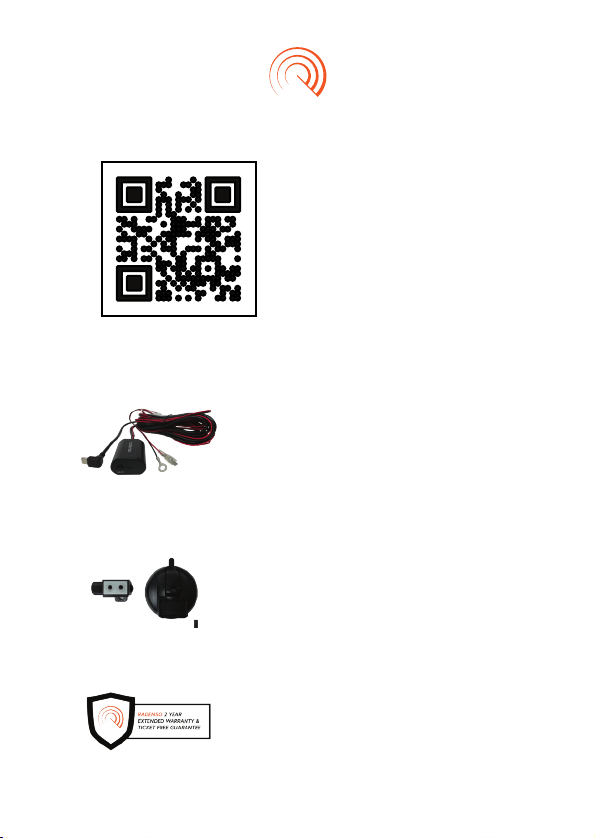
ACCESSORIES
Radenso USB-C Direct Wire Kit with
Mute Button
• Allows you to easily mute and create
GPS lockouts without having to reach
up to your radar detector
• Wiring can be hidden behind your car
interior panels to provide a stealthy
look
• Compatible with the Radenso DS1
Radenso Magnetic Suction Cup Mount
• Easily mount your detector to the
windshield of your car
• One comes complimentary with your
DS1, but replacements and additional
mounts are available for purchase
• Compatible with the Radenso DS1
2 Year Extended Warranty
• An optional feature that adds 2 years
to your warranty and the Radenso
Ticket Free Guarantee
This QR code will take
you to everything you
need regarding your new
DS1: optional accessories,
optional extended warranty,
replacement parts, firmware
updates and more

PAGE 4
MENU SETTINGS
Menu Submenu
Mode
Laser
K
Voice
Ka
Ka
K
X
MRCD
POP Ka
POP K
Option Menu
Auto, Custom
On, Off
On, Off
On, Off
On, Off
Wide, Narrow, Segment
Default: US, CAN: narrow;
AUS/NZ: NA K Narrow
Default: US, AUS, NZ: off; CAN: on
Wide, Narrow, NA K Narrow (AUS/NZ)
On, Off
On, Off
On, Off
On, Off
User
Preference
Band On/Off
Band Setting
Frequency
Display
Ka Radar
Sensitivity
K Radar
Sensitivity
X Radar
Sensitivity
Low Speed
Mute
Overspeed
Warning
On, Off
100%, 90%, 80%, 70%, 60%, 50%
100%, 90%, 80%, 70%, 60%, 50%
100%, 90%, 80%, 70%, 60%, 50%
Off, 5-45mph : 5mph step,
10-70km/h : 10km/h step
Default: US/CAN: 15mph; AUS/NZ: 40km/h
Off, 65-105mph : 5mph step,
100-170km/h : 10km/h step
The default menu settings are denoted in bold.

PAGE 5
Menu Submenu
Brightness
Idle Mode
Ka7 Mode
Ka5 Mode
Ka9 Mode
TSR Filter
Ka6 Mode
Ka Filter
Ka4 Mode
Display Color
Ka Alert
Color
K Alert Color
Laser Alert
Color
MRCD Alert
Color
X Alert Color
Sub Mode
Ka8 Mode
K Filter
Option Menu
Auto, Bright, Dim, Dimmer
Time, Scan, Smart Dark, Dark
On, Off
On, Off
On, Off
On, Off
On, Off
On, Off
On, Off
Red, Blue, White, Gray, Pink,
Purple, Green, Amber
Red, Blue, White, Gray, Pink,
Purple, Green, Amber
Red, Blue, White, Gray, Pink,
Purple, Green, Amber
Red, Blue, White, Gray, Pink,
Purple, Green, Amber
Red, Blue, White, Gray, Pink,
Purple, Green, Amber
Red, Blue, White, Gray, Pink,
Purple, Green, Amber
Speed, Compass, Speed +
Compass, Altitude, Off
On, Off
On, Off
Band Setting
(cont.)
Display
Setting
Ka3 Mode On, Off
Ka1 Mode
Ka2 Mode
On, Off
On, Off

PAGE 6
Menu Submenu Option Menu
Laser Tone
Ka Tone
1, 2, 3, 4, 5, 6, 7, 8, 9, 10
1, 2, 3, 4, 5, 6, 7, 8, 9, 10
Tone
X Tone
MRCD Tone
GPS Signal
Announce
Home Auto
Lockout Radius
Red Light
Camera
Speed Camera
Red Light &
Speed Camera
Delete All
User Points?
GPS Alert
Distance
Delete All
Lockouts?
RLC Auto
Mute
Delete
All Auto
Lockouts?
K Tone
GPS
Auto Lockout
Pin Home
1, 2, 3, 4, 5, 6, 7, 8, 9, 10
1, 2, 3, 4, 5, 6, 7, 8, 9, 10
On, Off
No Limit, 50 miles, 100 miles, 150
miles, 200 miles
On, Off
On, Off
On, Off
Reset?
Auto, Short, Medium, Long
Reset?
Off, 55-70mph : 5mph step, 90-
110km/h : 10km/h step
Reset?
1, 2, 3, 4, 5, 6, 7, 8, 9, 10
On, Off
On, Off
Set (no default setting)
GPS

PAGE 7
Menu Submenu Option Menu
Region
Volume Level
Unit
DST
Auto Mute
GMT
Auto Power
Off
Time 12/24
Auto Mute
Start
Factory Reset
Mode
Auto Mute Vol
Firmware
Version Mode
Database
Version Mode
US, Canada, AUS/NZ
0, 1, 2, 3, 4, 5, 6, 7, 8, 9
English (mph), Metric (km/h)
On, Off
On, Off
-12 to 0 to +12 / 1 step
Off, 15 min, 30 min
12 hr, 24 hr
1 sec, 2 sec, 3 sec
Reset?
50%, 40%, 30%, 20%, 10%, 0%
Vx.xx
xx.xx.xx
Unit
Etc
Default: US/CAN: -5 ; AUS/NZ: +12
Default: US: english; CAN/AUS/NZ: metric
Speed Unit
Speed Unit can be changed mph or km/h in the Menu
1. Set mph : Speed : mph, Distance and altitude : feet
2. Set km/h : Speed : km/h, Distance and altitude : meter

PAGE 8
Idle Display
Set the standby mode.
1. Scan Display: A moving scan graph is displayed.
2. Time Display: The current time is displayed. User can
select 12hr or 24hr in the menu.
3. Smart Dark, Dark: Shows only one dot on the right bottom
side. Smart dark only operates when the button clicks and
it alerts. In Smart Dark mode, the display turns on and the
brightness level is changed to the brightness setting in the
brightness mode when a button is pressed or an alert goes
off.
Sub Display
Set the display information that is located on the upper left
side.
4. Speed: Shows your current speed.
5. Speed + Compass: Shows your current speed and
direction.
6. Compass: Shows your current direction.
7. Altitude: Shows your current altitude.
8. Off: Displays nothing.
DISPLAYS
Autres manuels pour DS1
1
Table des matières
Autres manuels Radenso Détecteur de radar


