
RADEMACHER HomePilot 9486 Manuel utilisateur

VBD 659-2 (09.16)
Item No.: 3200 42 19
EN
HomePilot® HD Camera (indoor) 9486
Instruction Manual for Installation and Commissioning
Type: 9486

2
EN
i
Dear Customer...
With your purchase of a HomePilot® HD Camera (indoor) 9486,
you have chosen a quality product manufactured by RADEMACHER.
Thank you for the trust you have placed in us.
RADEMACHER products have been developed with the greatest
possible convenience in mind. Having applied uncompromising
quality standards and thorough testing, we are proud to be able
to present this innovative product to you.
It’s brought to you by all the highly-qualified
personnel here at RADEMACHER.

3
EN
i
Contents
I Dear Customer... .................................................................2
1. These instructions..............................................................4
1.1 Application of this manual................................................................4
1.2 Related instructions.............................................................................4
2. Hazard symbols ..................................................................5
2.1 Levels of danger and signal words.................................................5
2.2 Symbols used and depictions..........................................................6
3. Glossary - Definition ..........................................................6
4. Included in delivery ...........................................................7
5. Overview of the HD Camera 9486...................................8
6. Functional description ......................................................9
7. Technical Specifications................................................. 10
8. System requirements...................................................... 11
9. Safety Instructions .......................................................... 12
10. Intended Use .................................................................... 13
10.1 Incorrect use........................................................................................ 13
11. Connecting the HD Camera to the router................... 14
12. Alternative WLAN connection with WPS .................... 15
13. Logging on to the HomePilot®...................................... 15
13.1 Access data for configuring the HD Camera
during initial installation................................................................. 16
14. Logging out from the HomePilot® ............................... 17
15. Deleting all settings - Reset........................................... 17
16. Installation........................................................................ 18
17. Simplified EU Declaration of conformity .................... 18
18. Warranty Conditions....................................................... 19

4
EN
i
1. These instructions...
...specify the installation and commissioning of the HomePilot®
HD Camera (indoor) 9486.
You can find the detailed configuration of the HD Camera in the
service section of our website:
www.homepilot.de/manuals
Enter the URL into the address field of your browser.
1.1 Application of this manual
1.2 Related instructions
◆Please read this manual through completely and follow all
the safety instructions.
◆This manual is a component of the product. Please store it
in an easily accessible place.
◆When passing the HD Camera on to a third party, this
manual must be passed on as well.
◆If this manual is lost, please request a replacement manual.
◆Damage resulting from non-compliance with this manual
and safety instructions will void the guarantee, see detailed
operating instructions for configuration. We assume no
liability for any consequential damage.
i
i

5
EN
i
2. Hazard symbols
The following hazard symbols are used in this manual to
indicate safety instructions:
Danger of fatal electric shock
2.1 Levels of danger and signal words
CAUTION!
This hazard may result in serious injury or death if not avoided.
ATTENTION!
This hazard may lead to property damage.
i
6
EN
2.2 Symbols used and depictions
Depiction Description
1. Steps to be taken
2.
◆Itemisation
1) or a) Lists
i
further useful
information
i
i
3. Glossary - Definition
HomePilot®
Central controller unit for RADEMACHER radio products.
Control is carried out via a tablet PC or Smartphone.
LAN (Local Area Network)
Abbreviation for a wired, local computer network.
WLAN (Wireless-LAN)
Abbreviation for a local radio network.
WPS (Wi-Fi Protected Setup)
Direct and safe connection of two devices in a radio network
using the WPS function.
PIR-Sensor
Passive infrared sensor for motion detection.

7
EN
i
4. Included in delivery
Included in delivery
a) 1 x HD Camera 9486
b) 1 x Wall bracket with joint
c) 1 x WLAN antenna
d) 1 x Mains adaptor
e) 1 x LAN cable
f) 1 x Installation set
a)
b)
c)
d)
e)
f)

8
EN
i
5. Overview of the HD Camera 9486
Antenna
Camera lens
Infrared (IR) LEDs
PIR Motion
sensor
Loudspeaker
LEDs - Network (green) /
Power supply (red)
Connections
Antenna - LAN - Mains adaptor
Microphone
Slot for a micro
SD memory card
Audio input Audio output
Reset / WPS button
Thread for wall
bracket
Username/Password -
Factory setting

9
EN
6. Functional description
The HD Camera is a network-compatible camera used to monitor
interior rooms. It transmits image data to the HomePilot®. The HD
Camera can be installed in any desired place with the enclosed
wall bracket.
Integrated brightness sensor
For day and night monitoring with infrared LEDs and automatic
image adjustment when dark.
Integrated PIR sensor for motion detection
Configuration and logging on to the HomePilot®
The HD Camera can be configured via a PC using the
HomePilot® user interface.
Network port (LAN)
The HD Camera must be connected to a free LAN port on a
router to be able to register and use it in the HomePilot®.
WLAN
Once it has been registered to the HomePilot®, it is possible to
operate the HD Camera via WLAN. For this, the WLAN access
data must be entered via the HD Camera‘s user interface.
First, screw the enclosed antenna onto the HD Camera.
Alternative WLAN connection with WPS.
You can also connect the HD Camera directly to the WLAN router
or to your local radio network by means of the WPS function.
For this, the router must also support the WPS function.
i
10
EN
i
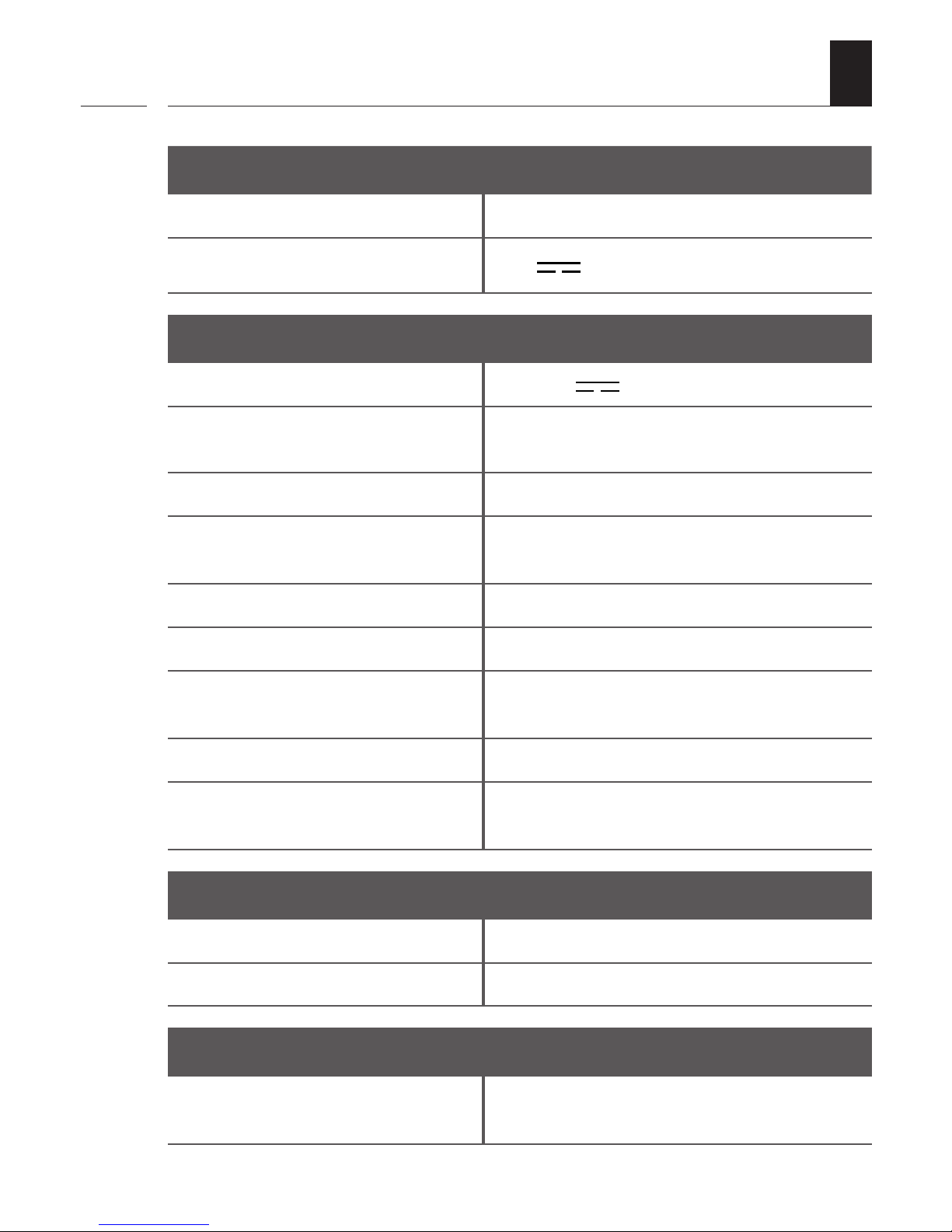
7. Technical Specifications
Mains adaptor
Operating voltage: 230 V / 50 - 60 Hz
Output voltage: 5 V / 2 A
HD Camera general
Supply voltage: 5 V DC via mains adaptor
Maximum current
consumption: 2 A
Consumption: < 5 W
Permitted place of
application: inside only
Protection class: II
Protection type: IP5X
Permissible operating
temperature: -10°C to + 50 °C
Permissible relative humidity: 20 % to 85 % rH
Dimensions (L x W x D): *
* without bracket 90 x 90 x 125 mm
Network interfaces
LAN: Ethernet
WLAN (IEEE): 802.11 b/g/n, 2.4 GHz
WLAN security
Supported WLAN Security
algorithms:
WEP 64 / WPA-PSK / WPA2-PSK
Table des matières
Autres manuels RADEMACHER Caméra IP


