
QUO Motiv Manuel utilisateur

User Manual
Q033MWE01

2
Contents
1The Basics
1.1 Overview
1.2 Safety Warnings and Notices
1.3 General Attention
1.4 Notices When Using Your QUO MOTIV
1.5 Charging Your QUO MOTIV
2Technical Parameters
3Getting Started
3.1 Equipment Parts Diagram
3.2 Key Explanations
3.3 Turning Your QUO MOTIV On and O
3.4 Using the Touchscreen
3.5 Basic Functions
3.6 Connecting to the Mobile Devices
3.7 Locking & Unlocking Your QUO MOTIV
3.8 Notication
3.9 Making A Call
3.10 Watch manager and QUO MOTIV apps
4Main Menu
4.1 Dialer
4.2 Contacts
4.3 Camera
4.4 Gallery
4.5 Media Control
4.6 Stopwatch
4.7 Timer
4.8 Today’s Schedule
4.9 Voice Memo
4.10 Weather
4.11 Settings

3
4.12 Notications
4.13 Pedometer
4.14 Find My Device
4.15 Call Log
4.16 Music
4.17 Compass
4.18 Telecamera
4.19 Swashlight
4.20 Gestures Control
5Connecting to a Computer
6FAQs and Solutions
1 The Basics
1.1 Overview
Thank you for choosing the QUO MOTIV smart watch. After reading this
guide you will be able to fully master the use of your watch and
appreciate all its functions and ease of use.
Not only does the smartwatch provide you with basic call functions such
as call Register, but also with many practical functions and services, to
improve the time you spend working and playing.
The availability of some services and features described in this manual
depends on the network and your subscription. Therefore, some menu
items may not be available in your smartwatch. The shortcuts to menus
and features may also vary from watch to watch.
Our company reserves the right to revise this manual content without
prior notice.
1.2 Safety warnings and notices
Before using your mobile phone and smartwatch, read and understand

4
the following notices carefully to ensure you will use it safely and
properly.
1.3 General attention
• Some features may not work (or work partially) in IOS or Android, how
ever, some of them will be updated in the near future IMPORTANT
• To avoid your smartwatch malfunctioning, or catching re, please do not
violently impact, jolt or throw your smartwatch.
• Please do not place the smartwatch in a microwave oven or high-pres
sure equipment. Otherwise it could lead to unexpected accidents such
as damage to the circuitry or re hazard.
• Please do not use your smartwatch near ammable or explosive gases,
otherwise it could cause malfunction of your phone or re hazard.
• Please do not subject your smartwatch to high temperatures, high
humidity or dusty places; otherwise this may lead to the malfunction of
your smartwatch.
• To avoid your smartwatch falling and malfunctioning or being damaged,
please do not place it on uneven or unstable surfaces.
1.4 Notices when using your QUO MOTIV
• Please do not subject the LCD to impact or use the screen to strike
things, as this will damage the LCD board and cause leakage of the liquid
crystal. There is a risk of blindness if the liquid crystal substance gets into
the eyes. If this occurs rinse eyes immediately with clear water (under
no circumstances rub your eyes) and go immediately to a hospital for
treatment.
• Do not disassemble or modify your smartwatch, as it will lead to damage
to the smartwatch such as battery leakage or circuitry failure.
• Please do not use needles, pen tips, or other sharp objects on the key
pad as this may damage the smartwatch or cause it to malfunction.
• The battery has a limited service life. The remaining life gets shorter as
the times of charging increase. If the battery becomes feeble even after

5
the charging, this indicates the service life is over and you have to use a
new battery.
• When installing the battery, do not use force or pressure, as this will
cause the battery to leak, overheat, crack and catch re.
• If the battery overheats, changes color, or becomes distorted during use,
charging, or storage, please stop using and replace it with a new battery.
• Please do not continuously charge for more than 24 hours. IMPORTANT
1.5 Charging your QUO MOTIV
• Connect the connector of charger to the smartwatch. The battery level
indicator ashes on the screen. Even if the smartwatch has been turned
o, the charging image still appears, indicating that the battery is being
charged. If the smartwatch is overused when the current is insucient,
it may take longer time for the charging indicator to appear on the
screen after the charging begins.
• When the battery level indicator does not ash and indicates the battery
is full, this indicates the charging has been completed. If the smartwatch
is o during charging, the charging being completed image also appears
on the screen. The charging process often takes 3 to 4 hours. During the
charging, the battery, smartwatch and charger gets warm, this is a
normal phenomenon.
• Upon the completion of charging, disconnect the charger from AC/USB
power socket, and from the smartwatch.
Notes:
• During charging, the smartwatch must be placed in well-ventilated
environment of +5°C ~ +40°C. Always use the charger supplied by your
smartwatch manufacturer. Using an unauthorized charger might cause
danger and invalidate the authorization and warranty clauses for your
smartwatch.
• Make sure the battery has been installed before charging. It is best not
to remove the battery while charging.

6
• Upon completion of charging, disconnect the charger from your
smartwatch and the power supply.
If you have not disconnected the charger from your smartwatch and the
power supply, the charger will continue to charge the battery after about
5 to 8 hours when the batter level decreases substantially. We advise you
not to do like this, as it lowers your phone performance and shortens your
smartwatch life.
2 Technical Parameters
Model:
QSW-508-BKSL (Silver)
QSW-508-BKGD (Gold)
Dimension (L×W×D): 69 x 38 x 12.5mm
Weight: 0,075 Kg
Material: Stainless brushed steel + plastic
Main Display Size: 1.6 inch
Main Display Resolution: 240 x 240
Chipset: MT6572 dual-core 1GHz CPU
Internal Storage: eMMC memory ( 4GB ROM + 512MB RAM)
WIFI/Bluetooth: 2.4GHz 802.11 b/g/n - Bluetooth 4.0
Camera: 5MP AF
Lithium-ion battery Capacity: 350mAh
7
3. Getting Started
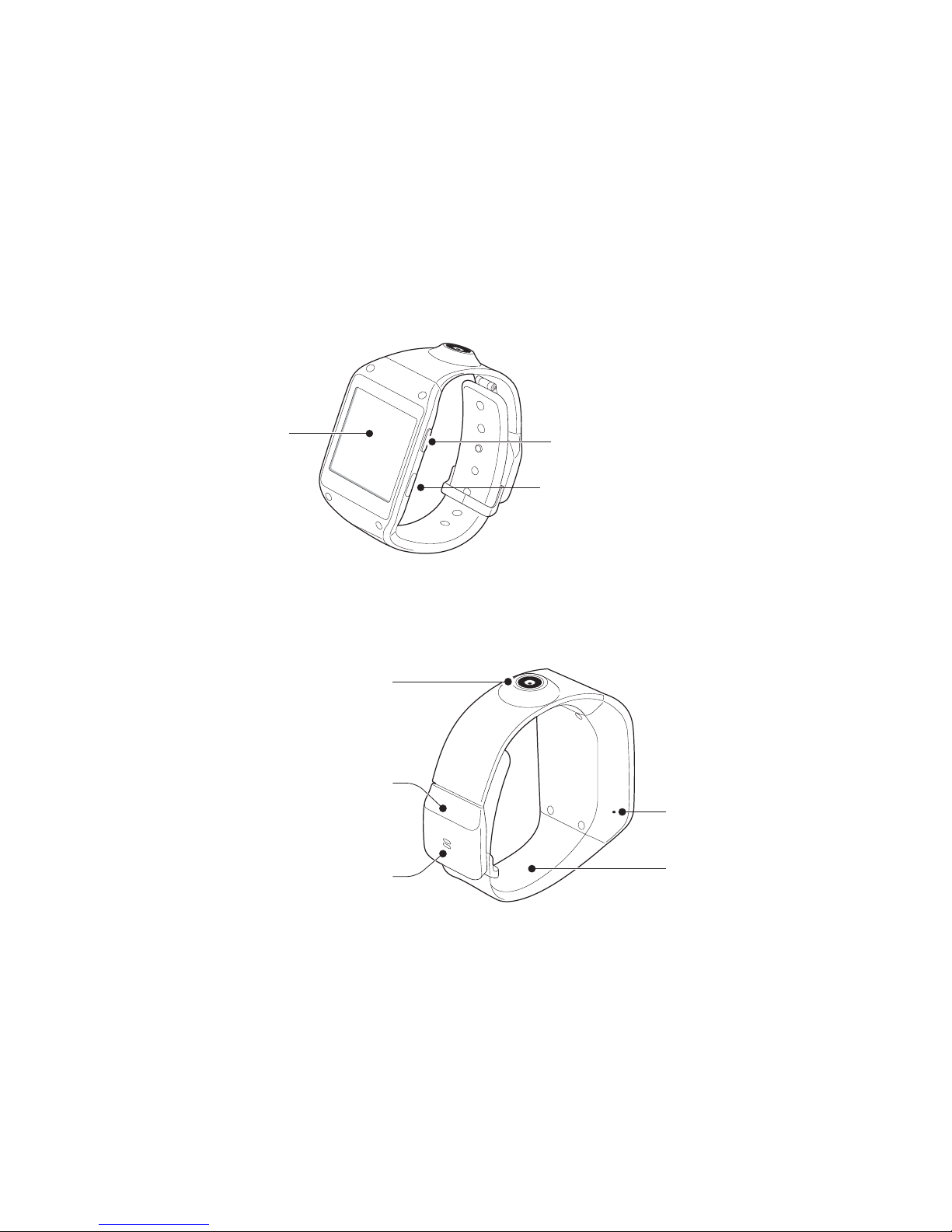
3.1 Equipment parts diagram
• Design and specications are subject to change without notice.
Touch screen Power button
USB port
Camera
Strap
Microphone
Speaker
Buckle

8
Wearing the equipment
1. Loosen the buckle.
• Don’t hurt your nails when loosen the belt buckle.
• Don’t bend the strap excessively. It may damage the equipment.
2. Open the buckle and adjust wrist band to your size.
3. To wear the equipment, put it back on your wrist and press buckle until
a click is heard.

9
3.2 Key explanations
Button Explanations
Power Key
• Hold down this key to turn your smartwatch o and
on.
• Press this key in other applications to return to the
clock screen.
• Generally, press this key to lock the mobile phone.
• Shut down the smartwatch by pressing this key for
about 10 seconds or restart the smartwatch by
pressing this key for about 15 seconds.
3.3 Turning your smartwatch ON and OFF
To turn ON the phone, hold down the POWER key on the right; to turn
OFF the phone, hold down the POWER key and select Power O.
3.4 Using the touch screen
Your smartwatch provides many touch keys in the Main screen.
Meanwhile please follow the instructions:
• Do not touch the screen with wet hands.

10
• Do not touch the screen with great forces.
• Do not touch the screen with metallic or conductive objects.
3.5 Basic functions
The home screen is the beginning of all applications. There are clock
shortcuts, applications, and others. Click on the screen to start the
application. The main screen has multiple panels. To view other panels,
swipe left or right.
Clock: Long press the clock screen until there is a shock, and then slide to
the right to select your desired clock interface.
View Recent Tasks: Double-click on the clock screen to see the recent
active tasks.
Autres manuels pour Motiv
1
Table des matières
Autres manuels QUO Montre


