Quicklynks T55 Manuel utilisateur

OWNER’S
MANUAL
FASTER &
EASIER
FOR 1996
AND
NEWER
OBD II
VEHICLES
T55
DIGITAL
OBD2/CAN
CAR SCANNER


CHECK
OWNER S MANUAL
,
OBD2 CODE SCANNER
1
Table of contents
1. Introduction --------------------------------------------------------------------------------------2
1.1 What Is OBD? ---------------------------------------------------------------------------------2
1.2 Safety Precautions and Warnings-----------------------------------------------------2
1.3 Vehicle Coverage----------------------------------------------------------------------------3
1.4 Data Link Connector (DLC) Location------------------------------------------------4
1.5 How To Use------------------------------------------------------------------------------------4
2. Product Information -------------------------------------------------------------------------5
2.1 Tool descri ption -----------------------------------------------------------------------------5
2.2 Specifications --------------------------------------------------------------------------------6
2.3 Accessories included ---------------------------------------------------------------------6
2.4 Navigation characters --------------------------------------------------------------------6
2.5 Keyboard --------------------------------------------------------------------------------------7
2.6 Power -------------------------------------------------------------------------------------------7
2.7 Product setup --------------------------------------------------------------------------------7
3. Operating Instructions -------------------------------------------------------------------10
3.1 VW/AUDI diagnostics --------------------------------------------------------------------10
3.2 OBDII / EOBD Diagnostics -----------------------------------------------------------16
3.3 Oil Reset --------------------------------------------------------------------------------------19
4. Warranty and Service ---------------------------------------------------------------------20
4.1 Limited One Year Warranty -----------------------------------------------------------20
4.2 Service Procedures ----------------------------------------------------------------------20

CHECK
OWNER S MANUAL
,
OBD2 CODE SCANNER
2
1. Introduction
1.1 What Is OBD?
Definition: Onboard Diagnostics II - A second-generation
emissions diagnostic system required on all 1996 and newer
vehicles (though some 1994 and 1995 model year vehicles were
equipped with early versions of the system).
This OBD2/EOBD/CAN Code scanner is designed to work on all OBD2
compliant vehicles (include all 1996 and newer cars,lig ht trucks and SUVs
sold in the World). OBD2 was adopted as part of a government mandateto
lower vehicle emissions. This sophisticated program in the vehicle's main
computer system is designed to detect failures in a range of systems,and
can be accessed throug h vehicle's 16-pin Data Link Connector (DLC) which
is usually located under the dashboard. For OBD systems,if a problem is
found,the vehicle's computer turns on the "CHECK ENGINE" lig ht to warn
the driver,and sets a Diagnostic Trouble Code (DTC) to identify where the
problem occurred. A special diagnostic tool,such as this OBD2 Code
Reader,is required to retrieve these codes throug h vehicle's Data Link
Connector (DLC),which consumers and professionals use as a starting point
for repairs.
CHECK
1.2 Safety Precautions and Warnings
To prevent personal injury or damage to vehicles and/or the scan
tool, read this instruction manual first and observe the following
safety precautions at a minimum whenever working on a vehicle:

CHECK
OWNER S MANUAL
,
OBD2 CODE SCANNER
3
Always perform automotive testing in a safe environment.
Wear safety eye protection that meets ANSI standards.
Keep clothing,hair,hands,tools,test equi pment,etc. away from all moving
or hot engine parts.
Operate the vehicle in a well ventilated work area: Exhaust gases are
poisonous.
Put blocks in front of the drive wheels and never leave the vehicle
unattended while running tests.
Use extreme caution when working around the ignition coil, distributor cap,
ignition wires and spark plugs. These components create hazardous voltages
when the engine is running.
Put the transmission in PARK (for automatic transmission) or NEUTRAL (for
manual transmission) and make sure the parking brake is engaged.
Keep a fire extinguisher suitable for gasoline/chemical/electrical fires
nearby.
Don't connect or disconnect any test equi pment while the ignition is on or
the engine is running.
Keep the scan tool dry, clean, free from oil/water or grease. Use a
mild detergent on a clean cloth to clean the outside of the scan tool,when
necessary.
1.3 Vehicle Coverage
The T55e VW/AUDI Code Scanner is specially designed to work with most
Volkswagen and Audis sold worldwide of 1990 or newer models. If a VW/
AUDI has a 16 pin”OBDII style Data Link Connector(DTC), the scanner tool
will certainly work. If it has an old-style 2x2 Data Link Connector(DTC),then
it depends on whether there are 4 or 3 wires connecting to the pins. If there
are 4 wires,each connecting a pin,then it will work. If there are only 3 wires
leaving one pin disconnected then it will not work. For VW/AUDI with old-style
2x2 Data Link Connector (DTC), you need to have a 2x2 cabling adapter
which is not included in this product package.

CHECK
OWNER S MANUAL
,
OBD2 CODE SCANNER
4
1.4 Data Link Connector (DLC) Location
The 16-pin DLC is usually located under the instrument panel (dash),
within 12 inches(300 mm) of center of the panel,on the driver's side of most
vehicles. It should be easily accessible and visible from a kneeling position
outside the vehicle with the door open. For some Asian or European vehicles,
the DLC is located behind the ashtray and the ashtray must be removed to
access the connector.
DLC
1.5 How To Use . . . .
1. Turn the ignition off.
2. Connect the OBD2 scanner tool cable and the vehicle's 16-pin Data Link
Connector (DLC).
3. Turn the ignition on. But do not start the engine.
4. Turn the OBD2 scanner tool power on.
5. Press the Y button. A sequence of messages showing the OBD2 protocols
will be observed on the display until the vehicle protocol is detected.

CHECK
OWNER S MANUAL
,
OBD2 CODE SCANNER
5
2.Product Information
2.1 Tool Description
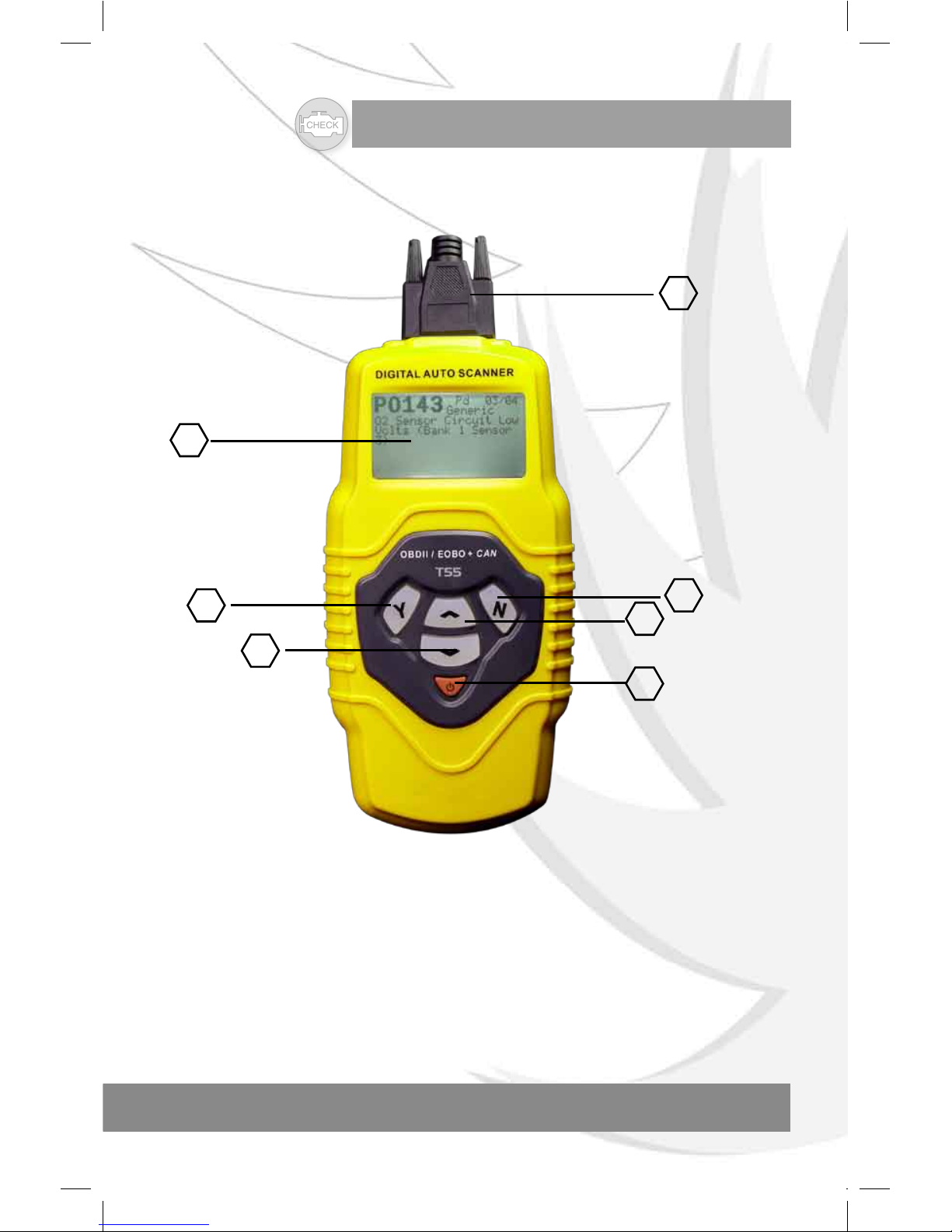
7
3
4
6
1
2
5
1. LCD DISPLAY --—Indicates test results. Backlit, 128 X 64 pixel display
with contrast adjustment.
2. "Y" BUTTON -- Confirms a selection (or action) from a menu. When a
DTCs definition covers more than one screen.it is used to move down to the
next screen for additional data.
3. "N" BUTTON -- Cancels a selection (or action)from a menu or returns to
the menu.It is also used to set up the unit when being pressed and held for at
least 3 seconds.

CHECK
OWNER S MANUAL
,
OBD2 CODE SCANNER
6
4. UP SCROLL BUTTON -- Moves up throug h menu and submenu items
in menu mode. When more than one DTC is retrieved,moves up throug h the
current screen to the previous screens for additional DTCs and definitions.
5. DOWN SCROLL BUTTON -- Moves down throug h menu and
submenu items in menu mode. When more than one DTC is retrieved,moves
down throug h the current screen to the previous screens for additional DTCs
and definitions.
6. POWER BUTTON -- Turns POWER ON or OFF.
7. OBDII CONNECTOR---Connects the scan tool to the vehicle's Data Link
Connector (DLC).
2.2 Specifications
1). Display: Backlit, 128 x 64 pixel display with contrast adjustment.
2). Operating Temperature: 0 to 50 C(32 to 1 22 F)
3). Storage Temperature: -20 to 70 C(-4 to 1 58 F)
4). External Power: 8.0 to 15.0 Volts provided via vehicle battery.
5). Dimensions:
Length Width Height
209 mm (8.22") 107 mm (3.74") 37 mm (1.38")
6). NW: 0.73kg (1.611b), GW: 0.98kg(2.161b).
2.3 Accessories Included
1). User's Manual --- Instructions on tool operations.
2). CD -- Includes user's manual, DTC lookup software,and etc.
3). OBD2 cable --- Provides power to tool and communicates between tool
and vehicle.
4). Serial Cable --- Used to upgrade the scan tool.
5). Carry Case --- A nylon case to store the scan tool when not in use.
2.4 Navigation Characters
Characters used to help navigate the scan tool are.
1). " " -- Indicates current selection.
2). " " -- A flashing Down Arrow indicates additional information is available
on the next screen.

CHECK
OWNER S MANUAL
,
OBD2 CODE SCANNER
7
3). " "”-- A flashing UP Arrow indicates additional information is available on
the previous screen.
4). "Pd" -- Identifying a Pending DTC when viewing DTCs.
2.5 Keyboard
No solvents such as alcohol are allowed to clean the keypad or display.
Use a mild nonabrasive detergent and a soft cotton cloth.
Do not soak the keypad as the keypad is not waterproof.
2.6 Power
The external power of the scan tool is provided via the vehicle Data Link
Connector(DLC). just follow the steps below to turn on the scan tool.
1). Connect the OBD II Cable to scan tool.
2). Find DLC on vehicle.
A plastic DLC cover may be found for some vehicles and you need to
remove it before plugging the OBD2 cable.
3). Plug OBD II Cable to the vehicle's DLC.
2.7 Product Setup
The scan tool allows you to make the following adjustments and settings.
1). Contrast adjustmen: Adjusts the contrast of the LCD display.
2). Display Test:Tests the LCD display.
3). Keyboard test:Tests the keyboard.
To enter the setup menu mode
1). From the keyboard: Press and hold the Nbutton for at least 3 seconds
until the System Setup. menu shows up. Follow the instructions to make
adjustments and settings as described in the following setup options.
System Setup
==================
1) Contrast
2) Display Test
3) Keyboard Test

CHECK
OWNER S MANUAL
,
OBD2 CODE SCANNER
8
2). From the Main Menu: Use the UP/DOWN scroll buttons to select
System Setup and then press the Ybutton. Follow the instructions to make
adjustments and settings as described in the following setup options.
Main Menu
======================
1) VW/AUDI
2) OBDII/EOBD
3) Oil Reset
4) System Setup
Contrast Adjustment
1. From the system setup menu: Use the UP/DOWN scroll buttons to
select Contrast and press the Ybutton.
System Setup
===================
1) Contrast
2) Display Test
3) Keyboard Test
2). From the Contrast menu: Use the UP/DOWN scroll buttons to
decrease or increase the contrast.
Contrast
======================
Contrast (47%)
Use or to change
Table des matières