QUICK INTELLIGENT EQUIPMENT ET8383 Manuel utilisateur

ET8383
3-Axis Desktop
Dispensing Robot
Instruction Manual

2
Thank you very much for purchasing this Robot.
This operation manual describes the features and operation of the robot. The
detailed describes about the teaching and processing may refer to the operation
manual of the “Teach Pendant”.
Before using, read the manual thoroughly for proper use of the robot. Store the
manual in a safe easily accessible place for future reference.
The specifications of the robot or the contents of this manual may be modified
without prior notice to improve its quality.

3
Contents
Ⅰ.Safety Instruction ......................................................................................................................................... 1
1.1 Safety symbol ...................................................................................................................................... 1
1.2 Unpacking and inspection .................................................................................................................... 2
Ⅱ.Summary ....................................................................................................................................................... 4
2.1 Features ................................................................................................................................................ 4
2.2 Specifications ....................................................................................................................................... 5
2.3 Parts Description .................................................................................................................................. 6
2.3 Dimension ............................................................................................................................................ 7
Ⅲ.Connection and Use ...................................................................................................................................... 8
3.1 Connection ........................................................................................................................................... 8
3.2 I/O Socket Instruction .......................................................................................................................... 8
3.2.1 Circuit Instruction of I/O Socket ............................................................................................... 8
3.2.2 Four-pin Socket Instruction ...................................................................................................... 9
3.2.3 Five-pin Socket Instruction ....................................................................................................... 9
3.2.4 Seven-pin Socket Instruction .................................................................................................. 10
3.3 Instruction about DB37 socket .......................................................................................................... 10
3.3.1 Pins Instruction of DB37 ........................................................................................................ 10
3.3.2 Circuit Instruction of DB37 .....................................................................................................11
3.4 Instruction about DB9 socket (option port) ....................................................................................... 12
3.4.1 Pins Instruction of DB9 .......................................................................................................... 13
3.5 Instruction of Input & Output ............................................................................................................ 13
3.5.1 IO Function Definition ............................................................................................................ 14
3.5.2 IO Function Instruction ........................................................................................................... 18
3.6 Debugging steps ................................................................................................................................. 20
3.6.1 Security check before operation .............................................................................................. 20
3.6.2 Operation of First Time ........................................................................................................... 21
3.6.3 Debugging steps (take a point for example) ........................................................................... 21
3.7 Interrupt and Continue ....................................................................................................................... 24
Ⅳ. Operation Panel Instruction ....................................................................................................................... 26
4.1 Introduction........................................................................................................................................ 26
4.2 Main menu (with teach pendant cord) ............................................................................................... 27
4.3 Main menu (disconnect teach pendant cord) ..................................................................................... 27
4.3.1 Loop menu .............................................................................................................................. 28
4.3.2 S-point menu ........................................................................................................................... 28
4.3.3 Temperature calibration menu ................................................................................................ 29

4
Ⅴ.Troubleshooting and Maintenance .............................................................................................................. 30
5.1 Trouble shooting and analysis ............................................................................................................ 30
5.2 Maintenance and inspection ............................................................................................................... 31
5.2.1 Cooling fan maintenance ........................................................................................................ 34
5.2.2 Emergency stop button maintenance ...................................................................................... 34
5.2.3 Robot moving mechanism maintenance ................................................................................. 34
5.2.4 Shift Maintenance ................................................................................................................... 34
5.2.5 Regular Maintenance .............................................................................................................. 34
5.2.6 Oil-water separator maintenance ............................................................................................ 35
5.2.7 Maintenance of linear track .................................................................................................... 35
5.2.8 Maintenance of ball screw ...................................................................................................... 36
5.2.9 Cleaning .................................................................................................................................. 36

1
Ⅰ.Safety Instruction
Make sure the operator has read the operation manual and other materials thoroughly, so that all problems can be
solved, thus minimizing damage during operation. To start operation of the robot, turn on the power switch of the
robot controller device. Please read the following conditions for safety during operation.
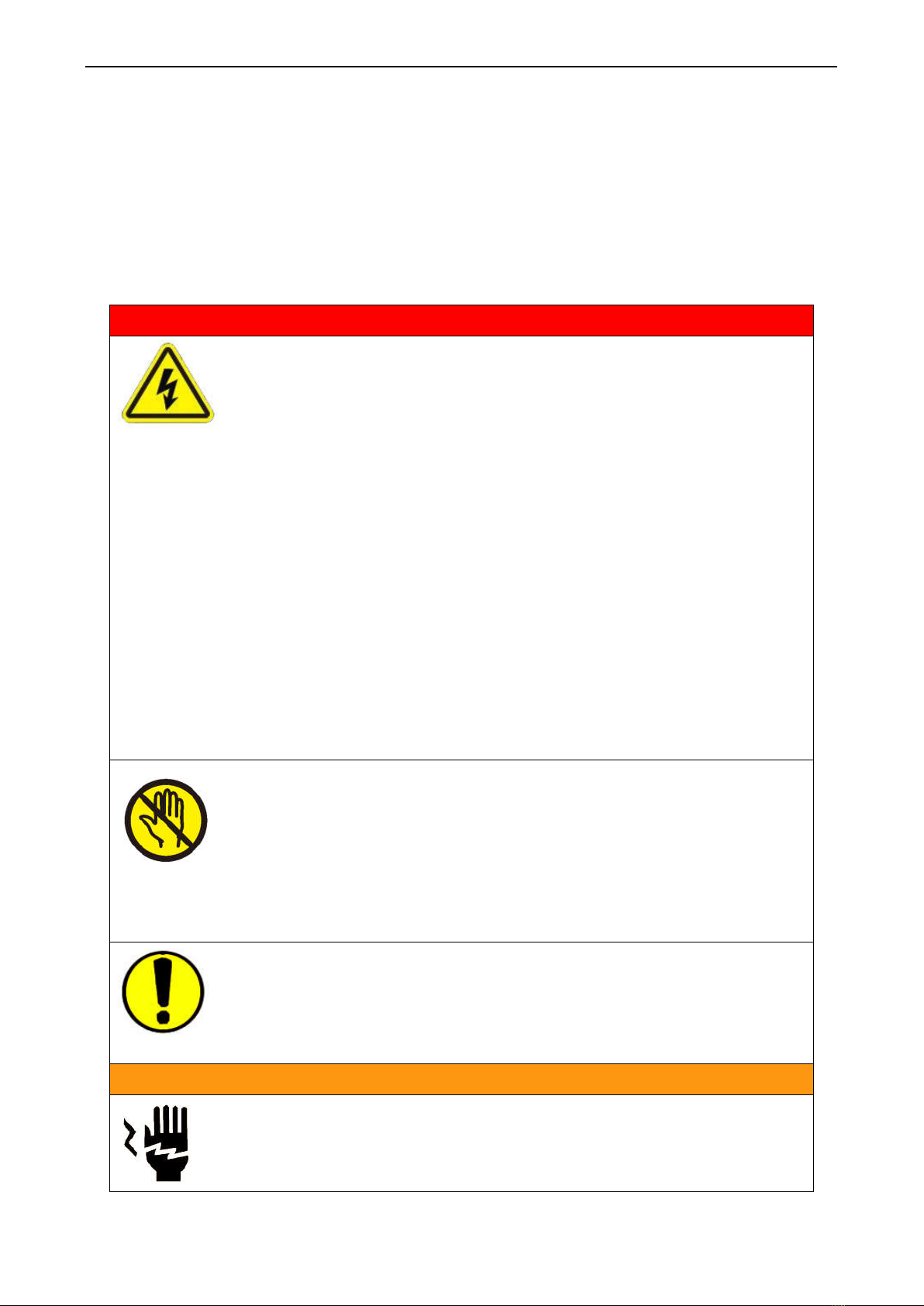
1.1 Safety symbol
Serious warning
Danger! High voltage! The product poses a risk of electric shock.
Only authorized personnel can change settings.
Push the red emergency switch for power off in an emergency situation.
Forbid working while the power wire was damaged.
If the device remains unused for a long time please pull the power cord out of
power socket.
During maintenance and inspection of the robot, pull out the power plug of the
controller.
Install a Frame Ground to prevent electric shock.
Please use robot within the standard requirements (such as payload, speed,
operational range, user environment) as stated in the specification. Make sure
specifically that the single phase is not over AV230V/15A before turning the
power on.
Please don't reset the device in the 10s after power off or emergency stop.
Keep the unit dry. Don’t use or disconnect the unit with wet hands.
Please keep clean around the device, so that reduce having an accident.
Do not attach or detach the power cord while the power switch of the controller is
turned ON.
When people and the robot are working together simultaneously, check for
manual safety, especially while the power is ON and during the manual operation.
During maintenance and inspection of the robot, must power off. High voltage,
Authorized personnel only.
The product is not explosion proof specification, forbid using in potentially
explosive atmospheres.
Warning
Do not move the movements by hands, avoid damaging the robot.
During processing, don’t touch the movable parts.
Touch the device while the robot is working may hurt the operator or damage the

2
device.
While the procedure paused, must inspect before manual operation.
Before starting the operation, make sure that there is no person or obstacle in the
robot’s working area.
Avoid falling the fittings or having an accident, please take the device and fittings
by help.
Mind head! Attention about the sheet metal.
Carry to an applicable place, install the device on a flat floor.
The product must be used or stored in an applicable environment.
Working ambient temperature is 0~40℃, relative humidity is 20%~90%.
The equipment is heavy and huge, do not pile up.
Before moving and carrying, make sure the movements is fixed (for example the
X-axis may be fixed by sheet metal or lines for safety).
Unfold the packaging, before using the robot, make sure the movements’ fixture
(for example the X-axis may be fixed by sheet metal or lines for safety) was taken
down.
Install the robot firmly so that it will not be shaken.
Regularly inspect and maintain will increase durability and performance.
Must operate the robot by standard procedure.
Before starting a repetitive operation, make sure that no obstacle is in the robot’s
working area.
Please use robot within the standard requirements (such as voltage, air pressure,
power frequency) as stated in the specification.
Make sure the air source is clean and dry.
Suggest the air pressure is less than 0.7Mpa.
Attention
Do not throw the packaging and foamed plastic.
If the robot should come back to the manufacture, it must be folded by initial.
The robot must be placed vertically.
The robot can be packet after fold by foamed plastic.
The robot can’t get wet
1.2 Unpacking and inspection
1.Carton packing:

3
①Put carton packing on the floor vertically, tear up the fixed film.
②Open the top cover, take fittings in the plastic foam
③Take off plastic foam, two or more than two people hold up the device, carry to appropriate station. All
fittings are in the table as follow.
2.Wooden case packing:
①Put wooden case packing on the floor vertically, tear up the fixed film.
②Take the screw out of the wooden case by drill and unfold the wooden case.
③Take and carry the device by two or more people, put firmly on appropriate station.
④Unfold the packaging, before using the robot, make sure the movements’ fixture (for example the
X-axis may be fixed by sheet metal or lines for safety) was taken down.
⑤All fittings are in the table as follow.
List
No. Part Name Model Quantity
Image
1 Dispensing controller 982SL 1pcs
2 Teach pendant 8009 1pcs
3 Teach pendant cord DB9 1pcs
4 Power cord 1pcs
5 Instruction manual 2pcs
6 Key box 8031A 1pcs
Check the machine carefully. If you have any problem, please contact the manufacturer immediately.

4
Ⅱ.Summary
The dispensing robot is high-precision automatic dispensing equipment with three shafting. The system
provides users with convenient programming instruction, larger storage space, fast processing speed, rich
parameter setting and effective flow control, which can improve production capacity. According to actual
production requirement, on the premise of meet the motion performance index, the optimization design was
carried out on the product structure, to meet the requirements of flexible.
2.1 Features
Comprehensive 3-dimensional drawings support, such as 3-dimensional linear interpolation, capabilities of
teaching 3D graphics and user-defined 3D array and so on.
Capable to store with mass storage.
User-defined array function: Easy solution for moulds deviation. Support user-defined 3D array.
Group function: This function allows users copy, delete, modify, array, and pan multi-points.
Excellent teaching pendant. Supporting advanced function, such as array, group edit, sub-procedure,
condition-call procedure etc.
Unique merge function: Easy resolution to process complex multi-layers irregular array and non-array
graphics.
Smooth functions of changing speed and hi-speed trajectory on the moving. User-definable speed parameters.
Multiple processing modes, such as single-step operation, overall processing, and automatic loop processing.

5
2.2 Specifications
Equipment Mode ET8383
Power supply 220V AC, 50/60Hz
Power consumption 200W
Axis Number 3
Movement Range (max)
X (mm) 300
Y (mm) 300
Z (mm) 100
R (deg) --
Movement Speed
X (mm/sec) 0.1~800
Y (mm/sec) 0.1~800
Z (mm/sec) 0.1~300
R (degree/sec)
--
Repeatability
X/Y/Z (mm) ±0.01
R --
Resolution
X/Y/Z 0.01
R --
Payload Weight(Kg)
Z Axis 5
Y Axis 8
Demo File Qty. Max 255 files, Max 60000 points
Process File Qty. Max 128 files
Motion Control Motion Control PCBA + Teach Pendant
Pressure Range 0.4-0.6MPa
Noise <70dB(Measure in the distance of 1m)

6
Operating Ambient
Temperature 0~40℃
Humidity 20%~90% (No condensation)
Dimension(mm)
Width 485
Depth 530
Height 630
重量 52
Note: Ensure that your power supply data agrees with the information on the nameplate of the machine!
2.3 Parts Description
Item Part Name Item Part Name
1 Z Axis Stepper motor (with
brake)+synchronous belt 7 Emergency stop key
2 X Axis Stepper motor +synchronous belt
8 Operation panel
1
2
3
4
5
6
7
8
9
10
11
Table des matières
Manuels Robotique populaires d'autres marques

STEMCenter USA
STEMCenter USA Pi-Bot v2.00 Manuel utilisateur

SunFounder
SunFounder PiDog Manuel utilisateur

Universal Robots
Universal Robots UR5 Manuel utilisateur

Universal Robots
Universal Robots E Series Manuel utilisateur

YASKAWA
YASKAWA MOTOMAN-MPL80 II Manuel utilisateur

EFORT
EFORT ECR5 Manuel d'instructions