
Quartzlock E5-MX Mode d’emploi

Quartzlock
Precision Frequency Engineering
E5-MX
Switch and Distribution Amplifier
USER’S HANDBOOK
Quartzlock
179 • Junction Road • Burgess Hill • RH15 0JW • UK
Tel: +44 (0) 1444 232967 E-mail: [email protected]om Web: www.quartzlock.com
Registered in England: 708818 VAT Registration No: GB 190 1166 84
HCD Research Limited trading as Quartzlock

Switch & Distribution Amplifier Manual version 1.01
2 | P a g e
Quartzlock
Precision Frequency Engineering E5-MX
Copyright
Copytight © 2023 Quartzlock
All rights reserved.
Quartzlock continuous improvement as part of it’s policy. Specification
subject to change without notice and not part of any contract.
Revision history
Revision
Date Description By
1 July 2023 Initial Release O. Khorremy
1.01 August 2023
Alex. K
Added new
commands and software
console

Switch & Distribution Amplifier Manual version 1.01
3 | P a g e
Quartzlock
Precision Frequency Engineering E5-MX
Contents
Copyright .............................................................................................................. 2
Revision history ...................................................................................................... 2
Safety Considerations .......................................................................................... 4
Voltage, Frequency and Power Characteristics ............................................... 5
Environmental Conditions .................................................................................... 5
Replaceable Fuse Characteristics ...................................................................... 5
Cleaning Instructions ............................................................................................ 5
Front panel LED indicators ................................................................................... 6
Rear panel connectors ........................................................................................ 8
Serial Port Parameters....................................................................................... 8
E5-MX console software ................................................................................... 9
Quick setup – How to configure ....................................................................... 10
Command Line Interface .................................................................................. 12
Specifications ...................................................................................................... 18

Switch & Distribution Amplifier Manual version 1.01
4 | P a g e
Quartzlock
Precision Frequency Engineering E5-MX
Safety Considerations
General
This product and related documentation must be reviewed for familiarization before
operation. If the equipment is used in a manner not specified by the manufacturer, the
protection provided by the instrument may be impaired.
Before Applying Power
Verify that the product is set to match the available line voltage and the correct fuse is
installed.
Before Cleaning
Disconnect the product from operating power before cleaning.
This equipment must be earthed
An uninterruptible safety earth ground must be maintained from the mains power
source to the product’s ground circuitry.
WARNING
Bodily injury or death may result from failure to heed a warning. Do not proceed beyond a warning
until the indicated conditions are fully understood and met.
CAUTION
Damage to equipment, or incorrect measurement data, may result from failure to heed a caution. Do not
proceed beyond a caution until the indicated conditions are fully understood and met.
WARNING
When measuring power line signals, be extremely careful and use a step down isolation transformer
whose output is compatible with the input measurement capabilities of this product. The product’s
front and rear panels are typically at earth ground. Thus, never try to measure AC power line signals
without an isolation transformer.
WARNING
Instructions for adjustments when covers are removed and for servicing are for use by
service- trained personnel only. To avoid dangerous electrical shock, do not perform such
adjustments or servicing unless qualified to do so.
WARNING
Any interruption of the protective grounding conductor (inside or outside the instrument) or
disconnecting of the protective earth terminal will cause a potential shock hazard that could result
in personal injury. Grounding one conductor of a two conductor out-let is not sufficient protection.

Switch & Distribution Amplifier Manual version 1.01
5 | P a g e
Quartzlock
Precision Frequency Engineering E5-MX
Whenever it is likely that the protection has been impaired, the instrument must be
made inoperative and be secured against any unintended operation.
If the instrument is to be energised via an autotransformer (for voltage reduction) makes
sure the common terminal is connected to the earthed pole terminal (neutral) of the
power source.
Instructions for adjustments while the covers are removed and for servicing are for use
by service- trained personnel only. To avoid dangerous electrical shock, do not perform
such adjustments or servicing unless qualified to do so.
For continued protections against fire, replace the line fuse(s) with fuses of the same
current rating and type (for example, normal blow time delay). Do not use repaired
fuses of short-circuited fuse holders.
Voltage, Frequency and Power Characteristics
AC Plug
Voltage 100-240V AC
AC Frequency 50-60Hz
Power characteristics
1000mA Max Voltage
Environmental Conditions
Temperature
Operating (ambient) -20°C to +65°C
Storage -40°C to +85°C
Magnetic Field
Sensitivity ≤2x10-11/ Gauss
Atmospheric Pressure -60m to 4000m
<1x10-13/ mbar
Replaceable Fuse Characteristics
Rackmount units: - 1000mA time-lag HBC
Cleaning Instructions
To ensure long and trouble operation, keep the unit free from dust and use care with
liquids around the unit.
Be careful not to spill liquids onto the unit. If the unit does get wet, turn the power off
immediately and let the unit dry completely before turning it on again.
Clean with a damp (with water) cloth.
Never spray cleaner directly onto the unit or let liquid run into any part of it. Never use
harsh or caustic products to clean the unit.

Switch & Distribution Amplifier Manual version 1.01
6 | P a g e
Quartzlock
Precision Frequency Engineering E5-MX
Front panel LED indicators
1. Output channels LED indicators
ON - Green : Signal is present on the output channels
ON - Red : Fault indicator, No signal is present on the output channels
2. AC and Alarm LEDs
AC - Green : the unit is powered
AC - OFF : the unit is not powered
ALARM – Red flashing: fault identified
3. Front Panel Pushbuttons and LED
4. Power switch
Power switch : The blue LED ring will lite when the unit is powered. The unit is OFF
when the blue LED ring is OFF.
Pushbutton Action Result
INPUT A Selects INPUT A
INPU B Selects INPUT B
AUTO Autoswitch mode
Press and hold Auto for 10 seconds Resets and clears faults

Switch & Distribution Amplifier Manual version 1.01
7 | P a g e
Quartzlock
Precision Frequency Engineering E5-MX
LED Function
Switch & Distribution Amplifier Manual version 1.01
8 | P a g e
Quartzlock
Precision Frequency Engineering E5-MX
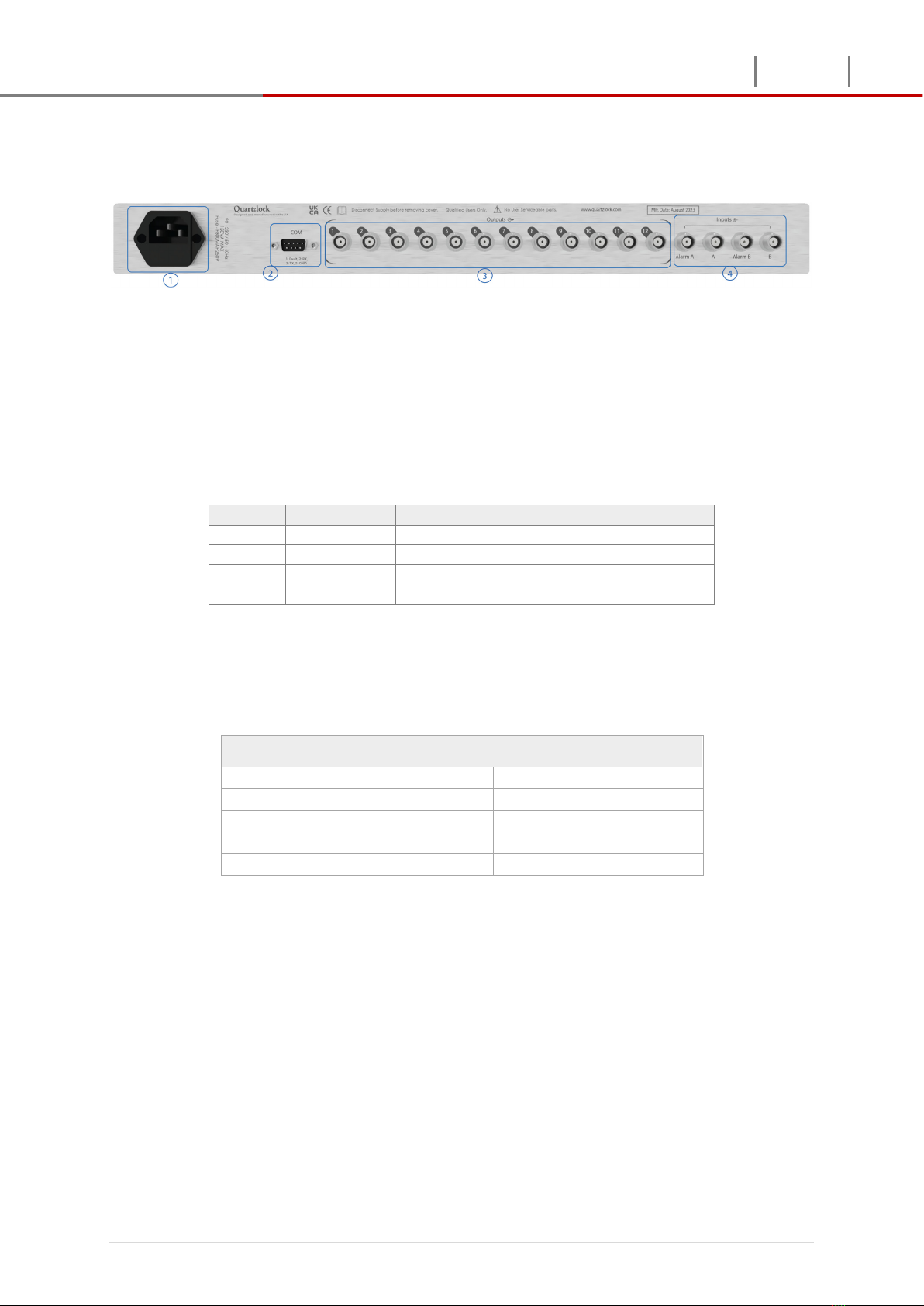
Rear panel connectors
1. Power = AC power input
IEC filter 320, fused at 1Amp
2. COMPORT settings
The 9 pin D-sub is configured to output fault and for command line interface.
Pin No Function Description
1 Fault output Logic High = fault, Logic Low = No fault
2 TX (RS232) Serial transmit
3 RX (RS232) Serial receive
5 Ground
The E5-MX device can be configured via serial port located on the rear panel.
Serial Port Parameters
The following parameters are the serial port configuration
Serial port parameters
Baud rate 115200
Data 8
Parity None
Stop bit 1
Flow control None
3. RF output channels
Digital and RF signal output on 12 BNC connectors
4. RF and Alarm inputs
Input ‘A’ and ‘B’ for RF and digital signals
‘Alarm A’ and ‘Alarm B’ for and external alarm input

Switch & Distribution Amplifier Manual version 1.01
9 | P a g e
Quartzlock
Precision Frequency Engineering E5-MX
E5-MX console software
The console software can be used to send and receive commands to configure the
E5-MX. There fixed command preselected for ease of use. Three additional
command fields available to enter commands by user.
df

Switch & Distribution Amplifier Manual version 1.01
10 | P a g e
Quartzlock
Precision Frequency Engineering E5-MX
Quick setup – How to configure
Use the following procedure containing the individual parameters and commands
to configure the unit via serial port interface. Connect the E5-MX to a computer via
RS232 port and launch the E5-MX console software.
1. frequency [<1-15>] (set the value of frequency range).
2. Waveform [<Sine/square>] (set the wave input waveform sine/square).
3. Impedance [<50|1000>] (set the value of impedance to either 50Ω or 1000Ω).
4. Switch mode Auto or manual : Select auto or manual mode for input A and B
5. Fault input: Enable/disable external fault input and the fault logic state (High or Low)
6. voltage [<0-5>] if input signal is CMOS/TTL, then set the reference threshold for
inputs A and B
Table des matières
Autres manuels Quartzlock Amplificateur

Quartzlock
Quartzlock A5-12 Instructions d'installation et d'utilisation

Quartzlock
Quartzlock E5000 Mode d’emploi

Quartzlock
Quartzlock A5-8 Mode d’emploi

Quartzlock
Quartzlock A3-R Manuel d'utilisation

Quartzlock
Quartzlock E5000 Mode d’emploi

Quartzlock
Quartzlock A5000 Mode d’emploi

Quartzlock
Quartzlock A5-32 Mode d’emploi

Quartzlock
Quartzlock A5-24 Manuel d'utilisation


