
Qilive Q.1708 Manuel utilisateur
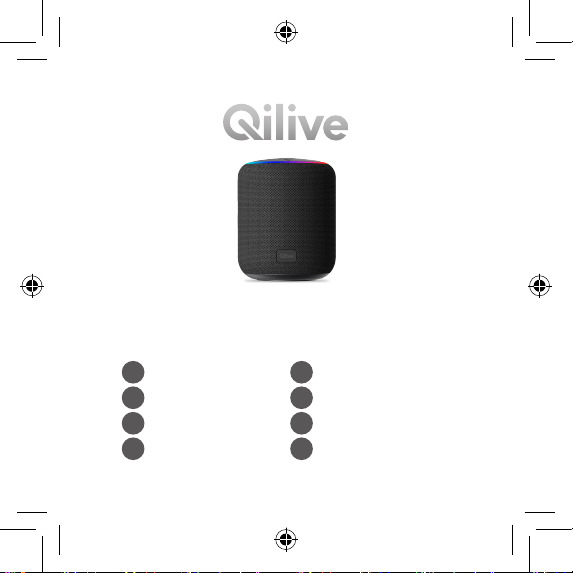
Bluetooth speaker
Q.1708
FR Enceinte bluetooth HU Bluetooth hangszóró
ES Altavoz bluetooth RO Difuzor cu bluetooth
PT Altifalante bluetooth RU Bluetooth-колонка
PL Głośnik bluetooth UA Bluetooth-динамік
User manual P. 4
Manuel d’utilisation P. 13
Manual del usuario P. 24
Manual do utilizador P. 44
Instrukcja użytkownika S. 54
Használati útmutató 54. o.
Manual de utilizare P. 64
Руководство пользователя C. 74
Посібник користувача C. 86
EN
FR
ES
PT
PL
HU
RO
RU
UA

EN
FR
ES
PT
PL
HU
RO
RU
UA
2
5
6
7
8
9
1
3
4
10
11

4
EN
1. SAFETY INSTRUCTIONS
Before using this product, carefully read these instructions and keep the
user manual for future reference.
1. This product is not a toy – never allow children to play with the appliance.
Always store the product out of reach from children and pets.
2. No naked ame sources, such as lighted candles, should be placed
on the apparatus. Do not place in direct sunlight or in the near of
heat sources (e.g. heaters, stoves, water heater, etc.).
3. Stop using the device immediately in case of an abnormality or failure.
4. Avoid dropping. Dropping or hitting the device may damage it.
5. Do not open the housing under any circumstances. Never insert
any foreign objects in any opening of the appliance and do not
obstruct the air vents. Do not cover the appliance.
6. Do not tamper with the product. Never attempt to service, dismantle
the product yourself, or push objects of any kind into the products,
as this may result in re, electric shock, or equipment damage and
will also invalidate the warranty.
7. Do not dispose of a battery in a re or a hot oven, or mechanically
crush or cut a battery, which can result in an explosion.
TABLE OF CONTENTS:
1. SAFETY INSTRUCTIONS P. 4
2. TECHNICAL SPECIFICATIONS P. 6
3. PACKAGE CONTENTS P. 6
4. PRODUCT DESCRIPTION P. 7
5. USE P. 7
6. MAINTENANCE AND CARE P. 9
7. GUARANTEES P. 10
5
EN
8. Leaving a battery in an extremely high temperature surrounding
environment can result in an explosion or the leakage of ammable
liquid or gas.
9. A battery subjected to extremely low air pressure may result in an
explosion or the leakage of ammable liquid or gas.
10. WARNINGS: This product contains non-replaceable battery. The
battery must be removed from the product before it is scrapped.
To remove the battery, take the product to a designated disposal/
collection site. For your safety, do not attempt to remove the battery
yourself. If the battery are not properly removed, they may lead to
damage to the battery and device, cause personal injury, and/or
result in the device being unsafe.
11. Do not overcharge. Overcharging may cause the battery to become
hot, rupture, or ignite.
12. The product is not waterproof. Do not submerge.
13.
Batteries must not be disposed of with normal household
waste. Recycle them at the collection points provided for
this purpose. Contact the local authorities or your dealer
for recycling advice. Correct disposal of old batteries
helps protect the environment and human health.
14. This marking indicates that this product should not be
disposed of with other household wastes. To prevent
possible harm to the environment or human health from
uncontrolled waste disposal, recycle it responsibly to
promote the sustainable reuse of material resources. To
return your used device, please use the return and collection
systems or contact the retailer where the product was purchased.
They can take this product for environmentally safe recycling.
6
EN
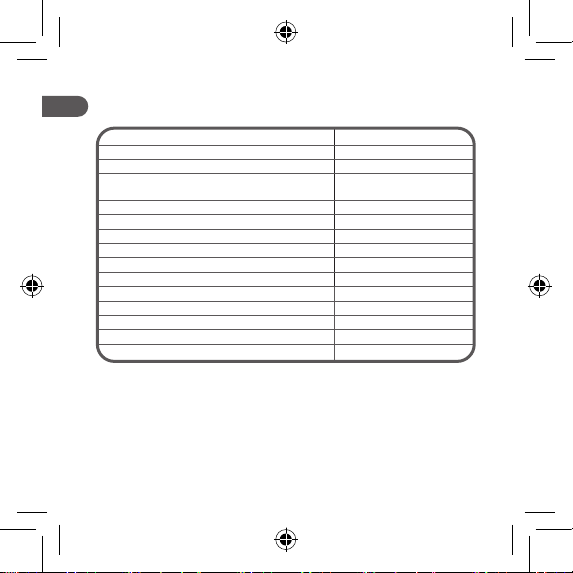
2. TECHNICAL SPECIFICATIONS
Bluetooth version Bluetooth 5.1
Working range (no obstacles) Up to 10 m
Frequency band(s) 2402-2480 MHz
Max radio-frequency power transmitted in
the frequency band(s) -6.63dBm
THD <=5%
Input DC 5V / 1 A
Speakers rated power 5 W
Battery 3.7 V
Battery capacity 1200 mAh
Charging time <=3 hours
Working time (play time) 5-6 hours (lights o)
Product dimensions Φ 88 x 110 mm
Product weight 306 g
Casting material Metal, plastic
Operating temperature 0-45°C
3. PACKAGE CONTENTS
• Bluetooth speaker x1
• Micro USB charging cable x1 • 3.5mm audio cable x1
• User manual x1
7
EN
4. PRODUCT DESCRIPTION
1. On/O power button
2. Volume down / Previous track
3. Working indicator
4. Play / Pause track / Answer/ Reject a call
5. Mode switch / Active voice assistant / TWS connection
6. Volume up / Next track
7. Microphone
8. LED light
9. Charging port
10.Charging indicator
11.AUX-IN port
5. USE
5.1 First use
1. Press the power button for 3 seconds to turn the speaker on. It will
automatically enter into a pairing mode. The LED light will ash blue.
2. Search for “Q.1708” on the pairing device to pair. Enter password
“0000” if required. When pairing is successful, the RGB LED light rim
on the top will illuminate.
3. You can enjoy music from your speaker.
5.2 Power on / o
1. Press the power button for 3 seconds to power on the speaker.
2. Press the power button for 3 seconds to power o the speaker.
8
EN
5.3 Music control
1. Press the button to play or pause the music.
2. Press the button to decrease the volume.
3. Press and hold the button for 2 seconds to play the previous track.
4. Press the button to increase the volume.
5. Press and hold the button for 2 seconds to go to the next track.
5.4 Calls control
1. Press the button to answer an incoming call and press it again to
end it.
2. Press and hold the button for 2 seconds to reject an incoming call.
3. Press and hold the button for 2 seconds to redial the last call.
5.5 TWS mode
If you have two Q.1708 bluetooth speakers, you can enjoy TWS
functions.
1. Make sure the speakers have no connection with other devices.
2. Power on the two Bluetooth speakers. Press the button for 2
seconds on either one to turn on the TWS connection. There will
be a beep notication. Then, two Bluetooth speakers will make a
connection by themselves automatically. A beep will sound when the
two speakers connect automatically.
3. Repeat the “First use” operation to pair them.
5.6 Aux-in mode
1. Using the supplied 3.5mm AUX-IN cable, insert one end into the AUX
port of the Bluetooth speaker.
2. Insert the other end of the supplied 3.5mm AUX-IN cable to the AUX-
IN port of your device.
3. Press the button to play or mute the music.
9
EN
Notes:
• Press the button to switch between the Bluetooth and AUX-IN
modes.
• Volume controls can be controlled on a connected device and
Bluetooth speaker. Ensure the volume is at a suitable level.
5.7 Light control
Press the power button to switch the light eect on the top.
5.8 Voice assistant
Press the button twice quickly to activate the voice assistant.
5.9 Disconnecting
Press and hold the button for 8 seconds to disconnect the Bluetooth
speaker from the paired device.
5.10 Charging
• Connect the small end of the Micro USB charging cable (included) to
the Micro USB port located on the bottom of the speaker.
• Connect the larger end of the cable to your computer’s USB port or
an AC adaptor (not included).
The LED indicator light will be lit in red while charging. The LED will turn
o when the speaker is fully charged.
6. MAINTENANCE AND CARE
Ensure the speaker is switched o and disconnected from the power
outlet before cleaning or storing.
1. Wipe with a dry cloth to clean.
2. Never immerse the speaker or its cable in water or other liquids.

10
EN
3. Do not use any abrasive cleaners, chemicals, glass cleaners,
universal cleaners, or oil-based maintenance agents.
7. GUARANTEES
Guarantees and limitations of liability
Products are guaranteed for a period of 36 months from the date
of purchase, or from the date of delivery to the customer’s home.
Depending on the country, this guarantee consists of 24 to 36 months of
validity for the legal compliance guarantee.
For countries that only implement a 24-month legal compliance
guarantee, a 12-month commercial guarantee is applied at the end of
the rst guarantee, and supplements it.
Guarantee application procedure
For the legal compliance guarantee
Please consult your retailer for information and/or to refer to their GTCs
(General Terms and Conditions of Sale).
For the commercial guarantee
Please go to the reception desk at your place of purchase with your proof
of purchase (e.g. sales receipt), the product and the accessories it came
with, and its original packaging, for all countries other than France. It is
important to have the date of purchase, the model and the serial number
or IMEI number to hand (this information is usually indicated on the
product, packaging, or on your proof of purchase). You’ll need to bring
back the product with the accessories needed for its correct functioning
(power supply, adapter, etc.). If your claim is covered by the guarantee,
the after-sales service may, within the limits of local law, either:
• Repair or replace faulty parts.
• Exchange the returned product with a product that has, at the least,
the same features and that oers equivalent performances.
• Refund the product at the price stated on the proof of purchase.
Table des matières
Langues :
Autres manuels Qilive Intervenants


Manuels Intervenants populaires d'autres marques


Bowers & Wilkins
Bowers & Wilkins 4 Manuel utilisateur

Sonance
Sonance SONOS OUTDOOR Series Manuel utilisateur

Electro-Voice
Electro-Voice EVID FM4.2 Manuel utilisateur

Pioneer
Pioneer XW-HTD630 Manuel utilisateur

Onn
Onn BWA16AA002 Manuel utilisateur

HP
HP GL313AA - USB Speakers PC Multimedia Manuel utilisateur