
PureTools PT-R-HD21 Manuel utilisateur
User Manual
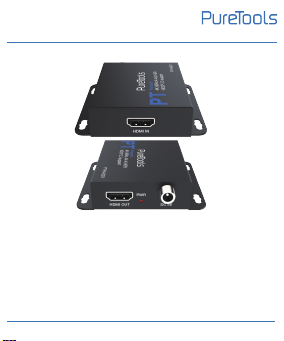
HDMI 18Gbps Repeater
Model PT-R-HD21
Designed in Germany
© 2022 PureLink GmbH All rights reserved.
VersionV1.0
User Manual
PT-R-HD21

Preface
Read this user manual carefully before using this product.
Pictures shown in this manual are for reference only.
Different model layouts and specifications are subject to the
physical product.
This manual is for operation instructions only, not for any
maintenance usage.
In the constant effort to improve our product, we reserve the
right to make changes in functions or parameters without
prior notice or obligation.
Trademarks
Product model and logo are trademarks. Any other
trademarks mentioned in this manual are acknowledged as
the properties of the trademark owner. No part of this
publication may be copied or reproduced without the prior
writ ten consent.
User Manual
PT-R-HD21

FCC Statement
This equipment generates, uses and can radiate radio
frequency energy and, if not installed and used in accordance
with the instructions, may cause harmful interference to radio
communications. It has been tested and found to comply with
the limits for a Class B digital device, pursuant to part 15 of
the FCC Rules. These limits are designed to provide
reasonable protection against harmful interference in a
commercial installation.
Operation of this equipment in a residential areais likely to
cause interference, in which case the user at their own
expense will be required to take whatever measures may be
necessary to correct the interference.
Any changes or modifications not expressly approved by the
manufacture wouldvoid the user’s authority to operate the
equipment.
User Manual
PT-R-HD21

REACH | 1907/2006/EU
ROHS | 2011/65/EU
PureLink hereby declares that this product PureTools
PT-R-HD21 complies with Directives 1907/2006/EU and
2011/65/EU.
EMC / LVD (Electro Magnetic Compatibility / Low
Voltage Directive)
PureLink GmbH hereby declares that this product PureTools
PT-R-HD21 complies with Directives 2014/30/EU and
2014/35/EU. The full text of the EU Declaration of
Conformity is available at the following Internet address:
http://www.purelink.de/ce/4251364737408_CE.pdf
User Manual
PT-R-HD21

SAFETY PRECAUTIONS
To ensure the best from the product, please read all
instructions carefully before using the device. Save this
manual for further reference.
Unpack the equipment carefully and save the original
box and packing material for possible future shipment.
Follow basic safety precautions to reduce the risk of
fire, electrical shock and injury to persons.
Do not dismantle the housing or modify the module.
It may result in electrical shock or burn.
Using supplies or parts not meeting the products’
specifications may cause damage, deterioration or
malfunction.
Refer all servicing to qualified service personnel.
To prevent fire or shock hazard, do not expose the unit
to rain, moisture or install this product near water.
Do not put any heavy items on the extension cable in
case of extrusion
1
User Manual
PT-R-HD21

Do not remove the housing of the device as opening or
removing housing may expose you to dangerous
voltage or other hazards.
Install the device in a place with fine ventilation to
avoid damage caused by overheat.
Keep the module away from liquids.
Spillage into the housing may result infire, electrical
shock, or equipment damage. If an object or liquid falls
or spills on to the housing, unplug the module
immediately.
Do not twist or pull by force ends of the optical cable.
It can cause malfunction.
Do not use liquid or aerosol cleaners to clean this unit.
Always unplug the power to the device before cleaning.
Unplug the power cord when left unused for a long
period of time.
Information on disposal for scrapped devices: do not
burn or mix with general household waste, please treat
them asnormal electrical wastes.
2
User Manual
PT-R-HD21

Content
1. Product Introduction...................................................
1.1 Introduction............................................................
1.2 Features...................................................................
1.3 Package List.............................................................
2. Panel Description.........................................................
2.1 Transmitter panel...................................................
2.2 Receiver panel........................................................
3. Specification..................................................................
4. System Diagram...........................................................
5. After-Sales Service......................................................
Asking for Assistance.......................................................
2
2
2
2
3
3
4
5
6
8
9
3
User Manual
PT-R-HD21

1.1 Introduction
1. Product Introduction
The HDMI 18Gbps Repeater is the most advanced solution
for HDMI signal extension/cascade. It can amplify and
equalize signals to improve the quality of audio and video
signal. It supports the transmission distance for input and
output respectively up to 10m and 5m at the resolution of
4K2K@50/60Hz(YUV_444), 15m and 10m at 4K2K@60Hz
(YUV_420), 20m and 20m at 1080p@60Hz. Capable of
receiving and transmitting 18Gbps bandwidth rate with
CDR (Clock Data Recovery) to ensure no data loss.
4
User Manual
PT-R-HD21

1.2 Features
•Compliant with HDMI 2.0b, HDCP 2.3 / 1.x and DVI 1.0
•Support 18Gbps video bandwidth
• Support resolution up to 4K2K@60Hz 4:4:4
•Built-in TMDS equalization and CDR (Clock Rate Recovery)
for extending HDMI cable distance
•Support HDR, HDR10, HDR10+, Dolby Vision, ARC and
CEC pass-through
• Signal amplification, jitter cleaning and signal condition
-ing of HDMI2.0 signal with cascade function
•Simple plug and play, no drive and installation setting
are required
•Compact professional mountable housing with locking
power connector
1.3 Package List
•1 × HDMI Repeater
• 1 × USB to DC 5.5mm locking cable (Male, 1.5m)
•1× User Manual
5
User Manual
PT-R-HD21

6
User Manual
PT-R-HD21
2. Panel Description
Note: Please contact your distributor immediately if any
damage or defect in the components is found.
HDMI input port, connect to HDMI source
device such as DVD or PS3 with an HDMI
cable.
HDMI OUT
HDMI IN
HDMI output port, connect to HDMI
display device such as TV or monitor with
an HDMI cable.
Power LED, lights red when the repeater
is powered on.
Function Description
No. Name
1
2
PWR3
DC 5V Power input port.
DC 5V
4
2 3 4
1
Table des matières


