PureLink iCON-10W Manuel utilisateur

PureLink iCON-10W 10 Button Controller User Manual
V1.1
iCON-10W
10 Button Controller
With built in web UI programming interface

PureLink iCON-10W 10 Button Controller User Manual V1.0
2
Contents
Overview ....................................................................................................................................................... 3
Features ........................................................................................................................................................ 3
Specifications ................................................................................................................................................ 4
Front and Rear View ..................................................................................................................................... 4
Installation .................................................................................................................................................... 5
Programming ................................................................................................................................................ 5
Reset to factory default. ....................................................................................................................... 6
Programming interface ................................................................................................................................. 7
Key Settings ............................................................................................................................................... 7
Command Settings .................................................................................................................................. 10
Device Settings ........................................................................................................................................ 11
Group Settings ........................................................................................................................................ 12
Network Settings ..................................................................................................................................... 13
Reset to factory default. ..................................................................................................................... 13
System Settings ....................................................................................................................................... 14
Preconfiguration Services ........................................................................................................................... 15

PureLink iCON-10W 10 Button Controller User Manual V1.0
3
Overview
The iCON-10W 10 button controller provides extremely easy programming via the built-in web UI
programming interface. Control up to 10 devices through LAN and RS232. Macros allow up to six
commands per button. The iCON-10W can be powered over PoE 802.3af, or with the included power
adapter.
.
Features
Easy programming with built in web UI programming interface.
Controls up to 10 devices.
Macro provides up to six commands (to any combination of devices) per button.
PoE 802.3af power, or optional power adapter.
Optional preprogramming services available when used with PureLink devices.
Optional button labels, pre-configured, or custom.

PureLink iCON-10W 10 Button Controller User Manual V1.0
4
Specifications
Technical
Front panel 10 x Buttons(silicone soft buttons)
Back panel 1 x LAN (RJ45, PoE), 1 x RS232; 1 x DC 12V Power In
Operating Temperature 0°C to 45°C (32°F to 113°F)
Storage Temperature -20°C to 70°C (-4°F to 158°F)
Humidity 10% to 90%, non-condensing
ESD Protection Human-body Model, ±8kV (Air-gap discharge)/±4kV (Contact discharge)
Power Supply DC 12V 0.5A (Power adapter optional)
Consumption (Max) 1.3W
Device Dimension
(W x H x D)
45mm x 105.6mm x 36mm/
1.77” x 4.16” x 1.42”
Product Weight 0.18kg/0.40lb
Front and Rear View

PureLink iCON-10W 10 Button Controller User Manual V1.0
5
Installation
The iCON-10W can be powered from a network switch or PoE injector that satisfies the 802.3af
PoE standard. Alternately, the iCON-10W also accepts 12 VDC power at the rear panel
Phoenix connector with the supplied AC adapter.
The iCON-10W occupies a one gang box and is compatible with decora wallplates.
With a power draw of 1.3 watts, thermal performance is negligible at ~ 4.4 btu.
Programming
The default address of the iCON-10W is 192.168.1.254.
The keypad provides a built-in web UI to setup devices and configure commands, as well as configure network
settings of the keypad and acquire system information. The web UI is accessible through browsers such as
Chrome, Firefox, Safari, Opera, IE10+, etc.
Once the keypad is powered via Poe or local power adapter, connected to the network, and your
programming laptop/tablet is in the same subnet and connected to the same network.

PureLink iCON-10W 10 Button Controller User Manual V1.0
6
Using your device’s browser, access the built-in web page of the iCON-10W.
Username ‘admin’
Password ‘admin’
Reset to factory default.
Press the two lowest buttons on the keypad until all of the button backlights blink 3 times.

PureLink iCON-10W 10 Button Controller User Manual V1.0
7
Programming interface
Key Settings
Prerequisite: Device settings and Command settings
Displays graphical interface of front panel. Here you can:
View commands assigned to each button when hovering over key:
Assigning commands to a button
Assign commands to the button, and change button name in web UI
o Hover over the edit symbol and click
o A popup window will open for changing the button name in web UI and assigning
commands that you have previously defined.

PureLink iCON-10W 10 Button Controller User Manual V1.0
8
o To assign a command, you must first select the device you want to send the command
to. Click the Edit button; this will open the Device List popup window.
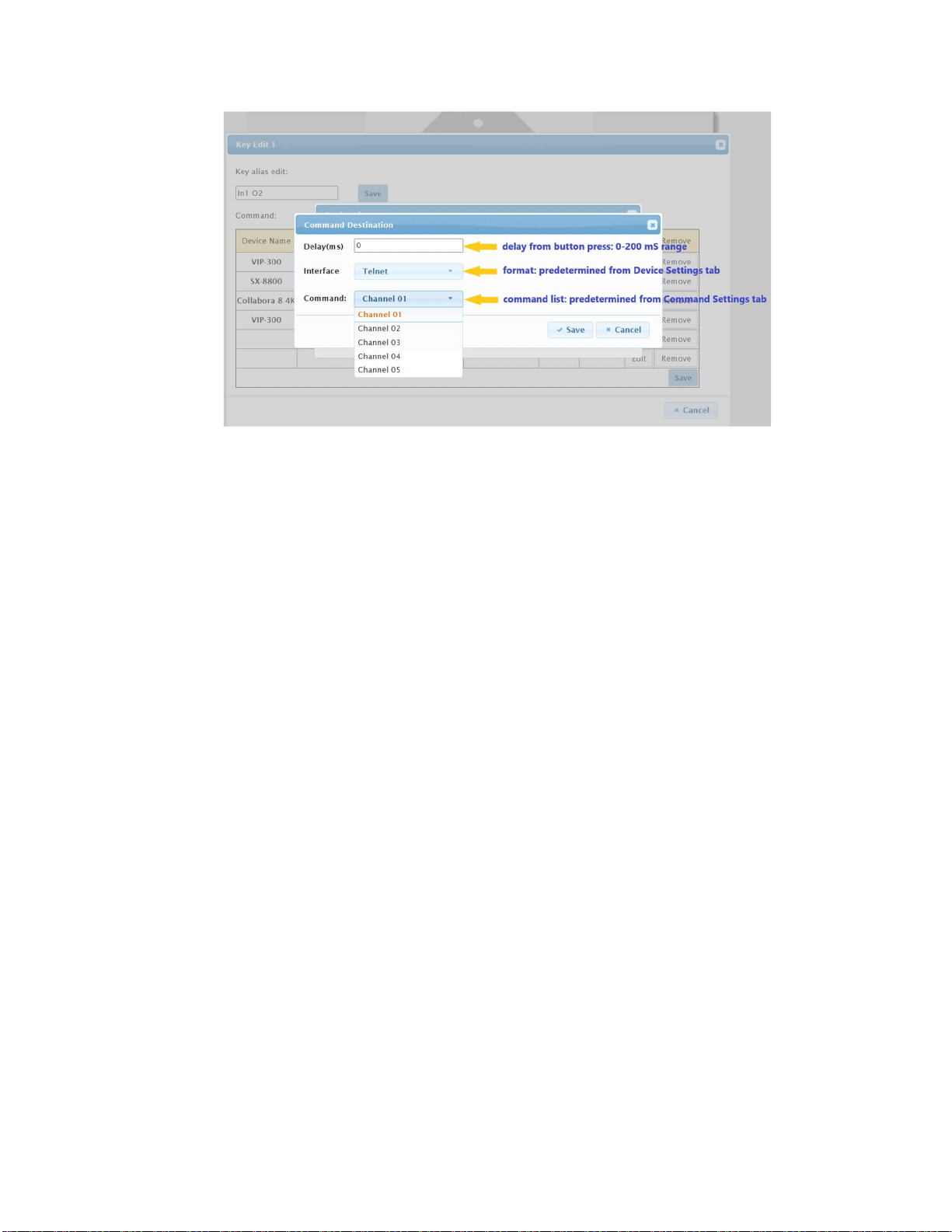
o Select a device; this will open a popup window to select commands available for that
device.
o

PureLink iCON-10W 10 Button Controller User Manual V1.0
9
o

PureLink iCON-10W 10 Button Controller User Manual V1.0
10
Command Settings
Prerequisite: Device Settings
This section allows you to enter up to 10 commands for a device. Keep in mind you can create a device
more than once if you need more than 10 commands for that device.
To add a command for a device, select the ‘Edit’ button where the fields are empty. A popup window
will appear allowing you to enter the command syntax, and identify whether it is an ASCII or HEX style
string.
You may also provide a name for the command, and what set of delimiters if any are needed. Press
Save to complete the process.
Table des matières