
PROZIS CoreHR Iris X Manuel utilisateur

EN
1
User Manual
Warranty statement
V.2 07/2020

2
3
6
USB
12
≥ 2s < 2s

3
Language index
EN 4
FR 17
DE 29
IT 41
ES 52
PT 65
EN
4
Prozis is a registered trademark of PROZIS.COM, S.A.
Prozis reserves the right to adjust or modify the product or any of the associated documentation
in order to ensure its suitability for use, at any time and without prior notice.
The most recent version of this document, which may contain such adjustments or modica-
tions, is available for reference at www.prozis.com.
Legal compliance statement
By means of this document, PROZIS declares that the CoreHR Iris X is fully compliant
with all the standards specied in the applicable legislation as well as other relevant
clauses.
Prozis will always be available for any additional clarication through our customer support
communication channels, available at www.prozis.com/support
To avoid any impact on the environment or human health due to dangerous
substances present in electrical and electronic devices, the end users of such devices
are expected to understand the meaning of the symbol consisting of a crossed-out
waste container. Do not dispose of electrical and electronic equipment along with
unsorted household waste, instead dispose of it separately and properly.
The packaging that protects the device against transport damage is made from
non-polluting materials that can be disposed of via local recycle bins.
FCC information to the user
FCC ID: 2AHFT226
This device complies with part 15 of the FCC Rules. Operation is subject to the following two
conditions: (1) This device may not cause harmful interference, and (2) this device must accept any
interference received, including interference that may cause undesired operation.
This equipment has been tested and found to comply with the limits for a Class B digital
device, pursuant to part 15 of the FCC Rules. These limits are designed to provide reasonable
protection against harmful interference in a residential installation. This equipment generates,
uses and can radiate radio frequency energy and, if not installed and used in accordance with
the instructions, may cause harmful interference to radio communications. However, there
is no guarantee that interference will not occur in a particular installation. If this equipment
does cause harmful interference to radio or television reception, which can be determined by
turning the equipment off and on, the user is encouraged to try to correct the interference by
one or more of the following measures:
• Reorient or relocate the receiving antenna.
• Increase the separation between the equipment and receiver.
• Connect the equipment into an outlet on a circuit different from that to which the receiver
is connected.
• Consult the dealer or an experienced radio/TV technician for help.

EN
5
Caution: Changes or modications not expressly approved by the party responsible for
compliance could void the user’s authority to operate the equipment.
Safety warnings
CAUTION!This symbol highlights dangerous situations that
can lead to light injuries, or damage, malfunction, and/or
destruction of the device.
Prolonged wearing may cause skin irritation or allergic reaction in some users. If you notice
any skin irritation, remove your device. If symptoms persist longer than 2-3 days after remov-
ing the device, consult your doctor.
• To reduce skin irritation, follow four simple wear and care tips:
»keep it clean;
»keep it dry;
»don’t wear it too tight;
»give your wrist a rest by removing the band for an hour after extended wear.
• Do not use abrasive cleaners to clean your Smartband.
• Remove your Smartband if it feels warm or hot.
• Do not wear your Smartband while charging it.
• Do not charge your Smartband while it is wet.
• Do not place your Smartband in a dishwasher, washing machine, or dryer.
• Do not leave your Smartband in direct sunlight for an extend- ed period of time.
• Do not expose your Smartband to extremely high or low temperatures.
• Do not use your Smartband in a sauna or steam room.
• Do not disassemble your Smartband.
• Do not attempt to replace the battery yourself. You may damage the battery, which can
cause overheating and injury.
• Do not allow children or pets to play with the device. This device is not a toy. This device
contains small parts.
• Do not use this product for diagnosis, treatment or prevention purpose.
MAINTENANCE AND CLEANING
Turn off and unplug the appliance before performing any cleaning or maintenance.
Clean the Smartband with a clean, slightly wet cloth as often as needed. Do not use solvents
(cleaning products, alkaline products, benzene, alcohol, etc).
STORAGE
Store the device in a clean, dry and cool place.

EN
6
User Manual
PACKAGE CONTENTS
• 1 × CoreHR Iris X
• 1 × Black Strap
• 1 × User Manual
TECHNICAL SPECIFICATIONS
Model: CoreHR Iris X
Display: 0.96” TFT screen; Touch key
BATTERY & POWER
Type: Li-ion Battery
Standby: Up to 30 days*
Charging time: 1–2 hours
Capacity: 70 mAh
Charging: USB port
* Actual battery performance may vary based on settings, environment and usage.
SETUP AND INSTALLATION
Device activation & charging
Make sure the Smartband is working normally before initial use. In case of low battery, con-
nect the device to the charger. Please connect the USB into a normal DC port (5V-500mA) for
charging. Device will automatically boot up. The main unit should be separated from the strap
when charging.
Downloading the app
Download the Prozis Go app from the Apple App Store® or Google Play Store®.
EN
7
Setting up your device
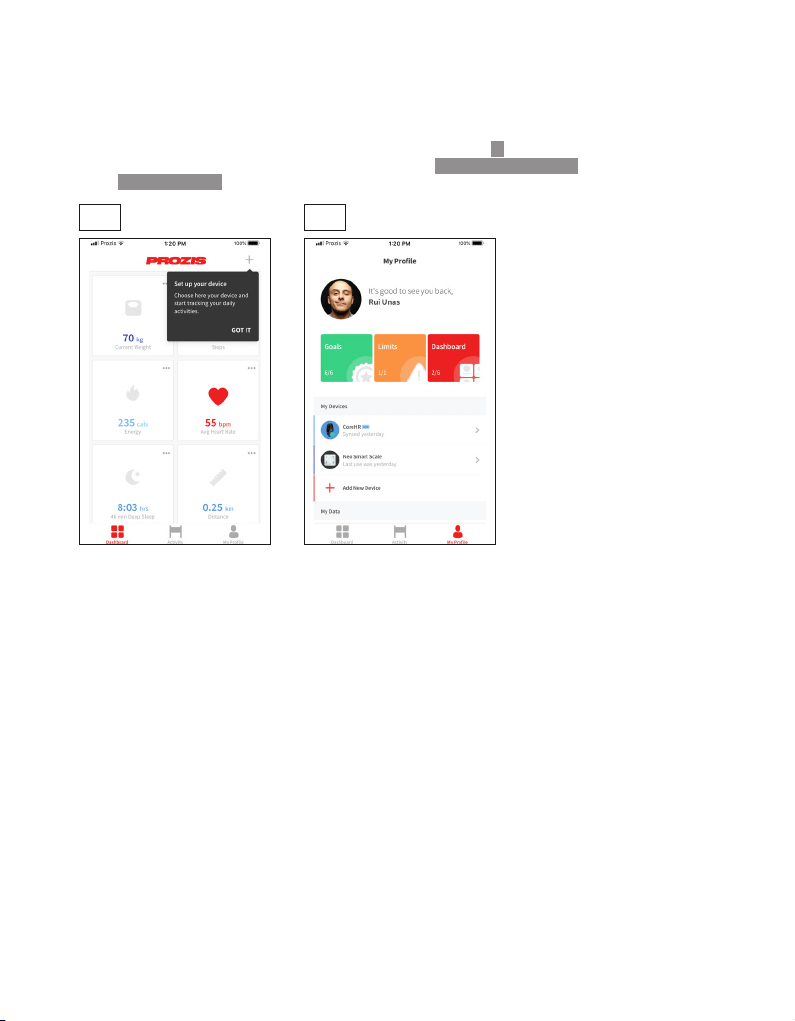
1. Turn on BT and GPS (Android) or BT (iOS). Do not attempt to pair the device through
the phone’s BT settings. Add your Prozis device by pressing the + button displayed at
the top of your dashboard screen (2.1) or by using the Add New Device button on
your My Profile screen (2.2).
2.1 2.2

EN
8
2. Select your Prozis device from the list (3.1). It may be necessary to select a subcategory
rst (3.2).
3. Follow the app’s pairing instructions for your new device (4).
3.1 3.2
4

EN
9
Key denitions
Tap: switch mode
Long press: choose function
How to wear
Wear the Smartband snugly but comfortably on your wrist, neither too tight nor too lose.
The heart rate monitor
To obtain the most accurate results from the heart rate monitor, follow these tips:
• Wear the Smartband as you would a watch, with the screen facing away from your wrist and
the bottom part touching your skin.
• Strap it to your wrist tightly, but comfortably.
The Smartband activates the heart rate monitoring function by default and automatically tracks it
all day long.
TAP THE TOUCH KEY TO VIEW:
Time mode Data mode Heart rate
mode
Sports
mode
Alarm clock
mode

EN
10
DATA MODE
Long press the touch key for 2 seconds to enter the data sub-mode: a more detailed level
where you can obtain the results for your steps, distance covered, time spent, calories. To
return to the initial Data Mode screen, tap the touch key in the last screen of the sub-mode.
HEART RATE MODE
Monitoring starts one second after accessing the Heart Rate screen.
ALARM CLOCK MODE
The Alarm Clock will only be displayed in the Smartband screen if the function is set on the
device app.
Press and hold the touch key for 2 seconds to activate/deactivate
the alarm repeat function.
SPORTS MODE
Long press the touch key 2 seconds to activate the Sports Mode.
Measuring
Heart Rate
Heart Rate
Result (bpm)
Table des matières
Langues :
Autres manuels PROZIS Montre


