
Promate Atom Manuel utilisateur

Atom
Sleek Multipoint Pairing
Wireless Headset

• Atom
• Ear Hook
• Charging Cable
• User Guide
Introduction
Packaging Contents
Atom headset is a remarkable wireless device that is all but imperceptible. Weighing
next to nothing, the Atom clips to your ear and syncs via V4.2 +EDR Bluetooth to your
mobile device. It also comes with multi-point technology allowing you to connect
two devices simultaneously. The Atom has crystal clear sound quality, between four
and ve hours of talk time and 150 hours of battery life on standby mode. The
rechargeable lithium polymer battery has radiation protection and is designed for
extra low power consumption.
Specification:
• nterface: Bluetooth Version: V4.2 + EDR
• Bluetooth Prole: HSP, HFP, A2DP
• Operating distance: 10 meters
• Frequency range: 100~10KHz
• Signal noise ratio (SNR): 58db
• Impedance: 32 Ohms
• Speaker power output: 5mW
• Battery charging time: 1.5 hours
• Operating temperature: -20~60_C
• Humidity: 0-95% (non-condensing)
• Microphone sensitivity: -42dBm
Features
1
• Multi-Usage: Make and receive calls wirelessly or listen to music on-the-go
• Universal Connectivity: Its universal compatibility allows you to enjoy the power of wireless
connectivity
• Hands-free Function: The built in mic ensures crystal clear calling function
• Stylish Headset: The ultra-small & elegant design makes sure that you never run out of class
English

Compatibility
Atom may be paired as a headset with any compatible Bluetooth enabled devices.
Precautions
Please read all safety instructions and warnings thoroughly before using this
product. Improper use of this product may result in damage to this or attached
products.
1. Do not disassemble the product or attempt to x it.
2. Kindly use an original charging cable provided to charge the product.
3. Do not attempt to replace any part of this product or battery inside.
4. Do not crush, puncture, dispose of in re, short the contacts or expose the
product to water or other liquids.
5. Do not store or use this product in a high temperature environment,
including intense sunlight or heat.
6. Avoid drops, bumps, abrasions and impacts.
7. If there is any reason to believe that there is damage to the product,
discontinue use immediately.
8. If you nd that the product is too hot, is emitting an odor, or is deformed,
punctured or exhibits any suspicious or abnormal behavior, discontinue
use immediately and contact our customer service.
9. Always charge this product before extended storage.
English
2
• Connect 2 Devices at the same time: Atom supports multi-point pairing i.e. you can connect
two devices simultaneously at the same time
• Portable Bluetooth Headset: No more worries for the space where you have to keep your
headset, Atom is an ultra-small Bluetooth headset that you can easily keep in your purse or even
in your bag
• Comfortable Ear Bud: The comfortable and padded ear bud provides comfort t
• Long life Battery: The rechargeable battery provides long lasting usage
English
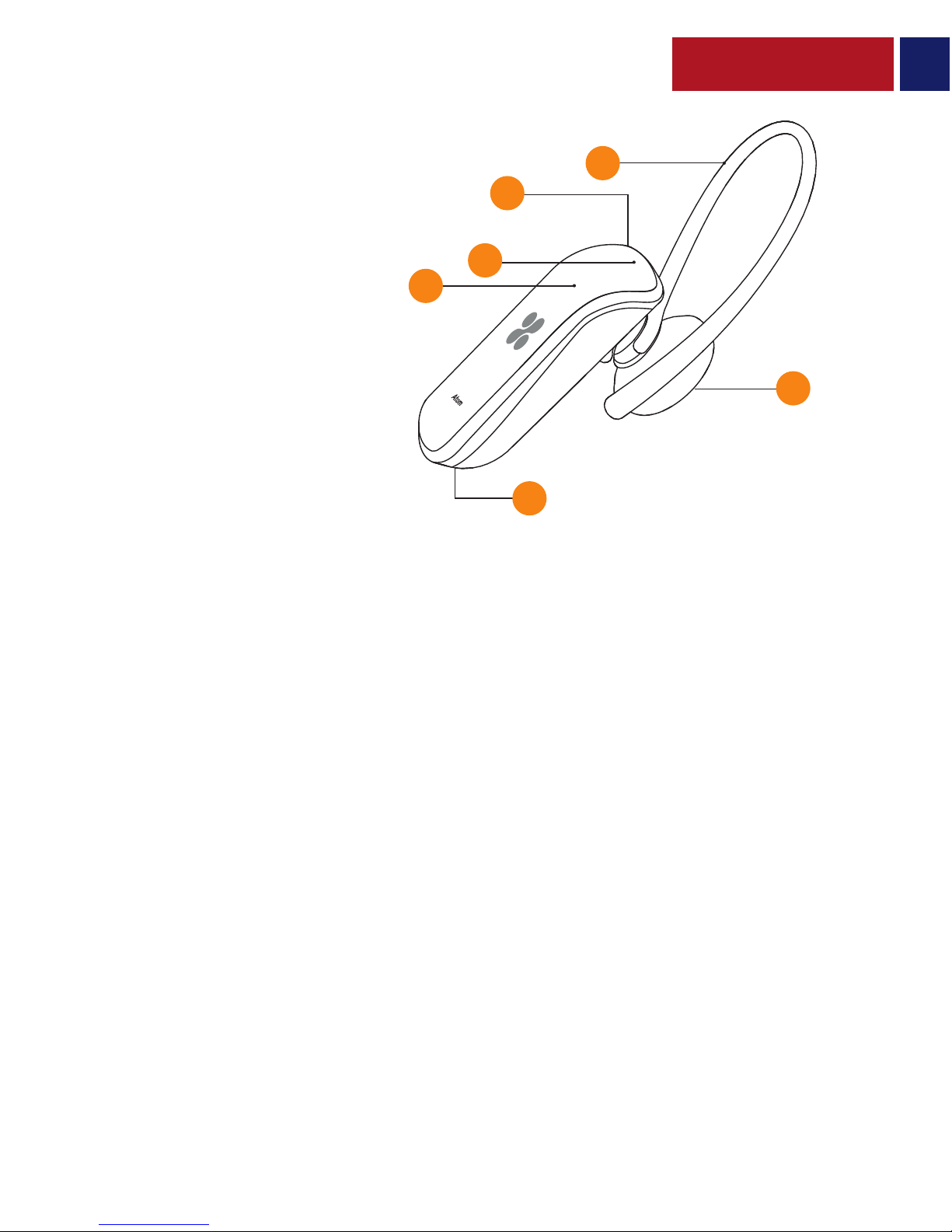
Appearance & Interface Description
1. Ear Hook
2. Charging Port
3. Multi-function Button
4. LED Indicator
5. Speaker
6. Microphone
3
1
2
3
4
6
5
Operation Instructions
1. Switching Atom On/O
• To turn on Atom, press and hold the Multifunction Button for about 3 seconds, until the Blue
LED starts ashing.
• To turn o Atom, again, press and hold the Multifunction Button for about 3 seconds.
2. Pairing Atom
• Before connecting Atom to your device, make sure that Atom is in pairing mode. In order
to enter pairing mode, press and hold the Multifunction Button for 4 seconds, until Red and
Blue LEDs start ashing alternatively.
• Turn on the Bluetooth function of the device you wish to connect and search for“Atom”. From
the list of found devices, select “Atom”.
• If your phone asks for a passkey or PIN code, conrm with‘0000’(4 zero).
• Atom is now connected to your device.
3. Multipoint Pairing
• Follow the above-mentioned steps to pair Atom with rst device.
• Turn o the Bluetooth function of the rst device.
• Then, repeat the steps to pair Atom with the second device.
• Turn on the Bluetooth function of the rst device.

English
4
4. Call Function
• Answering a Call: Press the Multifunction Button once to answer an incoming call.
• Rejecting a Call: Press the multifunction button twice to reject an incoming call.
• Ending a Call: Press the Multifunction Button once to end an ongoing call.
• Call Function with two phones connected
• Short press the Multi-Function button once to answer an incoming call.
• When you are on rst phone and receiving an incoming call on the second phone, press
and hold the Multi-function Button to place the rst call on hold and answer the second call.
• Press the multi-function twice during the rst call to reject the second incoming call.
• Double press the Multi-function button to end the rst call and answer the second call.
5. Controlling Music Playback
• Music Play/Pause: During standby mode, press the Multifunction Button once to Play music.
Again, press the Multifunction Button to Pause the ongoing track.
6. Charging Atom
• Plug one end of the charging cable into Atom charging input and the other end into a USB
Power Adapter or a Laptop/Desktop.
• The LED Indictor will light up in Red, indicating that Atom is charging normally.
• The LED Indicator turns o once the charging is done.

English
5
Correct disposal of this Product
(Waste Electrical & Electronic Equipment (WEEE)
Your product is designed and manufactured with high quality materials and components
which can be recycled and reused.
This symbol means that electrical and electronic equipment, at their end of-life should be
disposed of separately from your household waste.
Please dispose of this equipment at your local community waste
collection/recycling center.
This product complies with European safety and electrical interference directives
This product does not contain environmentally hazardous materials (lead, mercury,
cadmium, hexavalent chromium and brominated ammable agents: PBB and PBDE).

Spanish
6
Descripción del Aspecto y la Interfaz
1. Gancho para el oído
2. Puerto de Carga
3. Botón Multifunción
4. Indicador de LED
5. Altavoz
6. Micrófono
1
2
3
4
6
5
Instrucciones de Operación
1. Encendido/Apagado de Atom
• Para encender a Atom, oprima y retenga el Botón Multifunción durante unos 3 segundos
hasta que el LED azul empiece a destellar.
• Para apagar a Atom, oprima y retenga el Botón Multifunción durante unos 3 segundos.
2. Cómo conectar a Atom
• Antes de conectar a Atom a su dispositivo, asegúrese que Atom esté en modo de conexión.
Para entrar en modo de conexión, oprima y retenga el Botón Multifunción durante 4 segundos
hasta que los LED rojo y azul empiecen a destellar alternativamente.
• Active la función Bluetooth del dispositivo que desea conectar y busque "Atom". Seleccione
“Atom” de la lista de dispositivos hallados.
• Si su teléfono solicita una clave de acceso o código PIN, conrme con‘0000’(4 ceros).
• Atom estará ahora conectado a su dispositivo.
3. Conexión Multipunto
• Siga los pasos arriba mencionados para conectar a Atom con el primer dispositivo.
• Desactive la función Bluetooth del primer dispositivo.
• Luego, repita los pasos para conectar a Atom con el segundo dispositivo.
• Active la función Bluetooth del primer dispositivo.
• El auricular se conectará automáticamente a ambos dispositivos.

7
4. Función de Llamada
• Responder una llamada: Oprima el Botón Multifunción una vez para responder una llama-da
entrante.
• Rechazar una llamada: Oprima el Botón Multifunción dos veces para rechazar una llamada
entrante.
• Terminar una llamada: Oprima el Botón Multifunción una vez para terminar una llamada
en curso.
• Función de llamada con dos teléfonos conectados
• Oprima brevemente el botón Multifunción una vez para responder una llama-da entrante.
• Cuando esté en el primer teléfono y recibe una llamada entrante en el segun-do teléfono,
presione y retenga el Botón Multifunción para poner la primera llamada en espera y responder
la segunda llamada.
• Oprima del botón multifunción dos veces durante la primera llamada para re-chazar la
segunda llamada entrante.
• Oprima el Botón Multifunción dos veces para terminar la primera llamada y responder la
segunda llamada.
5. Control de la Reproducción de Música
• Reproducir/Pausar Música: Durante modo de espera, oprima el Botón Multifunción una
vez para Reproducir música. Oprima el Botón Multifunción de nuevo para Pausar la pista en curso.
6. Cómo cargar a Atom
• Enchufe un extremo del cable de carga en la entrada de carga de Atom y el otro extremo
a un adaptador de corriente USB o a un ordenador de escritorio/portátil.
• El indicador de LED se pondrá rojo indicando que Atom se está cargando normalmente.
• El indicador LED se apaga al completarse la carga.
Spanish

French
8
Aspect & Description Interface
1. Oreillette Accrochable
2. Port de Charge
3. Bouton Multifonction
4. Indicateur LED
5. Hautparleur
6. Microphone
1
2
3
4
6
5
Mode d’Emploi
1. Allumer et Eteindre l’Atom
• Pour allumer l’Atom, appuyez pendant environ 3 secondes sur le Bouton Multifonction
jusqu’à ce que le voyant LED Bleu commence à clignoter.
• Pour éteindre l’Atom, appuyez à nouveau sur le Bouton Multifonction pendant 3 secondes.
2. Appairage de l’Atom
• Avant de connecter l’Atom sur votre appareil, assurez-vous qu’il est en mode appairage.
An de passer en mode appairage, appuyez sur le Bouton Multifonction pendant 4 secondes,
jusqu'à ce que les voyants LED Rouge et Bleu clignotent alternativement.
• Activez la fonction Bluetooth de l’appareil que vous souhaitez connecter et recherchez
« Atom » sur la liste des périphériques détectés.
• Si votre téléphone demande un mot de passe ou le code PIN, saisissez‘0000’ (4 zéros).
• L’Atom est maintenant connecté à votre appareil.
3. Appairage Multipoint
• Suivez les étapes mentionnées ci-dessus pour apparier l’Atom avec le premier périphérique.
• Désactivez la fonction Bluetooth du premier appareil.
• Répétez alors les étapes pour apparier l’Atom avec le deuxième périphérique.
• Activez la fonction Bluetooth du premier périphérique.
• L’oreillette se connecte automatiquement aux deux dispositifs.

French
9
4. Fonction Appel
• Répondre à un Appel : Appuyez sur le Bouton Multifonction pour répondre à un appel entrant.
• Rejeter un appel : Appuyez deux fois sur le Bouton Multifonction pour rejeter un appel entrant.
• Mettre n à un appel : Appuyez une fois sur le Bouton Multifonction pour mettre n à un
appel en cours.
• Fonction Appel avec deux téléphones connectés
• Appuyez brièvement une foi sur le Bouton Multifonction pour répondre à un appel entrant.
• Lorsque vous êtes sur le premier téléphone et que vous recevez un appel entrant sur le
deuxième téléphone, appuyez pendant quelques secondes le Bouton Multifonction pour
mettre le premier appel en attente et répondre au deuxième.
• Appuyez deux fois sur le Bouton Multifonction pendant le premier appel pour rejeter
le deuxième appel entrant.
• Appuyez deux fois sur le Bouton Multifonction pour terminer le premier appel et répondre
au deuxième appel.
5. Contrôler la Lecture de la Musique
• Musique Play/Pause : En mode veille, appuyez une fois sur le Bouton Multifonction pour
écouter de la musique. Appuyez à nouveau sur le Bouton Multifonction pour faire pause
sur la piste en cours.
6. Chargement de l’Atom
• Branchez une extrémité du câble de chargement sur l’entrée de chargement de l’Atom et
l’autre extrémité sur un Adaptateur USB ou un ordinateur portable/ordinateur de bureau.
• Le voyant LED devient Rouge, indiquant que l’Atom se recharge normalement.
• Le voyant LED s'éteint une fois la charge terminée.
Autres manuels pour Atom
2
Autres manuels Promate casque

Promate
Promate reTrax-2 Manuel utilisateur

Promate
Promate Lite Manuel utilisateur

Promate
Promate Limber Manuel utilisateur

Promate
Promate Aria-2 Manuel utilisateur

Promate
Promate PX16 Manuel utilisateur

Promate
Promate Slender Multipoint Pairing Manuel utilisateur

Promate
Promate blueGear Manuel utilisateur

Promate
Promate proHarmony Manuel utilisateur

Promate
Promate Match Manuel utilisateur

Promate
Promate Tempo-BT Manuel utilisateur


