
pro user RVC3610 Manuel utilisateur

1
WIRELESS BACK-UP CAMERA SYSTEM
KABELLOSES RÜCKFAHR-KAMERA-SYSTEM
SYSTÈME DE CAMERA DE RECUL SANS FIL
DRAADLOOS CAMERASYSTEEM
with 3,5 i ch mo itor
mit 3,5” Mo itor
avec écra 3,5 pouces
met 3,5 i ch mo itor
RVC3610

2
INTRODUCTION
The Pro-User RVC3610 is member of the family of advanced car back-u systems
manufactured by Pro User International Ltd.
The Pro-User Wireless Back-u Camera and Monitor, when used as described, will
im rove your ability to see behind your car, cam er, trailer, or mini-van. We have taken
numerous measures in quality control to ensure that your roduct arrives in to condition,
and will erform to your satisfaction.
Please carefully read a d follow the followi g safety a d operati g i structio s.
IMPORTANT SAFETY INSTRUCTIONS
Before You I stall
If you are not confident working with 12 volt DC vehicle wiring, removing and reinstalling
interior anels, car eting, dashboards or other com onents of your vehicle, contact the
vehicle’s manufacturer, or consider having the camera system rofessionally installed.
I terfere ce
This device, as well as all other wireless devices, may be subject to interference.
Interference may be caused by cell hones, Bluetooth headsets, Wi-FI routers, ower
lines and other various electrical equi ment, etc.
Repair
The camera system should not be o ened. Any attem t at modification or re air by the
user will entail the loss of your guarantee.
PARTS
1. Monitor and mounting Arm 2. Camera with mounting late
3. Transmitter Box 4. Mounting Accessories 5. Monitor Power Cable
6. Transmitter Box Power Cable

3
INSTALLATION
These i structio s do ot apply to all vehicles. They are o ly mea t as a ge eral
guide due to the umber of differe t makes & models. For vehicle specific
questio s co tact your vehicle’s ma ufacturer.
Camera i stallatio
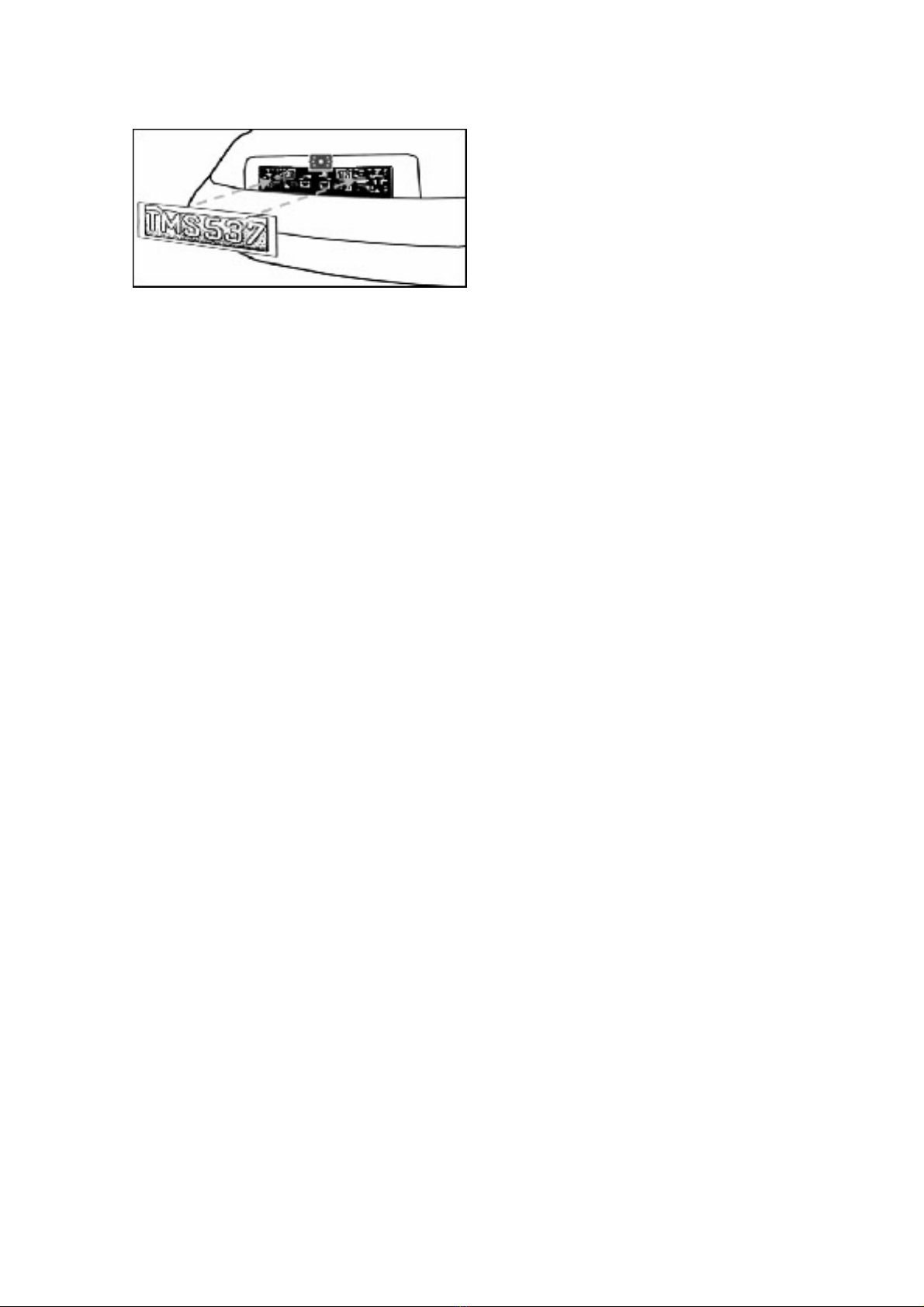
There are several ways to mount the camera on the back of your car. But the most
convenient is to mount it near the license late of the car. Su lied is one mounting late
that can be fixed behind the license late, and the mounting late have been installed in
the camera.
The camera is tiltable, camera angle can be adjusted manually on vertical direction.
Make
sure that its field of view and detection are not obstructed.
At some ty e of cars it is not ossible to mount the camera near the license late. You
may have to find another s ot at the back of your car to mount the camera.
1. Remove the rear license late, and then loosen the license late bolts/screws.
2. Position the su lied mounting lates (with camera together) behind the license late
bracket. Secure both license late bracket and mounting lates with the license late
bracket bolts/screws.
4
3. Mount the license late on the license late bracket.
4. Choose a routing ath for the camera’s ower cable through the vehicle’s body to the
reverse light circuit. If in doubt, seek rofessional installation assistance.
5. Some vehicles may have a hole available to ass the wire through, such as where the
license late light is mounted, or you can drill a hole close to where the ower cable
is attached to the camera. Once you have chosen where the cable will enter the
vehicle’s body, remove the camera. If you are able to use an existing opening, skip
the next two steps.
6. Before you drill a hole you MUST CHECK and see WHAT IS BEHIND WHERE YOU ARE
DRILLING. If there are any vehicle com onents, such as electrical arts or fuel
system com onents behind where you are drilling, you must take whatever
recaution is necessary not to damage them. Remove the license late and camera
before drilling.
7. After you have drilled the hole, insert the su lied grommet, then ass the camera
cables through the grommet into the vehicle. You must use the grommet to revent
the metal edge of the hole from cutting the camera cable.
8. Mount the transmitter box inside the trunk. Connect the camera’s ower cable and
the transmitter box ower cable to the transmitter box.
9. Next you’ll need to find the vehicle’s reverse lights. Turn the vehicle’s ignition key to
the accessory osition, engage the arking brake and ut the car in reverse. Look at
the vehicle’s tail lights to see where the reverse lights are located, they are the white
lights. To locate the reverse light’s 12V+ wire it will be necessary to gain access to
the rear of the vehicle’s tail light. For hel locating the vehicle’s reverse light circuit
contact your vehicle’s manufacturer for vehicle s ecific wiring diagrams.
10. Once you have located the reverse light circuit you will have to route the transmitter
box ower cable to that location. You must securely fasten the ower cable to revent
it from being caught on any vehicle com onent such as the trunk hinge. Never route
the cable on the outside of the vehicle!

5
11. The reverse light sockets on
most vehicles have two wires
connected to them. Usually the
negative wire is black and the
ositive wire is a colored wire. If
you are uncertain about the
wiring, you can use a 12 volt
multimeter available at most
auto arts stores to determine
which is the ositive wire. Follow
the manufacturer’s instructions
for the safe use of the
multimeter.
12. After determining which wire is
the ositive and which is the negative, turn off the ignition key, then remove the
battery’s negative cable.
13. S lice the red wire using the su lied in-line wire connectors to the reverse light’s
ositive (+) wire. Use a set of sli joint liers to squeeze the TAP and insure good
connection.
14. Next s lice the black wire of the transmitter box ower cable to the reverse light’s
negative (-) wire or ground.
15. Re lace the reverse light bulb, and then re-install the light socket. Secure all the
wires with cable ties or electrical ta e.
16. Re-attach the negative battery cable to the battery.
Mo itor I stallatio
When choosing a location to mount the monitor, make sure the
monitor is in an area that will not obstruct your vision while driving.
1. Before mounting the monitor, clean the mounting surface well.
2. Position the suction mount to the smooth surface which suits
your requirement.
3. Press the suction ca against the smooth surface and ress the
lock down to attach and fix the mount to the surface.
4. Sna in the monitor to the suction mount.
5. Adjust the mounting arms to suit your view angle to the monitor and tighten the
screws on the mount to fix the osition.

6
6. Route the ower cable to the vehicle’s cigarette lighter socket/12V ower outlet. The
cable must not interfere with the safe o eration of the vehicle.
7. Insert the small 12 Volt DC lug of the ower cable into the right side of the monitor.
8. Plug the 12 Volt cigarette lighter lug into the vehicle’s cigarette lighter socket.
To maximize the effectiveness of the suction mount, it is recommended that the
a lication be erformed under the following conditions:
•Surface tem erature should be between 21 and 38 degrees Celsius.
•A lication below 10 degrees should be avoided.
•A lication should not occur in direct sunlight.
Mounting should be rotected from ex osure to direct sunlight for a eriod of 24 hours.
NOTE: UNDER EXTREME BRIGHT LIGHT CONDITIONS, THE SCREEN IMAGE MAY TAKE A
FEW SECONDS TO STABLIZE. PLEASE WAIT UNTIL THE IMAGE HAS STABLIZED BEFORE
BACKING UP.
System testi g
1. Reattach the vehicle’s negative battery cable.
2. Turn the ignition key to the accessory osition, do not start the vehicle.
3. Engage the arking brake, and then ut the shifter in the reverse osition.
4. Look at the monitor, if the image does not match your rear view mirror ress the
Image Orientation button on the monitor to correct the image.
5. After testing the unit and you are satisfied with the route you have chosen for the
cabling, you must ermanently install it.
6. Route all wires behind interior anels or under car eting so they are hidden. Use
su lied cable ties to neatly gather any excess wire.

7
OPERATION
The monitor will automatically turn on when the vehicle is in reverse gear.
There are 5 control buttons available for users to have their controls:
Power butto
Press the POWER button to su ly ower to the monitor. When the monitor image is on,
the blue LED will be lit. If there is ower to the monitor, but the monitor image is OFF,
the blue LED will blink on and off. When the monitor ower is off, no icture can a ear
on the screen and the blue LED will be off.
Me u butto
Press the Menu button to enter the menu screen as shown below:
Re eat ressing the Menu button to select Bright ess,
co trast, colour or directio of the icture.
Press the + button or – button to adjust settings within the
control selected. Press the + button to increase the value and
ress the – button to decrease the value.
To change the orientation of the screen image, ress the menu button until directio is
selected. By ressing the + or - button re eatedly, different screen orientations will be
available. These different views allow you to
mount the camera and monitor in any
osition with kee ing the right icture on the
monitor.
To exit the menu screen, select exit on the screen.
Guideli e butto
This camera system has the o tion to show distance-
guidelines on the dis lay. This hel s you to visually see
the distance between the objects behind your car. By
ressing the guideline button, you can switch this o tion
on and off.
Menu button
Guideline button
Power button

8
TECHNICAL SPECIFICATIONS
Camera
O erating Voltage 12V DC
Current consum tion <150mA
Image sensor CMOS
No. of ixel 640x480
Resolution >330
O tical lens 2,4mm / F2,1
Wireless tra smitter
Transmission frequency 2414MHz
RF transmission distance (o en s ace) >80M
LCD mo itor
O eration Voltage 12V DC
Standby Current <40mA
O eration Current <350mA
LCD dis lay screen size 3,5inch
No. of ixel 320x240
O eration tem erature -10 to +45 degree Celsius
ENVIRONMENTAL PROTECTION
Waste electrical roducts should not be dis osed of with household waste.
Please recycle where facilities exist. Check with your local authority or
retailer for recycling advice.
WARRANTY
Pro-User warrants this roduct for a eriod of 2 years from the date of urchase to the
original urchaser. Warranty is not transferable. Warranty covers defect against
workmanshi and materials only. To obtain warranty service, lease return the unit to
the lace of urchase or authorized Pro-User dealer together with your roof of urchase.
The warranty is void if the roduct has been damaged or not used as described in this
manual. Warranty is void if a non-authorized re air has been erformed. Pro-User makes
no other warranty ex ressed or im lied. Pro-User is only res onsible for re air or
re lacement (at Pro-Users’ Discretion) of the defective roduct and is not res onsible for
any consequential damage or inconvenience caused by the defect.

9
EINLEITUNG
Der Artikel Pro-User RVC3610 gehört zur Familie der zukunftsweisenden Auto-Rückfahr-
Kamera-Systeme der Firma Pro-User-International Ltd.
Die kabellose Pro User Rückfahr-Kamera mit Monitor ermöglicht es Ihnen bei
ordnungsgemäßer Bedienung, hinter Ihr Auto, Ihren Anhänger oder Mini-Van zu sehen.
Es wurden zahlreiche Maßnahmen bei der Qualitätskontrolle ergriffen, um Ihnen ein To
Produkt zu Ihrer Zufriedenheit zu liefern.
Bitte lese Sie die Bedie u gsa leitu g sorgfältig durch u d folge Sie de
Sicherheitshi weise u d der Mo tagea leitu g.
WICHTIGE SICHERHEITSHINWEISE
Vor der Mo tage
Falls Sie sich nicht sicher fühlen, dieses System an die 12V Stromversorgung Ihres
Fahrzeuges selbstständig zu montieren (bohren von Löchern, abnehmen von
Verkleidungen etc.) nehmen Sie Kontakt zu Ihrem Autohaus oder zur Kfz-Werkstatt Ihres
Vertrauens auf. Dort können Sie eine rofessionelle Montage des Systems in Auftrag
geben.
Störu g
Dieses Kamera-System kann, genau wie andere kabellosen Systeme, bestimmten
Störungen unterliegen. Störungen können verursacht werden durch Handys, Bluetooth,
Headsets, Navigationssysteme und anderen elektrischen Geräten.
Reparatur
Dieses Kamera-System darf nicht geöffnet werden! Bei jeglichem Versuch einer
Re aratur erlischt die Garantie.
ZUBEHÖR
1. Monitor mit Befestigungsarm 2. Kamera mit Befestigungs latte
3. Sender 4. Installations- Material 5. 12V Kabel für Monitor
6. Netzkabel für Sender

10
MONTAGE
Diese Bedie u gsa leitu g ist icht für alle Fahrzeuge a zuwe de . Sie ist ei
ge ereller Leitfade für die meiste Fahrzeuge. Bei fahrzeugspezifische Frage
we de Sie sich bitte a Ihre Fahrzeughersteller.
Mo tage der Kamera
Es gibt verschiedene Möglichkeiten, die Kamera an der Rückseite Ihres Fahrzeuges zu
befestigen. die Gebräuchlichste ist, die Kamera nahe dem Nummernschild zu befestigen.
Sie können die mitgelieferte Montage latte hinter dem Nummernschild befestigen. Auf
diese Montage latte können Sie nun die Kamera montieren.
Die Kamera ist vertikal schwenkbar, bitte stellen Sie diese nach den Gegebenheiten ein.
Bei manchen Fahrzeugen ist es leider nicht möglich, die Kamera nahe dem
Nummernschild zu befestigen. Suchen Sie sich eine andere Stelle am Heck Ihres Autos
und befestigen Sie die Kamera mit den mitgelieferten Schrauben und Muttern.
1. Nehmen Sie das Nummerschild aus der Halterung und lösen Sie dannach die
Schrauben des Nummernschildhalter und nehmen dieses ab.
2. Positionieren Sie die Befestigungs latte mit der Kamera hinter dem
Nummernschildhalter und befestigen Sie die Befestigungs latte und den
Nummernschildhalter am Fahrzeug.
Table des matières
Langues :
Autres manuels pro user Automobile électronique


