Using Messaging Modes
SMOOTH TALKER has 8 playback modes which have been carefully designed to achieve the best
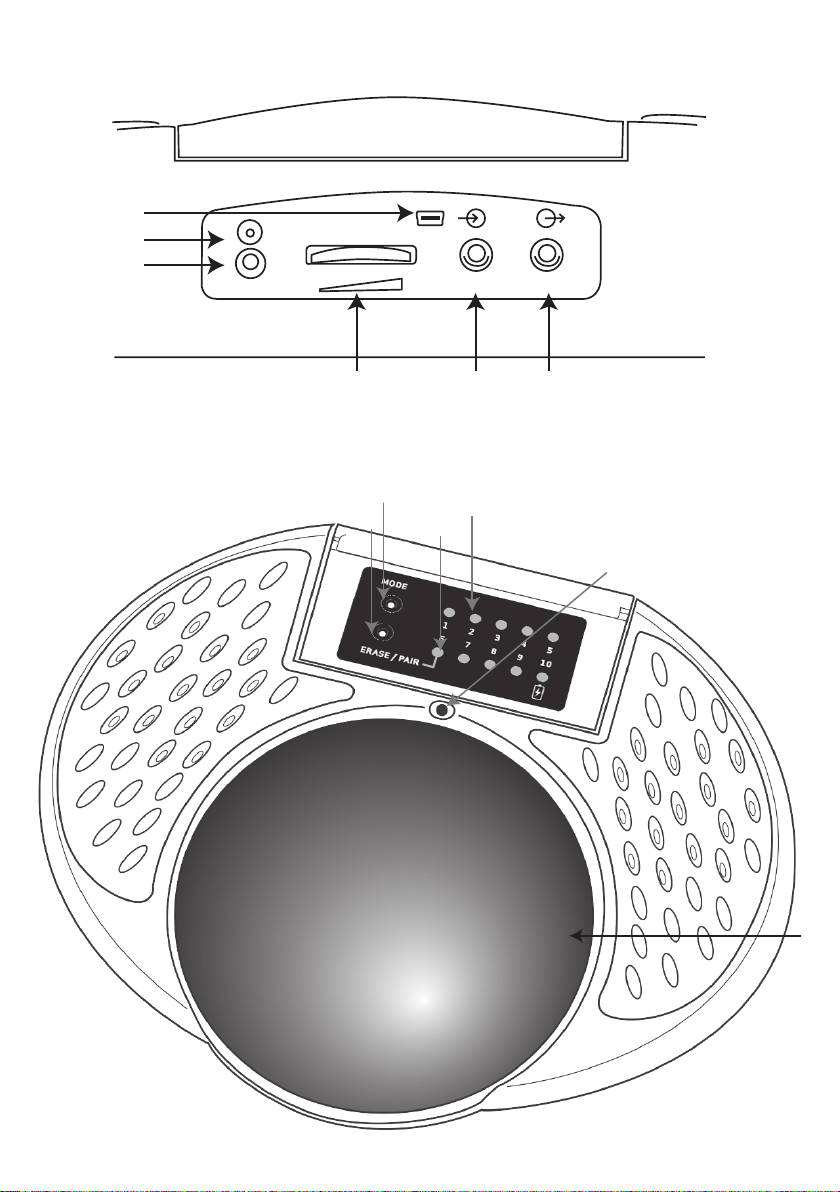
possible development of the users. To view the current mode setting, press the Mode button briefly [7].
The adjacent LEDs 1-8 illuminate to show the current Mode setting, without any changes being made.
If you wish to change to a different mode, press the Mode button repeatedly until the appropriate LED
lights, by reference to the list on the inside of the flap. The Mode LEDs are extinguished after a few
seconds and the unit announces the playback mode.
The following sections describe the messaging modes:
SEQUENTIAL
Plays the messages in the same order they were
recorded, beginning with the first. Once the last
message is reached, the sequence starts again
from the first message.
RANDOM
Randomly plays a message from any of the
recorded sequence of messages. For example,
record the numbers one to six and SMOOTH
TALKER becomes a speaking dice. Or record
messages appropriate to a selection of items and
then use SMOOTH TALKER for ‘show and tell’.
RANDOM (NO REPEATS)
Similar to Random mode but each time a message
is played, it is eliminated from the list of potential
messages, ensuring that they cannot be repeated.
This continues until every message has been
played once, after which the process starts again
with different randomisation. This mode is ideal
for choosing who goes next in a group activity.
Simply record the names of each child and use
SMOOTH TALKER to choose who goes next.
Nobody gets two goes and nobody is left out!
A sequence may be re-started at any time by
briefly pressing the Record button [1]. All messages
are re-engaged and elimination begins again.
CHOICE
Choice mode allows users to exercise a choice
between two messages. The main switch always
plays message 1 and the external switch (whether
wired or wireless) plays message 2. If more than
two messages are recorded, the third and any
subsequent ones are ignored. For example, you
could record ‘Yes’ as the first message and ‘No’ as
the second. Or try ‘Please’ and ‘Thank you’.
CHOICE PROGRESSION
Similar to Choice mode but allows a progression
through several choices. Record messages as
pairs and then for each pair, the main switch plays
choice 1 (the first message) and the external one
plays choice 2 (the second message). This mode is
ideal for choosing menu items- for example if you
were to record the following:
Messages 1/2 Pizza Hamburger
Messages 3/4 Ice Cream Doughnut
Messages 5/6 Lemonade Juice
This example allows the user to choose between
pizza and burger, then ice cream or a doughnut
and finally lemonade or juice.
The exercise may be augmented with the provision
of paired images, perhaps as a flip chart.
A progression sequence may be re-started from
messages 1 and 2 by briefly pressing the Record
button [1] at any time.
CONVERSE (TURN-TAKING)
This unique mode allows a conversation to
take place between two users in a strict back-
and-forth order no matter how the buttons
are pressed. It is very useful in teaching turn-
taking and in teaching the users the skill of
conversation. There is no possibility of the
conversation getting out of sequence. First,
record a number of messages in the normal way.
Odd messages form one half of the conversation
and even messages form the other half.
For example:
Message 1 (James) “Hello, my name is James”
Message 2 (Catherine) “Hi James, I’m Catherine”
Message 3 (James) “What is your favourite food?”
Message 4 (Catherine) “I like pizza”.
For added realism you could use different voices
for each half of the conversation.
Once recording is complete, the main switch
[6] plays odd messages and the external switch
(wired or wireless) plays even messages. In other
words James, in the example above, uses the main
switch and Catherine uses the external switch
Because James has the main switch, he must
initiate the conversation by pressing his switch.
Catherine’s switch does nothing until the first
message is complete. Once the first message has
ended Catherine may press her switch and play
the second message, meanwhile James’s switch
does nothing, so he can’t interrupt, and so on.