
Premium V12 Manuel utilisateur
Owner’s Manual
Blood Glucose Monitoring System
V12
V12 Voice


3
Dear Premium V12* Series System
Owner:
Thank you for purchasing the Premium V12 Series Blood Glucose
Monitoring System. This manual provides important information to help
you to use the system properly. Before using this product, please read the
following contents thoroughly and carefully.
Regular monitoring of your blood glucose levels can help you and your
doctor gain better control of your diabetes. Due to its compact size and
easy operation, you can use the Premium V12 Series Blood Glucose
Monitoring System to easily monitor your blood glucose levels by yourself
anywhere, any time.
If you have questions, just call ForaCare Customer Care Service Center
toll-free at 1-866-469-2632. We are here for you 24 hours a day, 7 days a
week. You can also visit www.foracare.com.
* Talking function is available on the FORA Premium V12 Voice System
only. The voice output of FORA Premium V12 Voice System is available in
English and Spanish.
Version 2.0 2013/01
311-4125000-001
English
Premium V12 Voice Model Only

4
IMPORTANT SAFETY PRECAUTIONS
READ BEFORE USE
● Themeterandlancingdeviceareforsinglepatientuse.Donotsharethem
with anyone including other family members! Do not use on multiple
patients!
● Allpartsofthekitareconsideredbiohazardousandcanpotentially
transmit infectious diseases, even after you have performed cleaning and
disinfection.
For more information, please visit
1.“FDAPublicHealthNotication:UseofFingerstickDevicesonMorethanOnePerson
PosesRiskforTransmittingBloodbornePathogens:InitialCommunication”(2010)
http://www.fda.gov/MedicalDevices/Safety/AlertsandNotices/ucm224025.htm
2.“CDCClinicalReminder:UseofFingerstickDevicesonMorethanOnePersonPoses
RiskforTransmittingBloodbornePathogens”(2010)
http://www.cdc.gov/injectionsafety/Fingerstick-DevicesBGM.html
1.UsethisdeviceONLY for the intended use described.
2. Do NOTuseaccessorieswhicharenotspeciedbythemanufacturer.
3. Do NOT use the device if it is not working properly or if it is damaged.
4. This device does NOT serve as a cure for any symptoms or diseases. The
data measured is for reference only.
5. Before using this device to test blood glucose, read all instructions
thoroughly and practice the test. Carry out all the quality control checks as
directed.
6.Useofthisdeviceinadryenvironment,especiallyifsyntheticmaterialsare
present(syntheticclothing,carpetsetc.)maycausedamagingstatic
discharges that may cause erroneous results.
7. Do NOT use this device in close proximity to sources of strong
electromagnetic radiation, as these may interfere with the accurate
operation.
KEEP THESE INSTRUCTIONS IN A SAFE PLACE

5
TABLE OF CONTENTS
BEFORE YOU BEGIN 06
Important Information 06
IntendedUse 07
Test Principle 07
Meter Overview 08
Display Screen 09
Test Strip 10
Setting the Meter 11
THE FOUR MEASURING MODES 15
Control Solution Testing 16
Performing a Control Solution Test 17
TESTING WITH BLOOD SAMPLE 20
Preparing the Puncture Site 20
Alternative Site Testing 22
Performing a Blood Glucose Test 23
METER MEMORY 25
Reviewing Test Results 25
Reviewing Blood Glucose Day Average Results 27
Downloading Results on to a Computer 28
MAINTENANCE 29
Battery 29
Caring for Your Meter 30
Caring for Your Test Strips 33
Important Control Solution Information 34
SYSTEM TROUBLESHOOTING 35
Result Readings 35
Error Messages 36
Troubleshooting 38
DETAILED INFORMATION 39
SPECIFICATIONS 40

6
BEFORE YOU BEGIN
Important Information
● Severedehydrationandexcessivewaterlossmaycausereadings
which are lower than actual values. If you believe you are suffering
from severe dehydration, consult a healthcare professional
immediately.
● Ifyourbloodglucoseresultsarelowerorhigherthannormal,and
you do not have any symptoms of illness, repeat the test. If you have
symptoms or continue to get results which are higher or lower than
normal, consult with your healthcare professional.
● Useonlyfreshwholebloodsamplestotestyourbloodglucose.Using
other substances will lead to incorrect results.
● Ifyouareexperiencingsymptomsthatareinconsistentwithyourblood
glucose test results and you have followed all the instructions given in
this owner’s manual, contact your healthcare professional.
● Wedonotrecommendusingthisproductonseverelyhypotensive
individuals or patients in shock. Readings lower than actual values may
occur for individuals experiencing a hyperglycemic-hyperosmolar state,
with or without ketosis. Please consult a healthcare professional before
use.
● Criticallyillpatientsshouldnotbetestedwithabloodglucose
monitoring system.

7
Intended Use
The Premium V12 Series Blood Glucose Monitoring System is intended
for use in the quantitative measurement of glucose in fresh capillary
wholebloodfromthefingerandthefollowingalternativesites:palm,
forearm, upper-arm, calf and thigh. It is intended for use by people with
diabetes mellitus at home as an aid in monitoring the effectiveness
of diabetes control program. It is not intended for the diagnosis of or
screening for diabetes mellitus, and is not intended for use on neonates.
It is intended to be used by a single person and should not be shared.
The alternative site testing in the Premium V12 Series Blood Glucose
Monitoring System can be used only during steady-state blood glucose
conditions.
Premium V12 Voice has some speaking functions but is not intended for
use by the visually impaired.
Test Principle
Yoursystemmeasurestheamountofsugar(glucose)inwholeblood.
The glucose testing is based on the measurement of electrical current
generated by the reaction of glucose with the reagent of the strip. The
meter measures the current, calculates the blood glucose level, and
displays the result. The strength of the current produced by the reaction
depends on the amount of glucose in the blood sample.
8
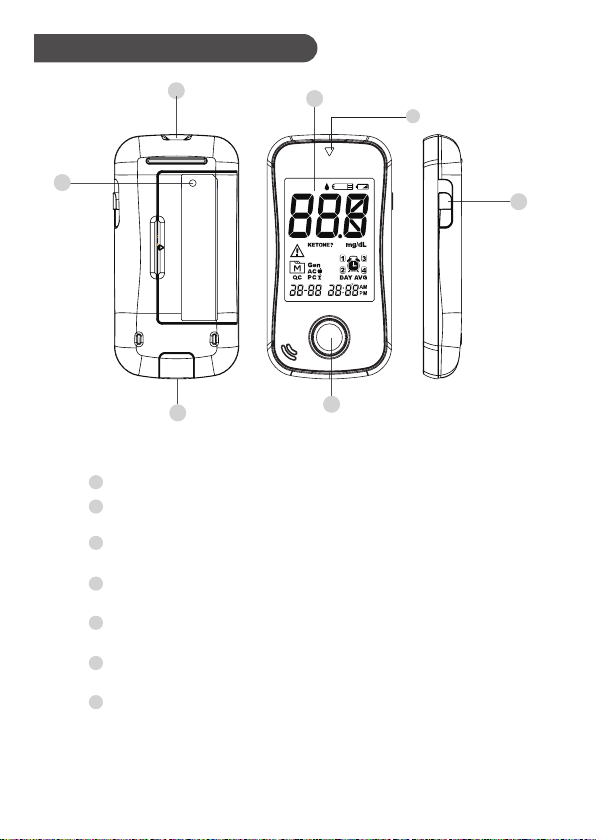
Meter Overview
Display Screen
Test Strip Slot
Insert test strip here to turn the meter on for testing.
Test Strip Ejector
Eject the strip by sliding the up this button
M Button
Enter the meter memory and silence a reminder alarm.
Data Port
Download test results with a cable connection.
SET Button
Enterandconrmthemetersettings.
Strip slot Indicator light
Press, release and wait for 5 seconds to see the test
lightindicatorlightup(forlowlightenvironment)
1
2
3
5
6
7
7
4
3
4
6
21
5
9
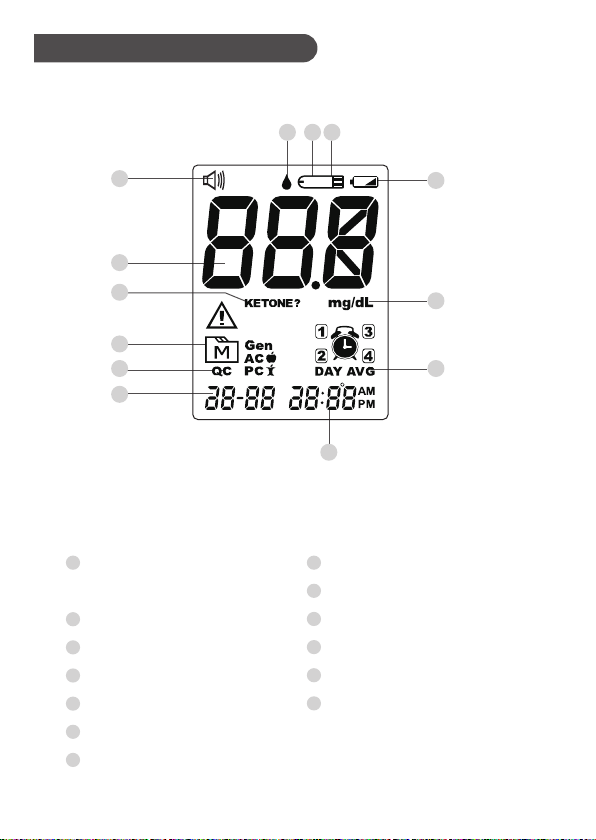
Display Screen
Volume Symbol( For
Premium V12 Voice Only)
Insert Test Strip
Test Strip Symbol
Blood Drop Symbol
Test Result
Date
Time
1
2
3
5
4
6
7
Day Average
Memory Symbol
Ketone Warning
Control solution Mode
Measurement Unit
Low Battery Symbol
8
10
13
9
12
11
2
1
34
5
10
6
9
11 8
12
13
7
10
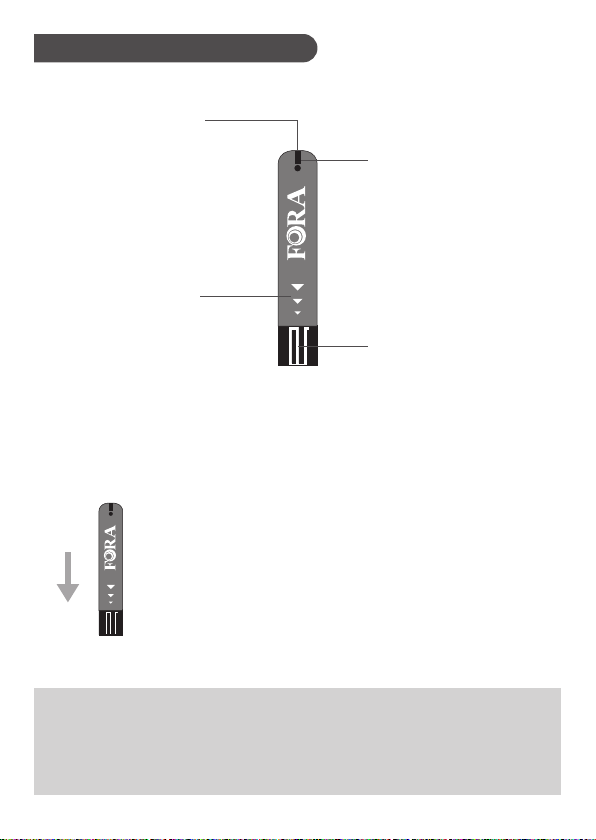
Test Strip
Test Strip Handle
Hold this part to
insert the test strip
into the slot.
Confirmation Window
Confirm if enough blood
has been applied to the
absorbent hole of the
strip.
Contact Bars
Insert this end of the test
strip into the test strip
slot.
Absorbent Hole
Touch to a drop of
blood here, blood will
be automatically
drawn in.
ATTENTION:
The front side of test strip should face up when
inserting test strip.
Test results might be wrong if the contact bar is not fully
inserted into the test slot.
NOTE:
The Premium V12 Series Blood Glucose Monitoring System should only be used
with Premium V12 SeriesTestStrips.Usingotherteststripswiththismetercan
produce inaccurate results.
Table des matières
Langues :
Manuels lecteur de glycémie populaires d'autres marques

ReliOn
ReliOn Prime Manuel de l'opérateur

AgaMatrix
AgaMatrix Presto Manuel utilisateur
Polymer Technology Systems
Polymer Technology Systems A1C Now Self Check Manuel utilisateur

Medisana
Medisana GlucoDock Manuel utilisateur

Arkray
Arkray ASSURE PLATINUM Manuel utilisateur

Dexcom
Dexcom G4 Professional Manuel utilisateur


LabStyle
LabStyle Dario Manuel utilisateur

ACONLABS
ACONLABS ON CALL EXPRESS Manuel utilisateur

Higi Technology
Higi Technology iGlucose Manuel utilisateur

Bayer HealthCare
Bayer HealthCare CONTOUR NEXT Manuel utilisateur

Accu-Chek
Accu-Chek ADVANTAGE Manuel utilisateur

Sanofi-aventis
Sanofi-aventis BG STAR Caractéristiques techniques