
Premio PA-DSG156 Mode d’emploi

USER GUIDE INSTALLATION INSTRUCTIONS
15.6” HOSPITALITY DIGITAL SIGNAGE
PA-DSG156 / PA-POE156

Page 1
2017-06-07 Rev. A
103-0023-000
Warning & Disclaimer
• Please read this document before shipping, moving, handling, installing or seng up the product. Please
follow the instrucons in this document during installaon process.
• Keep the product packed in the provided packaging during moving, shipping and transporng at all me to
prevent product damage.
• This product is designed to be installed on plywood, wood stud, unistrut, solid concrete or cinder block walls.
• Before installing please make sure the supporng surface will support the combined load of the equipment
and hardware. Consult with engineers for the wall structure inspecon.
• Product is designed for indoor use only. Do not install this product outdoor.
• Use an assistant or mechanical liing equipment to safely li and posion equipment as needed.
• Always install this product by professional installers. The installaon requires more than one installer for
safety purpose.
• Install the unit away from re. Do not use the product near re.
• Make sure to power o the product before installaon or maintenance.
• Clean the product with neutral cleaner. Do not clean the product with corrosive, ammable or toxic liquids.
• Only authorized professional installer or maintenance team shall open the unit. Do not open the enclosure
without proper training. Do not touch any component inside the product at any circumstance. Do not
add, remove, change or modify any part, cable or component inside or outside the product without the
authorizaon from Premio engineering team.
• For product specicaon, please refer to the product datasheet.
• The accuracy or completeness of the informaon provided in this document is not warranted. Premio has all
rights reserved. The informaon in this manual has been carefully examined and is believed to be reliable.
Premio shall not be liable for any direct, indirect, incidental, special, exemplary, or consequenal damages of
any kind, however incurred, through the use of the equipment, tools, soware or product menoned in this
document. Premio assumes no responsibility or liability for any errors or inaccuracies that may appear in this
document.
• The contents in this document are subject to change without noce. Please verify with sales for latest revision
• For customer support please call 1-626-839-3100 or email support@premioinc.com

Page 2
2017-06-07 Rev. A
103-0023-000
Applicable Models
PA-DSG156 & PA-POE156
MODEL NO. DESCRIPTION
PA-DSG156NCi302 15.6" Hospitality Digital Signage Solution (barebone). non-touch, Intel i3-6100TE CPU,
1366 x 768 resolution, 2 Years Warranty with 1st year advanced replacement service
PA-DSG156PCi301 15.6" Hospitality Digital Signage Solution (barebone). Projected Capacitive touch
screen, Intel i3-6100TE CPU, 1366 x 768 resolution, 2 Years Warranty with 1st
year advanced replacement service
PA-POE156NJ1901 15.6" POE Digital Signage Solution (barebone). non-touch, Intel J1900 CPU, 1366 x 768
resolution, 2 Years Warranty with 1st year advanced replacement service
PA-POE156PJ1901 15.6" POE Digital Signage Solution (barebone). Projected Capacitive touch
screen, Intel J1900 CPU, 1366 x 768 resolution, 2 Years Warranty with 1st year
advanced replacement service
PA-DSG156
Premio 15.6” Hospitality Digital Signage Soluon
All-In-One Smart Room Sign Soluon
Premio’s PA-DSG156 Hospitality Digital Signage series is surface wall mountable all-in-one panel
PC with slim prole design brushed stainless steel enclosure, available with non-touch and
Projected Capacive touch opons.
PA-POE156
Premio 15.6” Windows Based POE Digital Signage Soluon
All-In-One Windows Based Power Over Ethernet Smart Room Sign Soluon
Premio’s PA-POE156 Power over Ethernet Digital Signage series is surface wall mountable all-in-
one panel PC with slim prole design brushed stainless steel enclosure, available with non-touch
and Projected Capacive touch opons.
• Smart Room Sign
• Conference Room Signage
• Meeng Scheduling System
• Hospitality Digital Signage
• Event Board
• Lobby Guest Sign-in system
Page 3
2017-06-07 Rev. A
103-0023-000
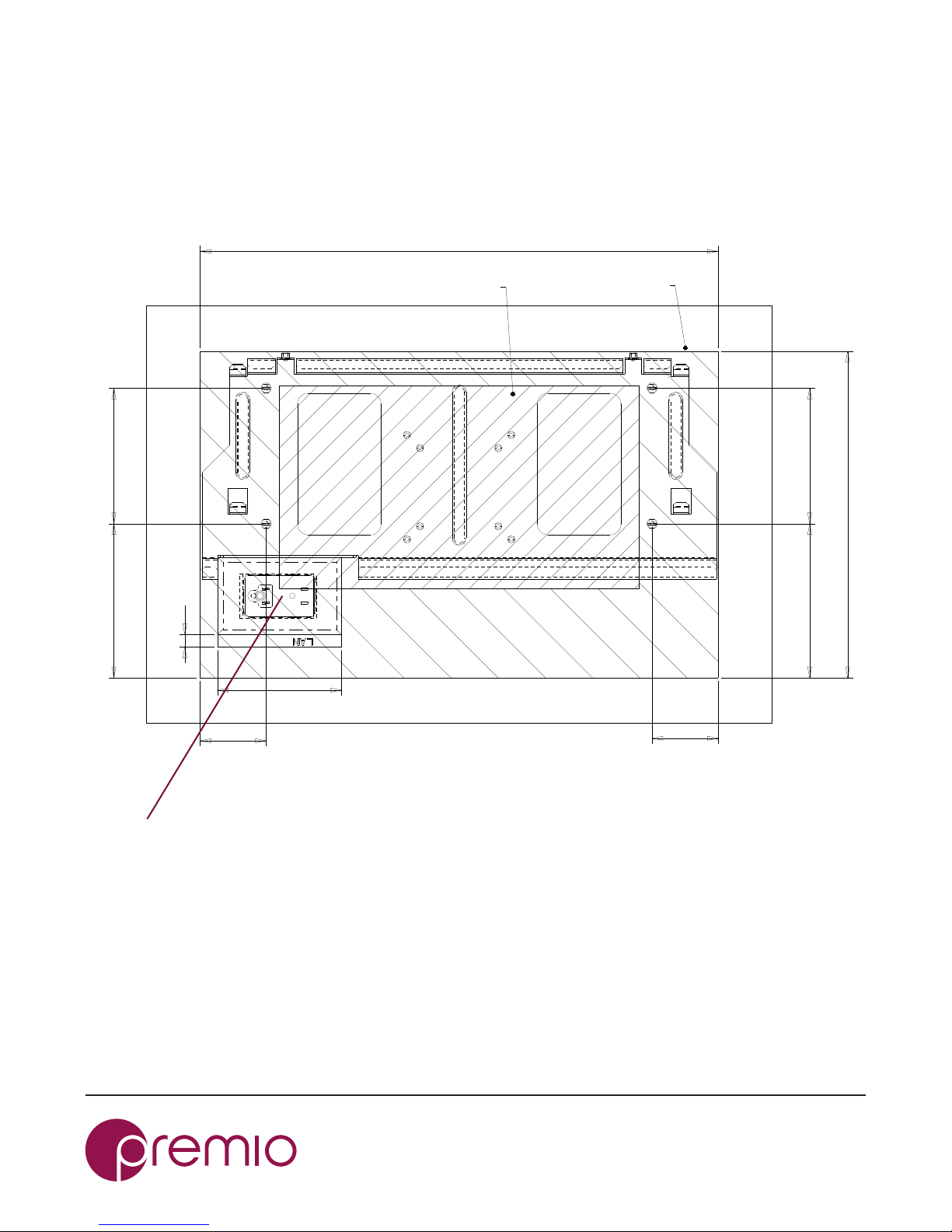
Pre-Installaon Wall Preparaon
System/wall outlet/mounng kit relave posions
12345678910
12345678910
B
C
D
E
F
G
A
B
C
D
E
F
G
DRAWING FILE NAME:
03-IGO022CAS01-ASM
MODEL FILE NAME:
03-IGO022CAS01-ASM
CHK.
APP.
DSN. SHT.
1
2
147.7
147.7
63.3 63.3
12
118.8
496.6
312.8
130
130
MODEL NO. IGO022CAS01
PART NO.
RANGE TOLERANCE PART NAME SCALE 1:1
0~10 0.1 DWG NO. UNIT mm
10~50 0.15 MATERIAL DATE Nov-05-16
50~100 0.2 FINISH REV 01
100~ 0.25 COLOR Jeff 1/1
REVERSIONS
EDIT DESCRIPTION DATE APP.
SYSTEM OUTLINE
MOUNTING KIT AREA
Recommended Recessed Wall Outlet Posion
Recessed Wall Outlet maximum size: 130(W) x 100(H) mm [5.1”(W) x
3.9”(H)]
Front View
For PA-DSG model: recessed wall outlet should include power outlet. LAN outlet is oponal.
For PA-POE model: recessed wall outlet should include LAN outlet

Page 4
2017-06-07 Rev. A
103-0023-000
Pre-Installaon Wall Preparaon
Embed recessed electrical outlet box

Page 5
2017-06-07 Rev. A
103-0023-000
1.
Determine the mounng posion based on the recommend
recessed wall outlet posion (see page 3 for detail)
Page 6
2017-06-07 Rev. A
103-0023-000
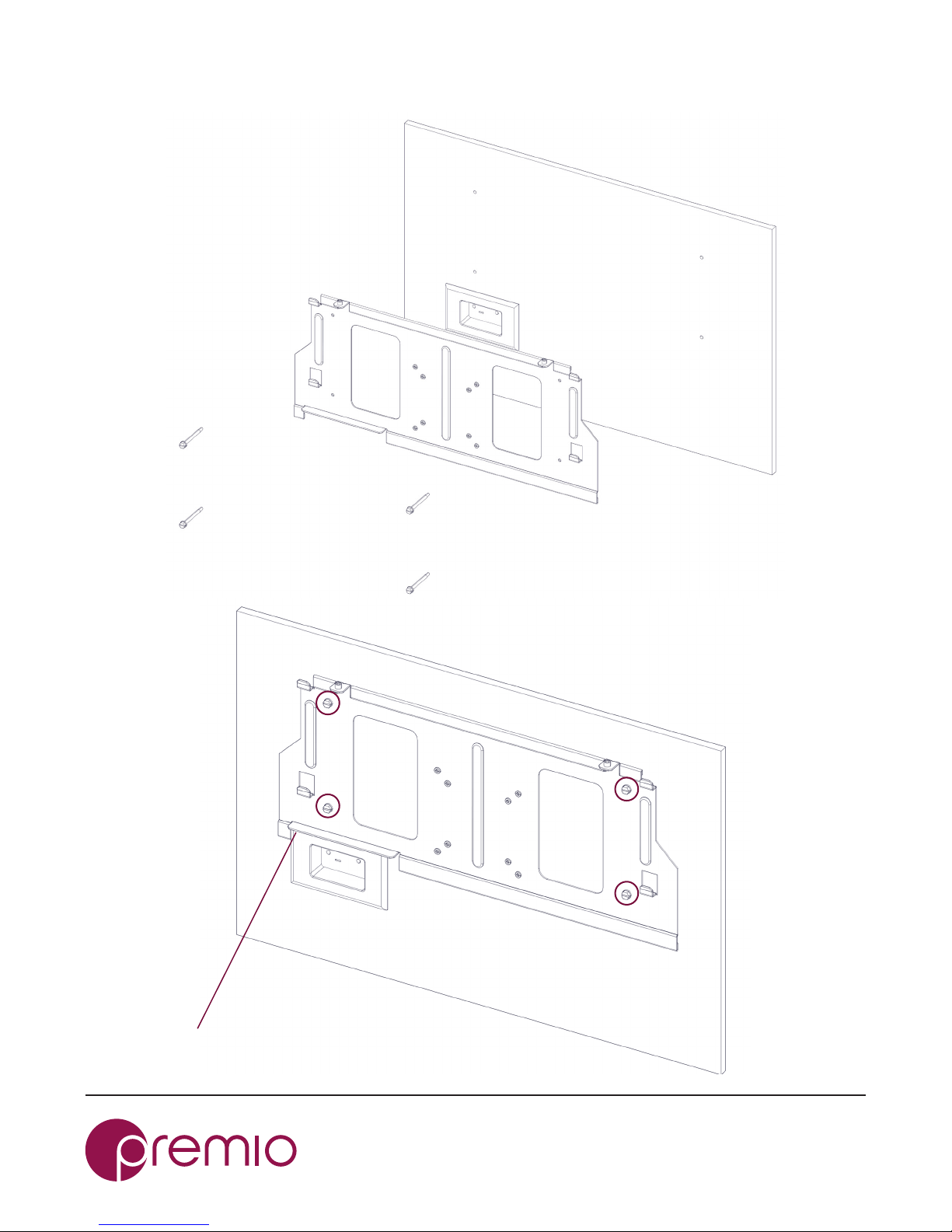
2. Install Wall mount Bracket
1
23
4
Make sure the wall mount kit is not overlapping
with the recessed wall outlet

Page 7
2017-06-07 Rev. A
103-0023-000
3.
Note: connect power cord/LAN cable from the recessed wall
outlet to the system before hanging the system onto the wall

Page 8
2017-06-07 Rev. A
103-0023-000
4.
Note: Place the system on the wall, make sure the system is install
correctly to the wall mount bracket, gently slide down to lock the
posion.
Page 9
2017-06-07 Rev. A
103-0023-000
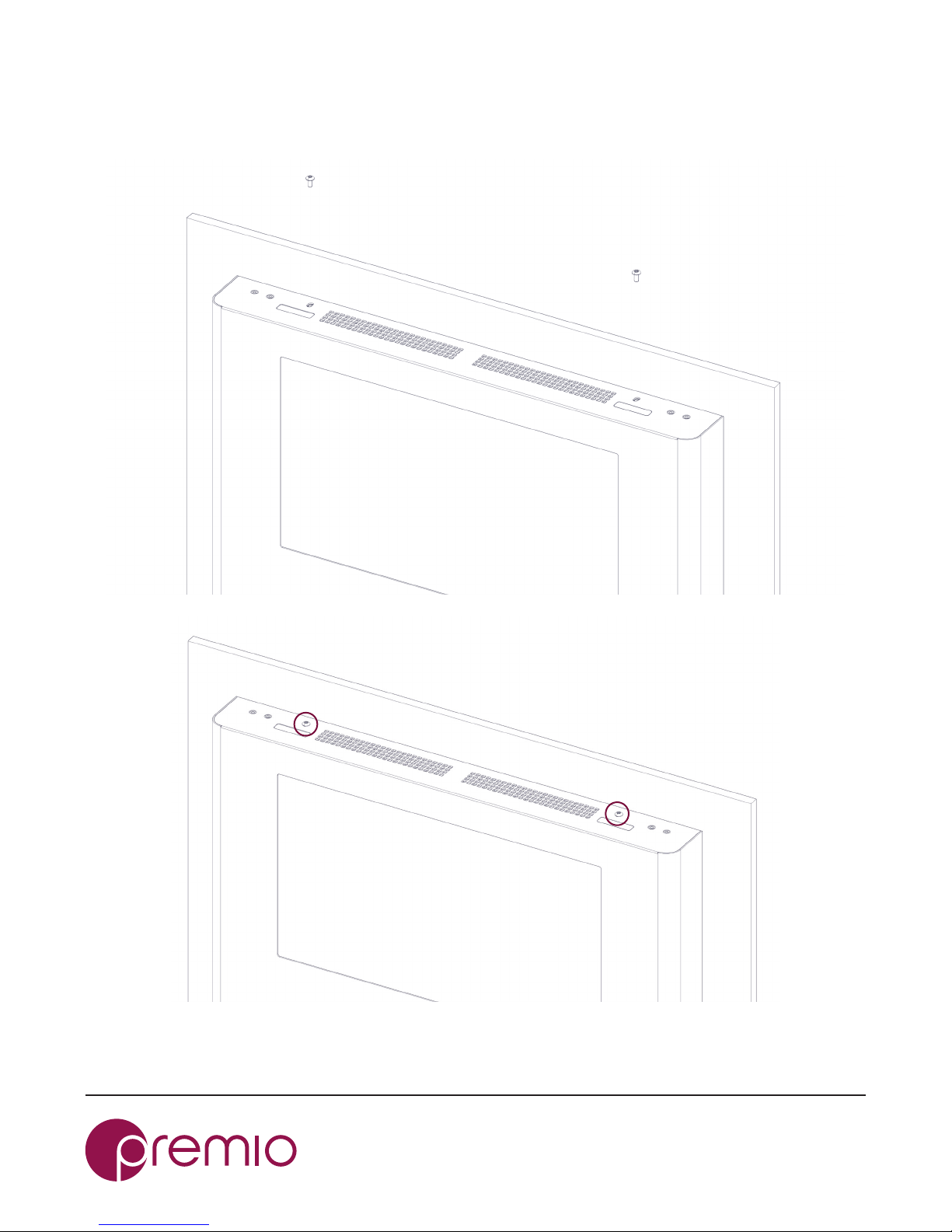
5. Fasten the security screws
1
2
Ce manuel convient aux modèles suivants
1
Table des matières


