
PoeWit U-11 Manuel utilisateur

poewit.com
CLOUD INTELLIGENT
UNINTERRUPTIBLE POWER SUPPLY (UPS)
WITH POWER CONDITIONER
QUICK START GUIDE
U-11 / U-15 / U-22 MODEL
poewit.com
INSTALLATION AND SETUP
2
BEFORE YOU START
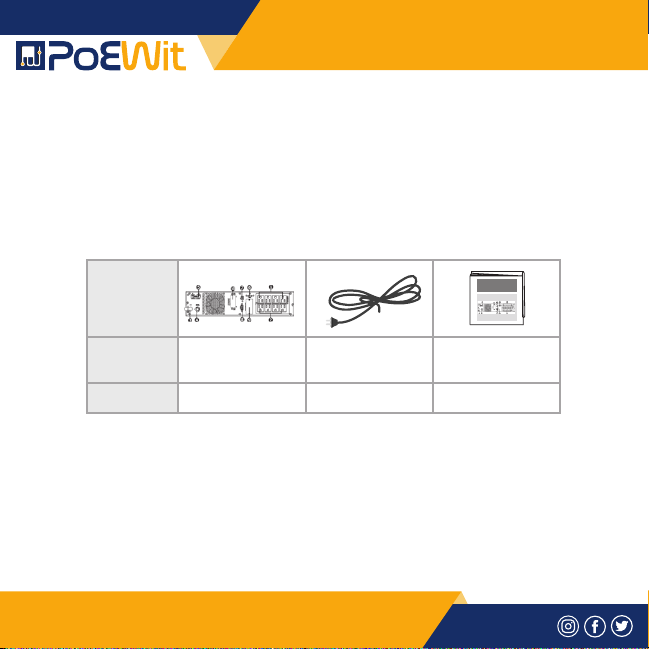
1) PACKAGE CONTENTS
Confirm that you have the package contents as follows:
1. PoE powered motion detector
2. Lens shield label
2) PRODUCT DESCRIPTION
PoEWit UPS, lets users define which devices have priority for
consuming battery power. In addition, PoEWit’s UPS battery
backup solutions feature state of the art noise filtering and
automatic voltage regulators to deliver clean power to audio and
video gear.
OS-458/A
PA SS IVE INF RA -RED
SE NS OR
FO R AU TO MA TION
CO NT RO L
PATTERN
ITEM
QUANTITY
UPS Unit
1
Power Cord
1
Poe Powered UPS
U-Series
Quick start
1
poewit.com
INSTALLATION AND SETUP
1
1) INSTALLATION AND SETUP
NOTE: Before installation, please inspect the unit. Be sure
that nothing inside the package is damaged. Please keep the
original package in a safe place for future use.
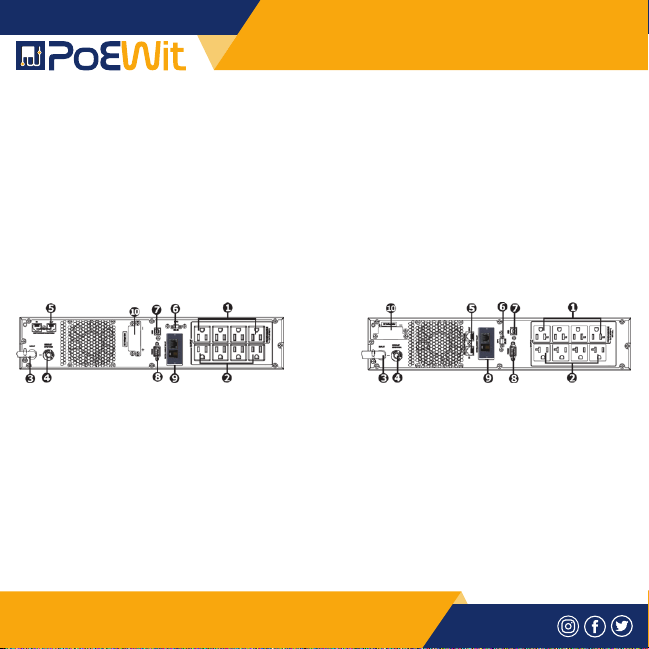
2-1. Rear Panel View
U-11/U-15 U-22
1. Programmable outlets
2. Non-programmable outlets
3. AC input
4. Input circuit breaker
5. Network/fax/modem surge protection
6. Emergency power off function connector (EPO)
Fig 1
poewit.com
INSTALLATION AND SETUP
2
7. USB maintenance port
8. RS232 maintenance port
9. RJ45 cloud network connection
10. External battery connector
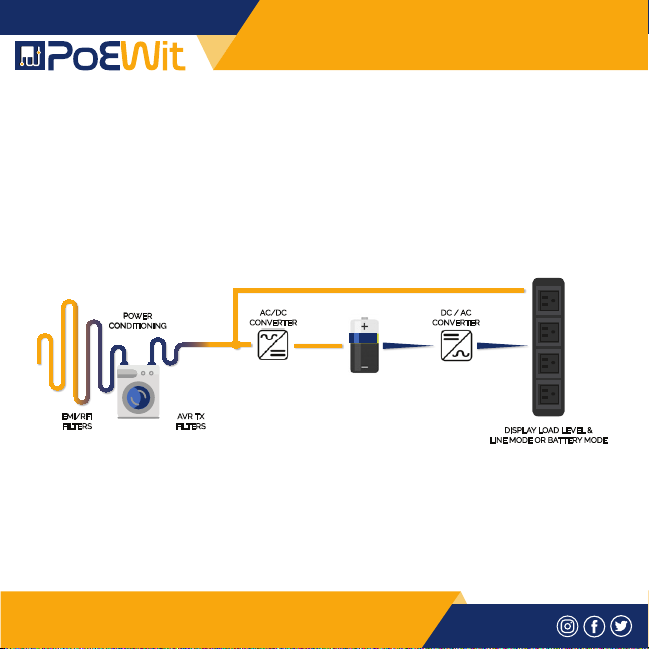
2-2. Operating principle
The operating principle of the UPS is shown as below.
2-3. Install The UPS
For safety consideration, the UPS is shipped out from factory
without connecting battery wires.
Before installing the UPS, please follow below steps to re-connect
battery wires first.
POWER
CONDITIONING
AC/DC
CONVERTER
DC / AC
CONVERTER
DISPLAY LOAD LEVEL &
LINE MODE OR BATTERY MODE
EMI/RFI
FILTERS
AVR TX
FILTERS
Fig 2
poewit.com
INSTALLATION AND SETUP
3
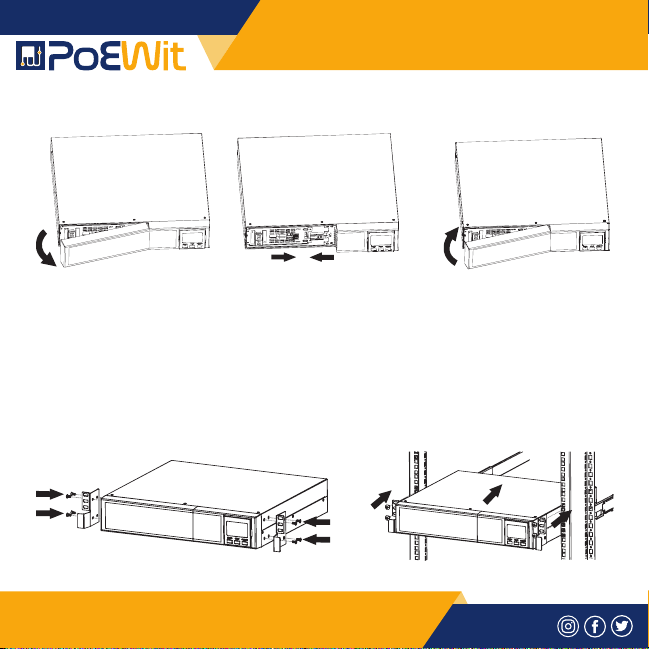
STEP 1 STEP 2 STEP 3
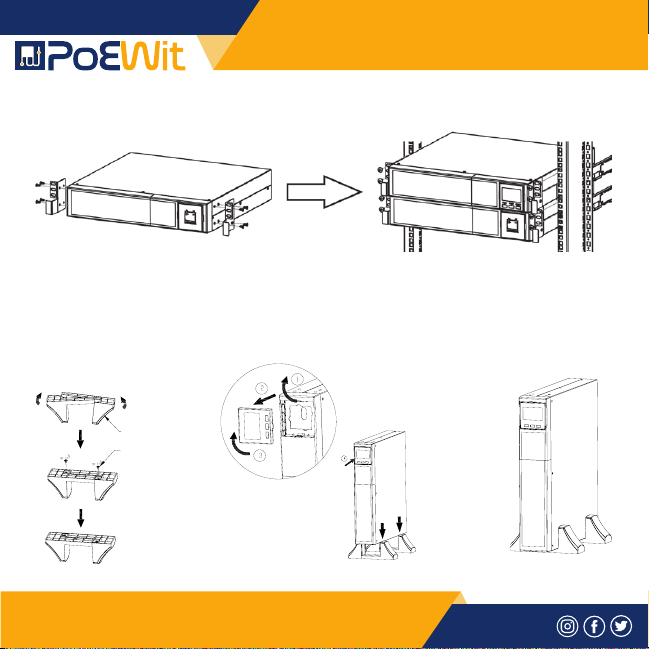
• Rack-mount Installation
CAUTION – Do NOT use the mounting brackets to lift the unit.
The mounting brackets are only for securing the unit to the rack.
• Install UPS alone
Remove front panel. Connect the AC input and
re-connect battery wires.
Put the front panel
back on the unit.
Fig 3
Fig 4
poewit.com
INSTALLATION AND SETUP
4
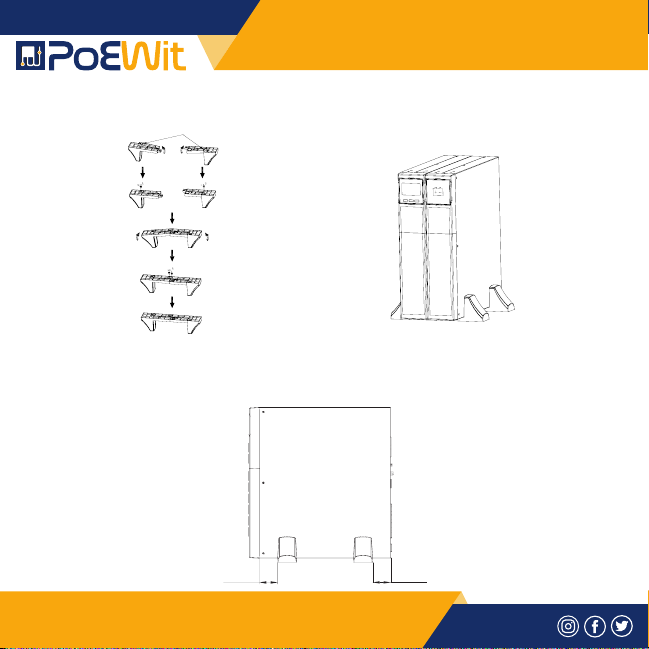
• Install UPS and external battery
• Tower Installation
Install UPS alone
Step 1 Step 2 Step 3
Footstand
Screw M4x8
Fig 5
Fig 6
poewit.com
INSTALLATION AND SETUP
5
Install UPS and external battery
NOTE: When installing the UPS or battery pack with feet,
please keep 70mm distance from the edge of the unit.
Foot Extend
70mm (2 .75 in)7 0mm (2 .75 in)
Fig 7
Fig 8

poewit.com
INSTALLATION AND SETUP
6
2-4. Setup The UPS
Step 1: UPS input connection
Plug the UPS into a two-pole, three-wire, grounded receptacle
only. Avoid using extension cords.
Step 2: UPS output connection
There are two kinds of outputs: programmable outlets and general
outlets. Please connect devices power control the programmable
outlets and non-power control devices to the general outlets.
Step 3: Communication connection
Intelligent slot
Connect your broadband connection to the RJ45 port for cloud connectivity.
Fig 9
poewit.com
INSTALLATION AND SETUP
7
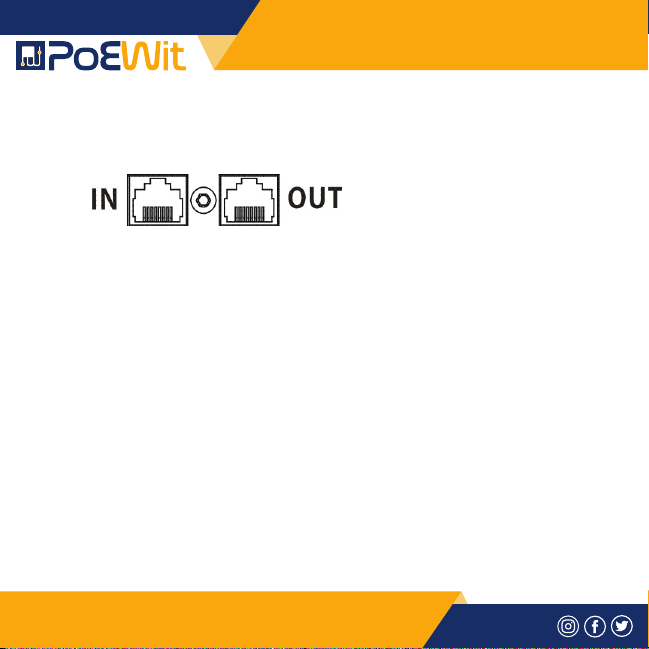
Step 4: Network connection
Network/fax/phone surge port
Connect a single modem/phone/fax line into surge-protected
“IN” outlet on the back panel of the UPS unit. Connect from “OUT”
outlet to the equipment with another modem/fax/phone line
cable.
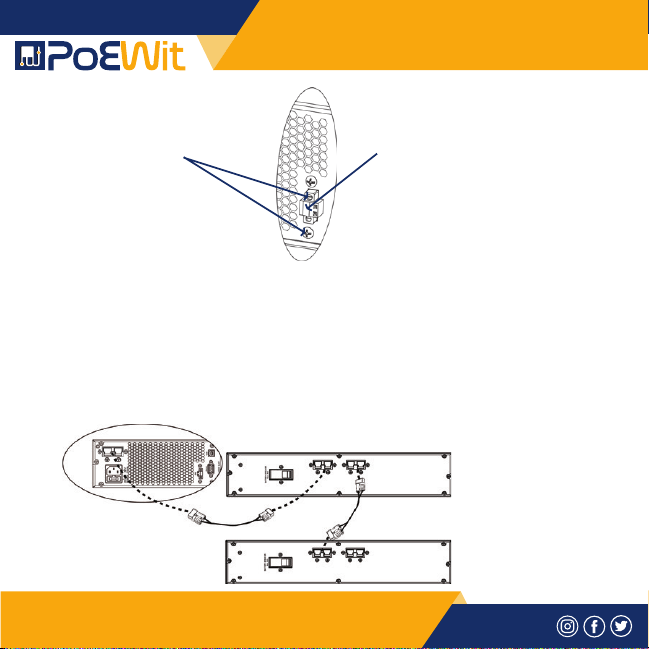
Step 5: Disable and enable EPO function
This UPS is equipped with EPO function. By default, the UPS is
delivered from factory with pin 1 and pin 2 closed (a metal plate
is connected to pin 1 and pin 2) for UPS normal operation. To
activate EPO function, remove two screws on EPO port and green
connector will be removed.
NOTE: The EPO function logic can be set up via LCD setting.
Please refer to program 7 in UPS settings for details.
Fig 10
poewit.com
INSTALLATION AND SETUP
8
Step 6: External battery connection
Connect one end of external battery cable to the UPS unit and
the other end to the battery box. See the chart below for detailed
connection.
CAUTION: Connection to external battery pack shall be installed by
SERVICE PERSONNEL only.
To activate EPO
function, remove
these two screws.
It’s in closed status for UPS
normal operation as default.
Batter y Pack #1
UPS
Batter y Pack #2
Fig 11
Fig 12
Ce manuel convient aux modèles suivants
2
Table des matières


