Planar SL3250 Manuel utilisateur

Simplicity Series

Simplicity Series
ii
Safety Instructions
Warnings and Precautions
KNOW THESE SAFETY SYMBOLS
CAUTION: TO REDUCE THE RISK OF ELECTRIC SHOCK,
DO NOT REMOVE COVER (OR BACK).
NO USER SERVICEABLE PARTS INSIDE.
REFER SERVICING TO QUALIFIED SERVICE
PERSONNEL.
This symbol indicates high voltage is present
inside. It is dangerous to make any kind of
contact with any inside part of this product.
This symbol alerts you that important literature
concerning operation and maintenance has
been included with this product.
CAUTION: FCC/CSA regulations state that any unauthorized
changes or modications to this equipment may
void the user’s authority to operate it.
CAUTION: To prevent electric shock, match the wide blade
of plug to the wide slot, and fully insert the plug.
TO PREVENT DAMAGE WHICH MAY RESULT IN FIRE
OR ELECTRIC SHOCK HAZARD, DO NOT EXPOSE THIS
APPLIANCE TO RAIN OR MOISTURE.
The Socket-outlet should be installed near the apparatus and
be easily accessible.
Read and follow these instructions
when connecting and using your Public
Information Display:
• Unplug the display if you are not going to use it for an
extensive period of time.
• Unplug the display if you need to clean it with a slightly
damp cloth. The screen many be wiped with a dry cloth
when the power is off. However, never use alcohol, solvents
or ammonia-based liquids.
• Consult a service technician if the display does not operate
normally when you have followed the instructions in this
manual.
• The casing cover should be opened only by qualied service
personnel.
• Keep the display out of direct sunlight and away from stoves
or any other heat sources.
• Remove any object that could fall into the vents or prevent
proper cooling of the display’s electronics.
• Do not block the ventilation holes on the cabinet.
• Keep the display dry. To avoid electric shock, do not expose
it to rain or excessive moisture.
• If turning off the display by detaching the power cable, wait
for 6 seconds before re-attaching the power cable for normal
operation.
• To avoid the risk of shock or permanent damage to the set
do not expose the display to rain or excessive moisture.
• When positioning the display, make sure the power plug and
outlet are easily accessible.
• IMPORTANT: Always activate a screen saver program
during your application. If a still image in high contrast
remains on the screen for an extended period of time, it may
leave an ‘after-image’ or ‘ghost image’ on the front of the
screen. This is a well-known phenomenon that is caused by
the shortcomings inherent in LCD technology. In most cases
the afterimage will disappear gradually over a period of time
after the power has been switched off. Be aware that the
after-image symptom cannot be repaired and is not covered
under warranty.

Simplicity Series
iii
Important Safety Instructions
1. Read these instructions.
2. Keep these instructions.
3. Heed all warnings.
4. Follow all instructions.
5. Do not use this apparatus near water.
6. Clean only with dry cloth.
7. Do not block any ventilation openings. Install in accordance
with the manufacturer’s instructions.
8. Do not install near any heat sources such as radiators, heat
registers, stoves, or other apparatus (including ampliers)
that produce heat.
9. Do not defeat the safety purpose of the polarized or
grounding-type plug. A polarized plug has two blades with
one wider than the other. A grounding type plug has two
blades and a third grounding prong. The wide blade or the
third prong are provided for your safety. If the provided
plug does not t into your outlet, consult an electrician for
replacement of the obsolete outlet.
10. Protect the power cord from being walked on or pinched
particularly at plugs, convenience receptacles, and the point
where they exit from the apparatus.
11. Only use attachments/accessories specied by the
manufacturer.
12. Use only with the cart, stand, tripod, bracket,
or table specied by the manufacturer, or
sold with the apparatus. When a cart is used,
use caution when moving the cart/apparatus
combination to avoid injury from tip-over.
13. Unplug this apparatus during lightning storms or when
unused for long periods of time.
14. Refer all servicing to qualied service personnel. Servicing
is required when the apparatus has been damaged in any
way, such as power-supply cord or plug is damaged, liquid
has been spilled or objects have fallen into the apparatus,
the apparatus has been exposed to rain or moisture, does
not operate normally, or has been dropped.
WARNING: TO REDUCE THE RISK OF FIRE OR ELECTRIC
SHOCK, DO NOT EXPOSE THIS APPARATUS
TO RAIN OR MOISTURE.
WARNING: Apparatus shall not be exposed to dripping or
splashing and no objects lled with liquids, such
as vases, shall be placed on the apparatus.
WARNING: The batteries (batteries installed) shall not be
exposed to excessive heat such as sunshine, re
or the like.
WARNING: The mains plug or appliance coupler is used as
the disconnect device,the disconnect device shall
remain readily operable.
WARNING: To prevent the spread of re, keep candles or
other open ames away from this product at all
times.
WARNING: To prevent injury, this apparatus must be securely
attached to the oor/wall in accordance with the
installation instructions.
CAUTION: These servicing instructions are for use by
qualied service personnel only. To reduce the
risk of electric shock,do not perform any servicing
other than that contained in the operating
instructions unless you are qualitied to do so.
CAUTION: Excessive sound pressure from earphones and
headphones can cause hearing loss. Adjustment
of the equalizer to maximum increases the
earphone and headphone output voltage and the
sound pressure level. Therefore, to protect your
hearing, adjust the equalizer to an appropriate
level.
For UL/CUL application: For use only with UL Listed Wall
Mount Bracket with minimum weight/load:
Minimum weight/load (kg)
SL3250 19.8
SL4250 35.7
SL4650 41.1
SL5550 63.6
For CB application: The equipment and its associated
mounting means still remain secure during the test:
Unit Weight
(kg)
VESA Size
(mm)
Mounting Screws
(X=Thickness of wall-mount plate)
SL3250 6.6 200 × 100 M6 × (16 + X)
SL4250 11.9 400 × 400 M6 × (20 + X)
SL4650 13.7 400 × 400 M6 × (20 + X)
SL5550 21.2 400 × 400 M6 × (24 + X)

Simplicity Series
iv
Regulatory Information:
Products: SL3250, SL4250, SL4650 and
SL5550; Regulatory Models: DS323QBT,
DS423QBT, DS463QBT and DS553QBT.
CE Declaration of Conformity
We declare under our responsibility that the product is in
conformity with the following standards:
• EN60065:2002+A1:2006+A11:2008+A2:2010+A12:2011
(Safety requirement of Audio, video and similar electronic
apparatus)
• EN55022:2010 (Radio Disturbance requirement of
Information Technology Equipment)
• EN55024:2010 (Immunity requirement of Information
Technology Equipment)
• EN61000-3-2:2006 +A1:2009+A2:2009 (Limits for Harmonic
Current Emission)
• EN61000-3-3:2008 (Limitation of Voltage Fluctuation and
Flicker)
• EN 50581:2012 (Technical documentation for the
assessment of electrical and electronic products with respect
to the restriction of hazardous substances)
following provisions of directives applicable:
• 2006/95/EC (Low Voltage Directive)
• 2004/108/EC (EMC Directive)
• 2009/125/EC (ErP Directive, EC No. 1275/2008, 642/2009
Implementing Directive for Standby and Off mode power
consumption)
• 93/68/EEC (Amendment of EMC and Low Voltage Directive)
and is produced by a manufacturing organization on
ISO9000 level.
• 2011/65/EU (RoHS 2 Directive)
Federal Communications Commission (FCC)
Notice (U.S. Only)
This equipment has been tested and found
to comply with the limits for a Class B digital
device, pursuant to Part 15 of the FCC Rules.
These limits are designed to provide reasonable
protection against harmful interference when
the equipment is operated in a commercial
environment. This equipment generates, uses
and can radiate radio frequency energy and,
if not installed and used in accordance with
the instructions manual, may cause harmful
interference to radio communications. Operation
of this equipment in a residential area is likely
to cause harmful interference in which case the
user will be required to correct the interference
at his own expense.
Changes or modications not expressly
approved by the party responsible for
compliance could void the user’s authority to
operate the equipment.
Use only an RF shielded cable that was supplied with the
display when connecting this display to a computer device.
To prevent damage which may result in re or shock hazard, do
not expose this appliance to rain or excessive moisture.
THIS CLASS B DIGITAL APPARATUS MEETS ALL
REQUIREMENTS OF THE CANADIAN INTERFERENCE-
CAUSING EQUIPMENT REGULATIONS.
This device complies with Part 15 of the FCC
Rules. Operation is subject to the following
two conditions: (1) this device may not cause
harmful interference, and (2) this device must
accept any interference received, including
interference that may cause undesired
operation.

Simplicity Series
v
End-of-Life Disposal
Your new Public Information Display contains materials that can
be recycled and reused. Specialized companies can recycle
your product to increase the amount of reusable materials and
to minimize the amount to be disposed of.
Please nd out about the local regulations on how to dispose of
your old display from your local dealer.
(For customers in Canada and U.S.A.)
Dispose of in accordance to local-state and federal regulations.
For additional information on recycling contact www.eia.org
(Consumer Education Initiative)
Waste Electrical and Electronie Equipment-
WEEE
Attention users in European Union private
households
This marking on the product or on its packaging
illustrates that, under European Directive
2002/96/EC governing used electrical and
electronic appliances, this product may
not be disposed of with normal household
waste. You are responsible for disposal of
this equipment through a designated waste
electrical and electronic equipment collection.
To determine the locations for dropping off such
waste electrical and electronic, contact your
local government ofce, the waste disposal
organization that serves your household or the
store at which you purchased the product.
End of Life Directives-Recycling
Your new Public Information Display contains
several materials that can be recycled for new
users.
Please dispose of according to all Local, State,
and Federal laws.

Simplicity Series
vi
Table Of Contents
4.3.3. Play les from wireless
device.................................... 16
4.4. Play options..................................... 16
4.4.1. Playing music les ................ 16
4.4.2. Playing movie les ................ 17
4.4.3. Playing photo les................. 17
5. Change your settings............................ 18
5.1. Settings ........................................... 18
5.1.1. Picture menu......................... 18
5.1.2. Sound menu.......................... 19
5.1.3. General settings menu.......... 19
5.2. Network Settings ............................. 20
6. Input mode ............................................. 21
7. Cleaning and Troubleshooting ............. 22
7.1. Cleaning .......................................... 22
7.2. Troubleshooting............................... 23
8. TechnicalSpecications ....................... 24
8.1. SL3250............................................ 24
8.2. SL4250............................................ 25
8.3. SL4650............................................ 26
8.4. SL5550............................................ 27
1. Unpacking and Installation..................... 1
1.1. Unpacking ......................................... 1
1.2. Package Contents............................. 1
1.3. Installation Notes............................... 1
1.4. Mounting on a Wall............................ 2
1.5. Cable Management........................... 3
1.6. Orientating in Portrait ........................ 3
2. Parts and Functions ................................ 4
2.1. Control Panel .................................... 4
2.2. Input/Output Terminals ...................... 6
2.3. Remote Control ................................. 8
2.3.1. General functions.................... 8
2.3.2. Inserting batteries in the remote
control ..................................... 9
2.3.3. Handling the remote control.... 9
2.3.4. Operating range of the remote
control ..................................... 9
2.4. RS232 Control................................ 10
2.5. LAN control .................................... 10
3. Connection............................................. 11
3.1. Connecting External Equipments.... 11
3.2. Connecting Multiple Displays .......... 12
3.2.1. RS232 Loop Through ........... 12
3.2.2. IR Loop Through .................. 12
3.3. IR Pass-through Connection ........... 13
3.4. Connecting Display to the Network . 13
3.5. Connecting Display to a Wireless
Device ............................................. 14
4. Operation................................................ 15
4.1. Watch the Connected Video Source15
4.2. Change Picture Format ................... 15
4.3. Play Multimedia Files ...................... 15
4.3.1. Play les from computer ....... 15
4.3.2. Play multimedia les from USB
device.................................... 15

Simplicity Series
1
1. Unpacking and Installation
1.1. Unpacking
• This product is packed in a carton, together with the standard accessories.
• Any other optional accessories will be packed separately.
• Due to the size and weight of this display it is recommended for two people to move it.
• After opening the carton, ensure that the contents are complete and in good condition.
1.2. Package Contents
Please verify that you received the following items with your package content:
• LCD display
• User manual
• Remote control with AAA batteries
• Power cord (1.8 m)
• VGA cable (1.8 m)
• RS232 cable (1.8 m)
• Cable Clamps (2)
Remote Control
and AAA Batteries
VGA Cable
RS232 Cable
Power Cord
Cable clamps (2)
Quick Start Guide
NOTES:
• For all other regions, apply a power cord that conforms to the AC voltage of the power socket and has been approved by and
complies with the safety regulations of the particular country.
• Keep the package box and packing material for shipping the display.
1.3. Installation Notes
• Due to the high power consumption, always use the plug exclusively designed for this product. If an extended line is required, please
consult your service agent.
• The product should be installed on a at surface to avoid tipping. The distance between the back of the product and the wall should
be maintained for proper ventilation. Avoid installing the product in the kitchen, bathroom or any other places with high humidity so as
not to shorten the service life of the electronic components.
• The product can normally operate only under 2000 m in altitude. In installations at altitudes above 2000 m, some abnormalities may
be experienced.

Simplicity Series
2
1.4. Mounting on a Wall
To mount this display to a wall, you will have to obtain a standard wall-mounting kit. We recommend using a mounting interface that
complies with UL1678 standard in North America.
SL3250:
Protective Sheet
Table
200
100
SL4250:
Protective Sheet
Table
400
400
SL4650:
Protective Sheet
Table
400
400
SL5550:
Protective Sheet
Table
400
400
1. Lay a protective sheet on a table, which was wrapped around the display when it was packaged, beneath the screen surface so as
not to scratch the screen face.
2. Ensure you have all accessories for mounting this display.
3. Follow the instructions that come with the base mounting kit. Failure to follow correct mounting procedures could result in damage to
the equipment or injury to the user or installer. Product warranty does not cover damage caused by improper installation.
4. For the wall-mounting kit, use mounting screws and tighten them securely:
VESA Size (mm) Mounting Screws
(X=Thickness of wall-mount plate)
SL3250 200 × 100 M6 × (16 + X)
SL4250 400 × 400 M6 × (20 + X)
SL4650 400 × 400 M6 × (20 + X)
SL5550 400 × 400 M6 × (24 + X)

Simplicity Series
3
Caution:
To prevent the display from falling:
• To lessen the probability of injury and damage resulting from fall of the display in case of earthquake or other natural disaster, be sure
to consult the bracket manufacturer for installation location.
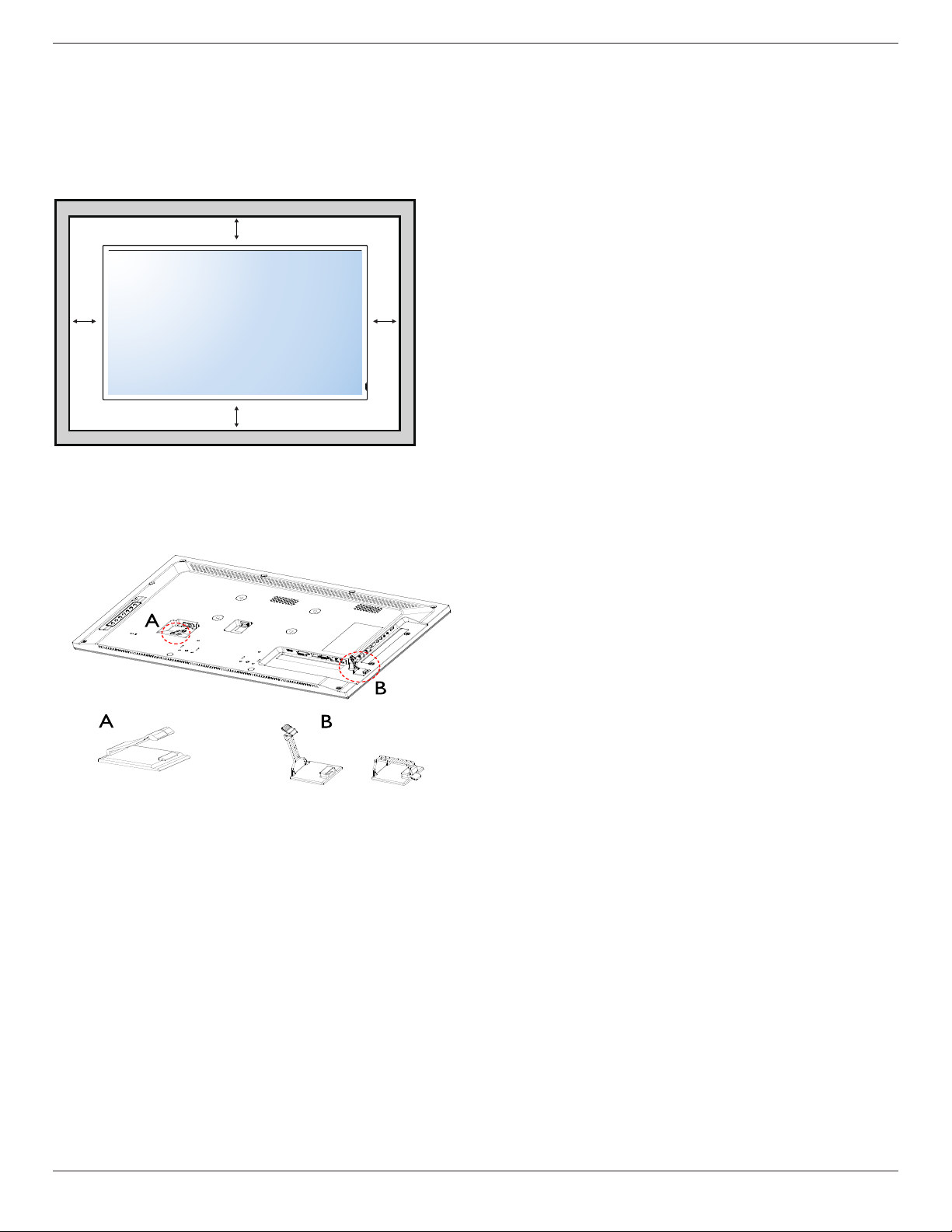
Ventilation Requirements for enclosure locating
To allow heat to disperse, leave space between surrounding objects as shown in the diagram below.
10 mm 10 mm
10 mm
10 mm
1.5. Cable Management
To use cable clamps for cable management.
Use cable clamp A to lock
the power cord
Use cable clamp B to
arrange the wires / cables
in side terminals
1.6. Orientating in Portrait
When using the display in the portrait position and looking at the front of the display,
it should be rotated clockwise so that the IR sensor window is on the bottom of the display. This will allow for proper ventilation.

Simplicity Series
4
2. Parts and Functions
2.1. Control Panel
SL3250:
INPUT MENU
3
2
5
4
1
7
6
8
SL4250:
INPUT MENU
3
2
5
4
1
7
6
8
SL4650:
INPUT MENU
3
2
5
4
1
7
6
8
SL5550:
INPUT MENU
3
2
5
4
1
7
6
8
Ce manuel convient aux modèles suivants
3
Table des matières