Pitney Bowes N500 series Manuel utilisateur

The Pinnacles, Harlow,
Essex, CM19 5BD
Electronic
Postal Scale
N500 series
- UK Model N521 & N521P
Operating Guide
We have made every reasonable effort to assure the accuracy and usefulness of this
guide, however we cannot assume responsibility for errors or omissions or liability for the
misuse or misapplication of our products.
© Pitney Bowes Limited, 2002Form No. N572001 REV B (11-02) Printed in U.S.A.
FOR SERVICE AND SUPPLIES:
Weight Hold

1
CHAPTER 1
INTRODUCTION
Offers a brief description of the scale and keypad, covers safety
precautions, cabling, specifications, and help information.
About Your Scale .................................................................... 2
Sleep Mode ..........................................................................................2
Safety Precautions ................................................................ 2
Mains Electrical Connection ......................................................... 2
Scale & Keypad Identification ............................................. 3
Connecting Wires, Cables, & Meter ..................................... 4
Specifications ......................................................................... 5
Getting Help............................................................................ 5

2
CHAPTER 1: INTRODUCTION
The N500 series Electronic Postal Scale is a 2kg capacity decision
making scale which uses computer technology to give you an accurate,
automatic display of weight, postal rate and charges. Place the mail on
the scale and select the appropriate category and any fees required; the
scale will display the correct postal charges.
The postage rate information is all contained within a small electronic
‘chip’ called a PROM. When the postage rates change, you can easily
remove the old PROM and fit a new one to instantly update your scale.
If the scale is linked to a Pitney Bowes electronic postage meter, it can
automatically set the postage value and control the accounts set up on
the postage meter.
If the scale is linked to a Pitney Bowes Electronic Postage Meter with a
Mailing Base capable of tape dispensing, the scale will also enable a tape
to be produced automatically.
The scale enters sleep mode if it remains inactive at zero weight for
more than three minutes. During sleep mode, the display is
extinguished.
Never attempt to remove covers from your scale. No user serviceable
parts are contained within the unit, servicing should be referred to
qualified personnel.
The scale platform may be removed to gain access to the Postage Rate
PROM (see page 26). Always ensure power is turned OFF at the mains
socket outlet before removing the platform.
The N500 is supplied with a power supply suitable for use on standard
UK 13A mains sockets. Only the power supply provided with the scale
should be used.
Note:
The socket outlet should be near to the equipment
and should be easily accessible.
ABOUT YOUR
SCALE
Sleep Mode
SAFETY
PRECAUTIONS
Mains electrical
connection

3
N500 User Guide
Weight Hold
SCALE & KEYPAD
IDENTIFICATION
Weighing Platform
Adjustable
Feet (4)
Level
Indicator Rate PROM
(Under Platform)
Display
Colour Keys
Alpha-
numeric Keys
C/CE Enter
Decimal
Point
Zero Key
(re-zeroes
scale)
Scroll Keys
Category/Carrier,
Scale & Meter Control
Keys
Menu Selection Keys
Model/Serial Number Plate
(Under Platform)

4
CHAPTER 1: INTRODUCTION
1
CONNECTING
WIRES, CABLES, &
METER
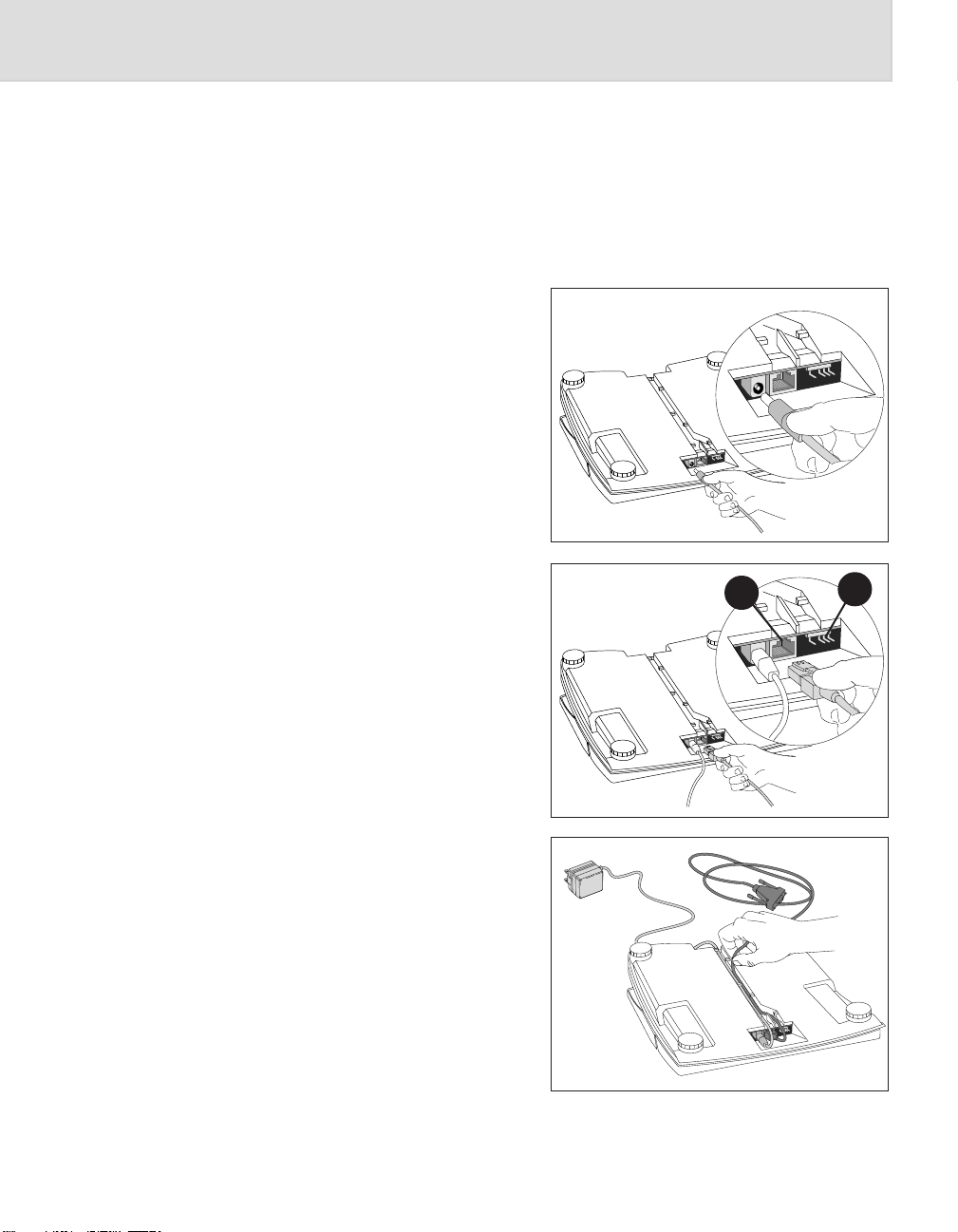
Your scale should already have been installed, either by yourself or by a
Pitney Bowes engineer. This section has been included to assist you if a
lead comes loose or you relocate the system.
1. Connect the small end
of the power cord to the
scale.
2. If using a Postage Meter,
connect the small end
of the meter cable to the
scale connector A.
Some meter cables may
have a second connector
which locates onto scale
connector B. If your
cable doesn’t have this
second connector,
nothing needs to be
connected at point B.
3. Tuck the cord(s) under
the guides on the
bottom of the scale.
B
A

5
N500 User Guide
Power supply: Input: 230VAC, 50Hz
Output: 9VDC, 300mA
Physical dimensions: 271mm deep x 237mm wide x 75mm high
Weight: 1.7kg
Operating temp. range: +10C to +40°C
Weighing specifications: Capacity: 2kg
Increment: 1g
Compliance: Pitney Bowes certifies that the
N500 complies with the
Low Voltage Directive 73/23/EEC and the
EMC Directive 89/336/EEC. The product
was tested in a typical configuration.
If you require assistance during the installation process, call our
Helpline on 0990 13 47 00.
If you require service after the initial installation process, call our
Careline on 0990 12 13 14.
SPECIFICATIONS
GETTING HELP
UL
Note:
A B700 Post-
perfect™ Postage
meter is shown, the
B900 meter has a
similar connector on
the right side of the
meter.
4. If using a Postage
Meter, connect the large
end of the meter cable
to the meter. Tighten
the thumbscrews
securely.

6
CHAPTER 1: INTRODUCTION

7
CHAPTER 2
USING YOUR SCALE
This Chapter describes the process of weighing a mailpiece and
calculating postage. It also provides information on special scale
features and meter interface.
The Keyboard ....................................................................... 8
Menu Selection Keys .................................................................. 8
Category/Carrier Keys ............................................................... 9
Scroll Keys..................................................................................... 9
Alpha-numeric & Colour Keys .................................................. 9
Scale Control Keys ..................................................................... 9
Meter Control Keys..................................................................... 9
Using the Scale .................................................................10
Sleep Mode ...................................................................................10
Postage Meter Accounts......................................................... 10
Choosing a Category .................................................................. 11
Choosing Fees .............................................................................. 12
Manually Adding a Value........................................................... 13
Using the Scale with a Postage Meter ................................ 13
Processing Additional Items................................................... 13
Using the Weight Hold Feature .............................................. 14
Currency Breakdown .................................................................. 15
Using ‘Scale Functions’ Feature .....................................16
Fee Recall ......................................................................................16
Entering Weight Manually ........................................................16
Pa rts Count .................................................................................. 17
Meter Functions ............................................................... 18
Funds .............................................................................................18
Account Status ......................................................................... 18
Changing Setup Options ................................................. 19
User Options ................................................................................ 19
Supervisor Options ...................................................................20

8
CHAPTER 2: USING YOUR SCALE
Weight Hold
This section is intended to familiarise you with the keyboard. Full
details of all key functions will be covered later in this guide as they are
used to operate the scale.
The keyboard is grouped into the following areas:-
•Menu Selection keys
•Category/Carrier keys
•Scroll keys
•Alpha-numeric keys and Colour keys
•Scale Control keys
•Meter Control keys
THE KEYBOARD
Menu Selection Keys
Note:
The keyboard layout
shown is correct at
the time of printing.
Changes to postal
rate structures
may mean your
keyboard looks
slightly different.
Operation of the
scale will, however,
be as described in
this guide.
Menu Selection keys Scale Control keys Scroll keys Colour keys
Category/Carrier keys Meter Control keys Alpha-numeric keys
The N500 features a menu driven user interface, which guides you
through each postal transaction and applies the information and
features you select. The Menu Selection keys also allow you to configure
the scale’s setup to your own requirements.
To select an item from the menu, press the key which is aligned with
you choice. The scale will accept your choice and advance to the next
menu screen, if appropriate.
Note: Pressing the
C/CE key once, while
in a transaction,
reverts to the
previous screen. The
second press of
C/CE clears the
transaction and
returns you to the
ready mode.

9
N500 User Guide
Category/Carrier Keys
Scroll Keys
These keys are either one-touch Category keys or Carrier keys. Pressing
a Category key will act as a short cut to select the Category in one easy
step. Pressing a Carrier key will list all available Categories for the
Carrier selected, then press the relevant Menu Selection key to choose
the Category you want.
Arrows ▲ ▼ appearing on the right hand side of the display indicate
that there are more choices available. Use the Scroll keys to move the
menu up or down to view the choices which will not fit on the display.
The Alpha-numeric keys are used to enter country codes, select the
number of tapes required or enter monetary amounts.
When used in conjunction with the Colour Keys, they allow you to
enter alphabetic information, such as names of countries or passwords.
For example, to enter the letter ‘S’:
First, press and release the blue key
Next, press the Skey
Remember: to enter alphabetic information, press the colour key before each
press of an alpha key.
Keys in this area are used to control functions of the scale. The Zero
key is covered below, see pages 15 and 18 for scale functions and setup
options.
The Zero key is used to re-zero the scale if it was turned on with a
weight on the platform or if the scale does not read zero correctly with
an empty platform.
Keys in this area allow you to change the account batch at the postage
meter, transfer monetary values to the meter for franking or producing
tapes, and allow you to view/change information at the meter.
Alpha-numeric &
Colour Keys
Scale Control Keys
Meter Control Keys
Ce manuel convient aux modèles suivants
2
Table des matières
Autres manuels Pitney Bowes Échelle

Pitney Bowes
Pitney Bowes Integra N300 Manuel utilisateur

Pitney Bowes
Pitney Bowes 397-C Manuel utilisateur

Pitney Bowes
Pitney Bowes 9K0U Manuel

Pitney Bowes
Pitney Bowes G795 Manuel utilisateur

Pitney Bowes
Pitney Bowes Integra N400 Manuel utilisateur

Pitney Bowes
Pitney Bowes SendKit SL-397-D Manuel utilisateur

Pitney Bowes
Pitney Bowes G799 Manuel utilisateur

Pitney Bowes
Pitney Bowes SV60584 Guide de référence

Pitney Bowes
Pitney Bowes G790 Manuel utilisateur

Pitney Bowes
Pitney Bowes INTEGRA N500 Manuel utilisateur