
Pinnacle PCTV 200E Manuel utilisateur

PCTV 200e
Hardware

PCTV 200e Hardware
User’s Guide
GB April 2005
© Pinnacle Systems GmbH 2005
All rights reserved.
No part of this manual may be reproduced or transferred to other media without
explicit written permission from Pinnacle Systems GmbH, Braunschweig,
Germany.
All brand or product names are trademarks or registered trademarks of their
respective holders.
This manual is printed on chlorine-free, bleached paper using solvent-free ink.
Pinnacle Systems GmbH has written this manual to the best of its knowledge,
but does not guarantee that the programs/systems will fulfill the users’ intended
applications.
No warranty is made as to the specifications of features.
Pinnacle Systems GmbH retains the right to make alterations to the content of
the manual without obligation to inform third parties.
All quotes, sales, supply and manufacturing contracts from Pinnacle Systems
GmbH, including consulting, installation and other contractual services are
subject exclusively to the General Sales and Delivery Terms of Pinnacle
Systems GmbH.

i
Table of Contents
Introduction...........................................................................................................1
Box Contents ........................................................................................................2
System Requirements ...........................................................................................3
Computer Hardware ..........................................................................................3
Computer Software............................................................................................3
Connecting the Antenna........................................................................................4
Active Planar Antenna.......................................................................................4
Or: Other Antennas ...........................................................................................5
Connecting to the Computer .................................................................................6
Positioning your PCTV 200e................................................................................7
Sitting on a Flat Surface ....................................................................................7
Attached to a Laptop Computer ........................................................................7
Positioning Tips for the Active Planar Antenna................................................9
Using the Remote Control ..................................................................................10
LED Display .......................................................................................................10
Technical Data ....................................................................................................11
Bus System......................................................................................................11
TV Tuner .........................................................................................................11
DVB-T Demodulator.......................................................................................11
Antenna Input (Optional) ................................................................................11

ii
Notes

Introduction
Congratulations! You are now the proud owner of a PCTV 200e!
PCTV 200e makes it possible to receive digital terrestrial television in
accordance with the DVB-T standard (Digital Video Broadcasting - Terrestrial)
and with excellent picture quality on your laptop and desktop PC. The PCTV
200e offers you a unique combination of a DVB-T receiver for USB and an
active planar antenna from Hirschmann™ Multimedia (the planar antenna is
optional).
The PCTV 200e has optimized reception and functions independently of the
power supply. This makes it the ideal mobile solution for digital television
reception on your laptop computer.
In addition to Live-TV, PCTV 200e also makes time delay television
(Timeshift) available, as well as giving you the ability to record shows on your
hard disk and on writable DVDs - without any compromise in sound or image
quality.
You also get access to the free information services, videotext and the electronic
program guide (EPG), which let you program the shows you want to record
simply and easily.
Additional services planned for the future include digital radio, interactive
television, and IP data reception. Some of these services are already available in
selected areas.
And now have fun with your PCTV 200e!
More information about DVB-T can be found on the Internet at
www.dvb.org.
1

2
Box Contents
PCTV 200e
Active planar antenna
Antenna adapter
Retaining clip
Remote control with batteries
(Figure is an example)
USB cable and
2 ferrite clips with special key
Adhesive pads Quick Start instructions
Installation CD
On CD-ROM:
User manual, Hardware instructions
Remote control instructions
Depending on the version of your product, package contents may vary.

3
System Requirements
In order for the PCTV 200e to function smoothly, your system must meet the
following requirements:
Computer Hardware
Processor
Minimum: Pentium III 1.0 GHz
or equivalent AMD Athlon XP processor (SD only)
Recommended: Pentium IV 2.0 GHz, Pentium M 1.3 GHz
or equivalent AMD Athlon 64 processor (SD and HD)
Working memory
Minimum: 256 MB RAM
Recommended: 512 MB RAM
Hard disk
Minimum: IDE hard disk with master mode drivers and 5 GB free disk space
Recommended: U-DMA hard disk with 20 GB free disk space
Graphics controller
Minimum: DirectX 8 compatible graphics card
Recommended: DirectX 9 (or higher) compatible graphics controller
Sound controller
Minimum: DirectX 9 compatible sound controller
USB port
USB (full-speed or high-speed) port
CD-ROM / DVD-ROM drive or recorder
Minimum: CD-ROM or DVD-ROM drive
Recommended: CD or DVD recorder
Computer Software
Windows XP (Home Edition, Professional Edition or Media Center Edition
2005) with the latest Service Pack
Connecting the Antenna
You can use different types of antennas with the PCTV 200e:
Active Planar Antenna
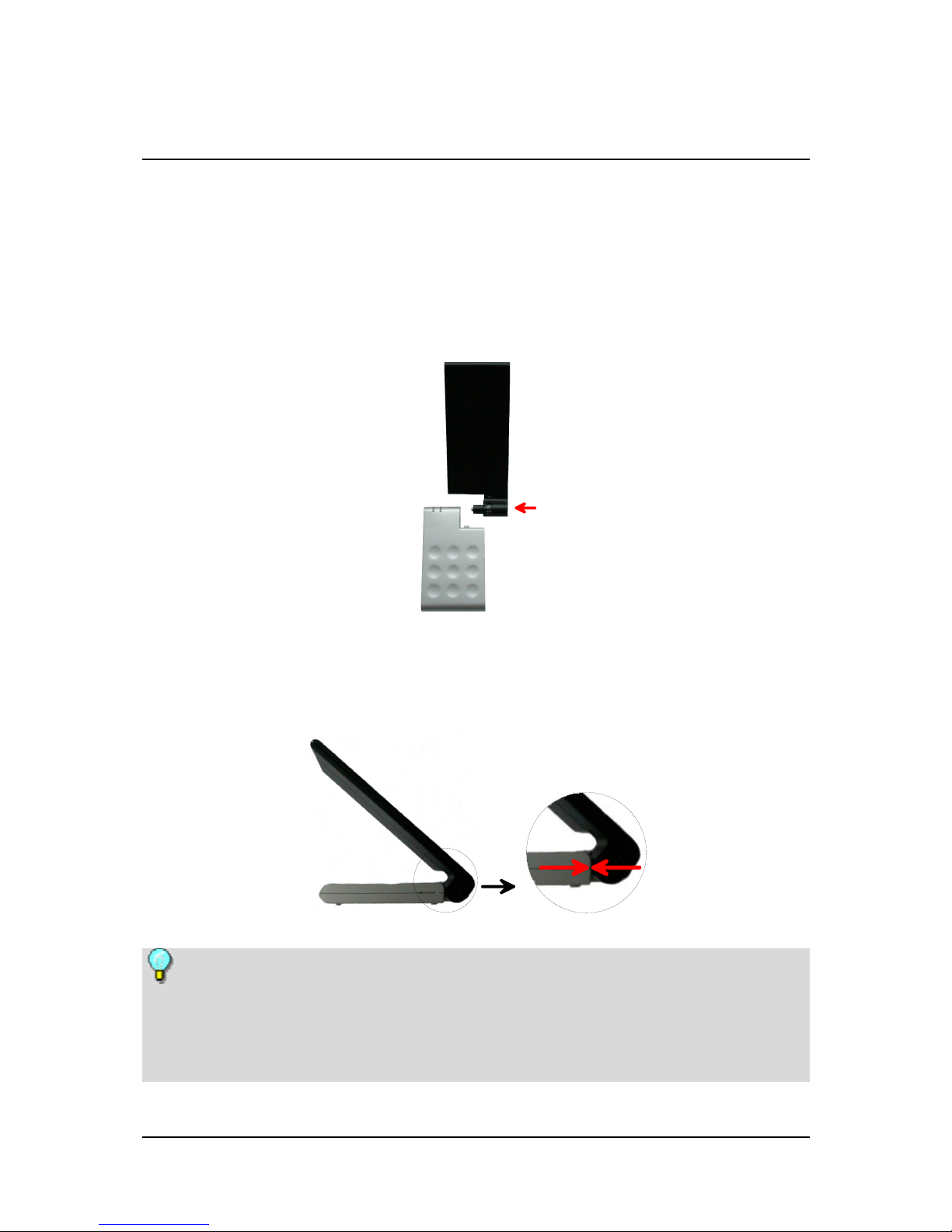
To mount the active planar antenna (optional), insert it into the antenna input
socket on the side of the PCTV 200e.
In order to insert the antenna into the PCTV 200e casing, the marking
stamped on the side of the antenna must be lined up with the seam of the
PCTV 200e casing.
When using the active planar antenna (optional) or another active antenna
without its own power supply, make sure that the antenna power supply is
activated in the "Settings" menu in the Pinnacle MediaCenter application.
If the antenna power supply is active, a red LED on the PCTV 200e casing will
light up.
4
Or: Other Antennas
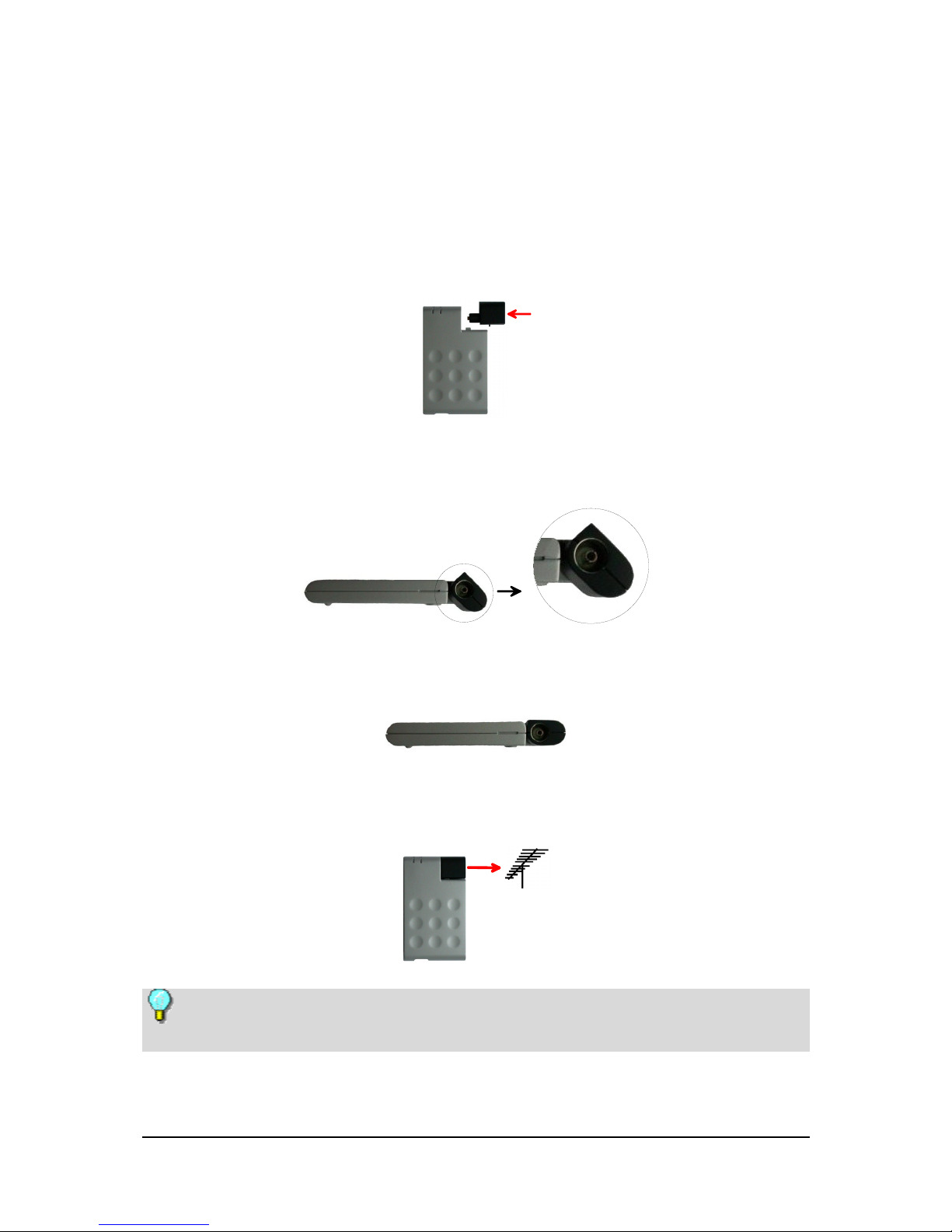
If your PCTV 200e does not include an antenna or you live in an area that is not
suited for receiving signals with indoor antennas, connect the PCTV 200e to
another antenna (e.g., your building antenna) using the antenna adapter:
Insert the antenna adapter into the antenna input socket of the PCTV 200e
from the side.
When doing this, make sure that the plastic knob on the
PCTV 200e casing fits into the round groove of the adapter.
Now turn the adapter until it snaps into the PCTV 200e casing and both line
up properly.
Finally, connect the antenna adapter to your building antenna or to an indoor
antenna.
To connect an antenna, you need the corresponding cable. Note that the
quality of the cable has a great influence on the quality of the reception.
5

6
Connecting to the Computer
Connect your PCTV 200e with your computer via the USB port.
Use only the USB cable included in the box.
In order to minimize possible interference when reception conditions are less
than optimal, we recommend attaching the ferrites included in the package
(see Figure 1) to both ends of the USB cable.
To do this, lay one end of the USB cable into a ferrite clip and fold the sides
of the clip together (Figure 2). Repeat the procedure for the other end of the
USB cable and the second ferrite.
If at some time in the future, you no longer want to use the ferrites, use
the special key included in the package to open them (Figure 3).
Table des matières
Autres manuels Pinnacle Récepteur TV


