Pinnacle Technology LS2R15 Manuel utilisateur

BARCODE LABEL SCALE
USER MANUAL
MODEL: LS2R15,LS2R30
Pinnacle Technology Corp.


CONTENT
1 SUMMARIZATION.......................................................................................................................................... 1
2 SPECIFICATION.............................................................................................................................................. 2
3 APPEARANCE................................................................................................................................................. 3
4 INSTALLATION............................................................................................................................................... 4
4.1 Install display pole............................................................................................................................. 4
4.2 Earthing.............................................................................................................................................. 6
4.3 Power on/off ...................................................................................................................................... 7
4.4 Paper Installation ............................................................................................................................... 8
5 PRINTER REPLACEMENT............................................................................................................................11
6 SALES OPERATION...................................................................................................................................... 14
6.1 Calculate by Weight......................................................................................................................... 14
6.2 Tare Operation ................................................................................................................................. 16
6.3 Calculate by Piece............................................................................................................................ 17
6.4 Discount........................................................................................................................................... 18
6.5 Change Price.................................................................................................................................... 19
6.5.1 Permanently Change Price.................................................................................................... 19
6.5.2 Temporarily Change Price.................................................................................................... 20
7 SOME SIMPLE OPERATION........................................................................................................................ 23
7.1 Normal Package............................................................................................................................... 23
7.2 Package by Fixed weight................................................................................................................. 23
7.3 Package by Fixed Price.................................................................................................................... 24
7.4 Piece Together Usage....................................................................................................................... 25
8 FUNCTION SET............................................................................................................................................. 27
8.1 PLU Set............................................................................................................................................ 27
8.2 System Set ....................................................................................................................................... 28
8.3 Function Lock.................................................................................................................................. 30
8.4 Lock Scale ....................................................................................................................................... 30
9 COMMUNICATION SETUP.......................................................................................................................... 31
9.1 Interface Criterion of Link 32 based on TCP/IP Protocol................................................................ 32
9.2 Handshaking Flowchart of Label Scale and Background................................................................ 33
9.3 Making procedure of connector....................................................................................................... 35
10 TROUBLESHOOTING .......................................................................................................................... 36
11 SOFTWARE DESCRIPTION ................................................................................................................. 40
11.1 Software installation........................................................................................................................ 40
11.2 Use Link32....................................................................................................................................... 42
11.2.1 Communication Test.............................................................................................................. 42
11.2.2 Main table explanation.......................................................................................................... 43
11.3 Programming PLU Information....................................................................................................... 52
11.3.1 Programming Barcode .......................................................................................................... 52
11.3.2 Programming Message.......................................................................................................... 52
11.3.3 Programming Multi Label .................................................................................................... 53
11.3.4 Programming Rebate............................................................................................................. 54
11.3.5 Weight Unit Setting................................................................................................................ 54

11.3.6 Shelf Time Setting.................................................................................................................. 55
11.3.7 Import from Excel and Export to Excel............................................................................... 56
11.3.8 Preferences.............................................................................................................................. 58
11.3.9 Page setup............................................................................................................................... 60
11.3.10 PLU Print ............................................................................................................................... 61
11.3.11 Programming PLU information ........................................................................................... 62
11.3.12 Download PLU....................................................................................................................... 63
11.3.13 Make PLU hotkey sheet ........................................................................................................ 64
11.4 Programming label........................................................................................................................... 67
12 APPENDIX ............................................................................................................................................. 68
12.1 Appendix 1: TXP (XU) File Format............................................................................................. 68
12.2 Appendix 2: Barcode Coding List ................................................................................................ 69
12.3 Appendix 3: Main difference between LB scale and LP scale:..................................................... 70
12.4 Appendix 4: Live Commodity Batch Management...................................................................... 71

1
1SUMMARIZATION
Simple and easy to operate
1. You can use single key to sell PLU quickly. Clerk can operate this scale without training.
2. This scale has 112 direct keys (224 hotkeys can be set) and can set hotkeys for most of the common goods.
Advanced function and endurance
1. Firmware program can be updated through PC in order to keep advanced and up to date.
2. FlashRom protection function assures the security of program and source.
3. Keyboard can be cleaned. It resists dirty with great validity.
4. Printer is designed elaborately and not easily subject to paper jam.
5. Barcode rotation can prolong the life of printer head. Printer core can be adjusted according to label paper.
6. Printer can load 1000 pieces of label paper while other printer can only load 800 pieces of label paper.
7. There are several package methods (fixed weight, and fixed price). Barcode printer is specially designed.
8. Piece together function, which can gather several kinds of commodity as required, such as fruit basket.
9. 12000 pieces of PLU can meet all kinds of demand.
10. Every piece of PLU can be set to use multiple labels.
11. Every piece of PLU can use single barcode format, which resolves the coding problems during selling.
12. Every piece of PLU can use single metric unit.
13. Numeric unit can be defined by user such as block, package and entries.
14. Sufficient PLU message includes barcode format, live commodity Code and package type and so on.
15. Label can be printed in rotated position.
16. Support Ean-13 code and 18 code, and resolve the coding problem of live commodity.
17. Special barcode type for the convenience of live commodity lot management.
Convenient, flexible and powerful software support
1. What you see in label designing is what you get. Label size can be selected. Volume of smallest area can be created
according to user. Thus we can decrease cost greatly.
2. International design and supporting worldwide language make it unnecessary to add any accessory.
3. We can adjust the popular commodity at any time and improve the foregrounding working efficiency greatly.
4. Downloading data can be executed in scheduled time.
5. Background discounts fixedly.
6. Discount in different period of time. Ten discount modes can be defined and each mode has five periods of time using
different discount rate.
7. It supports broadcast downloading.
8. With the function of FTP and TCP/IP. The software supports Unix system and Internet.
9. We can set POS program parameters on PC.
10. Its management is separated into machine, commodity, and hotkey, which make usage of the scale optimum.
11. We can edit and print keyboard sheet quickly with this software.
12. Locking the POS function key can control its operation such as locking discount key and PLU edit key. Also it offers
function to unlock password.
13. It is managed by multi-user and records login information automatically in order to supervision.
14. It offers dynamic link library for the convenience of user‟s second development.

2
2SPECIFICATION
1. Resolve segment
Power: AC 100V~240V 50/60Hz 1A
Working temperature: 0℃-40℃
Precision grade: Ⅲ
A/D resolving rate: 30000
Verification scale interval: LS2615ER: 0kg~6kg e=2g
6kg~15kg e=5g
LS215ER: 0kg~15kg e=5g
LS21530ER: 0kg~15kg e=5g
15kg~30kg e=10g
Number of verification scale interval: 3000
Printer:
Printer driver: 24V
Number of dots/line: 448dots/per line
Dot spacing: 0.125mm
LCD:
Message/weight: 24×110 dots
Price: 8×110 dots
Total price: 7×110 dots
Dimension:
(14.3
364.0mm
344.9mm
263.4mm
124.0mm
(13.6
(10.4
(4.9
(6.2
429.1mm
478.3mm
158.2mm
(16.9
(18.8

3
3APPEARANCE
Note: As for cleaning the thermal printer head, please refer to Chapter 10.
Clearing pen
Note: If the printer head is dirty, clean
hot sensor head softly with the cleaning
pen attached. The cleaning pen is an
alcohol pen; please cover it immediately
after you wipe the dirty off.
Printer
Display
Tray
Hotkey
Numerical key
Function key
Power switch

4
4INSTALLATION
4.1 Install display pole
1. Take out the fix set
2. Open the LCD cover
3. Mount the display pole
4. Cover the LCD, then put on fix set
like the picture shows.

5
5. Connect the line, and fix the 4
screws.

6
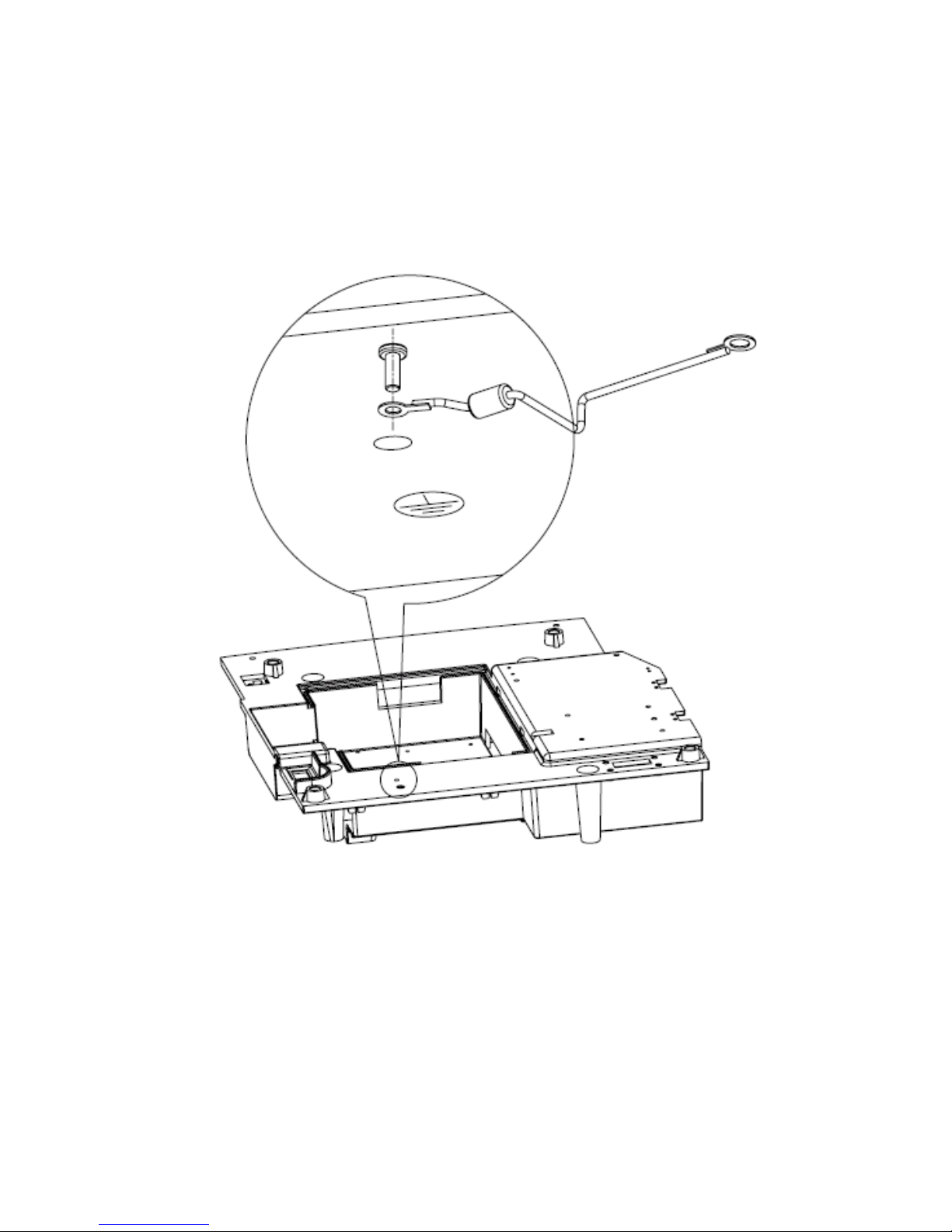
4.2 Earthing
NOTICE: We suggest you earth the scale in order to make sure the operator‟s safety. In case of the
electricity leak out, the operations on the scale is also safety.
Tighten the screw
Earthing
Ce manuel convient aux modèles suivants
1
Table des matières
Autres manuels Pinnacle Technology Échelle

Pinnacle Technology
Pinnacle Technology PS1X series Manuel utilisateur

Pinnacle Technology
Pinnacle Technology LS2R1 Manuel utilisateur

Pinnacle Technology
Pinnacle Technology LS2RX Manuel utilisateur

Pinnacle Technology
Pinnacle Technology CS3X Manuel utilisateur

Pinnacle Technology
Pinnacle Technology OS2CX Manuel utilisateur

Pinnacle Technology
Pinnacle Technology PS1XA Manuel utilisateur