
Pidion BIP-1300 Series Manuel utilisateur

•Please read the following warnings before using the product.
•Shapes and colors of the images shown in this manual may differ from the actual products.
•Contents of the manual may differ based on the software version of products or conditions of the wireless provider.

※ Please read “Cautions and Instructions” before using the product.
PIDION is a Leading Brand in the mobile industry. Bluebird Soft Inc. is a trusted global company which
represents high technology and is currently registered worldwide with its PIDION trademark legally
protected by law.
This manual is protected by Copyright Laws and has been produced by Bluebird Soft Inc.
(Please note that there may be editorial mistakes or possible omission of information.)
Programs embedded in the products are legally protected. Unauthorized copying, transferring, or deletion is strictly
prohibited by law.
There may be a few operational problems caused by the application environment, application program, or other
surrounding machinery. This product generates, uses and can radiate radio frequency energy and if not installed and used
in accordance with the instructions, it may cause harmful interference to radio communications. Service related to human
security is not provided as there may be a possibility of confusion in the electric waves of the product.
Registered Trademark
User Manual
This wireless product might cause radio jamming or there may be a possibility of confusion in the
electric waves of the product. Service related to human security cannot be provided
under these circumstances so it is up to the user to take precautions.
Registered Form
This machinery has been registered for electromagnetic emission sufficiency so the attention of
both the sellers and users are required. If an inappropriate product is sold or bought,
exchange it with a product for domestic use.
A-Class Machinery
(Information Communication
Device for Business)
Users ManualModel

This PDA device has passed the standard for the emission of electromagnetic waves. However, for the users health and safety please only use the authentic products
provided by Bluebird Soft Inc. Otherwise your safety cannot be guaranteed.
1. Precautions for Storing and Charging the Battery
• If the product or battery has been submerged under water, do not attempt to dry it by heater or microwave.
(In case of water damage, if the label inside the PDA changes color, you will not be able to receive free customer service for repair, so please be careful.)
• Ensure that necklaces, coins, etc. does not contact the battery’s connection terminal (the metal plate part).
• If you do not use the battery for a certain period of time, you must charge it first, and then store it in room temperature. This will ensure that the battery’s capacity and
durability are unaffected.
• Even when the battery is fully charged, usage time for a charge may shorten due to lowered voltage generated from the usage of the product.
• Use only original or authentic batteries and adaptors, and do not use them for applications other than those of the PDA.
(If you do otherwise there is a risk of explosion, or possibilities for shorter durability of the PDA, battery, and adaptor.)
•Plug in the adaptor firmly so it does not jiggle. If symptoms such as smoke, odor, or noise occurs, immediately turn the product off and detach the adaptor from the
outlet. Also in cases of thunder or lightening, please detach the adaptor from the outlet as well.
2. Precautions for the Phone and Product
• Make sure you are aware of all information related to the products electromagnetic waves.
- This product transmits and receives high-frequency energy (RF energy) while it is on. The Department of Information and Communication has legislated and is
enforcing the safety standards of these effects on the human body. This product meets all the standards.
(If you do not use the authentic product, we cannot guarantee the user’s safety related to electromagnetic transmission.)
•Please turn off the product in places where the use of it is prohibited (e.g.- airplanes, hospitals, etc.) or when you are in dangerous areas which may be associated to
electric waves.
• Do not put items using magnets such as credit cards, bankbooks, or transportation cards near the PDA. The magnetic waves from the PDA may damage the data saved in
the PDA.
• Record or store data from the PDA by making a backup copy. There may be cases where important data is deleted when repairing damage or upgrading the PDA, so
please backup your important data in advance.
• If the PDA has a RF Card reader we recommend that you do not use CDMA/GSM communications at the same time.
- If you use RF Card Reader and CDMA/GSM communication at the same time, calls may be cut off, incoming calls may not be received, or data connections might
became slow or completely cease. If you do not use it together, no problems with the connections will occur.
3. Other Precautions
• Data might be damaged by carelessness of the user or during reparation of the product. The producers are not responsible for the loss caused by it, so please record or
store your important data in advance.
• Do not remodel, disassemble or try to fix the product by yourself. Please contact customers service for reparations or inquiries.
• If you experience an allergic reaction from the product, stop using the PDA immediately and consult your doctor.
• Do not put dye or paint on the PDA. It may cause damage to the appearance or screen, or may cause the product to malfunction.
• Using the product in an environment with high temperature or humidity for a long period of time may cause damage to the product.
• If you use a drill, nail, or pen instead of the product’s Stylus Pen, it may cause damage to the LCD screen.
• Avoid external vibrations or shocks. When not in use and after detaching the power code, store it in a safe place where it cannot be dropped.
Cautions and InstructionsCautions and Instructions In order to use the product properly and safely, and to prevent accidents in
advance please follow the safety guidelines indicated below.
!!

Table of ContentsTable of Contents
Ⅰ. Knowing the Product
1. Components • 1
2. Basic Terms • 2
3. Button Description • 5
4. Function Key Description • 6
5. Attaching Detaching the Battery • 7
6. Charging the Battery • 8
7. About Batteries • 10
8. Connection Status Alerts • 11
9. PDA Specification • 12
Ⅱ. Learning the Basics
1. Turning On Off • 14
2. Using the Stylus Pen• 14
3. Starting the PDA • 15
4. Making Receiving Calls • 17
5. Typing • 18
6. Using SD Memory Card • 20
7. Software Reset (Initialization) • 21
8. Hardware Reset (Memory Format) • 21
9. Using SIM Card • 22
Ⅲ. Functions
1. Using Barcode Reader • 23
2. Using Camera • 25
3. Using Infrared Port (IrDA) • 27
4. Using Bluetooth • 28
5. Using Wireless Admin • 30
6. Using USB Host • 31
7. Setting GSM Band • 32
8. Setting CDMA 1xEVDO Data Connection • 33
Ⅳ. Connecting ActiveSync
1. Installing ActiveSync• 34
2. Downloading Files • 36
Ⅴ. Appendix
1. Q&A • 37
2. Customer Service • 38
3. Certifications of the Product • 39
Copyright © 2006 Bluebird Soft, Inc. All Rights Reserved. < 1 >
BIP-1300
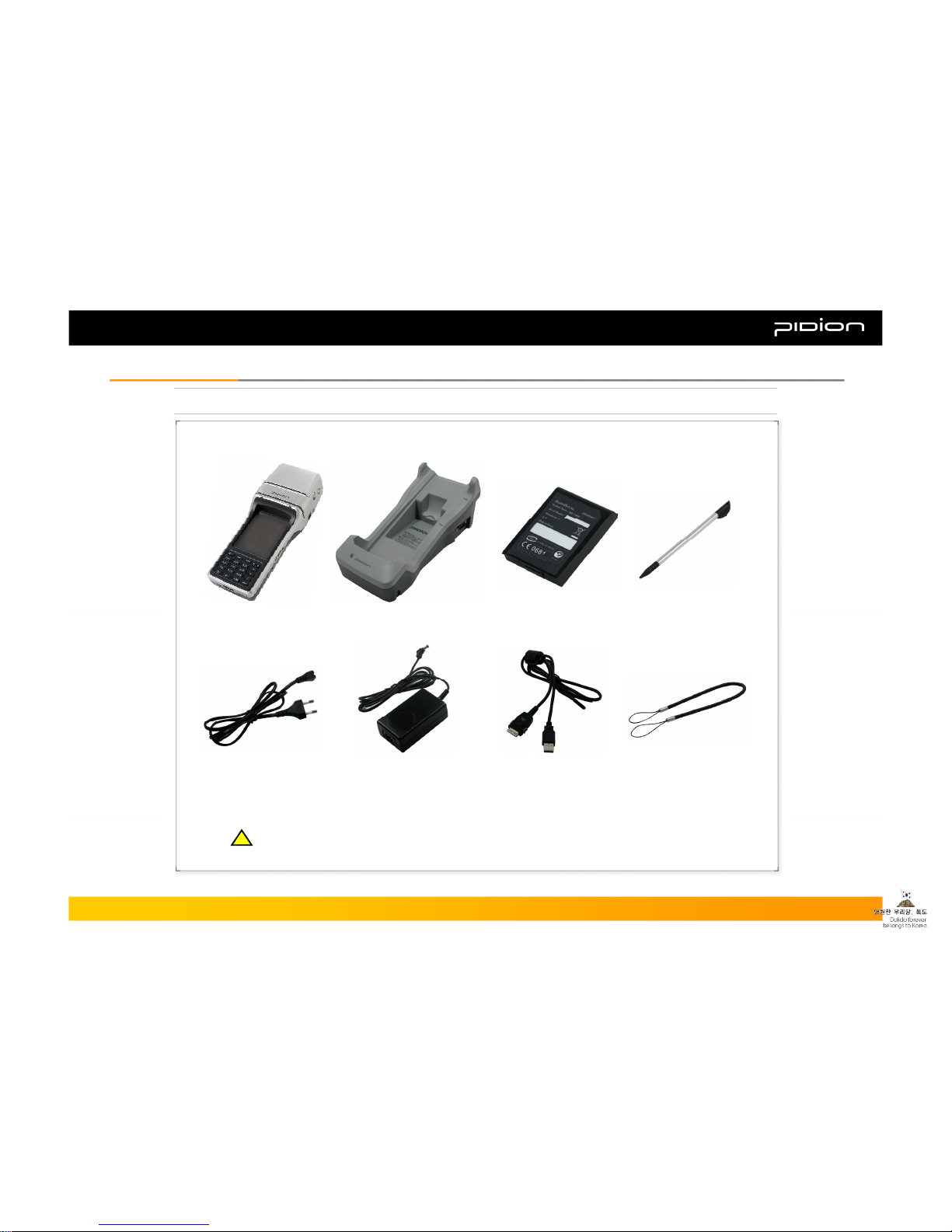
1. Components
Thank you for purchasing a PIDION product.
Please check and make sure the following components are included in the package.
[Cradle][PDA] [Battery] [Stylus Pen]
[Power Cable] [AC Adaptor] [USB Cable] [Stylus Pen Elastic Cord]
I. Knowing the ProductI. Knowing the Product
The pictures or the figures in this manual may differ from the actual product.
If you would like to purchase an additional or optional version, please contact Customers Service.
!!

2. Basic Terms
[Front]
Printer
Printer Output
Magnetic
Card Reader
CDMA/GSM
Status Alert Lamp
Charge Alert
Lamp
LCD
Key Pad
Junction for Data Sync or
Portable Charge
Cradle Connection
[Bottom]
Please familiarize yourself with the basic terms of the PDA product.
Copyright © 2006 Bluebird Soft, Inc. All Rights Reserved. < 2 >
BIP-1300
I. Knowing the ProductI. Knowing the Product

2. Basic Terms
[Right Side]
Speaker
Open/Close
Printer Button
Ear Jack
IC Card Reader
Barcode or
Camera Button
Reset Button
SD Slot
IrDA
[Left Side]
Printing Paper
Status
Window
USB Host
Terminal
Barcode or
Camera Button
Copyright © 2006 Bluebird Soft, Inc. All Rights Reserved. < 3 >
BIP-1300
I. Knowing the ProductI. Knowing the Product

2. Basic Terms
[Back]
Barcode Scanner
Camera
Hand Strap
Open/Close
Battery Case
Button
[Back]
Flash
Copyright © 2006 Bluebird Soft, Inc. All Rights Reserved. < 4 >
BIP-1300
I. Knowing the ProductI. Knowing the Product

3. Button Description
The side button on the PDA is generally used as the Barcode Reader.
You can also map it at the Users Setting to launch the Camera button.
Barcode/Camera
Side
Buttons
Move to the next line or enter signs and characters, run programs, or
activate folders.
Enter
Execute an event while holding the function key and a numeric key
simultaneously.
Function
Move to the left menu.
Move to the right menu.
Arrows
Turn the PDA ON/OFF.
You can turn the LCD back light ON/OFF by pressing the button for more
than 3 seconds.
Power
End the current call.
Or terminate the program currently in use.
End
Change the character mode to <Digits → Lower Case Letters → Capital
Letters>
Alpha
Deletes single characters at a time, from right to left.Clear
Launch Phone Program or make a phone call.Send
Front
Buttons
Copyright © 2006 Bluebird Soft, Inc. All Rights Reserved. < 5 >
BIP-1300
I. Knowing the ProductI. Knowing the Product

4. Function Key Description
Move down+
Move up+
Launch Stylus Pen control program+
Commend Page Up+
Select the next launched program on Tasks, or move 8 spaces to the
right in Word Mobile (same feature as the Tab key on the PC)
+
Commend Page Down+
Gradually darken the LCD screen+
Commend Refresh (same feature as the F5 button on the PC)+
Gradually brighten the LCD screen+
Launch On-Screen Keyboard+
Launch Start (same feature as the Windows button on the PC)+
Combinations
of Function
Keys and
Digit/Symbol
Buttons
Copyright © 2006 Bluebird Soft, Inc. All Rights Reserved. < 6 >
BIP-1300
I. Knowing the ProductI. Knowing the Product
Autres manuels pour BIP-1300 Series
1
Table des matières
Autres manuels Pidion PDA


