
Philco PDA20DX Manuel utilisateur

PDA20DX Air Purifying
Dehumdifier Manual

• Important Safe Guards
• Ambient Environment For Operating
• Components Diagrams---Parts Names
• Operating Introduction---How to operate
- Functions of Control Panel & Key Pads
- Operation of Key Pads
- Air quality detection function
- Mode of automatic shutdown function
- Memory function
- Air filter detection, replacing the reminding function
- Automatic Defrosting
- Full tank stop device
- Processions Of Abnormal Compressor--
Compressor delay start function
- Room temperature indication
- High temperature casts fan speed function
- Protection Of Extremely Low & High Temperature
- Low humidity safety protection function
- The fault detection function
- Continuous Drainage
• Features
• Maintenance &Cleaning
• 3-5
6
7
8
8
8-13
12
12
13
13
13
13
14
15
Index

P3
Important Safe Guards
Do not install and use the unit before carefully reading this instruction guide.
Please retain this manual for product warranty and future reference.
1) Please be sure your electricity is correct 2) To protect against electrical shock, do not
place it in near window or in bathroom
3) Please ensure the unit is not placed closely
to the high temperature appliance, in case of
plastic destroying and fire.
4) Never operate this unit in an explosive or
corrosive atmosphere.
The main performance parameters
Clothes Drying Mode
Quickly dry laundry with maximum air flow, The dehumidifying and air supply
functions work together to effectively dry clothes hung up in the room.
Pleasant Dehumidifying
Maintain desired humidity for a pleasant room atmosphere.
Large Water Tank
The dehumidifier comes with a 4.0L water tank which can fully meet the dehumidifying
requirement. Continuous drainage is enabled.
SAFETY PRECAUTIONS
1. Important Safe Guards
P4
Important Safe Guards
5) Always guide if children operate. Never
disassemble the unit, and never try to
carry out repairs or adjust the unit by
unqualified person.
6) Put the machine on the stable and flat
surface, to avoid the vibration and noise
occurrence.
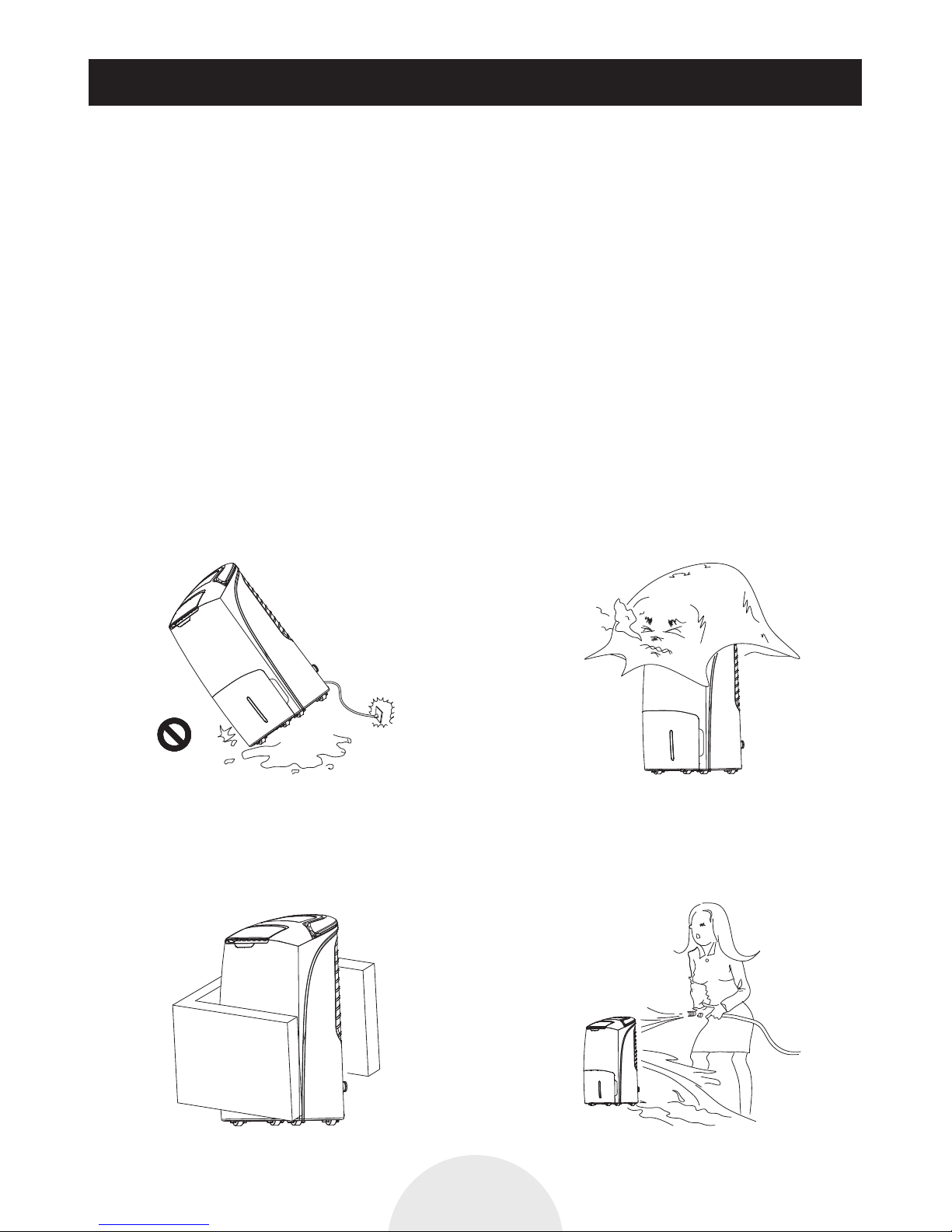
7) Do not use the unit when slanted. If
toppled over, please pull out the plug at
once.
8) Make sure the inlet and outlet ventilation
is not blocked at all times.
9) Ensure there is 30 cm of clear space on all
sides of the unit.
10) Do not spray water on the unit, spraying
water may cause malfunctioning and
electric shock.

1. Important Safe Guards
P5
Important Safe Guards
11) Never pull the socket by using damp
hands.
12) Always switch off at the socket before
unplugging to avoid electric shock or
arcing.
13) Switch off and unplug the unit, empty
the water reservoir when not using the
unit for a long time.
14) Do not pull power wire by force because
it will cause damage to power wire.
15) Never put fingers or other objects in any
openings of the unit.
17) WHEN MOVING, Stop the operation, open the drain outlet, and dispose water in the tank.
And then hold the handle to move.
16) Care should be taken when using the
unit, unplug the appliance during
cleaning.
Hold the handle
to move
If the supply cord is damaged, it must be replaced by the manufacturer, its service agent or
similarly qualified persons in order to avoid a hazard.

Ambient Environment For Operating
1. The appliance is designed to provide an optimum performance not recommended
to operate in ambient temperature exceeds 35℃ or lower than 5℃ (Relative
humidity 30%-90%RH).
2. Operate the unit at indoors, e.g. Living room, bedroom, etc.
3. Make sure the door and window are closed before turning on the unit.
4. Ensure that the unit is placed on a stable and flat floor surface. If the floor surface is
not even there is a risk that the unit may be unstable and topple over. Also exces-
sive vibration and noise may be result.
P6

Parts Names
P7
Air outlet
Control Panel
Water Tank
Water Pane
Louver
Air quality
indicator light
HandleHEPA Filter
Continuous
drainage tube
Pre-FilterRear panel
Air inlet
Active Carbon
Deodorizing Filter
Do not block the
air inlet

MAIN UNIT AND CONTROL PANEL
1. (Power Mode button): Touch the button to switch on/off the power;
2 (Function setting button): Touch the button to set up air purifying, air purifier and
dehumidifier.
3 (Operation mode setting button): Touch the button to set up manual mode, whistling quiet,
automatic mode and clothes drying mode (Clothes drying model can only set in the
dehumidification function)
4 (Setting button for humidity): Touch the button to set the machine running the humidity
environment)
5 (Timing button): Touch the button to set the machine shutdown time.
6 (Fan speed button): Touch this key to adjust the speed of fan
7 (Swing button): Touch the button to switch on/off swing function.
8 (Reset button): Press for over 5 seconds, to make filter working time zero.
9 (Child Lock): Press for over 3 seconds, to start or cancel lock control function of child lock,
display the lock to prevent incorrect operation by children.
How To Operate
Operation Of Key Pads
P8
Reset Function
settings
Power ON/OFF
Operation
mode setting
Setting
humidity
Timing
button
Fan Speed Swing Child Lock
1 2 4 5 6 13 73 98121110

1. Air purification display
2. Dehumidifier
3. Manual mode indication, In this mode can be according to the needs to set fan speed
Dehumidifying operation can set 4 kinds of speed. Air purifying can be set 5 kinds of speed.
4. Quiet mode indication In this mode, Fan motor speed in the most low-grade operation and
can not be adjusted, the air quality indicator lights is off.
5. Clothes dry mode indication, In this mode, the machine is running continuous dehumidification,
Fan motor at maximum speed 5 and can not be adjusted.
6. Automatic control operation indication, In this mode, the fan speed will be adjusted
automatically according to the detection results of machine
7. Display relative humidity, Set Working Humidity Ratio when operate machine after setting
to display current humidity.
8. Display shutdown machine time, Can be setting from 1 - 12 hours and no timing
9. Fan speed indication According to different motor speed to set LCD display corresponding
fan icon.
When setting speed 1 and mute mode, LCD display 1 icon …
When setting speed 2, LCD display 2 icons …
When setting speed 3, LCD display 3 icons …
When setting speed 4, LCD display 4 icons …
When setting speed 5, LCD display 5 icons …
10. Water full indication
11. Defrosting indication
12. Child lock indication
13. HEPA filter replacement tips
14. Air purifying quality display, The outlet indicating light will display different color
according to gas sensor detect air quality good or bad.
Air quality is very good, the indicator light shows green
Air quality is good, the indicator light shows blue
Air quality is the mild pollution, the indicator light shows yellow
Air quality is heavily polluted, the indicator light shows purple
Air quality is seriously polluted, the indicator light shows red.
How To Operate
P9

15. Fault detection display. When the machine malfunctioned, LED display the corresponding fault code.
C1: The defrosting sensor fault detection or above the temperature of 50℃ or below 0℃.
C2: Temperature and humidity sensor fault detection or above the temperature of 50 ℃ or below 0℃.
C7: Fan motor not working. Need to fix it and re-start again.
C8: defrosting sensor and temperature and humidity sensor detects the temperature difference
is less than or equal to 3 ℃, indicate refrigerant leakage
Functions of Control Panel
1. Power ON/OFF button When plug in appliance
The appliance is switched on, the machine is in standby state. General electric buzzer warning
three times, each time you press the button buzzer warning sound, Press on / off key shutdown
ringing sound,
Startup: press (on / off) button, the machine starts running, the louver was automatically open.
The first time after the power is switched on, after starting up the default for dehumidification
function and air purification , the operation mode is the manual control mode, Speed 3 to
operate. If after the shutdown, power continuous (not to pull out the power plug) and then turn
on the appliance, the machine run mode same with shutdown before mode
Shutdown: the machine during operation, touch (on / off) button, the machine stop working.
2. Function setting button:
Touch key, can start up, shut down the dehumidifying function operation. If the machine is
in operation, air purification function always in working (touch key, can not close or open
the purification function)
Show icon : air purification machine in fresh running. The machine is not dehumidification
Display two icons, the machines is in air purification function + dehumidifying function together.
3. Operation settings: touch (operation mode setting key)
Air purification is in the running state: can be set to manual control [display ], [display ]
mute operation, automatic control [display ] three operating modes (air cleaning operation
cannot be set for drying mode).
In the air purification + dehumidification operation function: can be set to manual control
[display ] [display ], mute, automatic control [display ], [display ] dry clothing
four operation modes
How To Operate
P10
Table des matières
Autres manuels Philco Déshumidificateur


