
peerless-AV ULTRAVIEW UV651 Manuel utilisateur

22016-04-21 #:220-9010-4 (2016-08-24)
System Installation And Electrical Requirements ..................................................................................3
Electrical Code...............................................................................................................................3
Power Source ................................................................................................................................3
General Safety Precautions ...................................................................................................................4
FCC Caution...................................................................................................................................6
FCC Statement...............................................................................................................................6
Relevant Information .....................................................................................................................6
Set Up Instructions.................................................................................................................................7
Parts List ........................................................................................................................................7
Choosing your TV Location............................................................................................................8
Removing Cord Cover....................................................................................................................8
Connecting Cables.........................................................................................................................8
Replacing Cord Cover...................................................................................................................9
Connecting To The Power Source................................................................................................10
Prepare Your TV For Mounting.....................................................................................................11
Prepare The TV For Usage..........................................................................................................12
Remote Control Battery Installation And Replacement................................................................12
Operating Instructions ..........................................................................................................................13
Power On/Off the TV....................................................................................................................13
Onboard Controls.........................................................................................................................13
Navigating The On-Screen Menu ................................................................................................14
Picture .................................................................................................................................14
Audio ...................................................................................................................................14
Setup ...................................................................................................................................14
Time ....................................................................................................................................15
Lock .....................................................................................................................................15
Channel................................................................................................................................15
(RS-232C) Serial Control Of The TV ...........................................................................................16
Tips ............................................................................................................................................17
Troubleshooting............................................................................................................................17
Care Of Screen ...........................................................................................................................17
Mobile Telephone Caution ...........................................................................................................17
End Of Life Directives ..................................................................................................................17
License Agreement & Trademark Notice .....................................................................................17
Product Specifications .........................................................................................................................18
Display..........................................................................................................................................18
Power ..........................................................................................................................................18
TV Controller Features ................................................................................................................18
Environmental .............................................................................................................................18
Mechanical ..................................................................................................................................19
Input/Output Connections ............................................................................................................19
Warranty ..............................................................................................................................................20
CONTENTS
32016-04-21 #:220-9010-4 (2016-08-24)
SYSTEM INSTALLATION AND ELECTRICAL REQUIREMENTS
Electrical Code
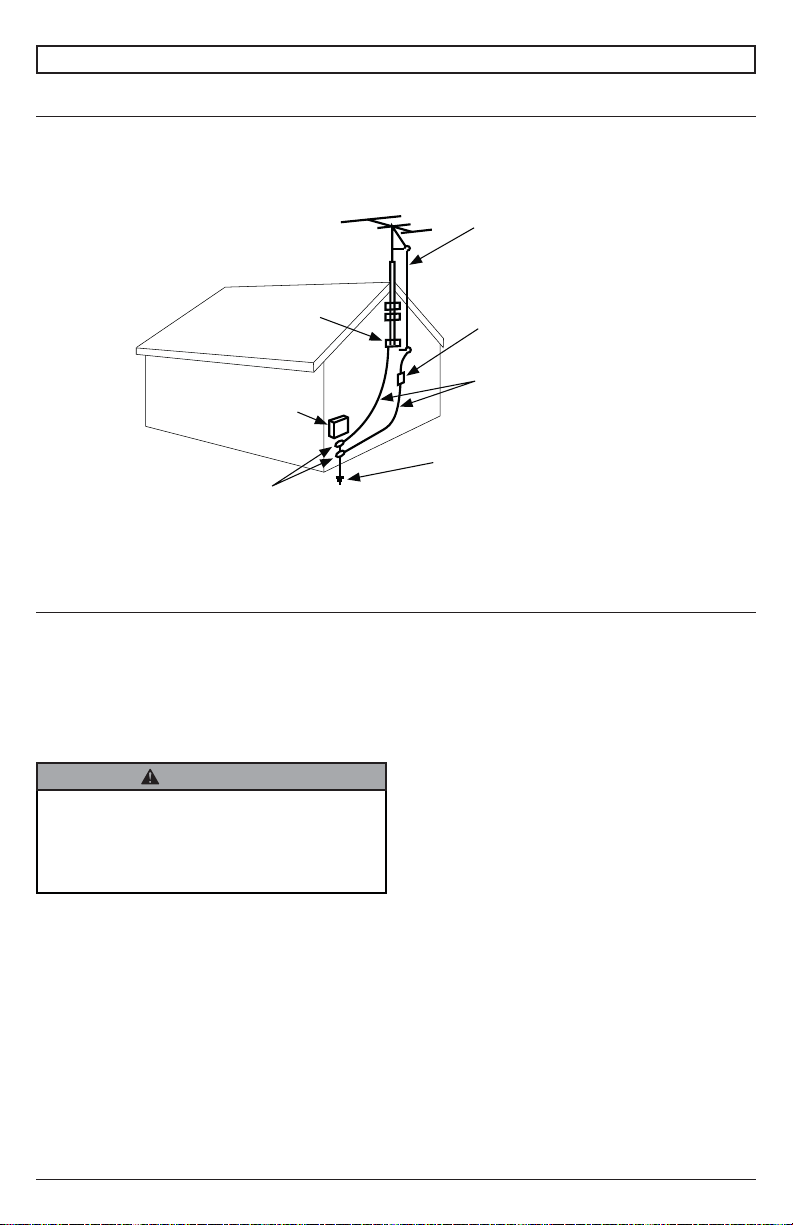
Note: To the display system installer: This reminder is provided to call attention to Article 820-44 of
the National Electric Code that provides guidelines for proper grounding and, in particular, specifies
that the cable ground shall be connected to the grounding system of the facility. Outlet shall be
installed near the equipment and shall be easily accessible.
Note: Installation shall incorporate UL Listed external surge protection rated 2500 Vpk or less, for 150
to 300 Vac mains, installed in accordance with Article 285 of ANSI/NFPA70 or applicable local codes.
Power Source
The TV must be connected to a main socket outlet with a protective grounding connection.
The main plug is used as the disconnect device and shall remain readily accessible.
This display operates on 100-240 volts 50-60 Hz, AC current. Insert the power cord into a 120 volts
60 Hz outlet. Never connect the TV to direct current or anything other than the specified voltage.
To prevent electric shock from the TV, do not use with an extension cord, receptacle, or other outlet
unless the blades and ground terminal can be fully inserted to prevent blade exposure.
Antenna discharge unit
(NEC Section 810-20)
NEC National Electric Code
Ground clamp
Electric service
equipment
Ground clamps Power service grounding
electrode system
(NEC Art 250 Part H)
Grounding conductors
(NEC Section 810-21)
Antenna lead-in wire
• Never remove the back cover of the TV as
this can expose you to very high voltages
and other hazards. If the TV does not
operate properly, unplug the TV and call
your authorized dealer or service center.
WARNING
42016-04-21 #:220-9010-4 (2016-08-24)
Read before operating equipment
Thank you for purchasing our product. Before using it, please read this user manual carefully
and follow the instructions correctly for safe operation. Please keep this manual handy for future
reference. Also, please be sure to always include this user manual in the packaging when transferring
or transporting this product to a different location.
Batteries Installed Warning
CAUTION - Danger of explosion if batteries are incorrectly replaced. Replace only with the same or
equivalent type. Even though the remote is designed for outdoor usage, the batteries should not be
exposed to excessive heat due to sunlight, fire or other heat sources.
CAUTION:
To reduce the risk of electric shock, do not perform any servicing other than that contained in the
operating instructions unless you are qualified to do so.
• Read these instructions.
• Keep these instructions.
• Heed all warnings.
• Follow all instructions.
• Do not defeat the safety purpose of the polarized or grounding type electrical plug. A polarized
plug has two blades with one wider than the other. A grounding type plug has two blades and
a third grounding prong. The wide blade or the third prong are provided for your safety. If the
provided plug does not fit into your outlet, consult an electrician for replacement of the obsolete
outlet.
• Protect the electrical cord from being walked on or pinched particularly at plugs, convenience
receptacles, and the point where they exit from the apparatus.
• Refer all servicing to qualified service personnel. Servicing is required when the apparatus has
been damaged in any way, such as electrical-supply cord or plug is damaged, does not operate
normally, or has been dropped.
• Only use attachments/accessories specified by the manufacturer.
• In case of emergency such as fire or electric shock caused by the product, immediately contact
911 or proper emergency police/fire service agencies in your country.
• If monitor or glass is broken, do not come in contact with the liquid crystal and handle with care.
• Follow instructions for wall, shelf or ceiling mounting as recommended by the manufacturer.
• An outdoor antenna should not be located near overhead electrical lines or any electrical circuits.
• If an outside antenna is connected to the receiver, confirm that the antenna system is grounded
to protect against voltage surges and built up static charges. Section 810 of the National Electric
Code, ANSI/NFPA No 70-1984, provides information with respect to proper grounding for the
mast and supporting structure, grounding of the lead-in wire to an antenna discharge unit, size of
grounding connectors, location of antenna discharge unit, connection to grounding electrodes and
requirements for the grounding electrode.
• Use properly rated electrical voltage. Use of non-rated voltage may cause fire, electric shock and
severe damages to the product.
• Do not open the cabinet under any circumstances. High voltage inside of this product may cause
electric shock.
• Do NOT climb on the product.
GENERAL SAFETY PRECAUTIONS
RISK OF ELECTRICAL SHOCK
To reduce the risk of electric shock, do not disassemble the unit under any circumstances. No
user serviceable parts inside. All product services should be done by the Peerless-AV certified
service personnel.
WARNING

52016-04-21 #:220-9010-4 (2016-08-24)
• Do NOT, under any circumstances, modify or disassemble this product as it may cause fire,
electric shock, or severe damages to the product. Also, any unauthorized modifications made to
the product automatically void product warranty.
• Never touch antenna lines or wires, electrical cables or plugs when lightning or thunder is present
as it may cause electric shock.
• Any severe physical impact on the product may cause certain components to fall out of place
within and break, which may cause fire or electric shock. In such event, do not operate the
product. Contact the manufacturer for support.
• Periodically clean dust off the electrical plug to keep it clean and dry, ensuring proper and safe
operation of the product.
• Do NOT destroy, process, or place close to any heat source; do NOT bend or twist electrical
cords, electrical plugs, cables, or wires with excessive force; do NOT place any heavy object on
the TV as all of the above may cause damage resulting in fire or electric shock.
• Do NOT touch electrical plugs with wet hands.
• Always make sure to plug in the electrical plug firmly and completely. Incompletely placed
electrical plugs may cause fire or electric shock due to built up heat emission.
• Do NOT use any non-rated electrical sockets or power strips with many other devices jointly
plugged in. The wire of non-designated capacity may cause fire due to built up heat emission.
Try to use a single, directly dedicated and rated GFCI electrical outlet for the product for safe
operation.
• In case of product malfunction or unusual events such as electrical burning smell, smoke, or loss
of content signals on TV due to internal overheating, immediately turn off and unplug the electrical
cord and contact the manufacturer.
• Do NOT install the product in unstable locations or near moving objects, constantly vibrating
equipment, or uneven surfaces. Follow mounting instructions properly for safe operation of the
product as improper installation may cause products to fall.
• Do NOT install the product near any poisonous gas or chemically unstable atmosphere as it may
cause fire.
• Do NOT submerge TV in water.
• Do NOT pressure wash TV. Although the IP55 rating protects against jets of water, high pressure
force may compromise the TV.
• Do NOT install the product near any strong magnetic or electrical current field as it may cause
fire, electric shock, or severe damages to the product and the product may be subject to
electromagnetic radiation, causing deterioration of the picture quality.
• Do NOT leave any fire source, such as candles, close to or on the product as it may be a cause
for fire or damages to the product.
• Do NOT move or transport the product with any cables (electrical cables, content connectivity
cables) plugged in to the source devices. Damages may occur to the cables, plugs, or jointing
connectors of the cables due to forcible bending and stress, which may cause damages to the
waterproof seal of the product, making it subject to fire, electric shock, or shorted circuit.
• When unplugging the electrical plug or other cables, always pull using the plug and not the cord.
Improper pulling of the cords or cables may cause damage to the waterproof seal, making it
subject to fire, electric shock, or a shorted circuit.
• Outdoor TVs should always be carried and supported by at least two persons.
• Do NOT use any other electrical cords or connection cables than what is provided with the
product or from the manufacturer directly. Use of untested, unauthorized, or substituted electrical
cords or connection cables may cause malfunction, fire, electric shock, or severe damages to the
product. Also such use of improper or undesignated electrical cords or connection cables will void
product warranty.
• Always leave the Power Off when plugging or unplugging the electrical cords or connection cables
to avoid electric shock or damages to the product.
• Do NOT use any chemical such as paint thinner or benzene to clean the product’s exterior. It may
cause scratches on the surface, erasing proper indications, identification labels, or instructions on
the exterior, which may cause misuse and improper operation of the product.

62016-04-21 #:220-9010-4 (2016-08-24)
FCC CAUTION
To assure continued compliance and possible undesirable interference, ferrite cores may be used
when connecting this TV to video equipment; maintain at least 400mm (15.75 inches) spacing to
other peripheral devices.
FCC STATEMENT
This equipment has been tested and found to comply with the limits for a Class B digital device,
pursuant to Part 15 of the FCC Rule. These limits are designed to provide reasonable protection
against harmful interference in a residential installation. This equipment generates, uses and can
radiate radio frequency energy and, if not installed and used in accordance with these instructions,
may cause harmful interference to radio communications; however, there is no guarantee that
interference will not occur in a particular installation. If this equipment does cause harmful
interference to radio or television reception, which can be determined by turning the equipment off
and on, the user is encouraged to try to correct the interference by one or more of the following
measures:
1. Reorient or relocate the receiving antenna.
2. Increase the separation between the equipment and receiver.
3. Connect the equipment into an outlet on a circuit different from that to which the receiver is
connected.
4. Consult the dealer or an experienced radio/TV technician for help.
This device complies with Part 15 of the FCC Rules. Operation is subject to the following two
conditions:
• This device may not cause harmful interference.
• This device must accept any interference received, including interference that may cause
undesired operation.
Relevant Information
Record your TV's model and serial number here for future reference. Keep this user manual in an
accessible location in the event service is required.
Note: Your TV's serial number can be found on the box and underneath the rear cover plate.
Model Number ____________________________________
Serial Number ____________________________________
• Please use the electrical cord provided with this display. If a electrical cord is not supplied
with this equipment, please contact your supplier. Only plug equipment into receptacles with
GFCI protection.
• Peerless-AV is not responsible for any issues created by water present at the plug/receptacle
insertion point.
CAUTION

72016-04-21 #:220-9010-4 (2016-08-24)
SET UP INSTRUCTIONS
Parts List UV491
Part # UV551
Part # UV651
Part #Description Qty
Atelevision 1 180-W1338 180-W1339 180-W1141
Bcord cover plate 1 180-W1341 180-W1341 180-W1341
Cremote 1 410-1032 410-1032 410-1032
Dthumb screw 4 560-1397 560-1397 560-1397
Eretaining washer 4 540-0496 540-0496 540-0496
Fdisplay dust cover 1 591-0007 591-0006 591-0013
C (1)
E (4)
A (1)F (1)
B (1)
D (4)
remote
retaining
washer
television display dust
cover
cord cover
plate
thumb screw
AUX
LAST
OK
INFO
+
EXIT
CBLDVD
MUTE
POWER
VCR SAT
SOURCE
TV
1
4
7
.
2
5
8
0
3
6
9
VOL
REW PLAY FF MENU
REC STOP PAUSE GUIDE
CH
• Never apply pressure to the exterior of the LCD screen. The manufacturer's warranty does not
cover user abuse or improper installations
• All cables and cable covers MUST be connected and attached prior to installation on mount.
• When routing cables through the cable entry, make sure that the cables are formed in such a
way as to remove any stress on the connectors.
• Electrical installation shall be in accordance with the applicable parts of Chapter 8 of ANSI/
NFPA70.
CAUTION

82016-04-21 #:220-9010-4 (2016-08-24)
RS-232C
Connecting Cables
Removing Cord Cover
Connect cables from the source devices to their appropriate connector on the display.
Remove (4) thumb screws (D), (4) retaining washers (E) and cord cover (B) to access source
connection panel. Do not disconnect lanyard.
Antenna or Cable
HDMI 2
Coaxial SPDIF
AV / Video
AV / Audio L
AV / Audio R
Component 1 / PR
Component 1 / PB
Component 1 / Y
HDMI 1
VGA
PC Audio
USB
Audio Out
HDMI 3
A
B
D (4)
br
Choose your TV location
The TV should be installed in a location where the screen will not be facing direct sunlight. Ideal TV
placement is an area that is shaded by landscaping, structures, trees, awnings, or elevated patio
cover. The operating temperature range of the TV is -24° to 122° F. Do NOT use the TV if ambient air
temperature exceeds the operating temperature limits.
Do not install within 5 ft. from a body of water.
CAUTION
E (4)

92016-04-21 #:220-9010-4 (2016-08-24)
Replacing Cord Cover
1. Run cables across foam gasket block. Leave approximately 1/2" (13mm) between cables to
ensure a proper seal.
2. Replace cord cover (B), (4) thumb screws (D) and (4) retaining washers (E). Fasten thumb
screws until gasket on cord cover plate is fully compressed to back of television. Cables will seal
between display's gasket and cord cover's gasket as cover is pressed into place. Route cables
through opening at end of cord cover.
B
D (4)
E (4)
• Ensure bend radius limits for cables do not
exceed limits set by the manufacturer.
• Ensure cables are seated properly in the
cable gland to avoid potential damage to
cables when cord cover is installed.
• Do not remove lanyard that connects the
cord cover to the display.
CAUTION
Do not overtighten screws
10 2016-04-21 #:220-9010-4 (2016-08-24)
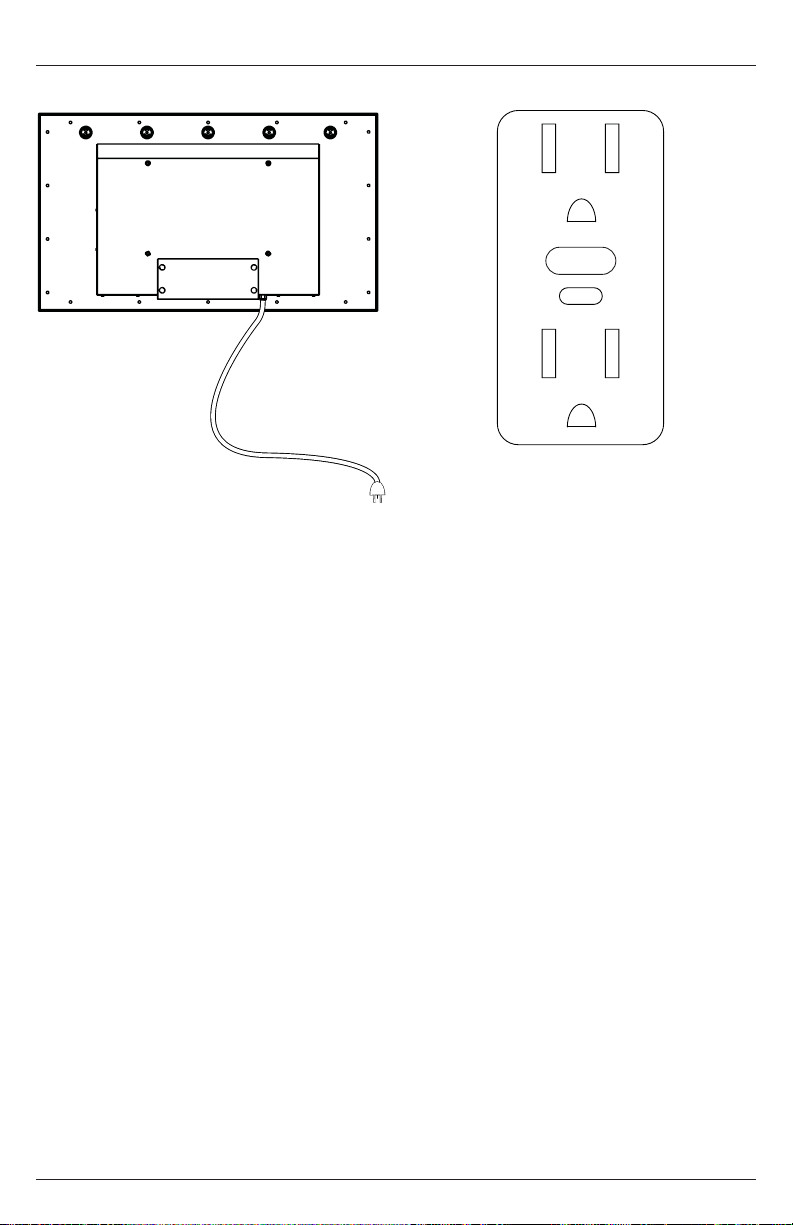
Connect To The Power Source
Connect power cord to GFCI outlet.
Ce manuel convient aux modèles suivants
2
Table des matières


