
PCD JAGUAR PRO II Manuel utilisateur
PL571 User Manual
1
PL571 User Manual
2
PL571

PL571 User Manual
3
CONTENTS
1. Phone Overview.........................................................4
2. Get Started.................................................................4
3.Basic Operations ........................................................5
4. Touchscreen Usage...................................................6
5. Home Screen..............................................................7
6. Phone Settings...........................................................8
7. Move/Uninstall apps ..................................................9
8. Call............................................................................10
9. Contacts...................................................................11
10. Message .................................................................12
11. Browser ..................................................................13
12. E-mail......................................................................14
13. Gallery....................................................................14
14. Clock.......................................................................15
15. Multimedia Function..............................................15
16. Manage File............................................................16
17. Troubleshooting.....................................................17
18. PCD LIMITED WARRANTY.....................................19
PL571 User Manual
4
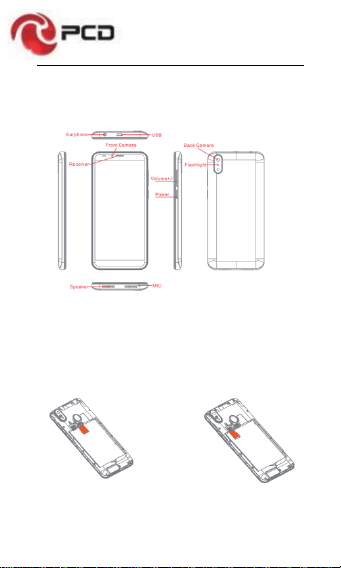
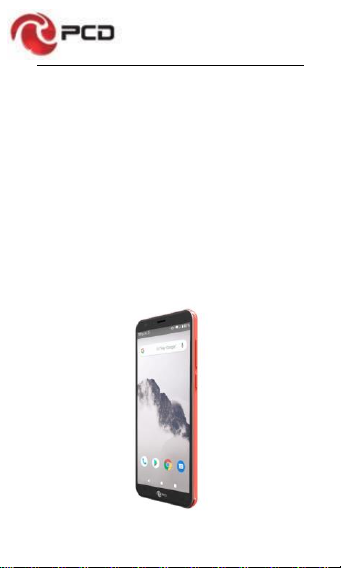
1. Phone Overview
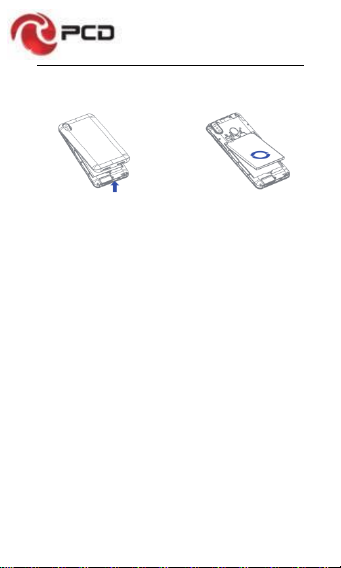
2. Get Started
Install the SIM card Install the memory card
PL571 User Manual
5
Remove the back cover Attach/Detach the battery
3.Basic Operations
Switch on
Touch and hold the Power button until the phone switches
on.
Note: If you have enabled USIM/SIM lockingin the Settings
menu, enter the correct PIN number upon power-on before
you use the phone.
Caution: Three consecutive attempts of entering an
incorrect PIN will lock the SIM card. If it is locked, use a
PUK provided by the operator to unlock it.
Switch off
Touch and hold the “Power button” until the Phone Options
screen displays. Tap “Power off” to switch off the phone.
Unlock
Short press the “Power button” light up the screen,
according to the clues of the screen interface can be
unlocked.

PL571 User Manual
6
4. Touchscreen Usage
Use your fingers to perform operations directly on icons,
buttons, and the on-screen keypad.
Tap/Touch/Click
Tap the icon of an App tostart it.
Touch & Hold
Touch and hold an item to display a pop-up menu of
options. For example, go toAddress Book, touch and
hold a contact on the Address Book page, and a menu of
options pops up.
Drag
Tap an item on the screen and drag it to another place.
Slide/Sweep
To sweep vertically or horizontally across the screen, you
can view apps, pictures, and webpages in a convenient
manner.
Scroll
Similar to sweeping, but faster.
PL571 User Manual
7
Pinch
Put two fingers on the screen to pinch in or out an item,
such as a webpage or picture.
5. Home Screen
1. Status bar: allows you to view status icons and notices,
such as signal, battery, current time and data service.
2. Notification bar: On the Home screen, tap the status
bar and drag it down to display the notification bar. Tap this
bar. Then you can view the notices. Touch the return button
to switch back to the previous page.
3. App icon: Tap an app to open it.
4. Main menu: Drag it up to enter the app main menu.

PL571 User Manual
8
6. Phone Settings
To display the Settings menu, tap the Settings icon directly.
1. SIM card: In the Settings menu, select WLAN to
configure your radio network,choose SIM Card. You can
then manage your SIM cards on the pop-up page.
2. Network: In the Settings menu, select WLAN to
configure your radio network; or select Traffic usage to
View the details of usage; or select Mobile Network
configure data services of your phone
3. Sound: In the Settingsmenu, choose Sound. The allows
you to set the volume, enable/disable vibration during
ringing, and select ringtones for incoming calls and alarm
clock, as well as enable/disable keypad touch sound effect,
touch alert tone, and screen lock tone
4. Display: allows you to configure the brightness,
wallpaper, automatic device rotation, sleep duration, and
font size.
5. Security: In the Settings menu, choose Security. The
Security page allows you to set the screen locking mode
and USIM/SIM locking mode.
6. Application and notification: In the Settings menu,
chooseApps. Then you canview or manage your apps.
Note: Disable or unload certain apps if available space is

PL571 User Manual
9
less than 100MB.
7. Message: On the Message page, tap the Menu button
and choose Settings, you can open and close message
send prompt sound, you can enable/disable Message
report obtain,view SMS in SIM.
8. Call: To display the Call Settings page, choose Settings
on the Call page.
7. Move/Uninstall apps
1. Access the App main menu from the Home screen. On
the ALL App page, tap and hold an app to be put on the
Home screen, and drag it left or right to locate it at a proper
place. In this way, a desktop app is created.
2. On the All App page, tap and hold an app, and drag it to
Uninstall on the desktop. In this way, the app is removed
from the phone.
Note: You are not allowed to uninstall basic apps of the
phone.
3. On the All App page, tap and hold an app, then select
the application information,In this way details about the
app is displayed.

PL571 User Manual
10
8. Call
This phone allows you to make or answer a call, initiate an
emergency call, and launch a multi-party call.
On the bottom left of the Home screen, tap the Dial-up icon.
The Dial-up page is displayed. Enter a phone number and
choose between card 1 and card 2 to make the call. When
you enter the number, the phone will automatically search
among all contacts a number that best matches the
entered numerals, to facilitate your operation.
During a call, tap Add a Call, and this call automatically
switches to Silent mode. Enter the number of another
contact, tap Dial-up, and the previous call automatically
switches to On-hold mode. After the second call is
answered, tap Join. In this way, a teleconference is
established to achieve a multi-party talk.
Note: You need to subscribe to this service from your
carrier before you use it.
You are also allowed to initiate a call by selecting a phone
number from the list of contacts or the Message page.
Ce manuel convient aux modèles suivants
1
Table des matières
Autres manuels PCD Téléphone portable

PCD
PCD TE1303MX Manuel utilisateur

PCD
PCD UK01 Manuel utilisateur

PCD
PCD c5017 Manuel utilisateur

PCD
PCD Z219 Manuel utilisateur

PCD
PCD CDM8635 Manuel utilisateur

PCD
PCD PCD509 Manuel utilisateur

PCD
PCD TE1303MX Manuel utilisateur

PCD
PCD TTX38 Manuel utilisateur

PCD
PCD PH201Q Manuel utilisateur

PCD
PCD CDM2030 Manuel utilisateur


