MB COMAND 2.0, APS220:
PL Wybierz opcję TV. Na ekranie będzie widoczny obraz
GB Chose TV button. It will be seen picture on the navi screen.
DE Drücken ie die Option TV . Auf dem Display erscheint das Bild.
AUDI RNS-E:
PL Naciśnij przycisk CD/TV, pojawi się menu dostępnych źródeł. Naciśnij przycisk górna
strzałka i dużym pokrętłem wybierz opcję TV. Naciśnij pokrętło aby zatwierdzić.
GB Press the CD/TV key, the source menu will indicate. Press the upper right key and turning
rotary knob choose the TV option. For sign this, press rotary knob.
DE Nach dem ie die CD/TV taste gedrückt haben, erscheint das Quellen Menü. Danach drücken
ie die obere, rechte Pfeil Taste und mit dem Drehknopf erst wählen und dann
bestätingen ie die Funktion TV.
MB COMAND 2.5 :
PL Wybierz opcję TV. Zamontuj nawigację. Na ekranie będzie widoczny obraz
GB Chose TV button. Build the navi. It will be seen picture on the navi screen.
DE Drücken ie die Option TV aus Bauen ie das Navi ein. Auf dem Display erscheint das Bild.
8.
PL Adap ery z okablowaniem 94-210, 94-220, 94-130, 94-230, 94-140, 94-240,
94-150, 94-250 (z CAN-BUS):
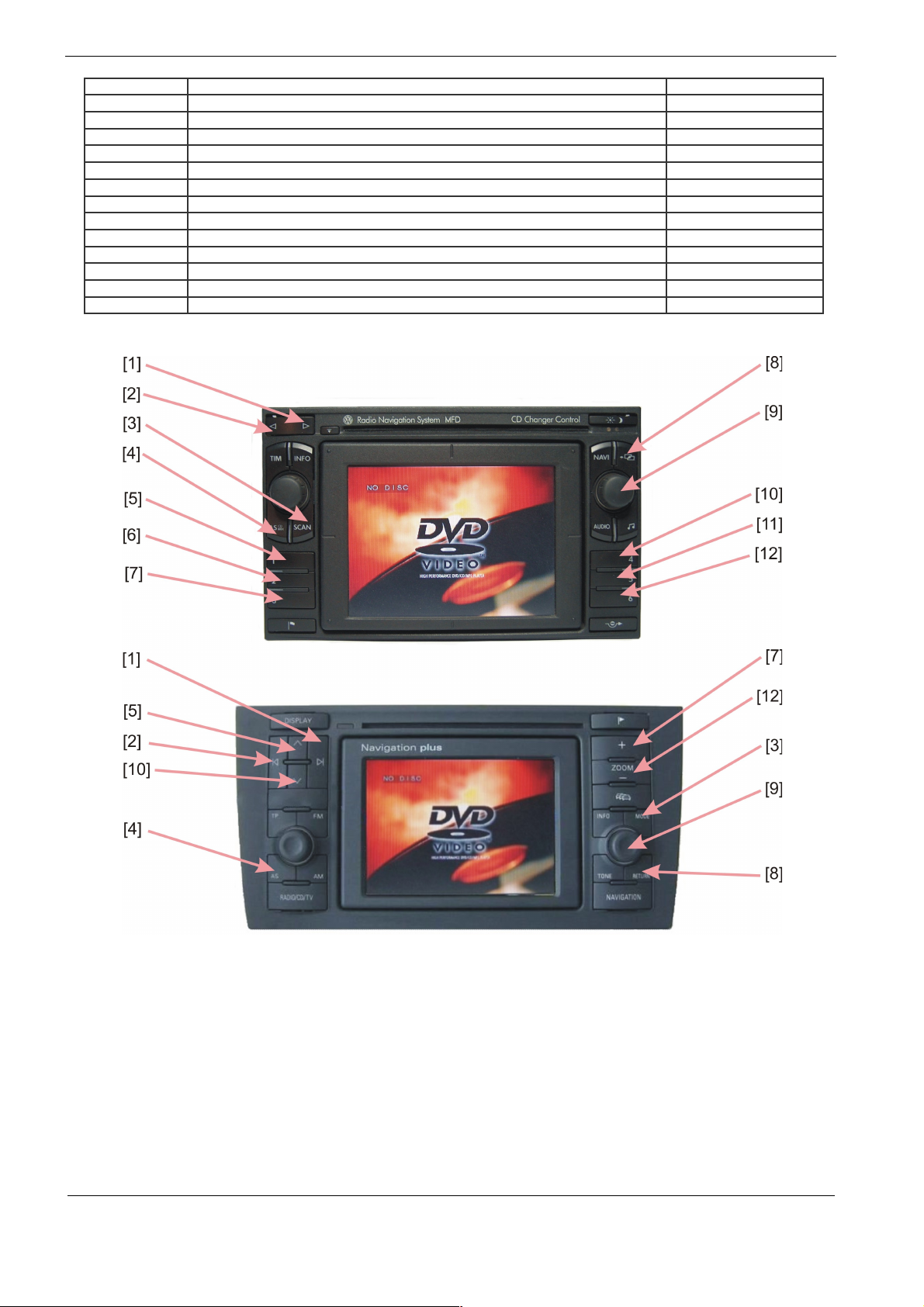
Aby zaprogramować tryby pracy adaptera naciśnij i przytrzymaj klawisz na nawigacji ( nr [4] –
rysunki poniżej ). Na ekranie pojawi się symbol jasności. Każde krótkie naciśnięcie pokrętła
[9] zmienia opcję którą można regulować pokręcając pokrętłem:
Jasność -> Kon ras -> Nasycenie -> Urz. A -> Urz. B -> Zoom -> CAM -> Jasność i d.
Każda regulacja jest dostępna przez 10 sek. Po tym następuje wyjście z trybu regulacji.
Kody sterujące urządzeniami są podane na końcu instrukcji .
Funkcja CAM ma następujące ustawienia:
CAM 0 – wejście VIDEO 2 nieaktywne
CAM 1 – wejście VIDEO 2 wyzwalane przez +12V na fioletowym kablu
CAM 2 – TYLKO MFD2, RNS2, RNS-E wejście VIDEO 2 wyzwalane sygnałem biegu
wstecznego na magistrali CAN
Adap ery z okablowaniem 94-110, 94-120 (bez CAN-BUS) :
Wyreguluj jasność, kontrast i kolor za pomocą przycisków MODE,+ , - . na adapterze.
Naciskanie MODE powoduje wejście w tryby regulacji w kolejności : Jasność -> Kon ras ->
Nasycenie -> Urz. A -> Urz. B -> Zoom -> CAM -> Jasność i d. poprzez klawisze + i - .
Każda regulacja jest dostępna przez 10 sek. Po tym następuje wyjście z trybu regulacji.
Funkcja CAM ma następujące ustawienia:
CAM 0 – wejście VIDEO 2 nieaktywne
CAM 1 – wejście VIDEO 2 wyzwalane przez +12V na fioletowym kablu
CAM 2 – dla kabli 94-110 i 94-120 funkcja niedostępna
GB Adap ers wi h wiring harness 94-210, 94-220, 94-130, 94-230, 94-140, 94-240,
94-150, 94-250 (wi h CAN-BUS):
To program the adapter modes, press and hold button in the navigation (No [4] - the drawings
below). On the screen appears brightness symbol. Each short pressing the wheel [9] changes
the option that you can adjust the turning knob:
Brigh ness -> Con ras -> Sa ura ion -> Device A -> Device B -> Zoom -> CAM ->
Brigh ness, etc.
Each of regulation is posibble for 10sec. After this time adjustment is not available. Device
control codes are listed at the end of manual.