Patterson HIGH-5 Manuel utilisateur

HIGH-5
INSTALLATION INSTRUCTIONS
For an electronic copy of these instructions, please visit www.pattersonfan.com/installation-services-and-guides
208-230/460V Three-Phase Input using ABB ACS355 VFD

Patterson Fan Company
1120 Northpoint Blvd.
Blythewood, SC 29016
(800) 768-3685
www.pattersonfan.com
TABLE OF CONTENTS
Safety Information
Parts List
Fan Placement, Spacing, and Clearance
Fan Maintenance
PART 1: Installation Instructions (Mechanical)
PART 2: Installation Instructions (Electrical)
PART 3: Daisy Chaining
pattersonfan.com
800.768.3985 2
3
4
5
5
6
15
20

TO REDUCE THE RISK OF FIRE, ELECTRIC SHOCK, OR INJURY TO PERSONS, OBSERVE THE
FOLLOWING:
WARNING: Installation and electrical wiring of this fan must be performed by qualified person(s) in
accordance with all applicable codes and standards.
WARNING: Ensure that power is o before attempting installation.
WARNING: Installation of this fan must be completed in accordance with the procedures set forth in this
manual, the National Electric Code, ANSI/NFPA 70, and any applicable local codes. Code compliance is the
responsibility of the installer, and ultimately the end user.
WARNING: Use this unit only in the manner intended by the manufacturer. If you have questions, contact
the manufacturer.
WARNING: Before servicing or cleaning unit, switch power o at service panel and lock the service
disconnecting means to prevent power from being switched on accidentally. When the service
disconnecting means cannot be locked, securely fasten a prominent warning device, such as a tag, to the
service panel.
WARNING: To reduce the risk of fire, electric shock or injury to persons, Patterson High-5s must be installed
with Patterson High-5 supplied controllers that are marked (on their cartons) to indicate the suitability with
this model. Other controllers cannot be substituted.
CAUTION: When service or replacement of a component requires the removal or disconnection of a safety
device, the safety device is to be reinstalled or remounted as previously installed.
WARNING: Potential risk of fire, electric shock, or injury to persons during cleaning and user maintenance.
Disconnect the fan from the power supply before servicing.
WARNING: To reduce the risk of personal injury, do not bend the blade brackets when installing the
brackets, balancing the blades, or cleaning the fan. Do not insert foreign objects in between rotating fan
blades.
WARNING: To reduce the risk of fire, electric shock, or personal injury, mount directly to a structural framing
member.
ATTENTION: This fan is suitable for use with solid-state speed controls.
WARNING: This product can expose you to chemicals which are known to the State of California to cause
cancer and birth defects or other reproductive harm. For more information go to www.P65Warnings.ca.gov.
IMPORTANT SAFETY INFORMATION
READ AND SAVE THESE INSTRUCTIONS
pattersonfan.com
800.768.3985 3

pattersonfan.com
800.768.3985 4
MECHANICAL ITEMS INCLUDED IN YOUR SHIPMENT
1 Fan Drive Assembly
1 Beam Mounting Bracket
5 Fan Blades
5 Fan Blade Flaps
5 Fan Blade End Caps
4 1/4" Turnbuckles with jam nuts
Gearbox Vent (Must be installed)
Bolts, nuts, washers, and clamps of various sizes (see Installation Instructions for types and quantities)
ELECTRICAL ITEMS INCLUDED IN YOUR SHIPMENT
1 Lockable disconnect with installation instructions
1 ABB ACS355 Variable Frequency Drive (VFD) with remote keypad
a. One (1) VFD mounting bracket and hardware kit
b. 100 ft. of Cat 6 cable (with RJ45 connectors)
c. Three (3) wire crimps for motor control cable
d. One (1) Cat 6 cable strain relief
e. One (1) Remote control keypad box
f. One (1) ACS355 drive User’s Manual
g. One (1) ACS355 drive Supplement Manual
h. One (1) motor control cable (fan motor to VFD)
i. Two (2) motor cable strain reliefs
FAN SAFETY COMPONENTS PROVIDED
Drive Assembly safety cable (1)
Guy wires (4)
Blade Safety Brackets (5)
TOOLS TO GET STARTED
Scissor lift
Wrench and socket set (5/16”-3/4” needed)
Cordless power driver with clutch and Phillips Bit
1/4” Nut driver
Torque wrench
Standard and Phillips screwdrivers
Instrument screwdriver (1/8” flat blade)
Wire stripper/cutter
Level
1/8” “L” shaped Allen wrench
Four (4) beam clamps with eye bolts
Check that all necessary parts are included with your shipment. Should an item be missing, contact
Patterson immediately at (800) 768-3985.

pattersonfan.com
800.768.3985 5
FAN SPACING, PLACEMENT, & CLEARANCE
Fans should be mounted such that the blades are a minimum of 10 feet above the floor. The ideal height
is 20 to 25 feet. Also, ensure that the fan blades have a clearance equal to 15% of the fan’s diameter in all
directions.
Care should be taken when installing the fan around a fire sprinkler system. The VFD is equipped with the
ability to connect to a fire suppression system – stopping the fans in case of a fire. However, it is the
responsibility of the installer to read and comply with all local codes and regulations.
MAINTENANCE
Prior to performing any maintenance on the fan, it MUST be disconnected from the power source
by means of the separate lockable disconnect (provided).
VFD Box – Clean heat dissipating fins on the back of the box periodically.
Gearbox – Periodic maintenance will ensure your fan remains operational for its intended life. While
Patterson recommends the end-user check and change the gearbox oil annually, failure to do so will not void
any warranties. Oil type used is Chevron® Delo Gear ESI 85W-140. Contact Patterson at (800) 768-3985 for
availability.
Hub Grease – Hub should be inspected yearly to ensure proper lubrication. Grease type is Chevron Delo
HD Moly 5%. There are two grease fittings, an upper and lower. Add grease as needed, filling each area
slowly until grease passes through the upper seal.
Mounting Hardware – All nuts and bolts related to mounting of the fan unit should be checked for tightness
annually. In addition, guy wires need to be inspected to ensure they remain taut and show no signs of
fraying.
Blades – Blades can be occasionally wiped down with a damp cloth. A mild detergent can also be used if
desired.

pattersonfan.com
800.768.3985 6
PART 1
MECHANICAL
INSTALLATION

pattersonfan.com
800.768.3985 7
STEP 1A – MOUNT TO AN EXISTING I-BEAM
1) It is important to attach the mounting bracket to the structure first and then connect the fan assembly.
If the mounting surface isn't level, the mounting bracket can be mounted in either direction to allow
the fan to swivel and hang straight.
2) Refer to Image 1 to determine which set of bolt slots to use:
a. For I-beam width less than 7¼”, use slots labeled “A”. I-beams wider than 7¼” should use
slots labeled “B”.
b. For I-beam thickness greater than ½”, use the provided spacer as shown in Image 2.
IMAGE 1
IMAGE 2
SPACER
MOUNTING
BRACKET
CONNECTORS

pattersonfan.com
800.768.3985 8
3) If a down rod was ordered, adjust the mounting bracket
connectors to their widest position. Refer to Image 2.
4) Attach clamp to I-beam structure, as shown in the diagram
labeled Image 3. Torque GRADE 8 ½” bolts to 80 ft-lbs.
STEP 1B - MOUNT BETWEEN BAR JOISTS
1) This installation requires the spanning of building structure.
While structures and distances may vary, we recommend using
2” steel tubing welded to a 3/8” thick steel plate as shown in
the diagram labeled Image 4. Consult a structural engineer for
spanning distances greater than eight feet.
2) Secure the spanning material to the building structure using ½”
bolts, washers, and lock nuts (not provided) as shown in Image
4. Bolts should pass through the steel plate, and out the
bottom of the joist or other structure. Torque bolts to 50 ft-lbs.
3) It is important to attach the mounting bracket to the spanning
structure first and then connect the fan assembly. If the
mounting surface isn't level, the mounting bracket can be
mounted in either direction to allow the fan to swivel and hang
straight.
IMAGE 3
IMAGE 4

4) Refer to Image 5 to determine which set of bolt slots to use:
a. For spanning structure width less than 7¼”, use slots labeled “A”. Spanning structures wider
than 7¼” should use slots labeled “B”.
b. If spanning structure thickness is greater than ½”, use provided spacer as shown in Image 6.
5) If a down rod was ordered, adjust the mounting bracket connectors to their widest position. Refer to
Image 6.
6) Attach clamp to spanning structure, as shown in the diagram labeled Image 4. Torque GRADE 8 ½”
bolts to 80 ft-lbs.
pattersonfan.com
800.768.3985 9
IMAGE 5
IMAGE 6
SPACER
MOUNTING
BRACKET
CONNECTORS

pattersonfan.com
800.768.3985 10
STEP 2 - ATTACH FAN ASSEMBLY TO MOUNTING BRACKET
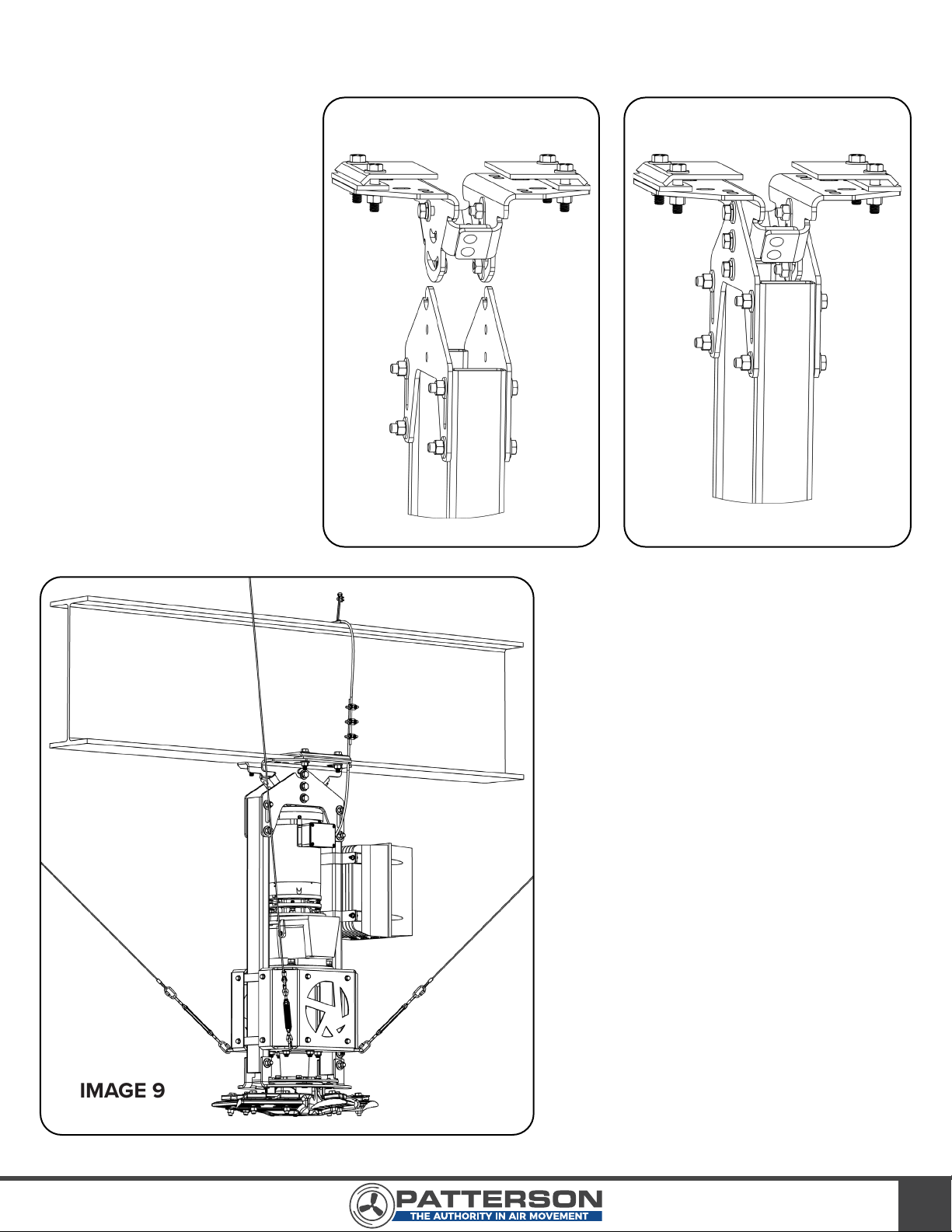
1) Using a scissor lift, raise
the fan assembly and
guide the hangers onto
the top bolt of the
mounting bracket (see
Image 7). If using a down
rod, bolt the down rod to
the mounting bracket first
and place the top bolts on
the lower section of the
down rod to guide the
hangers onto.
2) Add the final four bolts
through the mounting
bracket (or lower down
rod section) and secure
the fan as shown in Image
8. Torque bolts to 65
ft-lbs.
STEP 3 - ATTACH VFD
TO FAN
1) Using the hardware packet provided,
attach the VFD to the side of the
frame with the VFD brackets. A
properly installed VFD is shown in
Image 9 (I-beam mount) or Image 10
(mount with spanning structure).
INSTALLER PLEASE NOTE:
Cus-
tomers may request that the VFD NOT be
mounted on the fan so that it can be
accessed. It is important to emphasize that
after installation, there is no reason to get to
the drive. ALL of the information, resets,
error codes and parameters are accessed
from the remote keypad only. If the customer
insists, Belden 29522C Multi-Conductor
600V VFD cable should be used. Failure to
use proper VFD cable may result in opera-
tional issues with the drive or fan and can
shorten life expectancy.
IMG 7 IMG 8
IMAGE 9
Autres manuels pour HIGH-5
1
Table des matières
Autres manuels Patterson Ventilateur