Patriot PBO Core Manuel utilisateur

1 PBO Core User's Manual
www.patriotmemory.com
Contents
1. Product Information..................................................................................................3
1.1 Specification.........................................................................................................3
1.2 Package Contents................................................................................................5
2. Easy Installation Guide ............................................................................................6
2.1 Front/Back Panel..................................................................................................6
2.2 HDD Installation (Optional) .................................................................................7
3. Using PBO CORE HD Multimedia Player................................................................8
3.1 Remote Control & Layout3.2 Getting Started ...................................................8
3.2 Getting Started ...................................................................................................10
3.2.1 Connect PBO Core to your TV...................................................................10
3.2.2 Starting PBO Core......................................................................................10
3.2.3 Setup ..........................................................................................................11
3.2.3.1 Audio ....................................................................................................12
3.2.3.2 Video ...................................................................................................13
3.2.3.3 Network................................................................................................14
3.2.3.4 System ................................................................................................15
3.2.3.5 MISC ...................................................................................................16
3.2.4 Brows & Play ..............................................................................................17
3.2.4.1 Play Movies..........................................................................................18
3.2.4.2 Play Music...........................................................................................20
3.2.4.3 Music Player.........................................................................................21
3.2.4.4 Show Photos.......................................................................................25
3.2.4.5 Adding content to PLAYLIST ...............................................................26
3.2.4.6 Slide Show ..........................................................................................27
3.2.4.7 File Copy.............................................................................................28
3.2.5 IMS Menus..................................................................................................29
4. Transcoding Software ............................................................................................33
4.1 Install and run Transcode Server.........................................................................33
4.2 Adding Share Folders on PC ...............................................................................33
4.3 Connect to File Sharing Folders and BitTorrent Download.................................35
4.3.1 Set up the PBO Core..................................................................................35

2 PBO Core User's Manual
www.patriotmemory.com
4.3.2 Connect to File Sharing Folder...................................................................36
4.3.3 Connect to BT Download Management.....................................................36
4.3.4 Account Management.................................................................................37
Frequently Asked Questions:.................................................................................38

3 PBO Core User's Manual
www.patriotmemory.com
1. Product Information
1.1 Specification
Hardware Specifications
RCA Composite Out x 1
Video Output HDMI 1.3 Out x 1
RCA Audio Out L/R x 1
Audio Output SPDIF(Optical) x 1
File transfer port USB 2.0 Host port x 2
Data transfer with
PC USB 2.0 mini port x 1
Exterior Interfaces
Ethernet 10/100Mbps RJ-45 x 1
Note: For greatest compatibility it is recommend that you use the Patriot USB
802.11n Wi-Fi adapter
Wireless Adapter: (Optional)
Product Description Product Part Number
Patriot USB 802.11n Wi-Fi adapter PCBOWAV2-N

4 PBO Core User's Manual
www.patriotmemory.com
Software Specifications
MPEG-1 MPG/MPEG/DAT support up to
1080p
MPEG-2 MPG/MPEG/VOB/ISO/IFO/TS/
TP/M2TS up to 1080p
MPEG-4 MP4/AVI/MOV support up to
1080p
DivX 3/4/5/6/7,
Xvid AVI/MKV/ support up to 1080p
H.264, AVC TS/AVI/MKV/MOV/M2TS
support up to 1080p
WMV 9 WMV support up to 1080p
FLV FLV support up to 1080p
ISO ISO image
Video
Decoding
(Movie)
Real Video
8/9/10 RM/RMVB support up to 720p
Dolby™ Digital AC3, DTS
MPEG-I Layer 1/2/3, MPEG-II Layer 1/2, Real
Audio, AAC, WMA, LPCM
Audio
Decoding
(Movie) HDMI RAW/SPDIF RAW output to Amplifier for
decoding 5.1/7.1 audio channels
Audio
Decoding
(Music)
WMA, MP3, Real Audio (RA), WAV, OGG, AAC,
FLAC
Multi-Media
Support
Picture
Format JPEG, BMP, PNG
Note: Product features and specifications are subject to change at any time without
notice

5 PBO Core User's Manual
www.patriotmemory.com
1.2 Package Contents
Package Contents
1 x PBO Core HD Multimedia Player
1 x Remote Control
2 x AAA Battery
1 x AC Power Adaptor
1 x HDMI Cable
1 x Composite A/V Cable
1 x USB Data Cable
1 x Quick Start Guide
1 x User CD

6 PBO Core User's Manual
www.patriotmemory.com
2. Easy Installation Guide
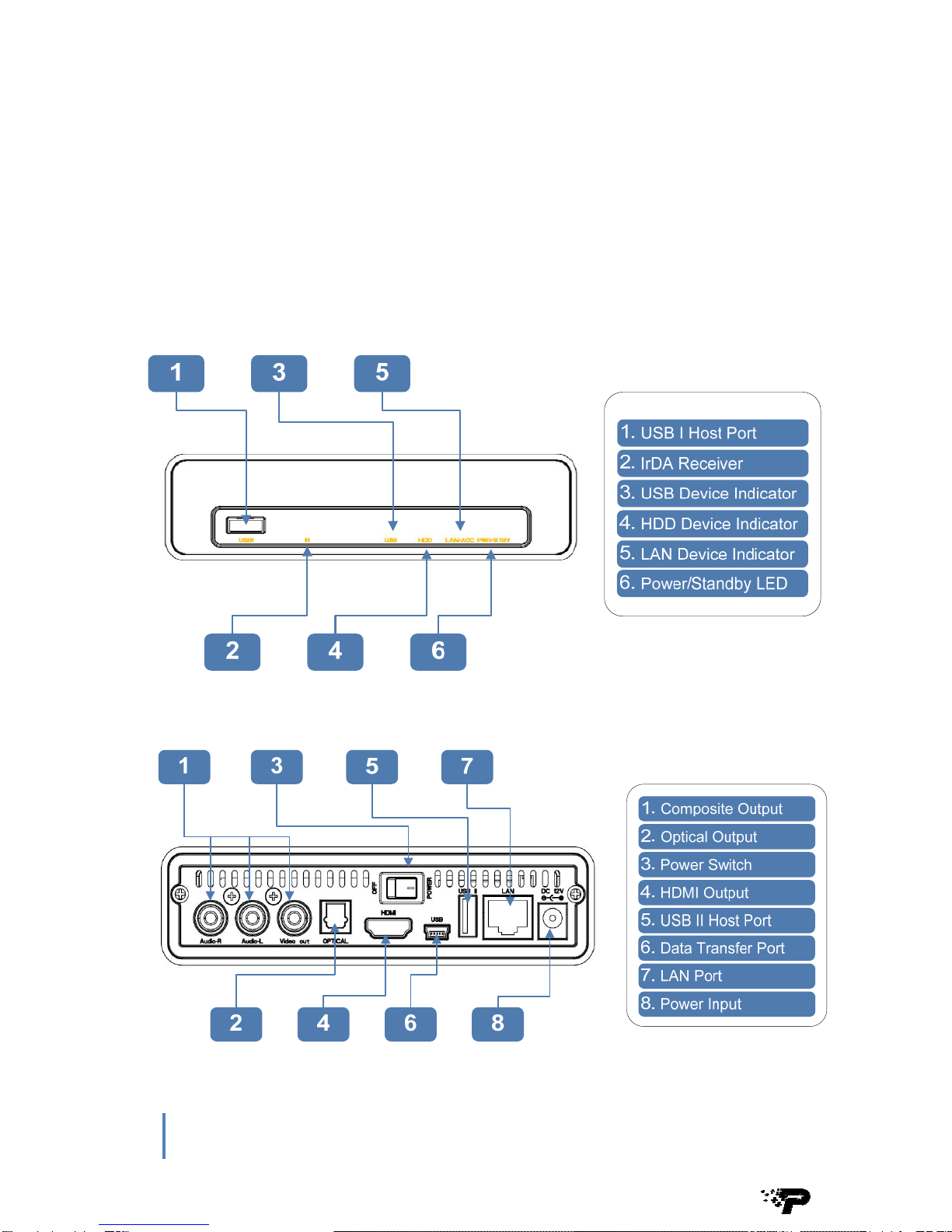
2.1 Front/Back Panel

7 PBO Core User's Manual
www.patriotmemory.com
2.2 HDD Installation (Optional)
NOTE: PBO Core can play back your media files through any connected USB
storage device, over home network via built-in Ethernet, wireless network* or internal
HDD/ SSD storage. * Using an optional Wi-Fi adapter.
Step 1: Remove the
two screws from the
rear panel and slide
out the tray.
Step 2: Connect a
2.5” SATA HDD or
SSD to the SATA
connector
Step 3: Secure the
drive to the tray by
installing the screws
on both sides of the
drive
Step 4: Slide the tray back into the outer case of PBO Core and secure
the tray by installing the two screws removed in Step 1

8 PBO Core User's Manual
www.patriotmemory.com
3. Using PBO CORE HD Multimedia Player
3.1 Remote Control &
Layout

9 PBO Core User's Manual
www.patriotmemory.com
1
418
5
23
27 9
10 11
78
23 19
20 22
6
29
25
26
28
31
30 32
21 33
24
17
15 16
14 12
13
1Power
2Display
3Audio
4Number Buttons
5GOTO
6Setup
7Enter/Zoom
8Browser
9Stop
10 Play
11 Previous
12 Slow
13 Option
14 Repeat
15 Angle
16 Eject
17 Title
18 Home
19 TV System
20 Subtitle
21 Menu
22 Volume +/-
23 Mute
24 Replay
25 Navigation
26 Return
27 Pause
28 Next
29 Fast Rewind/Fast Forward
30 Confirm
31 CM Skip
32 Select
33 Copy

1
0 PBO Core User's Manual
www.patriotmemory.com
3.2 Getting Started
3.2.1 Connect PBO Core to your TV
Connect PBO Core to your TV via HDMI cable or Composite A/V cable
Use the included HDMI cable for the best video and audio quality. PBO Core will
automatically detect the HIGH DEFINITION output level your TV can support.
Use included Composite A/V cable (CVBS) for STANDARD DEFINITION.
3.2.2 Starting PBO Core
If running PBO Core with any internal HDD, a quick format of the drive is needed.
NOTE: Installing an internal 2.5” Hard Disk Drive is optional. Features such as
Playlist, BT, Samba File Sharing etc require an internal HDD to enable.
Table des matières
Autres manuels Patriot Lecteur multimédia