
Paselec N5236 Manuel utilisateur


USERS GUIDE
N5236

CONTENT
1. Preface......................................................................................- 1 -
2. Appearance, Size and material.................................................- 1 -
3. Function Summary................................................................... - 3 -
4. Main Display Figures................................................................ - 4 -
5. Note for users...........................................................................- 6 -
6. Standard operation.................................................................. - 6 -
6.1 On/Off............................................................................ - 6 -
6.2 Speed..............................................................................- 6 -
6.3 Turn on/off headlight..................................................... - 8 -
6.4 6km/h Walk assist.......................................................... - 9 -
6.5 PAS Level Adjustment...................................................- 11 -
6.6 Capacity of battery.......................................................- 12 -
6.7 Auto Backlight.............................................................. - 13 -
6.8 USB Charging................................................................- 14 -
6.9 Bluetooth Mode...........................................................- 15 -
6.10 Navigation mode........................................................- 17 -
6.11 Error Code.................................................................. - 21 -
7. Settings...................................................................................- 21 -
7.1 Settings:........................................................................- 21 -
7.2 wheel size check...........................................................- 22 -
7.3 Speed limited check..................................................... - 22 -
7.4 Clearance of Single trip distance..................................- 23 -
7.5 Backlight Setting...........................................................- 23 -
7.6 unit settings..................................................................- 24 -
8. Circuit Diagram and wire sequence.......................................- 25 -
9. Instrument printing code....................................................... - 26 -
10. FAQ & Quality assurance and warranty scope.....................- 26 -

- 1 -
1. Preface
To ensure better performance of your e-bike, please read
through the N5236 product introduction carefully before
using it. We will use the brief words to inform you of all
the details (including hardware installation, setting and
normal use of the display) when using our display.
Meanwhile, the introduction will also help you solve
possible confusion and barriers.
2. Appearance, Size and material
The Working temperature scope of N5236 housing
material is -20 ℃—+60 ℃, the shell material can ensure
normal use and good mechanical performance of the
products.

- 2 -
Display Size and Installation Size (Unit: mm)
Button unit is connected to the bottom of the
N5236 display via lead cable. In the following introduction,
is named as “Switch”. is named as
“Headlight”.

- 3 -
N3-button unit:
N3-button unit is connected to the bottom of the display via lead cable
In the following introduction, is named as
“MODE”. is named as “UP”, is named as
“DOWN”.
3. Function Summary
N5236 display content list as follows:
◆capacity of the battery

- 4 -
◆Power of Cycling
◆Speed (current speed, average speed and Max speed)
◆Distance (single trip distance and ODO)
◆PAS level
◆Turn on/off headlight
◆6km/h walk assist
◆USB Charging
◆Bluetooth, GPS location
◆Error code
◆Multi set up parameters: Wheel Size, Speed limited, unit
settings (metric/imperial), Backlight Setting, Single trip
distance Clearance
◆Photosensitive backlight (Automatically adjust the
screen backlight according to the ambient light intensity).
4. Main Display Figures
There are three kinds of display interfaces, including
normal display interface, detailed information interface
and navigation interface, they can be switched by Press
and hold the “MODE” button for a long time.

- 5 -
Normal display interface
Detailed information interface Navigation interface
No.
normal display
interface
detailed
information
interface
navigation interface
1
Headlight
Headlight
Headlight
2
Walk assist
Walk assist
Walk assist
3
Navigation
Navigation
Navigation
4
USB Charging
USB Charging
USB Charging
5
Battery Capacity
Battery Capacity
Battery Capacity
6
Power of Cycling
Single trip distance
Remaining distance
7
PAS level
Power of Cycling
Current speed
8
ODO
Current, average
and Max speed
ODO

- 6 -
9
Single trip distance
ODO
PAS level
10
Current speed
PAS level
Single trip time
11
Current speed
Navigation direction
indicator
5. Note for users
When the instrument displays the error code, please go to
the dealer for maintenance.
6. Standard operation
6.1 On/Off
Press and hold the “Switch” button for 2 seconds, the
display will start to work. In the power on state, long press
the “Switch” button for 2 seconds to turn off the e-bike
power. In the shutdown state, the battery power is no
longer used for the display, and the leakage current of the
instrument is less than 1uA.
If the e-bike is not used for a long time, the display will
automatically shut down.
6.2 Speed
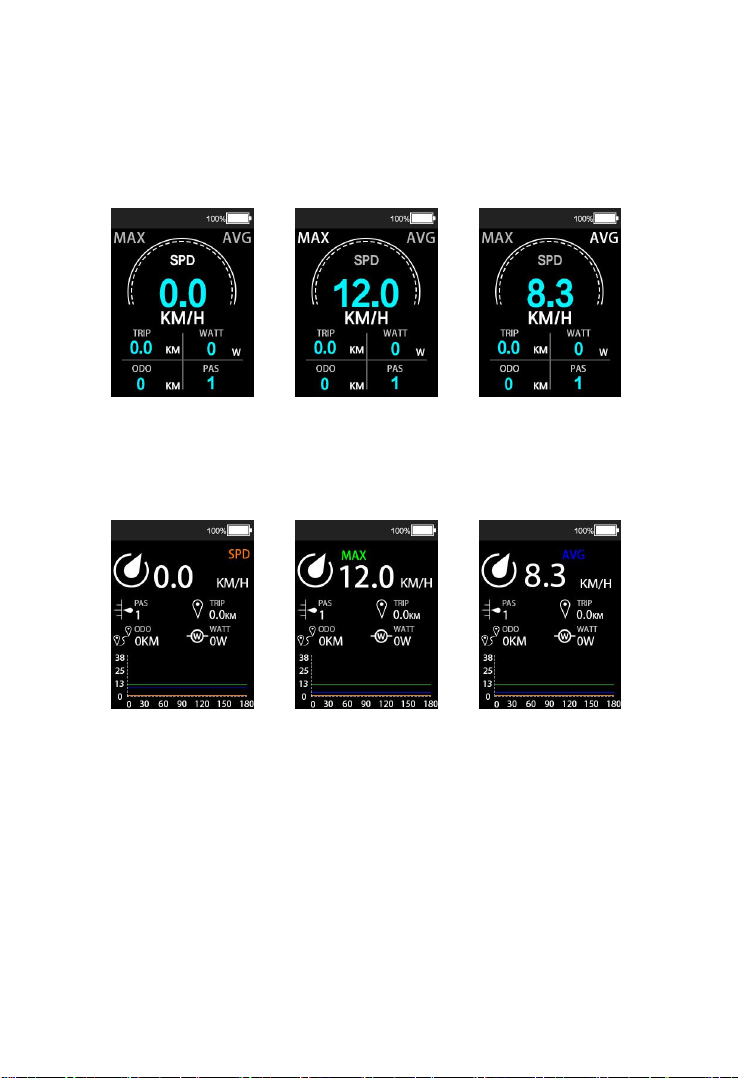
After the display is powered on, the display will show the
current speed by default. Short press the “MODE” button
briefly to switch the display information. The sequence of
- 7 -
display is: current speed → max speed → average speed.
Normal display interface:
Current speed Max speed Average speed
Detailed information interface:
Current speed Max speed Average speed
Navigation interface
Table des matières


