
Packard Bell Compaesseo 300 Manuel utilisateur

WARNING
RISK OF ELECTRIC SHOCK
DO NOT OPEN
COPYRIGHT NOTICE
Packard Bell DVDDivX 300/350 User'sGuide. Copyright 2004NEC Computers InternationalB.V. All RightsReserved.
No part ofthis manual maybe reproduced ortransmitted, in any form or by any means, whether electronic, chemical, manualor
otherwise, including butnot limited tophotocopying, recording, orinformation storage and retrieval systems, for any purpose
without prior writtenpermission of NECComputers International B.V.
DISCLAIMER
NEC Computers InternationalB.V. specifically disclaimsall warranties, eitherexpress or implied,including, but notlimited
to, implied warrantiesof merchantability andfitness for a particular purpose with respect to thisproduct and documentation.
Updates to softwareand hardware componentsare made regularly. Therefore some of the instructions,specifications and
pictures in thisdocumentation may differ slightly fromyour particular situation.All items describedin this guideare for
illustration purposes onlyand may not apply to your particular situation. No legal rights orentitlements may be
obtained from descriptions made inthis manual.
NEC Computers InternationalB.V. reserves theright to reviseor make changesor improvements tothis product or
documentation at anytime without obligationto notify anyperson of such revisions or improvements. In no event shall NEC
Computers International B.V. be liablefor any consequentialor incidental damages,including but notlimited to lossof
business profits orany other commercialdamages, arising outof the use of this product.
TRADEMARKS
Packard Bell isa registered trademarkof NEC ComputersInternational B.V. All othercompany or product names are
trademarks, registered trademarksor service marksof their respectiveowners.
1. Warning
To prevent fire or shock hazard, do not use the plug with an extension cord,
receptacle or other outlet unless the plug can be fully inserted, to prevent fire
or shock hazard. Do not expose this appliance to rain or moisture.
The lightning flashwith arrowhead symbol
within an equilateraltriangle is intendedto
alert the userto the presenceof uninsulated
dangerous voltage withinthe product's
enclosure that maybe of sufficientmagnitude
to constitute arisk of electricshock to persons.
WARNING:TO REDUCE THERISK OF
ELECTRIC SHOCK, DONOT REMOVE
THE COVER (ORBACK). NO USER
SERVICEABLE PARTS INSIDE, REFER
SERVICING TO QUALIFIED SERVICE
PERSONNEL
The exclamation pointwithin an
equilateral triangle isintended to
alert the userto the presenceof important
operating and maintenance(servicing)
instructions in theliterature accompanying
the appliance.
1.1 Important Safety Precautions
Read these instructions.
Keep these instructions.
Heed all warnings.
Follow all instructions.
Do not use this apparatus near water.
Clean only with a dry cloth.
Do not block any ventilation openings. Install in accordance with the manufacturer's
instructions.
Do not install near any heat sources such as radiators, heat registers, stoves or other
apparatus (including amplifiers) that produce heat.
C

Do not defeat the safety purpose of the polarized or grounding-type plug. A polarized
plug has two blades with one wider than the other. A grounding type plug has two
blades and a third grounding prong. The wide blade or the third prong is provided
for your safety. If the provided plug does not fit into your outlet, consult an electrician
for replacement of the obsolete outlet.
Protect the power cord from being walked on and from pinching.
Only use attachments/ accessories specified by the manufacturer.
Unplug this apparatus during lightning storms or when unused for long periods of
time.
Refer all servicing to qualified service personnel. Servicing is required when the
apparatus has been damaged in any way, has been exposed to rain or moisture,
does not operate normally or has been dropped.
Please note that the product warranty does not apply if damage to the product is
the result of a lightning strike.

CONTENTS
1
3
4
11
12
14
2
2
3
6
11
13
22
2
9
12
12
12
13
14
22
23
24
14
13
13
13
11
11
9
8
6
6
6
14
14
1. DVD brief
1.1 Difference between DVD and other disc
1.2 Features
1.3 An introductionto your DVD player
2. Applicable symbols in this user manual
3. Buttons and connectors
4. Setting up your DVD player
4.1 Box contents
4.2 Inserting remotecontrol batteries
4.3 Connections
4.4 Setting ofyour TV set
5. Operation instructions
5.1 Disc playback
6. Function buttons introduction
6.1 Screen display
6.2 Language
6.3 Angle
6.4 Subtitles
6.5 Program
6.6 MENU DVD
6.7 SUB-MENU
6.8 Direction selection buttons
6.9 Numeric buttons
6.10 PBC button(Program Backward Control)
6.11 A-B
6.12 Repeat
6.13 Zoom
6.14 Volume/ MIC-, MIC+
6.15 Random
6.16 Mute
6.17 L/R
6.18 VIDEO OUT
6.19 Progressive Scan
6.20 Pause
6.21 Forward/ Backward
6.22 Stop
7. System setup
8. MP3 Playback
9. Kodak Picture CD Playback
10. Troubleshooting
11. Disc maintenance
12. Specifications
7
9
11
14
14
24
10
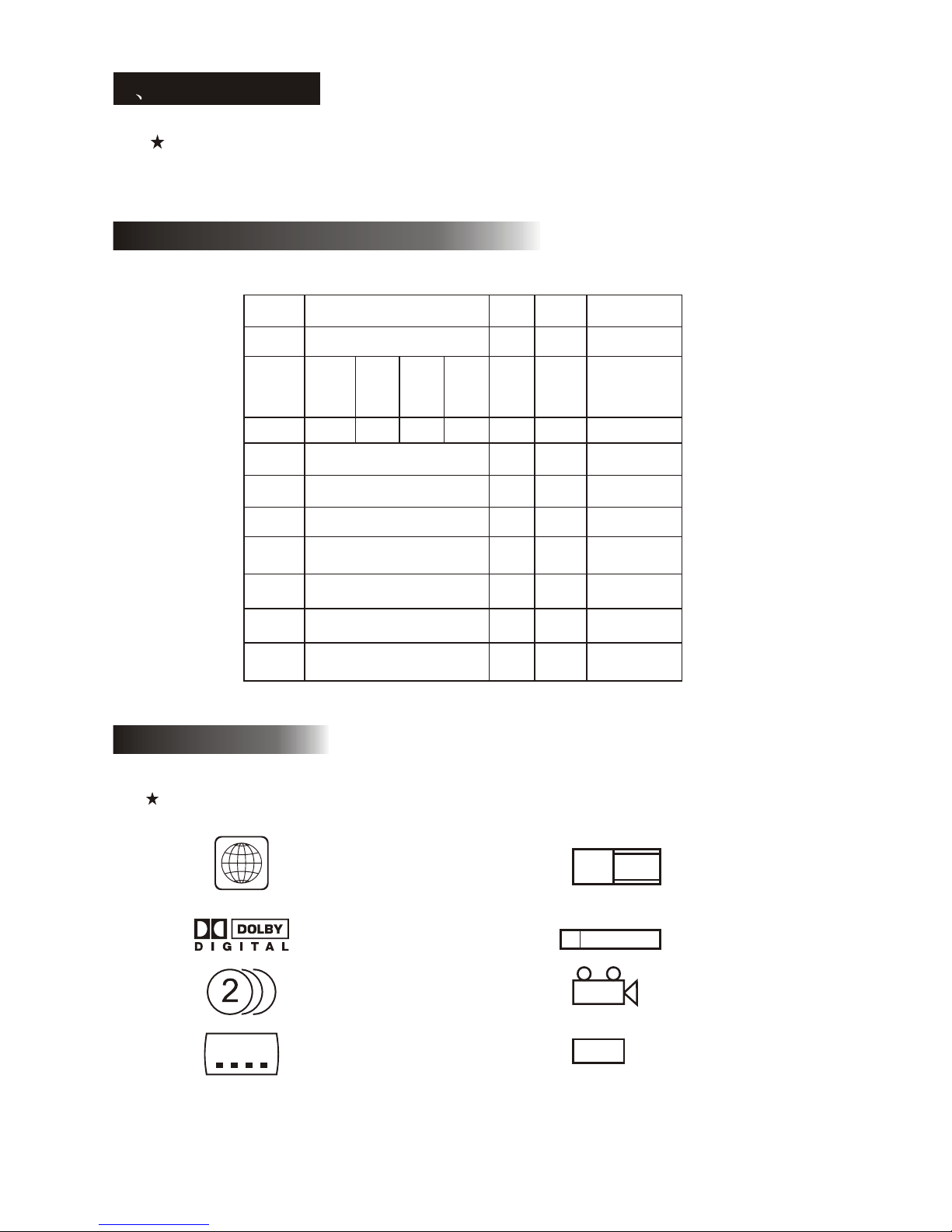
1.1 Difference between DVD and other discs
1 DVD brief
1.2 Features
2
The DVD player is a must for your home theatre system. By using this latest digital technology,
high quality, high-density soundand video has been condensed intoa 12 cmdisc.
DVD SVCD
VCD CD LD
Recording Digital/MPEG2 digital digital Analogue
Capacity
Double
layer
Mono
side,
8.5GB
Mono
layer,
double
Side,
9.4GB
Double
sides,
Double
layer,
17GB
650MB 650MB
Play time
133
min
45min 74min
1side:60min
2side:102min
Disc
diameter
12cm/8cm 12cm
12cm
/8cm
30cm
/20cm
Horizontal
resolution
500 line or above
350
line
430
line
Picture
scale
Multi-scales One
Subtitle
Language
32 subtitle language 8Utmost 16
Sound Dolby decoder/ linear PCM
Linear
PCM
Linear PCM,
FM
Sound
quality
44.1KHz, 48KHz,96KHz16,20,24bit
44.1KHz
/16bit
channels
Dolby digital/linear PCM:8
Dolby digital/5+1 linear PCM:8
42
Linear
PCM:2
Analogue:2
242
min 266
min 484
min
One side,
mono
layer
4.7GB
DVD discs can support many technologies. The following marks are available to describe
these technologies:
NTSC zone coding & TV system
DOLBY digital surround sound
Numbers of sound language
Numbers of subtitle language
Picture scale mode
Parental lock
View angle
Close caption
(Only NTSC)
ALL
NTSC
2
16:9 LB
R RESTRICTED
4
CC

3
A. FULL COMPATIBILITY
Fully compatible with various disc formats: DVD, SVCD, VCD, CD, CD-G, DivX, WMA,
XVID, Kodak Picture CD and Mp3.
B. HIGH DEFINITION
Horizontal image definition can reach 500 lines or above.
C. DTS, Dolby 5.1 channels digital surround sound output
DTS, Dolby 5.1 channels (6 single channels) digital surround sound provide.
Listeners 3D effects and can intensify the bass effect.
D. PARENTAL LOCK
This allows protecting your children against violent or erotic material.
E. Multi story plot selection
Users can select and play different plots of a story (beginning, advancing, climax and
ending) from a disc. Available on certain discs only.
F. Multi subtitles and sound languages
Up to 32 subtitle and 8 sound languages are supported.
G. Multi view-angle
Users can view from different angles (close watching, side watching, panorama etc.).
Available on certain discs only.
Disc video
TV set screen scale
normal pan scan letter box
4:3 16:9
4:3
16:9
1.3An introduction to your DVD-Player
2. Applicable symbols in this user manual
These symbols indicate that it can play Mp3/ WMA discs.
This symbol indicates that it can play DVD discs.
DVD
These symbols indicate that it can play SVCD/CVD/OKO discs.
SVCD
VCD
This symbol indicates that it can play CD discs.
CD
Mp3
WMA
DivX
XVID
These symbols indicate that it can play DIVX/XVID disc.

3.Buttons introduction:
Front panel diagram (DVD DivX 300) :
WEIGHT: 2.9kg
SIZE: 420mmX42mmX240mm
Back panel diagram (DVD DivX 300):
1. Optical output jack
2. Coaxial output jack
3. Center output jack
4. Sub-woofer output jack
5. Left and right surround output jack
6. Left and right front output jack
7. Video output jack
8.S-video output jack
9.Y Cb/Pb Cr/Pr
10.Scart output jack
11.Power cable
4
4. VFD display 7. Prev button
5. I.R
8. Next button
6. Play button
1. Power button
2. DVD disc holder
3. Open/Close button
1236
478
55
3.Buttons and connectors
1
23
4
567
8
10
911

Front panel diagram (DVD DivX 350) :
WEIGHT: 2.5kg
SIZE: 430mmX38mmX255mm
Back panel diagram (DVD DivX 350):
1. Optical output jack
2. Coaxial output jack
3. Center output jack
4. Sub-woofer output jack
5. Left and right surround output jack
6. Left and right front output jack
7. Video output jack
8.S-video output jack
9.Y Cb/Pb Cr/Pr
10.Scart output jack
11.Power cable
4-1
4. VFD display 7. Prev button
5. Play button
8. Next button
6. Stop button
1. Power button
2. DVD disc holder
3. Open/Close button
23567
148911
10
1236
478
55

Remote control diagram:
5
1. Power
2. Numeric buttons
3. Fast forword
4. Fast Rewind
5. CURSOR CONTROL
(up, down, left,right) /
OK(enter)
6. Menu dvd
7. Angle
8. Language
9. Repeat
10.Progressive scan
11.Zoom
12.OSD
13.PBC
14.L/R
15.Program
16.Sub-menu
17.A-B
18.Mute
19.Random
20.VOL+/-
21.Subtitle
22.Setup
23.Next
24.Prev
25.Pause Stop Play
26.Video out
27.Open/Close
25
26
27

DVD player+TV set
Depending on the connectors that are available on your TV set, you may need an
additional cable. Please check your TVs documentation for the best possible
connection.
You may need to use the VIDEO OUT and PROGRESSIVE SCAN buttons to set
the video output mode correctly. Please check the table below.
6
1.Remote control 2.SCART cable
3.User manual & Service Guide 4.Batteries
Open the lid of the battery compartment and install 2 AAA batteries.
Assure correct placement.
1) Before connecting, make sure to turn off the power of all apparatus.
2) After finishing connection, turn on the power again.
The AV cable (optional) is colour coded.
Yellow plug-------- video terminal (yellow)
White plug--------- left audio terminal (white)
Red plug----------- right audio terminal (red)
Please make sure that colours of connectors and plugs correspond.
4.2 Inserting remote control batteries:
4.3 Connections
4. Setting up your DVD player:
5.1 accessories
4.1 Box contents
OUTPUT PORT
VIDEO
S-VIDEO
Y/Cb/Cr
Y/Pb/Pr
SCART
VIDEO SCANNING MODE VIDEO OUTPUT MODE
Interleaved
Progressive scanning
CVBS, CVBS+YUV, CVBS+S-VIDEO
CVBS+S-VIDEO
RGB
CVBS+YUV
PSCAN
Interleaved
Interleaved
Interleaved
DVD player and Amplifier or Decoder (DVD DivX 300)
COAXIAL OPTICAL
Decoder
5.1 CHANNEL SURROUND
SOUND OUTPUT
CENTER
SW
R
LFORNT
R
SUR
L
Amplifier

DVD player+VCR (DVD DivX 300)
If you havea VCR, youcan use it to record programsplayed by thisunit.
DVD player+Y Cb/Pb Cr/Pr or SCART (DVD DivX 300)
DVD player and Amplifier or Decoder (DVD DivX350)
DVD player+VCR (DVD DivX 350)
If you havea VCR, youcan use it to record programsplayed by thisunit.
VIDEO
VCR
AUDIO
YCb/Pb Cr/Pr
INPUT
SCART INPUT
COAXIAL OPTICAL
Decoder
5.1 CHANNEL SURROUND
SOUND OUTPUT
CENTER
SW
R
LFORNT
R
SUR
L
Amplifier
VIDEO
VCR
AUDIO
7
Ce manuel convient aux modèles suivants
1
Table des matières
Autres manuels Packard Bell Lecteur DVD

Packard Bell
Packard Bell DVX 461 Manuel utilisateur

Packard Bell
Packard Bell DIVX 300 Manuel utilisateur

Packard Bell
Packard Bell DVX 460 Manuel utilisateur

Packard Bell
Packard Bell DVX 160 Manuel utilisateur

Packard Bell
Packard Bell DivX 450 PRO Manuel utilisateur
Packard Bell
Packard Bell DVX 360 USB Manuel utilisateur


