Oxygen MTB-X Manuel utilisateur

Owner
Manual

2
B
B
S
IMPORTANT PLEASE READ THIS MANUAL FULLY BEFORE USE
For your safety and to ensure a long and trouble free life of your Oxygen
bicycle, check the operation of brakes, lights, bell and gears,
and check tyre pressures are correct.
Also check all fasteners, including quick release mechanisms,
before every ride.
DEALERSTAMP
White
Matte Black
FW
BATTERY SERIAL NUMBER:-
MODEL:-
/
/ 20
PURCHASE DATE:-
DAY MONTH YEAR
DATATAG ID:-
DATATAG ETCH NUMBER:-
Register your OXYGEN
Warranty online at
oxygenbicycles.com/
support/register-a-bike
Register your DATATAG online at
datatag.co.uk/cycle/validate.php
BICYCLE SERIAL NUMBER:-
MTB-X

3
Thank you for purchasing an OXYGEN Electric Bicycle
With care and correct usage your bicycle
will give many years of service.
Important
PLEASE CHARGE THE BATTERY
BEFORE FIRST USING THE BICYCLE
Even though the battery indicator will show charge this cannot be
relied upon until the battery has had the initial full charge.
1 ELECTRIC BICYCLE
1 BATTERY with 2 Keys
1 BATTERY CHARGER with UK Mains Lead
1 MANUAL
1 WARRANTY CARD
1 DATATAG Regiistration Certificate
Contents
Parts Identification ............................................ PAGE 4
Battery Care & Charging ...................................PAGE 6
Using the Power Assistance ............................. PAGE 8
Programmable Functions ..................................PAGE 15
Cycle Computer Functions ............................... PAGE 20
Standard Bicycle Functions .............................. PAGE 22
Troubleshooting................................................. PAGE 25
Datatag ............................................................. PAGE 26
Maintenance Schedule ..................................... PAGE 28
Special Battery Features .............................. PAGE 30
Warranty ........................................................... PAGE 32
Specifications ................................................... PAGE 34
Certificate of Conformity ................................... PAGE 35
PACKAGE
CONTENTS

4
DISPLAY
POWER
SWITCH
1
9
LEFT SIDE VIEW
OF BATTERY
10
5
3
7
5
4
1
6
8
2
SERIAL NUMBER
LABEL ON END OF
BATTERY
RIGHT SIDE VIEW
OF BATTERY
15
11
13
12
14
16
PARTS IDENTIFICATION
We continually strive to ensure that we provide you with
the best possible products, therefore
SPECIFICATIONS ARE SUBJECT TO CHANGE WITHOUT NOTICE
1
2
3
4
5
6
7
8
9
10
13
14
15
11
12
16
17
18
19
20
21
22
23
24
25
28
29
30
26
27
LCD (Display)
Gear Selector (3 front)
Rear Brake Lever
Front Brake Lever
Motor Cutout Switch
Gear Selector (8 rear)
Bell
Gear Indicator
Battery Security Lock
Battery
Charging Socket
USB Power Socket
Battery Power Switch
Battery Power Meter
Fuse 30A
Front Disc Brake
Controller Box
Datatag Visible ID
Battery Serial Number
8 Spd Shimano Gears
Seat Height Adjuster
3 Spd Chainwheel
Forks Lockout Lever
Rear Disc Brake
Front Tyre 28 x 2.25
Rear Tyre 28 x 2.25
Rear Hub Motor
Motor Connector
Bicycle Serial Number
Suspension Adjuster
OPTIONAL HALF-
GRIP THROTTLE

5
22
18
24
23
19
BOTTOM OF
SEAT TUBE
25
30
20
21
17
26
28
29
27
S/N1234BBS567

6
BATTERY CARE & CHARGING
Your Oxygen Electric Bike uses a Lithium battery for it's power and the following
points will directly affect battery life and performance.
Storage
Batteries do not like to be stored in very hot or very cold conditions or to be
subject to conditions of high moisture. They also do not like to be left in a fully
discharged state. If Lithium batteries are left flat for an extended period they may
no longer be functional.
• Store your battery between 15º C and 25º C
in a dry area. (The conditions found in a
normal domestic house).
• If your MTB-X is not in use for an extended
period it is imperative that you charge the
battery before storage and then charge the
battery once a month to prevent deterioration.
Charging
Lithium batteries do not like to be left discharged.
It is good practice to recharge as soon as is
reasonably possible after the battery goes flat.
We recommend charging after every ride, that
way your electric bike is always ready for your
next outing.
• Do not charge at temperatures below 0º C
• Switch off the battery before charging, using
switch located on the side of the battery.
• Battery can be charged on or off the bike.
• Always make sure the battery and charger
are on a non-flammable, dry surface away
from sources of heat, humidity and flammable
materials.
• Do not cover the battery
or charger whilst charging.
• Only use the charger
supplied with your battery.
• Even if not in use recharge
your battery a minimum of
once a month.
Removing the Battery
To remove the battery, turn off at the switch
located on the side of the battery and then
unlock by turning the key anti-clockwise to the
unlock position.
Slide the battery upwards using the handle
provided taking care to hold the battery firmly
and then lift away from the holder.
For Your Safety
• Keep battery away
from children
• Do not dismantle
• Do not pierce or crush
• Do not immerse in liquid
• Do not expose to
temperatures over 60ºC
• Do not short circuit the
battery connections
• Do not leave unattended
whilst charging
• Do not sleep near a
battery that is charging
Failure to adhere to these
Battery Care instructions
can allow the battery to
deteriorate and may pose
a serious risk of Fire

7
Using the Charger
Two types of battery charger are
used for the MTB-X. (Only one will be
supplied). Both have a charge light
which will display RED when
charging and change to GREEN
when the battery is charged.
The alternative type charger also has a second light
which shows RED when mains power is applied.
• Ensure the battery is switched off.
• Plug the charging lead into the battery.
The charging lead plugs into the charging socket
located beneath the rubber cover on the side of the
battery casing. It can only be inserted one way.
• Plug the charger into the mains socket and
switch on at the wall outlet.
• The lights on the charger will illuminate after a
few seconds.
When charging is complete the RED charge light will
change to GREEN. May take up to 6 hrs for flat battery.
• Once charged, switch off at the wall outlet and unplug.
• Disconnect the charging lead from the battery and
replace the cover over the charging socket.
The battery does not have to be completely discharged before it is recharged. The
Lithium battery has no "memory" and therefore can be charged at any time. It is
perfectly acceptable to recharge the battery after a short ride so that the battery is
fully charged before the next ride.
NOTE: If the battery is charged
and the charger left switched
on for an extended period the
alternative type charger will enter
a low power state, indicated by
both the RED and ORANGE/
GREEN LEDs flashing slowly.
Switch off and unplug as above.
IMPORTANT
Plug the charger into the battery
before switching on at the mains.
Similarly, switch off at the mains before
unplugging the charger from the battery.
DO NOT LEAVE PERMANENTLY
CONNECTED

8
Your OXYGEN Electric Bicycle
can be used as a normal pedal
cycle by simply not switching on
the battery.
(or using in Zero
Assist - see below)
Usage
Buttons
Display Information Areas
UP
POWER
DOWN
CYCLE
COMPUTER
FUNCTION
TYPE
BATTERY
STATUS
POWER
USAGE
Display Information Areas
ASSIST
LEVEL
DATA AREA
/ASSIST LEVEL

9
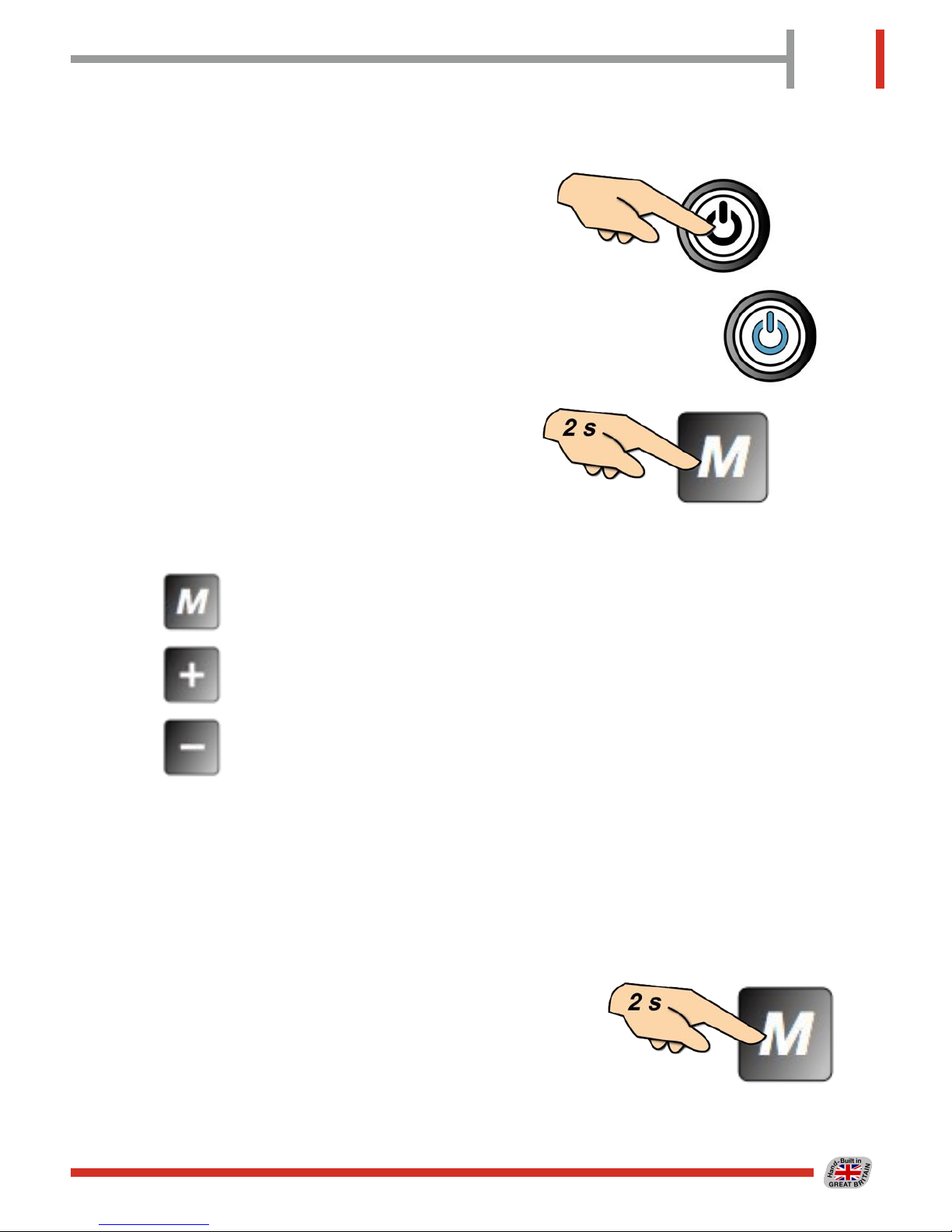
To use under electric power, switch
on at the switch on the side of the
battery, which will show blue when
ON,
then press the POWER button on
the handlebar LCD display for 2
seconds.
Control Buttons
By means of the three buttons, MODE, UP and
DOWN, on the handlebar mounted display unit,
the various functions of the power controller and
Cycle Computer can be utilised.
See the following sections for details.
To turn off the LCD and the power to the
bike, press and hold the POWER button for
2 seconds.
If the power is left on for an extended period
and the bike is not used, then the power will
automatically be turned off.
Switching Off
Switching On
ELECTRIC BICYCLE FUNCTIONS
GLOWS BLUE
WHEN ON

10
The LCD has a backlight for
night time use. This is
switched on by pressing and
holding the UP button.
To turn the backlight off,
again press and hold the UP
button.
The LCD shows the charge remaining in the
battery in the lower right of the display. The
indicators will gradually go out as the battery
power is used up. Refer to the table below
for details.
Battery Meter
Display Backlighting - Night Mode
70 - 100%
SYMBOL
DISPLAYED
CHARGE
REMAINING
BATTERY METER DISPLAYS THE CHARGE REMAINING IN THE BATTERY
BATTERY IS
EXHAUSTED AND
SHOULD BE
RECHARGED AS
SOON AS POSSIBLE
50 - 70%
30 - 50%
15 - 30%
0 - 15%
FLASHING
Table des matières
Autres manuels Oxygen Vélo