Outsight Creamsource Micro+C Manuel utilisateur

USER MANUAL
For firmware v1.0 and above

2
1. Welcome ..................................................................1
2. Getting Started........................................................ 2
2.1 What’s included ....................................................2
2.2 Powering Up and Down ........................................ 3
2.3 Batteries ............................................................... 3
3. Water, weather and temperature .............................4
4. Rigging and Safety................................................... 5
4.1 Quick Release Yoke...............................................6
4.2 Multi Yoke.............................................................6
4.3 Universal Mount Plate...........................................7
4.4 3/8” Tapped (threaded) Hole................................8
4.5 Optional Spigot ....................................................8
4.6 Gels and Lenses ....................................................9
4.7 Light Shaping tools ...............................................9
4.8 Dome Diffusers................................................... 10
5. Controls ................................................................. 11
5.1 Control Wheel and Buttons.................................. 11
5.2 LCD Display and Menu .........................................12
5.3 Low Battery Warning............................................13
6. Change Settings with Menus................................... 13
6.1 Colour Mode - Normal CCT ................................ 18
6.2 Colour Mode - Colour HSV ................................. 18
6.3 Colour Mode - Colour RGBW .............................. 19
6.4 Colour Mode - Colour XY ................................... 19
6.5 Colour Mode - Lighting Gels............................... 19
6.6 Colour Mode - Crossfades ..................................20
6.7 Colour Mode - BUMP COLOUR............................21
6.8 Colour Mode - REMOVE BUMP............................21
7. Effects Modes........................................................ 22
7.1 Normal ............................................................... 22
7.2 Dual Level ........................................................... 23
7.3 Strobe and Flashes.............................................. 23
7.4 Random Flashes.................................................. 23
7.5 Timed Flash (FlashBandit – sync to shutter)........24
7.6 Flash Frames ....................................................... 24
7.7 Colour Cycle .......................................................24
8. Syncing ..................................................................25
8.1 Syncing to camera using Flashbandit.................. 25
8.2 Calibrate with Flashbandit .................................. 26
8.3 Slave Multiple Creamsource Units ......................28
9. DMX Control ......................................................... 29
10. Accessories Port and Pinout Specifications ............. 31
Contents

1
Welcome
Thank you for buying a Creamsource Micro+C from Outsight.
We design and engineer our products to the highest standards
to be used under the challenging circumstances that come with
motion picture and television production. This unit will give you
years of reliable service.
This manual will explain the multiple functions of the
Creamsource Micro+C and its capabilities as a stand alone
unit as well as working in sync with other units, cameras and
accessories. We are always eager to find out about new and
unusual applications for our products as well as suggestions
for future features.
Please let us know about your experiences on social media or
email: ideas@creamsource.com
Chapter 1:
.com/outsightglobal
@OutsightGlobal
outsightglobal

2
1
2
3 4 5
Chapter 2: Getting Started
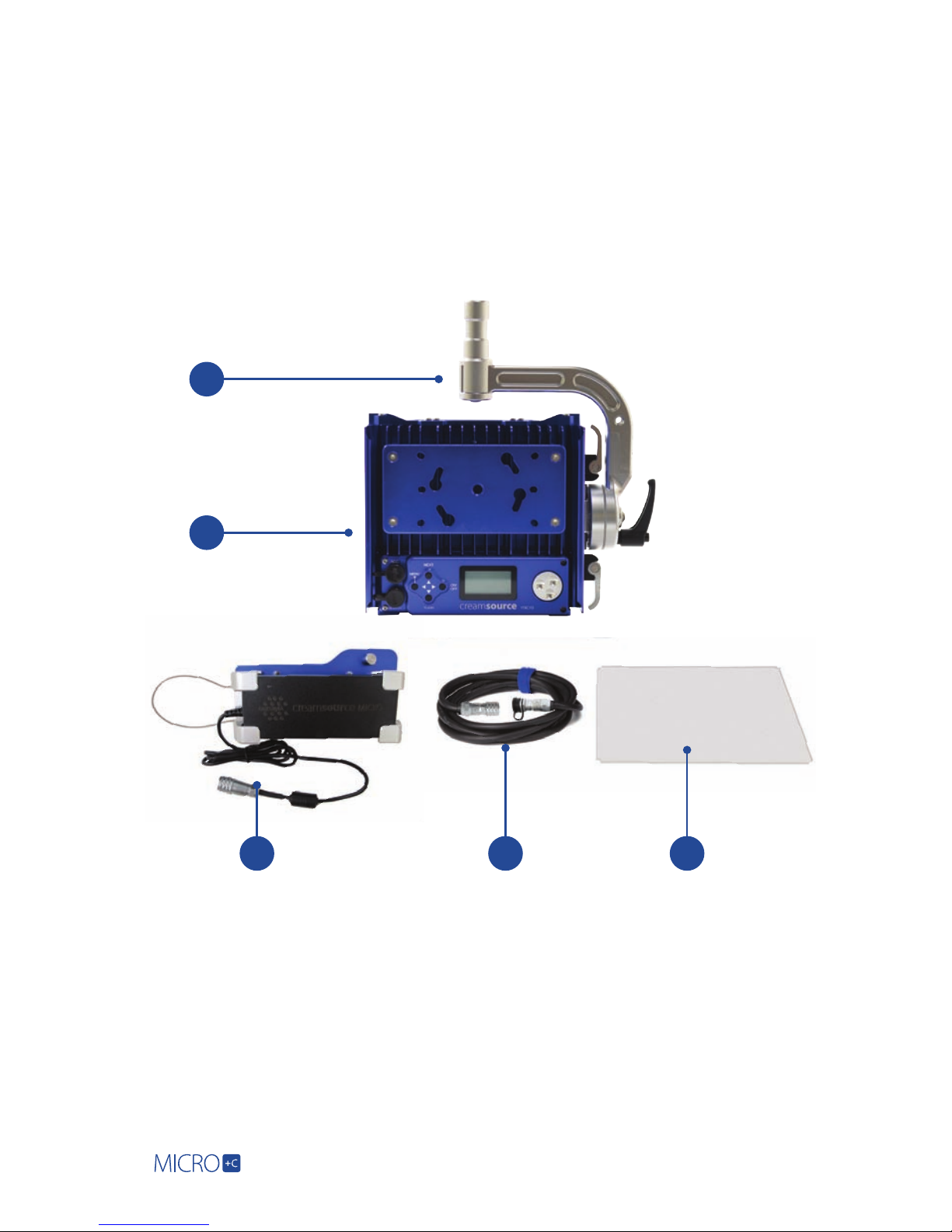
2.1 What’s included:
If you have purchased your Creamsource Micro+C as an Essential Kit, you will
receive the following:
1. Creamsource Micro Rigging Yoke
2. Creamsource Micro Luminaire fixture
3. Creamsource Micro Power Supply with
Mounting Bracket
4. Creamsource Micro Power Cable
5. Creamsource Micro 60° Lens

3
If the external flexible cable of
this luminaire is damaged, it
must be replaced by an original
cable from the manufacturer
or service agent.
2.2 Powering Up and Powering Down:
Before you power up make sure you read all the safety warnings (page 33), it won’t
take much time.
• Use only the power supply that comes with the Creamsource Micro+C. Its
input is auto-ranging from 100-240V AC, 50/60Hz for use world-wide.
• Attach power supply to main power source. With the power supply turned
OFF, connect the power cable to the light head. This procedure will extend
the life of the connectors.
• The Creamsource Micro+C remembers its last brightness setting, if the light
was turned on or off and the last MODE it was used in.
• Up to 10m (32ft) of extension cable can be run between the power supply and
the head.
The power should be switched off before unplugging the cable. There are no
other special procedures for powering down - it can be done at any time without
harm to the unit.
2.3 Batteries
The Creamsource Micro+C can be run on DC battery power directly with no
additional hardware required. Any voltage source between 10V and 32V which is
capable of 80 watts draw can be used. The LED array will turn off if the voltage falls
below 10V, so it is advisable to use 14.4V or higher for best performance.
The standard Power Supply IS NOT water resistant, please make
sure to keep in a dry location to avoid electric shock

4
Chapter 3: Water, Weather and Temperature
The IP65 rating of the Creamsource Micro+C Head means it can survive low
pressure water jets in all directions, BUT not full submersion. It also means that it
has a high resistance to dust and dirt. Still precautions are advised.
Note that the standard accessories are not water resistant - for
example battery mount, remote, power supply etc.
Temperature
As the Creamsource Micro+C is a high-power device, it will get hot during normal
operation, and care must be taken when touching the unit.
• The maximum surface temperature of the lamp head will be 60º C/140ºF,
when operated in an ambient temperature of 25º C/77º F
• Maximum ambient temperature for normal operation is 40ºC/104ºF.

5
Chapter 4: Rigging and Safety
Recommended rigging position for the Creamsource Micro+C is with the cooling
fins in a vertical orientation. This allows for the best natural cooling of the unit.
It can be mounted in other positions BUT care must be taken not to smother the
cooling fins on the back of the unit. Keep a 10cm/4in. clearance around the unit
to maintain air flow.
If rigging the unit above people, from vehicles, moving platforms, or hanging from
any rigging, be sure to secure the unit through the safety-cable holes located
at each end of the unit using approved and correctly rated safety cables, chains
or carabiners.
Use appropriate safety cable for 4kg load. If the unit is to be
mounted suspended, it is necessary to replace the standard spigot
with a 28mm DIN or Euro spigot - please contact Outsight for
more details

6
Rigging Options
4.1 Quick Release Yoke:
A combo Junior/Baby spigot - compatible with a large range of stands and
other rigging equipment. The yoke is quickly fitted without tools. Simply
flip the levers on each side of the yoke to the UP position, and slide the yoke
onto the unit. Then press the lockers “levers” down to lock.
4.2 Multi Yoke:
The Multi Yoke (Part number CSU-YOKE-1X4) is designed to complement
the Creamsource Micro as an accessory that allows the deployment of two,
three or four units in a linear array. It features a quick release tool-less setup,
and folds down for easy transport.

7
4.3 Universal Mount Plate:
The universal mount plate on the back of the Micro can be used to mount the
Power Supply and Battery mount. It can also be used for rigging - it is compatible
with mounting accessories from Kino Flo, such as the MTP-BF41S (“lollipop”)
mount. To release, lift the spring pin and turn plate counter-clockwise.

8
4.5 Optional Spigot:
Suitable for floor stand mounting only. (Supplied with ‘Basic Kit’).
4.4 3/8” Tapped (threaded) Hole:
Another mounting option is the 3/8” hole tapped (threaded) directly in
the base and top of the unit.
Table des matières
Manuels Matériel de DJ populaires d'autres marques

thomann
thomann Stairville DJ Lase 40-G MK-III Manuel utilisateur

Eagletone
Eagletone 6 Eyes Flower Manuel utilisateur

EuroLite
EuroLite FLD-1508 Manuel utilisateur

Technical Pro
Technical Pro LG8xSEA Manuel utilisateur

JB Systems
JB Systems Lounge Laser DMX Manuel utilisateur

Lightmaxx
Lightmaxx Vega Halo 90 Manuel utilisateur

Elation
Elation FUZE WASH Z350 Manuel utilisateur

Maverick
Maverick MK3 WASH Manuel utilisateur

Infinity
Infinity TF-260C7 Fresnel Manuel utilisateur

Chauvet
Chauvet EVE E-50Z Manuel utilisateur

Eliminator Lighting
Eliminator Lighting E 138 Manuel utilisateur

EuroLite
EuroLite Mini Multicolor LED Flashing Light SC Manuel utilisateur