
oticon Steamer Manuel utilisateur
908 70 910 00 / 03.09
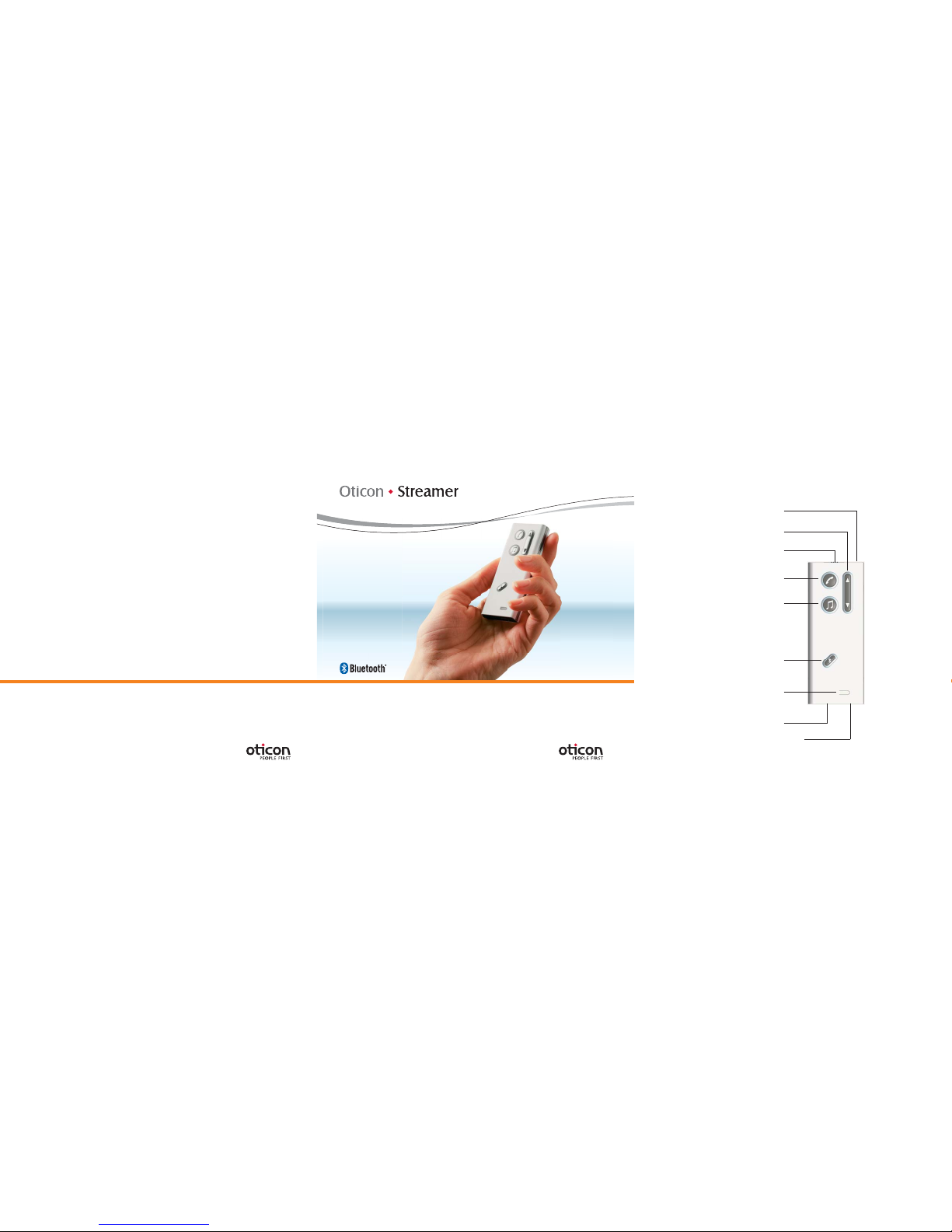
Oticon Streamer Overview
Microphone
Up-Down
(Volume control and programme shift)
Key lock
Phone
Music connection
e.g. MP3
Connect
Audio (TV, music)
Battery indicator
Getting Started Guide
Power

Table of Contents
Introduction 3
Wearing Streamer 4
How to get started 6
How to use with a phone 7
How to listen to audio (TV, music) 8
How to use as remote control 9
Important information 10
Battery 10
Key lock 10
On/Off button 10
My paired Bluetooth devicesOticon Streamer Overview
Microphone
Up-Down
(Volume control and programme shift)
Key lock
Phone
Music connection
e.g. MP3
Connect
Audio (TV, music)
Battery indicator
Power

3
Introduction
Streamer connects your hearing instruments wirelessly to different audio
sources and makes your hearing instruments work like wireless headphones.
Streamer transmits the sound directly into both hearing instruments and
thereby improves the audio experience by giving excellent sound clarity.
Streamer gives you the following possibilities:
Hands free home phone conversations•
Hands free mobile phone conversations•
Listening to TV sound•
Listening to audio (e.g. music) from a radio, PC, MP3 player etc.•
wired to Streamer
Listening to audio (e.g. music) from a wireless stereo device via Bluetooth•
Remote Volume Control and Programme Shift in the hearing instruments•

Wearing Streamer
To get the most out of your Streamer, wear it hands-free by using the included
neck strap. There is a short and a long neck strap. If you use Streamer hand-
held you risk occasional audio dropouts in the hearing instruments.
See the illustrations below on how to wear and use Streamer.
Hands-free
Neck strap
Purpose: Landline phone, mobile
phone, TV, music, remote
control, stand-by
Handheld
In your hand In your pocket
Purpose: Landline phone,
mobile phone, remote control
Purpose: Remote control
and stand-by
4 5
Stand-by is when Streamer is not being actively used (idle state). In this
situation Streamer can be in your pocket and still allow you to receive phone
calls.

How to use with a phone
When talking
Talk into the microphone of Streamer (optimal up to 30 cm/12 inch distance).
Answer
incoming
phone calls
When a phone connected to Streamer rings, you
will see a blinking green light around the Phone
button and you will also hear a ringing tone in your
hearing instruments.
Press the Phone button shortly to answer the call.
The ring around the Phone button now lights solid
green.
(The Connect function must be active – see “Turn on
Connect function”)
Outgoing
calls with
ConnectLine
Phone
Press Streamer’s Phone button. The hook is off and
you will hear a dial tone in the hearing instruments.
The green rim light shows constant light in
Streamer’s Phone button. Pick up the phone
receiver and dial the wished phone number.
Put the receiver back on.
Outgoing
calls with your
mobile phone
Use your mobile phone to make the call. When the
call goes through, talk into Streamer – do not press
the Phone button on Streamer.
6 7
How to get started
Pairing
Before Streamer can be used with your ConnectLine devices or a mobile phone
and music player, Streamer must be paired to these devices.
Set Streamer
into pairing
mode
Press and hold the Connect button for 5 seconds
until the blue light flashes.
After 2 seconds the blue light turns on, and after
5 seconds it flashes rapidly, which indicates the
pairing mode.
Turn on
Bluetooth
function
The Connect function must be active to ensure the
wireless communication between Streamer and
your audio sources.
Press the Connect button shortly.
The blue light turns on.
After a few seconds the blue light starts to pulsate
and after half a minute it turns off again to save
power.
Refer to Streamer manual for detailed pairing instructions.
For more information on pairing your mobile phone with Streamer, visit the
Oticon website on www.oticon.com

9
8
How to listen to audio (TV, music)
Listening to
ConnectLineTV
Press the Audio button when near the TV. After a
few seconds the orange shows constant light and
the hearing instruments receive theTV sound.
Listening to
wired music
Connect the cable of the audio source to the Music
Connection of Streamer. Press the Music/Audio
button. The orange ring around the button lights up
and the music starts.
Stop TV
listening or
music
Press the Audio button. The orange light in the
button turns off.
Adjust volume Use the Up-Down button. Press Up or Down until
the volume in the hearing instruments is
comfortable.
How to use as remote control
Adjust
volume
Press Up or Down shortly to adjust volume. Repeat
until the volume in the hearing instruments has
reached the desired level.
Shift
programme
Press and hold Up or Down for 2 seconds to go for-
wards or backwards in the programme cycle.
Only possible if more programmes are present in
the hearing instrument.

10
Important information
Battery
The Streamer has a built-in rechargeable battery. The battery will last 5 hours
when audio streaming is active.
When Connect function is on (Stand-by) the battery will last for 70 hours.
The battery indicator will light up solid red when the battery is low
(about 20 minutes left). The battery indicator will start blinking when
the battery is close to empty (about 5 minutes left).
Recharging the battery takes approximately 4 hours. When charging
the battery, the indicator blinks green. When fully recharged, the
battery indicator lights solid green.
The battery should be charged frequently.
Key lock
You can lock the keys to avoid pressing the buttons unintentionally.
The key lock slider on the top of Streamer locks and unlocks the keys.
On/Off button
The Streamer has no On/Off button, as it only uses little power. If you plan not
to use Streamer for longer periods, turn off the Connect function.
The slider button on top of Streamer is a keyboard lock, not an On/Off switch.
Table des matières
Autres manuels oticon Lecteur multimédia


