
oticon ConnectLine Streamer Pro 1.3A Manuel utilisateur

Streamer Pro
1.3A
ConnectLine
Instructions for use

Introduction to this booklet
This booklet gives you guidance on how to use and maintain your new Streamer
Pro. Please read the booklet carefully, including the Warning section. This will
help you achieve the full benefit of your Streamer Pro.
If you have additional questions about the use of your Streamer, please contact
your hearing care professional.
For your convenience, this booklet contains the below navigation bar to help you
navigate easily through the different sections.
About Start-up Handling Functions Warnings More info
Intended use
Intended use Streamer Pro is intended to be used by Oticon wireless hearing aid
users. The product is intended to be used together with the given
hearing solution. Streamer Pro is a communication interface between
the hearing aid and other devices such as mobile phones. Streamer Pro
can be connected to a range of external (additional) devices to enable
the hearing aid user to better hear a TV or to communicate through
Bluetooth-enabled mobile phones, etc.
Streamer Pro can also be used as a remote control that enables you to
adjust the hearing aid volume and change programs in the hearing aid.
Indications for use No indications for use.
Intended user Adults and children older than 36 months.
User environment Indoor/Outdoor.
Contraindications Users of active implants must pay special attention when using the
device. For more information, read the Warning section.
Clinical benefits See clinical benefits of the hearing aid.

Table of content
About
Package content 6
Accessories and spare parts 8
Streamer overview 11
Start-up
Use the Streamer with the neck loop 12
Use the Streamer without the neck loop 14
Turn the Streamer ON and OFF 16
Remote control of the hearing aid 18
Pair the Streamer 20
Charge the Streamer 22
Handling
Low battery indication 24
Clear pairing 28
Cleaning and maintenance 31
Functions
Primary functions 32
Mobile phone 33
ConnectLine phone solution 40
ConnectLine microphone 42
ConnectLine TV solution 44
ConnectLine App 46
Secondary functions 47
Music or audio cable 48
Headset cable 50
Music or audio wireless 52
Headset – wireless 54
T-coil (built-in) 56
FM receiver (optional) 58
Warnings
Warnings 60
More info
Conditions of use 64
International warranty 65
Warranty 66
Technical information 67

Streamer Pro
1.3A
ConnectLine
Instructions for use
6 7
About Start-up Handling Functions Warnings More info
Package content
The package consists of the following elements:
Streamer Pro
1.3A
Protective skin
Box 3Box 1 Box 2
Neck loop – medium Neck loop – long
Charger
This booklet (Instructions for use)
3.5 mm mini
jack stereo
cable for MP3
or music
USB charger
cable
3.5 mm headset
splitter cable
for use with PCs
Power supply will vary from
country to country.
About

8 9
About Start-up Handling Functions Warnings More info
Accessories and spare parts
Protective skins
Additional protective skins, dark or light grey, are
available from your hearing care professional.
Protective skins – single button
A protective skins, dark or light grey, with one
protruding button, which makes “blind” operation
easier, are available from your hearing care
professional.
Replacement neck loops
Replacement neck loops, black or white,
are available in three sizes: Short (51
cm), medium (66 cm) and long (81 cm)
from your hearing care professional.
Belt clip
A belt clip, black or white, is available from your
hearing care professional.

10 11
About Start-up Handling Functions Warnings More info
Streamer overview
Microphone
Volume control
(up/down)
Neck loop in/out
Neck loop
Phone
TV
AUX selector
Microphone inlet
ON/OFF button
Status
indicator
ON/OFF indicator
Pairing Charging
Battery
Mini jack
FM receiver
Power supply
ON/OFF
IMPORTANT NOTICE
Please refer to your hearing aid’s Instructions for use for details on the functionality of
your specific hearing aid solution.
12 13
About Start-up Handling Functions Warnings More info
Use the Streamer with the neck loop
The neck loop is an integral part of the Streamer’s electronic system. It is used as
an antenna to transmit sound to your hearing aids.
For the best possible sound and longest possible streaming time, the Streamer
should always be worn with one of the included neck loops. The Streamer comes
with two neck loops, a long and a medium.
IMPORTANT NOTICE
Please use the neck loop carefully. To avoid strangulation the neck loop will
automatically release if it gets caught in something. Do not shorten or modify the neck
loop in any way, such as tie a knot to shorten the length. If a neck loop breaks, it cannot
be repaired and must be replaced immediately. Consult your hearing care professional
for a replacement.
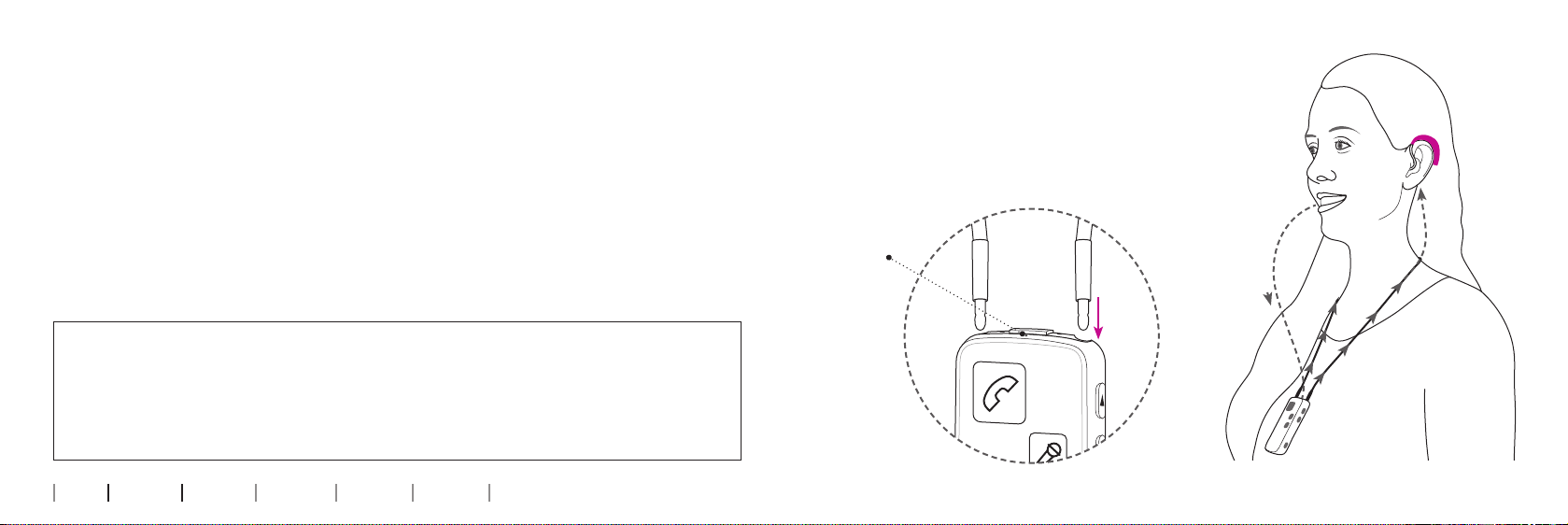
Insert the neck loop
The neck loop snaps into the holes on the top of
the Streamer.
Note that when talking to somebody through the
Streamer, it is important that your voice can be
picked up by the built-in microphone on the top.
Microphone
Your
voice
Sound from
Streamer to
hearing aids
Start-up

14 15
About Start-up Handling Functions Warnings More info
Use the Streamer without the neck loop
When using the Streamer without the neck loop, the distance to the hearing aid
should be less than one metre. You may experience drop-outs in sound, which is
why we always recommend using the neck loop.
When using the Streamer without the neck loop, more power will be used –
consequently maximum streaming time is reduced to 5 hours on one full charge.
Max 1 metre
Belt clip (optional)

16 17
About Start-up Handling Functions Warnings More info
Turn the Streamer ON and OFF
Power on
Press the ON/OFF button on the top of the Streamer for
2 seconds until all lights on the front and top flash to
indicate it is powered on.
Release the ON/OFF button. The power indicator on the
top of the Streamer should now fade to green.
If the Streamer does not turn on, make sure it is
charged.
To see the status of the Streamer, press the ON/OFF
button briefly.
Power off
Press and hold the ON/OFF button on the top of the
Streamer for 2 seconds until the green power indicator
is turned off.
Status Front Description
The Streamer is off
After pressing the ON/OFF button for 2 seconds, all lights will be on
for a few seconds to indicate that the Streamer is now turned on.
The Streamer is now turned on and ready for use

18 19
About Start-up Handling Functions Warnings More info
Remote control of the hearing aid
Volume up/down
Briefly pressing on either volume up or down will regulate the volume in the
hearing aids accordingly. You will hear small confirmation “ticks” in the hearing
aids.
Changing programs in the hearing aids
You can change programs up or down by holding the volume up or down for more
than one second. Changing programmes is indicated by a sound in your hearing
aids.
Muting the hearing aids
You can mute the hearing aids by pressing the volume up AND down for 1 second
simultaneously.
Volume/program
shift Mute
IMPORTANT NOTICE
The mute function is only available in the most recent Oticon hearing aids. Please
consult your hearing care professional for details. Even though the Streamer is turned
off, the remote functionality of the hearing aids will still work.
Autres manuels pour ConnectLine Streamer Pro 1.3A
2
Table des matières
Manuels Système de conférence populaires d'autres marques

Kramer
Kramer VIA GO Manuel utilisateur

AVT
AVT MAGIC AC1 Go Manuel utilisateur

ProSoft Technology
ProSoft Technology AN-X4-AB-DHRIO Manuel utilisateur

Sony
Sony PCS-I150 Manuel utilisateur

Middle Atlantic Products
Middle Atlantic Products VTC Series Manuel utilisateur

Prentke Romich Company
Prentke Romich Company Vanguard Plus Mode d’emploi


