ortizan M8 Manuel utilisateur

M8 Bluetooth Speaker
User Manual

Safety instructions
Package Included
Please read all instructions before use
1. To avoid damaging the product, please charge the product with devices rated at 15 v.
2. To avoid disabling the warranty and damaging the product, please do not disassemble the product.
3. The rechargeable battery charging cycles are limited.
4. Battery life and charging cycle owing to the different use and settings.
5. Please do not place the product near the high-temperature heat source.
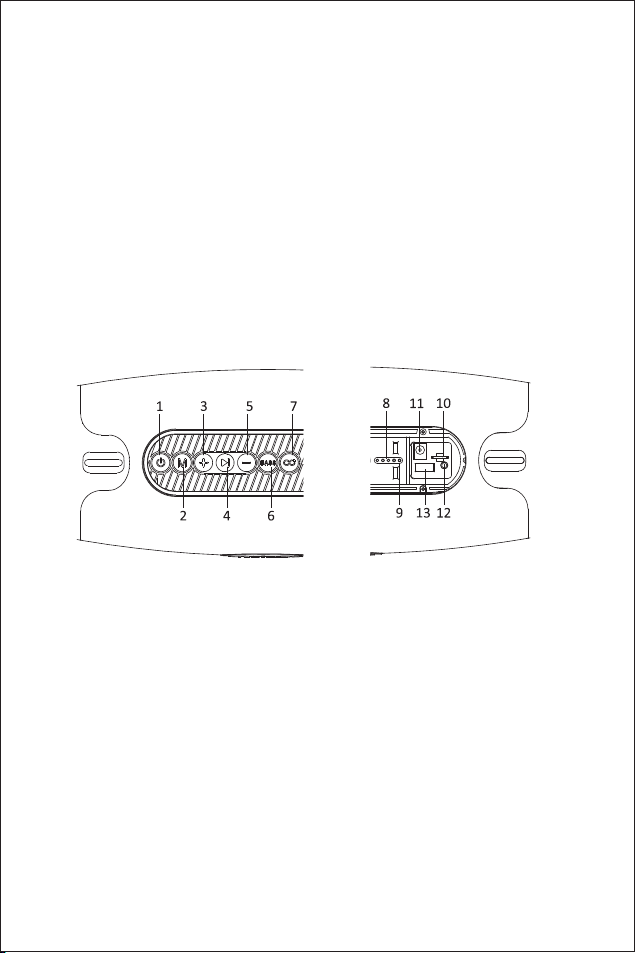
Button And Function
1. Power: Short press to switch light effects. Long press 3s to power on/off
2. Mode: Short press to switch Bluetooth/TF/AUX/USB music play mode. Long press to disconnect Bluetooth
3. +: Short press to volume up.Long press to choose the next track
4. Pause: In music mode short press to pause
5. —:Short press to volume down.Long press to choose the previous track
6. BASS: Short press to Switch sound effects(Normal/Heavy bass). Long press to clear Bluetooth pairing
information
7. ECHO: Long press to turn on/off TWS mode
8. Battery level indicator light
9. Bluetooth indicator light
10. TF card slot
11. Charging port
12. AUX port: Reset button build-in AUX port
13. USB port
1*M8 Bluetooth Speaker 1*User Manual 1*Power Adapter
1*Shoulder Strap 1*Audio Cable
1

Battery
Built-in rechargeable lithium battery
Charging
A white LED light will be on when charging. Four white LED lights will be on when fully charged.
If the product has not been used for more than 7 days, it is suggested that charge for 10 minutes before
using the product, then use it after the charge.
Power ON/OFF
Power on: Long press the power button 3s to turn on the speaker, the Bluetooth indicator light will be
on then you can connect the Bluetooth device.
Power off: Long press the power button 3s to turn off the speaker, and the Bluetooth indicator light will
be off.
Connect The Speaker
Turn on the speaker, and it automatic into Bluetooth mode, turn on the Bluetooth device to search the
“M8”, and select the connection, there will have a voice prompt after the connection is successful.
One speaker only supports connecting one Bluetooth device at the same time. If you need to connect
other Bluetooth devices, please disconnect the current Bluetooth device first.
Disconnect The Bluetooth
After the Bluetooth connection, long press the "M" button 3s to disconnect the Bluetooth.
Reconnect The Speaker
After a speaker is paired with a device that automatically connects to Bluetooth, the speaker will
automatically paring after the restart.
If the device without automatically connects to the Bluetooth function, the speaker can not automatic
paring after the restart. When the Bluetooth can not connect, long press the "M" button 3s will
automatically connect the last disconnected Bluetooth devices.
RGB Light
Short press the power button to switch the light effects.
Play Mode
Short press the “M” button to switch Bluetooth/TF/AUX/USB play mode.
Adjust The Volume And Switch Music
Volume up: Short press the “+” button.
Volume down: Short press the “—” button.
Next track: Long press the “+” button.
Previous track: Long press the “—” button.
2

Heavy Bass Mode
The speaker defaults to Normal mode, short press the “BASS” button to switch to Heavy Bass mode.
Long press the “BASS” button to clear Bluetooth pairing information, after a beep sounds the speaker
will restore default settings and auto power off.
SD Card Mode
Turn on the speaker, insert the SD card to play music.
AUX Mode
Turn on the speaker, using a 3.5mm audio cable to connect the speaker to your Bluetooth device, then
the speaker plays music via the audio cable.
Pause Function
Press the “ >I” button to start /pause music.
Reset Function
Using a long fine needle long press the reset button 6s in the AUX port, the speaker will have reset tone
and auto power off.
Auto Power Off
The speaker will auto power off after 20 minutes if it does not pair with any Bluetooth device or does not
play any sound after pairing. When in low battery, the speaker will auto power off as well.
T-W-S Mode
1. Turn on the two speakers (disconnect the speaker from the other Bluetooth device).
2. Short press the "ECHO" button 2s on one of the speakers, and it will have a voice prompt after the
pairing is successful. After the pairing is successful, the blue indicator light will flash on the master
speaker, and the slave speaker's blue indicator will be off.
3. Release the "ECHO" button, T-W-S connection may take a few seconds.
4. Turn on the Bluetooth device, and select the“M8" for Bluetooth pairing(Two speakers display one
Bluetooth name)
3

Disconnect T-W-S
Long press the "ECHO" button 2s on one of the speakers.
Specification
Model: Ortizan M8 Input: 15 v DC
Waterproof level: IPX7 Bluetooth: V5.0
Built-in rechargeable battery: 14400 mah Format: MP3, WAV, WMA
Note:
1.Notice: If the battery is scrap, please use the same type of replacement. Otherwise, maybe an explosion.
2.Lithium batteries may not be exposed to places such as flammable or overheating.
Fault and maintenance:
1.Bluetooth connection failure:
Solution:
(1) Please make sure the white LED light is on. If the light is off, please turn on the speaker. If the light is
still off, please recharge the speaker.
(2) If there are a lot of Bluetooth devices around, please turn off the other Bluetooth devices. It is difficult
to search Bluetooth if there are a lot of Bluetooth device.
(3) Restart the speaker to re-search Bluetooth.
2.Music player's voice interrupted
Solution:
(1) Check the distance between the music player and the speaker is not too far.
(2) Ensure that there is no obstacle between the music player and the speaker.
(3) Check whether the music player and the speaker are in a state of low power consumption.
3.Unknown problems.
Solution:
Reset the speaker.
4

Before use
This product design fully pay attention to safety. In order to ensure safe operation, please follow the
following rules:
1. Please keep the product in a safe and stable position to avoid falling, which may cause damage or
personal injury.
2. Please do not drop, disassembly, open, extrusion, bending, piercing, burning the product.
3. Please keep the product away from any heat source.(such as radiators, heating equipment, stoves, or
other heat source)
4. If there have any damage, please contact professional maintenance personnel for repair.
5. Please unplug the power before use dry cloth to wipe the product.
6. For your health ,please adjust the volume to an appropriate level
Warning:
Do not alter or modify the product without permission.
Troubleshooting Guide
Can not power on
Please recharge the speaker.
No Sound
1. Adjust the volume.
2. Please ensure that the Bluetooth device is within Bluetooth transmission range.
3. Please ensure there are no obstacles blocking/interfering with the Bluetooth signal.
4. Please ensure the speaker is connected to the Bluetooth device.
Poor sound quality
Keep the Bluetooth device closer to the speaker, or try to clear obstacles between the Bluetooth device
and the speaker.
Can’t connect to the Bluetooth device
Disconnect the speaker from other Bluetooth devices and re-connect(
Disconnect from the Bluetooth device or long press the “M” button).
In order to avoid damage to the product performance, please charge it at least
once every three months.
5

セキュリティの 説明
Package Included
すべての説明を読む
1.製品を損傷させないために、定格電圧15ボルトの機器を使用して製品を充電してください。
2.保証の失効や製品の破損を防ぐために、製品を分解しないでください。
3.充電可能バッテリの充電サイクルには制限があります。
4.使用と設定が異なるため、バッテリ寿命と充電周期が異なる。 製品を高温熱源の近くに置かないでください。
ボタンと機能
1. 電源:短く押すとライト効果が切り替わります。3秒間長押しで電源オン/オフ
2. モード:短押しでBluetooth/TF/AUX/USB音楽再生モードを切り替えることができます。長押しでBluetooth
接続を切断
3. +:短く押すと音量が上がります。長押しで次の曲を選択できます
4. 一時停止:音楽モードでは、短押しで一時停止可能
5. -:短く押すと音量が下がります。前の曲を選択するには長押し
6. BASS:短押しでサウンド(普通/重低音)を切り替えます。長押しでBluetoothペアリング情報を消去
7. ECHO:長押しオン/オフTWSモード
8. バッテリ電力量インジケータ
9. Bluetooth LED
10. TFカードスロット
11. じゅうでんぐち
12. AUXポート:AUXポートに内蔵されたリセットボタン
13. USBポート
1*M 8 Bluetoothスピーカr 1*ユーザーマニュアル 1*電源アダプタ
1*肩ひも 1*オーディオケーブル
6

バッテリ
充電可能リチウム電池内蔵
じゅうでん
充電中は、白色LEDライトが点灯します。フル充電すると、4つの白色LEDライトが点灯します。
製品が7日以上使用されていない場合は、使用前に10分間充電してから、充電後に使用することをお勧めします。
電源オン/オフ
電源投入:電源ボタンを3秒間押し続けてスピーカーをオンにすると、Bluetooth LEDが点灯し、Bluetooth
デバイスに接続できます。
電源オフ:電源ボタンを3秒間長く押すとスピーカーがオフになり、Bluetooth LEDが消灯します。
コ ネ クションス ピーカ
スピーカーを開くと、自動的にBluetoothモードに入り、Bluetoothデバイスを開いて「M 8」を検索し、
接続を選択します。接続に成功すると音声メッセージが表示されます。
1つのスピーカーでは、1つのBluetoothデバイスを同時に接続することしかできません。他のBluetoothデバイスに
接続する必要がある場合は、まず現在のBluetoothデバイスを取り外してください。
Bluetooth接続の切断
Bluetooth接続後、「M」ボタンを3秒間押し続けてBluetooth接続を切断します。
スピーカーを再接続する
スピーカーがBluetoothに自動的に接続されたデバイスとペアリングされると、スピーカーは再起動後に自動
的 に ペ アリン グさ れます。
デバイスがBluetooth機能に自動的に接続されていない場合、スピーカーは再起動後に自動的にペアリングでき
ません。Bluetoothが接続できない場合は、「M」ボタン3 sを長く押すと、接続解除された最後のBluetoothデバイスが
自動的に接続されます。
RGBライト
電源ボタンを短く押すと、ライトの効果が切り替わります。
再生モード
「M」ボタンを短く押すとBluetooth/TF/AUX/USB再生モードが切り替わります。
音量を調整して音楽を切り替える
音量の増加:「+」ボタンを短く押します。
音量低下:「-」ボタンを短く押します。
次の曲:「+」ボタンを長押しします。
前の曲:「-」ボタンを長押しします。
7

重低音モード
スピーカーのデフォルトは通常モードで、BASSボタンを短く押して重低音モードに切り替えます。
Bluetoothペアリング情報をクリアするには、BASSボタンを長押ししてください。ブーブーと音がすると、スピーカ
ーはデフォルト設定に戻り、自動的に電源を切ります。
SDカードモード
スピーカーを開き、SDカードを挿入して音楽を再生します。
AUXモード
スピーカーを開き、3.5 mmオーディオケーブルを使用してBluetoothデバイスにスピーカーを接続し、スピーカ
ーからオーディオケーブルを介して音楽を再生します。
機能の一時停止
「>I」ボタンを押して音楽を開始/一時停止します。
リセット機 能
長いピンを使用してAUXポートのリセットボタン6 sを長く押すと、スピーカーにリセットトーンがあり、電源が自
動的にオフに なります。
自動電源オフ
スピーカーがBluetoothデバイスとペアリングされていないか、ペアリング後にサウンドが再生されていない場
合は、スピーカーは20分後に自動的にオフになります。バッテリーが不足すると、スピーカーも自動的に電
源をオフにします。
T-W-Sモード
1. 2つのスピーカーの電源を入れます(スピーカーを他のbluetoothデバイスから外します)。
2. スピーカーのいずれかの「echo」ボタン2を短く押すと、後に音声プロンプトが表示されます
より成功対である。ペアリングが成功すると、青色のインジケータライトがマスターに点滅します
スピーカーとスレーブスピーカーの青いインジケーターが消灯します。
3. 「echo」ボタンを離すと、t-w-sの接続に数秒かかることがあります。
4. bluetoothデバイスの電源を入れ、bluetoothペアリング用の「m8」を選択します
Bluetooth名)
8

T-W-Sの切断
どちらかのスピーカーの「ECHO」ボタンを2秒間長押しします。
仕様
型式:Ortizan M 8 入力:15 v DC
防水レベル:IPX 7 Bluetooth:V 5.0
内蔵充電可能電池:14400 mah 形式:MP 3、WAV、WMA
注:
1.注意:電池を廃棄する場合は、同じタイプの電池を使用してください。そうでないと、爆発が起こる可能性があります。
2.リチウム電池は燃えやすい場所や過熱しやすい場所に露出してはならない。
障 害とメンテナンス :
1.Bluetooth接続に失敗しました:
ソリュ ー ション :
(1)白色LEDライトが点灯していることを確認してください。ライトが消灯している場合は、スピーカーをオンにし
てください。ライトが消灯したままの場合は、スピーカーを充電します。
(2)周囲にBluetoothデバイスが多い場合は、他のBluetoothデバイスをオフにしてください。Bluetooth
デバイスがたくさんあると、Bluetoothを検索するのは難しい。
(3)Bluetoothを再検索するためにスピーカーを再起動します。
2.音楽プレーヤーの音が途切れる
ソリュ ー ション :
(1)音楽プレーヤーとスピーカーの間の距離が遠すぎるかどうかをチェックします。
(2)音楽プレーヤーとスピーカーの間に障害物がないことを確認する。
(3)音楽プレーヤーとスピーカーが低消費電力状態にあるかどうかをチェックする。
3.不明な問題。
ソリュ ー ション :
ス ピ ー カ ー をリ セットし ま す。
9
Table des matières
Langues :
Manuels Intervenants populaires d'autres marques

Bowers & Wilkins
Bowers & Wilkins 4 Manuel utilisateur

Sonance
Sonance SONOS OUTDOOR Series Manuel utilisateur

Electro-Voice
Electro-Voice EVID FM4.2 Manuel utilisateur

Pioneer
Pioneer XW-HTD630 Manuel utilisateur

Onn
Onn BWA16AA002 Manuel utilisateur

HP
HP GL313AA - USB Speakers PC Multimedia Manuel utilisateur