
Opus AMR650 V2.0 Manuel utilisateur

AMR650 V2.0
A-BUS Active Ceiling Speakers
Installation Guide

2
Packaging contents.........................................................................2
Introduction......................................................................................3
Installation notes..............................................................................4
Painting the AMR650 V2.0...............................................................5
Care and maintenance.....................................................................5
AMR650-A rear connections............................................................6
AMR650-A jumper settings..............................................................7
Connecting the AMR650 V2.0..........................................................8
Mounting the AMR650 V2.0.............................................................9
Advanced features....................................................................10-11
Operating the AMR650 V2.0..........................................................12
Sound adjustment functions..........................................................13
Technical specifications.................................................................14
Limited warranty.............................................................................15
CONTENTS
This package should contain the following:
1 x AMR650-A V2.0 Active Speaker
1 x AMR650-P V2.0 Passive Speaker
1 x Installation Guide
1 x cutting template
1 x painting mask
If any of the above items are missing or appear damaged, contact
your Opus dealer immediately. Do not throw the away the
packaging in case you need to return your AMR650 V2.5.
PACKAGING CONTENTS

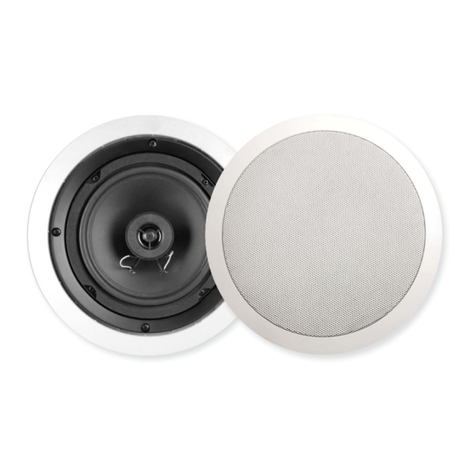
The Opus AMR650 V2.0 is an A-BUS™ compatible ceiling-
mounted speaker pair for use where an installer wishes to avoid the
complication of a separate keypad and speakers. It uses the
Octopus MCU300 as the hub or connects to an Opus sub-zone
output etc.
The AMR650 V2.0 consists of one active speaker with a stereo
power amplifier and other electronics built-in (AMR650-A ); and one
passive speaker (AMR650-P).
Please take the time to read this guide fully as it contains important
information and should be retained for future reference.
3
INTRODUCTION
AMR650-A
AMR650-P
Your speakers are an example of superior design and
craftsmanship. These suggestions will help you care for them so
you can enjoy them for years.
Keep the speakers dry. If they get wet dry immediately. Liquids can
contain minerals that can corrode electronic components.
Keep the speakers away from dust or dirt, which can cause
premature wear of parts.
Wipe the speaker frame occasionally with a damp cloth to keep it
looking new. Do not use harsh chemicals, cleaning solvents or
strong detergents.
CARE AND MAINTENANCE

4
It is advisable to plan all aspects of installation in advance of work
beginning, preferably with the house/flat building schematics if
available. Great care should be taken to ensure that all building
regulations are followed. When deciding upon a ceiling placement,
care should be taken to avoid joists, load bearing beams etc
Before cutting ceiling loudspeaker holes it is suggested that the
area is tested for clearance by making an L-shaped probe from
strong wire (eg a coat hanger), drilling a small hole in the target
area, inserting the probe and slowly turning. Any obstructions will
be immediately obvious, and the target area can be moved to a
more suitable position.
When placing the AMR650 V2.0 speakers, thought should be given
to positions which give the best desired sound coverage
throughout a room, while not interfering with existing or planned
light fittings or joists. Also, locate loudspeakers taking into account
location of furnishings for optimal stereo reproduction.
When mounting speakers flush to a ceiling or wall, ensure that
enough depth/clearance is available in the respective cavity. A
clearance of at least 80mm is necessary when mounting an
AMR650 V2.0.
Remove the round cardboard pad from inside the supplied
template (see below). Use the template to mark the position for the
mounting hole at the selected location. Cut the mounting hole with
a drywall or keyhole saw.
110mm
Min 80mm
Min 10-30mm
INSTALLATION NOTES
AMR650 V2.0
207mm diameter
mounting hole
Use an L-shaped probe
to check available void
space before cutting
loudspeaker holes

1. Remove the grille by inserting a small hook or similar small
implement into one of the grille openings, then pulling on the
grille. For the AMR650-A, carefully disconnect the IR connector
lead before proceeding.
2. Fit the clear plastic painting mask provided when painting the
speaker surround to avoid getting paint getting on the speaker
cone.
3. Spray-painting the grille will prevent blocking the grille holes with
paint. For the AMR650-A unscrew the IR window assembly
before spray painting. Do not paint the silver IR window on the
AMR650-A Active speaker. If you do not wish to not paint the
silver badge on the AMR650-P Passive speaker, cover with
masking tape.
After the paint dries, remove the paint mask and replace the grille.
5
PAINTING THE AMR650 V2.0

6
1– Connection to MCU or A-BUS Ready socket via
Cat-5/5E cable
2– Optional independent local power socket
3– Stereo/Mono jumper (CN17)
4– Local input
5– Preamp output
6– Stereo/Mono jumper (CN14)
7– Cat-5e connection to passive speaker
8– Speaker cable connection to passive speaker
9– 123 jumper (no current function)
10 – Opus/A-BUS mode jumper
11 – Local jumper
12 – Fader jumper
1
2
4
5
7
8
9
10
11 12
6
3
AMR650-A REAR CONNECTIONS

Stereo/Mono
Adjusting the CN17 and CN14 jumpers together switches the
speaker between some stereo and mono modes. Two mono modes
are available, see page 10 for further details.
123
No current function.
7
The AMR650-A has six ‘Push-on Jumpers’ (shown below - see
opposite for PCB location) that select between different modes of
operation. Incorrect positioning will prevent the AMR650 V2.0 from
working properly.
Fader
Turns Fader function on and off. See page 11 for futher details.
Local
Switches between LIM300 local and AMR650 V2.0 onboard option.
See page 10 for further details.
Opus/A-BUS
Swtiches between Opus Enhanced mode for use with Octopus
hubs, and normal A-BUS mode.
For use with an Octopus MCU300 A-BUS hub the jumper MUST be
in the OPUS position. For use with standard A-BUS hubs and
amplifiers from other manufacturers (or as a sub-zone to a MCU500
based system) the jumper MUST be in the A-BUS position.
AMR650-A JUMPER SETTINGS
Fader off
(default) Fader on
LM300 mode
(default) AMR650 V2.0
onboard mode
Opus Enhanced
mode (default) Standard
A-BUS mode
Stereo mode
(default) Stereo mode
(default)
CN17
CN14
Mono 1 mode
(1 channel mono)
CN17
CN14 Mono 1 mode
(1 channel mono)
Mono 2 mode
(2 channel mono) Mono 2 mode
(2 channel mono)
CN17
CN14

8
Gather pairs, trim and carefully
insert into RJ45 plug: Crimp wires in place using a
professional quality crimping tool
to ensure a secure connection:
1. Using a single Cat5e cable, connect the AMR650-A to the
MCU300 via an RJ45 plug at the Master Control Unit, and the 8-
way colour-coded punch down connection at the AMR650-A.
The RJ45 hub connection should be wired to EIA/TIA568A
standard as shown.
The Cat5 connection from MCU to the AMR650-A should not
exceed 30 metres/100 feet.
2. The AMR650-A is then connected to the AMR650-P using either
Cat5e cable terminated at 8-way colour-coded punch down
connections (all 8 cores must be connected) or using a run of
standard speaker cable.
Only one method of connection between the active and passive
speaker is necessary.
Note: Use a professional quality punch down tool to ensure secure
punch down connections.
CONNECTING THE AMR650 V2.0
EIA/TIA 568A wiring standard
(view from contact end):
1 white/green
2 green
3 white/orange
4 blue
5 white/blue
6 orange
7 white/brown
8 brown
12345678
Cat5e cable terminated at AMR650
V2.0 8-way punch down connector:
1 white/brown
2 brown
3 white/blue
4 blue
5 white/green
6 green
7 white/orange
8 orange
MCU300
AMR650-P
Cat5/5e
AMR650-A Cat5/5e (or standard
loud-speaker cable)
PSA65U

9
1. Before mounting, ensure that the four fixing screws are
slackened off so that the red mounting dog-legs can move freely.
2. Move each red dog-leg foot to the LEFT into it’s holding slot, and
then insert the speaker into the mounting hole.
3. Using a cross-head screwdriver, slowly turn each fixing screw
clockwise. This will move the mounting dog-legs out of their
slots.
4. Tighten each fixing screw until the mounting dog-legs grip the
ceiling.
MOUNTING THE AMR650 V2.0

Stereo/Mono mode
The default mode for the AMR650-A is stereo, but there are two optional
mono modes:
1. Mono 1 Mode (1 channel mono)
In instances where it is desired to fit only one speaker (ie in a small room
such as a bathroom), the AM650-A (active) speaker can be set to mono
mode, and the AM650-P (passive) speaker not used. The active speaker
then reproduces both left and right signals combined. Starting from the
default jumper positions on the AMR650-A, the CN17 jumper stays on the
RIGHT end pins and the CN14 jumper moves to the LEFT end pins - see
page 7.
2. Mono 2 Mode (2 channel mono)
In instances where two speakers will be installed but due to physical
placement stereo imaging will not work effectively (ie in an L-shaped room
or corridor etc), the speaker pair can be set to mono mode. The speakers
then both reproduce left and right signals combined. Starting from the
default jumper positions on the AMR650-A, move the CN17 jumper to the
LEFT end pins and the CN14 jumper stays on the RIGHT end pins - see
page 7.
10
Local Source Input
It is possible to install a piece of source equipment to be used local
to the room that contains the AMR650 V2.0. This might be a games
machine or CD player in the bedroom, for example. The are two
ways of connecting a local source:
1. Octopus LIM300 Wallplate
The LIM300 wallplate has a line input and and IR output socket for
IR control of the local source via the AMR650 V2.0. See dedicated
literature for installation instructions. Local Jumper MUST be set to
left and centre pins - see page 7.
2. AMR650 V2.0 onboard local input
A local source can be connected directly to the AMR650 V2.0. IR
control of the source can only be done ‘line-of-sight’ in this case as
the AMR650 V2.0 does not have an IR output. Connection to the
local input socket on the AMR650-A should be via screened audio
cable, terminated at a suitable faceplate. Local jumper MUST be
set to centre and right pins - see page 7.
ADVANCED FEATURES
Table des matières
Autres manuels Opus Intervenants

Manuels Intervenants populaires d'autres marques


Bowers & Wilkins
Bowers & Wilkins 4 Manuel utilisateur

Sonance
Sonance SONOS OUTDOOR Series Manuel utilisateur

Electro-Voice
Electro-Voice EVID FM4.2 Manuel utilisateur

Pioneer
Pioneer XW-HTD630 Manuel utilisateur

Onn
Onn BWA16AA002 Manuel utilisateur

HP
HP GL313AA - USB Speakers PC Multimedia Manuel utilisateur