
OPTOKON OERN-13 Manuel utilisateur

Please read these instructions carefully before using this product, and save this manual for future use.
Rugged Notebook
OERN-13 / OERN-14
Quick Start Guide

1
Contents
Preface ............................................................................................................................................. 2
1. Overview ..................................................................................................................................................... 6
2. Package Content ....................................................................................................................................... 6
3. Product Overview ...................................................................................................................................... 7
4. Mechanical Dimension ............................................................................................................................ 12
5. Hardware Installation .............................................................................................................................. 12
5.1 Side Expansion Area ...................................................................................................................... 12
5.2 Installing a Micro SD Card ............................................................................................................. 15
6.1 Installing and Removing the Batteries ......................................................................................... 16
6.2 Important Battery Tips ................................................................................................................... 17
7.1 Turning On the Computer .............................................................................................................. 18
7.2 Turning Off the Rugged Laptop .................................................................................................... 20
Appendix ........................................................................................................................................ 21
Appendix A: Declaration of Conformity (DoC) ......................................................................................... 21

2
Preface
Advisory Conventions
Four types of advisories are used throughout the user manual to provide helpful information or to
alert you to the potential for hardware damage or personal injury. These are Notes, Important,
Cautions, and Warnings. The following is an example of each type of advisory.
Note:
A note is used to emphasize helpful information
Important:
An important note indicates information that is important for you to know.
Caution A Caution alert indicates potential damage to hardware and explains how
to avoid the potential problem.
Warning! An Electrical Shock Warning indicates the potential harm from electrical
hazards and how to avoid the potential problem.
Alternating Current! The Protective Conductor Terminal (Earth Ground) symbol
indicates the potential risk of serious electrical shock due to improper grounding.

3

4

5
Copyright Notice
No part of this document may be reproduced, copied, translated, or transmitted in any form or by
any means, electronic or mechanical, for any purpose, without the prior written permission of the
original manufacturer.
Trademark Acknowledgement
Brand and product names are trademarks or registered trademarks of their respective owners.
Disclaimer
OPTOKON Elektronik Ltd. reserve the right to make changes, without notice, to any product,
including circuits and/or software described or contained in this manual in order to improve design
and/or performance. We assume no responsibility or liability for the use of the described product(s)
conveys no license or title under any patent, copyright, or masks work rights to these products, and
make no representations or warranties that these products are free from patent, copyright, or mask
work right infringement, unless otherwise specified. Applications that are described in this manual
are for illustration purposes only. We make no representation or guarantee that such application will
be suitable for the specified use without further testing or modification.
About This User Manual
This User Manual provides information about using the OERN Series Rugged Notebook.
The documentation set includes:
• OERN Rugged Notebook Quick Start Guide - describes how to get the computer up and to
run.
• OERN Rugged Notebook User Manual – contains a detailed description of how to use the
device, its components, and features using the default setting.
Note:
Some pictures in this guide are samples and can differ from the actual product.

6
1. Overview
Congratulations on purchasing OERN Series Rugged Notebook.
OPTOKON Elektronik Rugged Notebook features with
• Fanless cooling system.
• Flip design for quick switching between laptop and tablet modes.
• Easy-replaceable design for keyboard.
• Removeable hard handle for easy carrying
• Dual battery with hot-swappable design for whole-day-work.
• Expansion slot supports optional 2nd removable SSD and smart card reader.
2. Package Content
Carefully remove the box and unpack your device. Please check if all the items listed below are
inside your package. If any of these items are missing or damaged contact us immediately.
Factory shipment list:
• Rugged Laptop
• Quick Start Guide
(Hardcopy)
• Adapter
• Power Cord
• Standard Batteries x 2

7
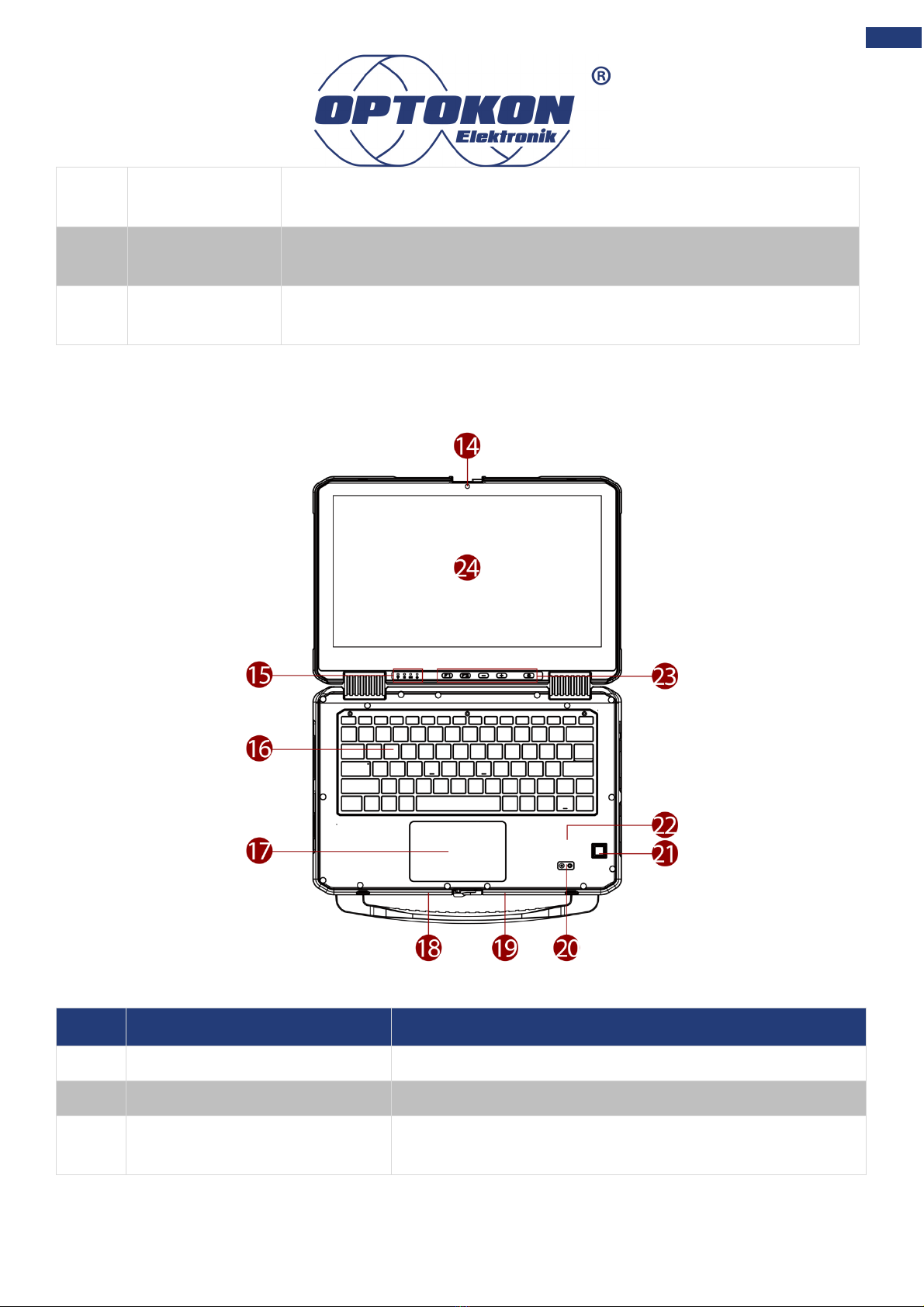
3. Product Overview
This section contains mechanical drawing of the OERN Series Rugged Notebook. Notice that this
is a simplified drawing and some components are not marked in detail.
Front Components
No
Item
Description
1
Top cover latch
Locks the top cover.
2
Detachable carrying handle
Provides a convenient way to carry the computer. Do
not use the handle if the handle is worn or damaged.
Rear Components
No
Item
Description
3
360° hinge
Quickly turn the device from a laptop into a touch-
enabled tablet PC.

8
Right-side Components
Left-side Components
No
Item
Description
11
Expansion Area
Reserved expansion slot for customization. Either for smart card
reader that accepts a smart card for additional security feature. Or
No
Item
Description
4
Audio Jack
Connects a set of headphones or headset. (Mic is only supported with
3.5mm 4-pin headset).
5
HDMI
Connects a HDMI monitor or TV set.
6
USB Type-C
High speed USB port connects to USB devices, such as USB flash
drive, mouse, keyboard, printer, etc.
Note: The USB Type-C connector follows USB 3.0 standard, which
does not support Alternate Mode (ALT) or USB Power Delivery (USB-
PD).
7
USB Type-A
USB 3.0 port connects to USB devices, such as USB flash drive,
mouse, keyboard, printer, etc.
8
USB Type-A
USB 3.0 port connects to USB devices, such as USB flash drive,
mouse, keyboard, printer, etc.
9
RJ45 Connector
Connects the LAN cable.
10
Power Jack
DC power input jack.
9
for solid-state drive, which is the mass storage device of the
computer. Or USB 3.0 x 1 or PCI-E x 4 or Power 5V/1A.
12
RS232
Interface that enables the connection of a serial device to a
computer.
13
USB Type-A
USB 3.0 port connects to USB devices, such as USB flash drive,
mouse, keyboard, printer, etc.
Top-open Components
No
Item
Description
14
Front Camera
2 Megapixel Webcam.
15
LED Indicators
Show the current status of the Battery.
16
Qwerty Keyboard with
backlight
Serves as the data input device.
Autres manuels pour OERN-13
1
Ce manuel convient aux modèles suivants
1
Table des matières
Autres manuels OPTOKON Ordinateur portable


