
Opt PD3000-RGB Manuel utilisateur

PD3000-RGB
PD4000-RGB PD9000-RGB
PD5000-RGB PD10000-RGB
PD6000-RGB PD12000-RGB
PD7000-RGB PD15000-RGB
PD20000-RGB PD25000-RGB
PD26000-RGB PD30000-RGB
USER MANUAL
Noce
AVOID EYE OR SKIN EXPOSURE TO
DIRECT OR SCATTERED LIGHT
CLASS 4 LASER PRODUCT
Manufactured/ Cerfied by
Shenzhen Optlaser Technologies Co.,Ltd
Thank you for purchasing our products, please take some minutes to read this manual
before operang any of these laser projectors!
PD8000-RGB
.......
www.optlaser.com

Content
INTRODUCTION
PACKING LIST
UNPACKING INSTRUCTIONS
GENERAL INFORMATION
SAFETY NOTES
LASER AND SAFETY NOTES
LABELLING REFERENCE
PROPER USAGE
RIGGING
OPERATIONS
INTERLOCK DIAGRAM
LCD Display Seng introducon
PD3 SERIES
INTRODUCTIONS of PD3 SERIES
Specificaons of PD3 SERIES
PD6 SERIES
INTRODUCTIONS of PD6 SERIES
Specificaons of PD6 SERIES
PD8 SERIES
INTRODUCTIONS of PD8 SERIES
Specificaons of PD8 SERIES
PD20 SERIES
Display mode introducon
SD Card Introducon
DMX CHART
FB4 integrated Devices
INTRODUCTIONS of FB4 INTEGRATED DEVICES
INTRODUCTIONS OF RE-ALIGNMENTS. REF.
Maintenance Instrucon
Aer sale service and warranty
2
2
2
2
3
4
5, 6
7
7
8, 9
10
11
12
13
14
15
16
17
18
19
20
21
22
Specificaons of PD20 SERIES
23
23
24, 25
26
27
28, 29
30
30
INTRODUCTION
Thank you for purchasing our products. To opmize the performance of your laser, please read these
operang instrucons carefully and familiarize yourself with the basic operaons of this system. These
instrucons contain important safety informaon regarding the use and maintenance of this system as well.
Please keep this manual with the unit, for future reference. If you sell this product to another user, be sure
that they also receive this document.
Noce
We are constantly striving to improve the quality of our products. As such, the content of this
manual may be changed without noce.
We have tried our best to guarantee the accuracy of this manual. If you have any quesons or find
any errors, please contact us directly to help correct this.
UNPACKING INSTRUCTIONS
Open the package and carefully unpack everything inside.
Ensure all parts are present and in good condion.
Do not use any equipment that appears to be damaged.
If any parts are missing or damaged then please immediately nofy your carrier or local distributor.
GENERAL INFORMATION
The following chapters explain important informaon about lasers in general, basic laser safety and
some ps about
how to use this device correctly. Please read this informaon as it contains crical
informaon you must be aware of, prior to using this system.
PACKING LIST
LASER projector
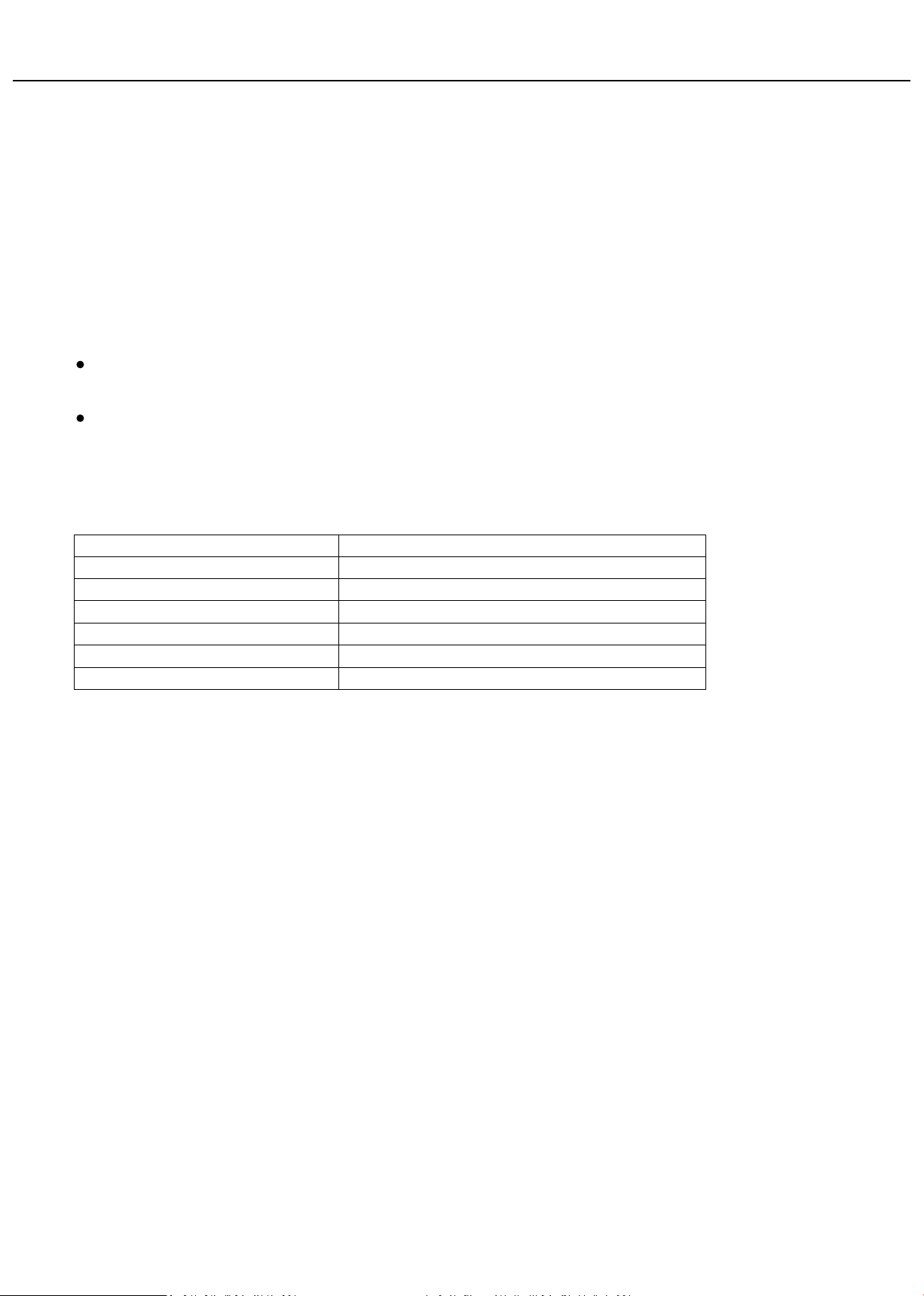
Name Qty(pcs)
1
AC power cord 1
Keys for Key switch 2
Power output connector 1
Remote Interlock connector 2
Allen key 1
2

WARNING! This projector is a Class 4 laser product. It must never be used for audience-scanning
applicaons. The output beam of the projector must always be at least 3 meters above the floor in the
audience. See the Operang Instrucons secon for further informaon.
Please read the following notes carefully! They include important safety informaon about the
installaon, usage, and maintenance of this product.
SAFETY NOTES
Keep this User Manual for future consultaon. If you sell this product to another user, be sure that they also receive
this document.
Always make sure that the voltage of the outlet to which you are connecng this product is within the range stated on
the decal or rear panel of the product.
This product is not designed for use outdoors in adverse weather condions. To prevent risk of fire or shock, do not
expose this product to rain or moisture.
Always disconnect this product from the power source before cleaning it or replacing the fuse.
Make sure to replace the fuse with another of the same type and rang.
If mounng it overhead, always secure this product to a fastening device using a safety chain or cable.
In the event of a serious operang problem, stop using the projector immediately. Never try to repair the unit except in
a controlled environment under trained supervision. Repairs carried out by unskilled people can lead to damage or
malfuncon of the unit, as well as exposure to dangerous laser light.
Never connect this product to a dimmer pack.
Make sure the power cord is not crimped or damaged.
Never disconnect the power cord by pulling or tugging on the cord.
Never carry a product from the power cord or any moving part. Always use the hanging/mounng bracket or the
handles.
Always avoid eye or skin exposure to direct or scaered light from this product.
Lasers can be hazardous and have unique safety consideraons. Permanent eye injury and blindness is possible if lasers
are used incorrectly. Pay close aenon to each safety REMARK and WARNING statement in this user manual. Read all
instrucons carefully BEFORE operang this device.
Never intenonally expose yourself or others to direct laser light.
This laser product can potenally cause instant eye injury or blindness if laser light directly strikes the eyes.
It is illegal and dangerous to shine this laser into audience areas, where the audience or other personnel could get direct
laser beams or bright reflecons into their eyes.
It is a US Federal offense to shine any laser at aircra.
No service allowed by customer. There are no user serviceable parts inside the unit. Do not aempt any repairs
yourself.
Service is only to be handled by the factory or authorized factory trained technicians.
Product is not to be modified by the customer.
Cauon – use of controls or adjustments or performance of procedures other than those specified herein may result
in hazardous radiaon exposure.
3

LASER AND SAFETY NOTES
STOP AND READ ALL THE LASER SAFETY NOTES BELOW
Laser Light is different from any other light sources with which you may be familiar. The light from this
product can cause eye and skin injury if not set up and used properly. Laser light is thousands of mes
more concentrated than light from any other kind of light source. This concentraon of light can cause
instant eye injuries, primarily by burning the rena (the light sensive poron at the back of the eye). Even
if you cannot feel “heat” from a laser beam, it can sll potenally injure or blind you or your audience. Even
very small amounts of laser light are potenally hazardous even at long distances. Laser eye injuries can
happen quicker than you can blink. It is incorrect to think that because these laser entertainment products
use high speed scanned laser beams, that an individual laser beam is safe for eye exposure. It is also
incorrect to assume that because the laser light is moving, it is safe. This is not true.
Since eye injuries can occur instantly, it is crical to prevent the possibility of any direct eye exposure. It is
not legal to aim this laser projector into areas where people can be exposed. This is true even if it is aimed
below people’s faces, such as on a dance floor.
Do not operate the laser without first reading and understanding all safety and technical data in this
manual.
Always set up and install all laser effects so that all laser light is at least 3 meters (9.8 feet) above the
floor on which people can stand. See the “Proper Usage” secon later in this manual.
Aer set up, and prior to public use, test the laser to ensure proper funcon. Do not use if any
defect is detected.
Laser Light - Avoid Eye or Skin Exposure to Direct or Scaered Light.
Do not point lasers at people or animals.
Never look into the laser aperture or laser beams.
Do not point lasers in areas where people can potenally be exposed, such as uncontrolled
balconies, etc.
Do not point lasers at highly reflecve surfaces, such as windows, mirrors and shiny metal objects.
Even laser reflecons can be hazardous.
Never point a laser at aircra, as this is a US Federal offense.
Never point un-terminated laser beams into the sky.
Do not expose the output opc (aperture) to cleaning chemicals.
Do not use the laser if the housing is damaged, open, or if the opcs appear damaged in any way.
Never leave this device running unaended.
In the United States, this laser product may not be purchased, sold, rented, leased or loaned for
use unless the recipient possesses a valid Class 4 laser light show variance from the US FDA CDRH.
This product must always be operated by a skilled and well-trained operator who is familiar with the
data included in this manual. Note that use of this projector in the United States also requires a
valid Class 4 laser light show variance from the CDRH as stated above.
The legal requirements for using laser entertainment products vary from country to country. The
user is responsible for the legal requirements at the locaon/country of use.
Always use appropriate lighng safety cables when hanging this projector overhead.
4

LABELLING REFERENCE
5
Laser wavelength nm( )
R 637 638
G 520 532
B 445 465
Total P ow er:
A C Powe r Su ppl y 100-120V 100-24 0 V 20-240V , 50 -6 0Hz
NE VER A IM AT AI RCRAFT, IT IS UNS AFE A ND I LLEGA L
In c ompli anc e w ith IEC-EN60825- 1 and 2 1 CF R1040.10 & 1040. 11
4
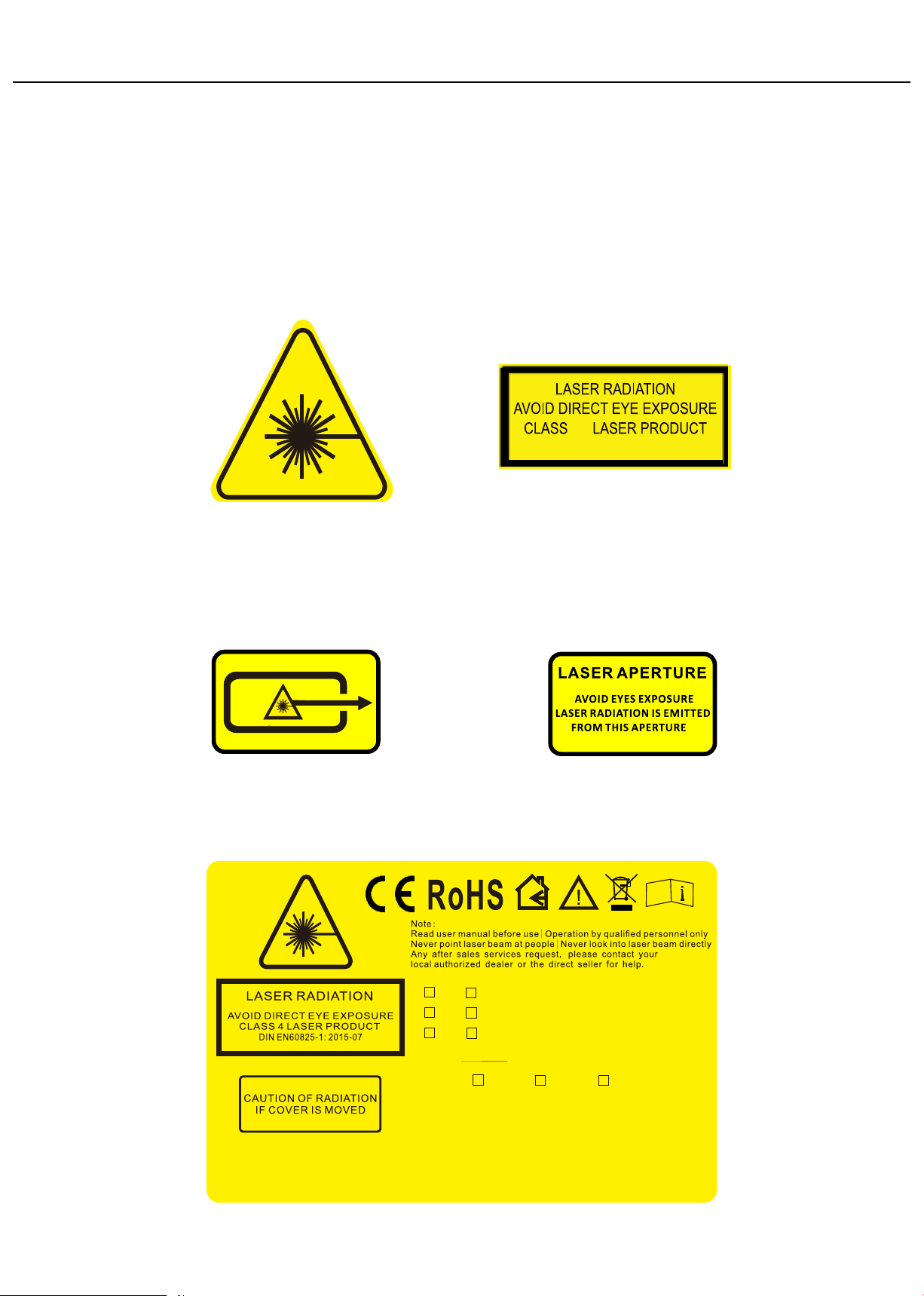
See the following reproducons of the product labels. All these labels must be intact and legible
prior to be used on the projector.
Hazard warning symbol
Aperture steering label
2
6

Stainless steel cable(safety rope)
PROPER USAGE
This product is for overhead mounng only. For safety purposes, this projector should be mounted on
steady elevated plaorms or sturdy overhead supports using suitable hanging clamps. In all cases, you must
use safety cables.
Internaonal laser safety regulaons require that laser products must be operated in the fashion illustrated
below, with a minimum of 3 meters (9.8 .) of vercal separaon between the floor and the lowest laser
light vercally. Addionally, 2.5 meters of horizontal separaon is required between laser light and
audience or other public spaces.
The audience area can be passively protected by sliding the aperture cover plate upwards and fixing it in
proper posion by the two thumb screws.
RIGGING
3 meters
laser beams
Be sure that the structure onto which you are mounng this product can support its weight.
Mount the product securely. You can do this with a screw, a nut, and a bolt. You may also use a mounng clamp if
rigging this product onto a truss. The U-shaped support bracket has three mounng holes which may be used to
secure the clamps to the projector.
Always consider ease of access to the unit before deciding on a locaon for this product
When mounng this product overhead, always use a safety cable.
7
OPERATIONS
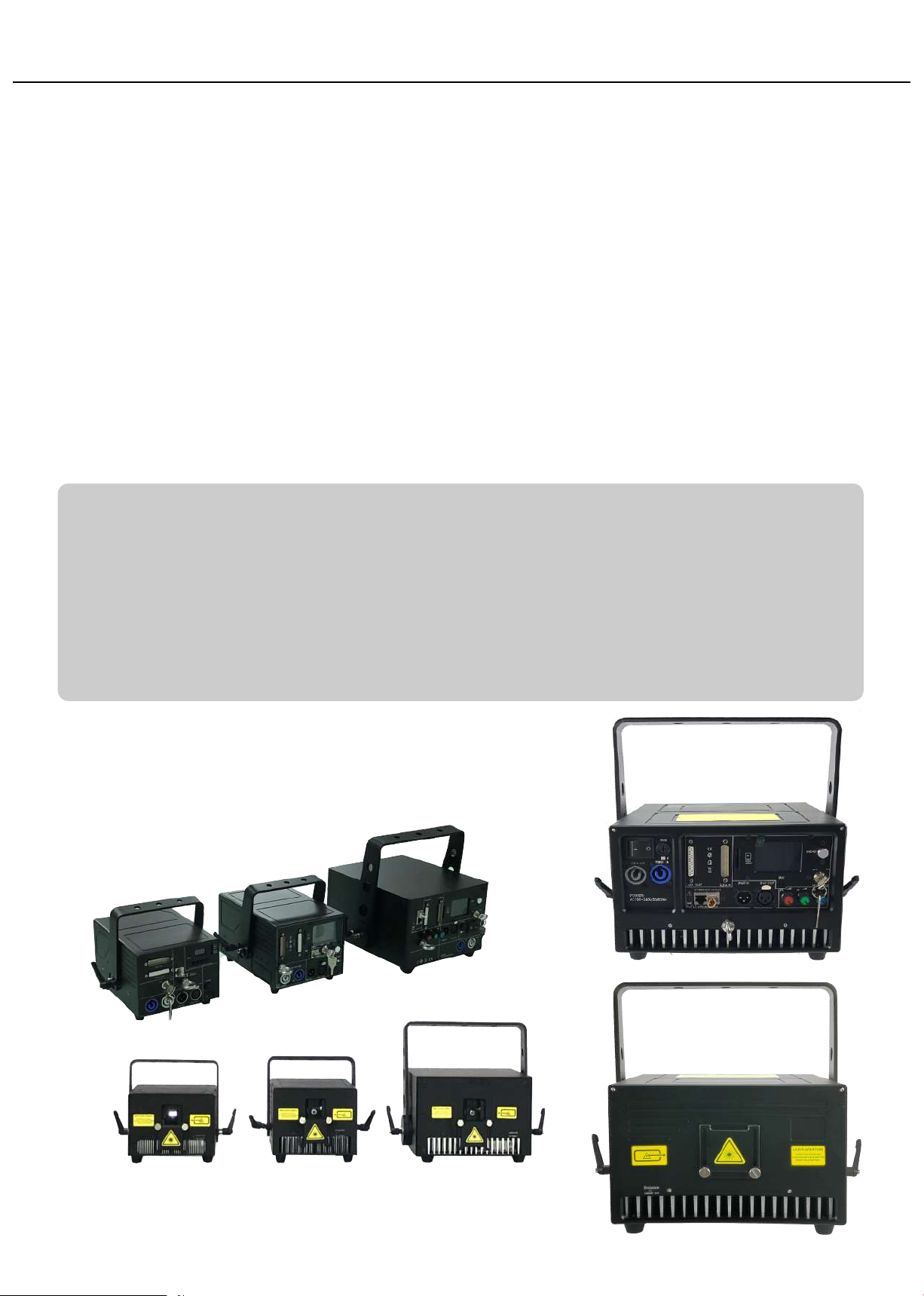
PD SERIES units come with diode-based only laser sources and all sources have beam correcon ,thus have
great beam show with analog FULL colors modulaon.
The PD SERIES units can be controlled over ILDA and have a bult-in memory with preset
paerns ,also with SD-card slot for freely programs export onto it, that can be easily
triggered through DMX. They can also be operated in automac and sound-to-light mode.
The laser projector provides a master-slave-mode. Show lasers of the same series (slave
projectors), connected via DMX to a main projector (master projector) project the same
paerns like the master projector.
This Series will be applicable for clubs, bars, and those Small/medium venues or theater
events, pares, business acvies, large venues etc.
“PD series projectors are not supplied with standard "E-Stop Box" and "Remote Interlock bypass"
Instead, a simplified “E-Stop Box” featured with “Mushroom switch” and “Key switch” will be supplied in
the purchase accordingly to request.
The “E-stop Box” is generally with a CAT5 cable of 2m length unless there would be different requests.
If user doesn't need adional "E-Stop Switch", Then the “RJ45 jack interlock connector” should be
insterted into the rear plate of the projector’s INTERLOCK posion(with silkscreen INTERLOCK marking) ,only
by this way user will be able to light up the laser projector during operaons.
8
Several steps to start up the laser projector(s)
1. Use the included power cord to connect the laser device to a proper power outlet(AC100-240V, 50/60Hz)
2. Use one of the included keys( 2 sets included in the package, either one
of them will work) to insert into the key-chassis and switch to the “ON” posion
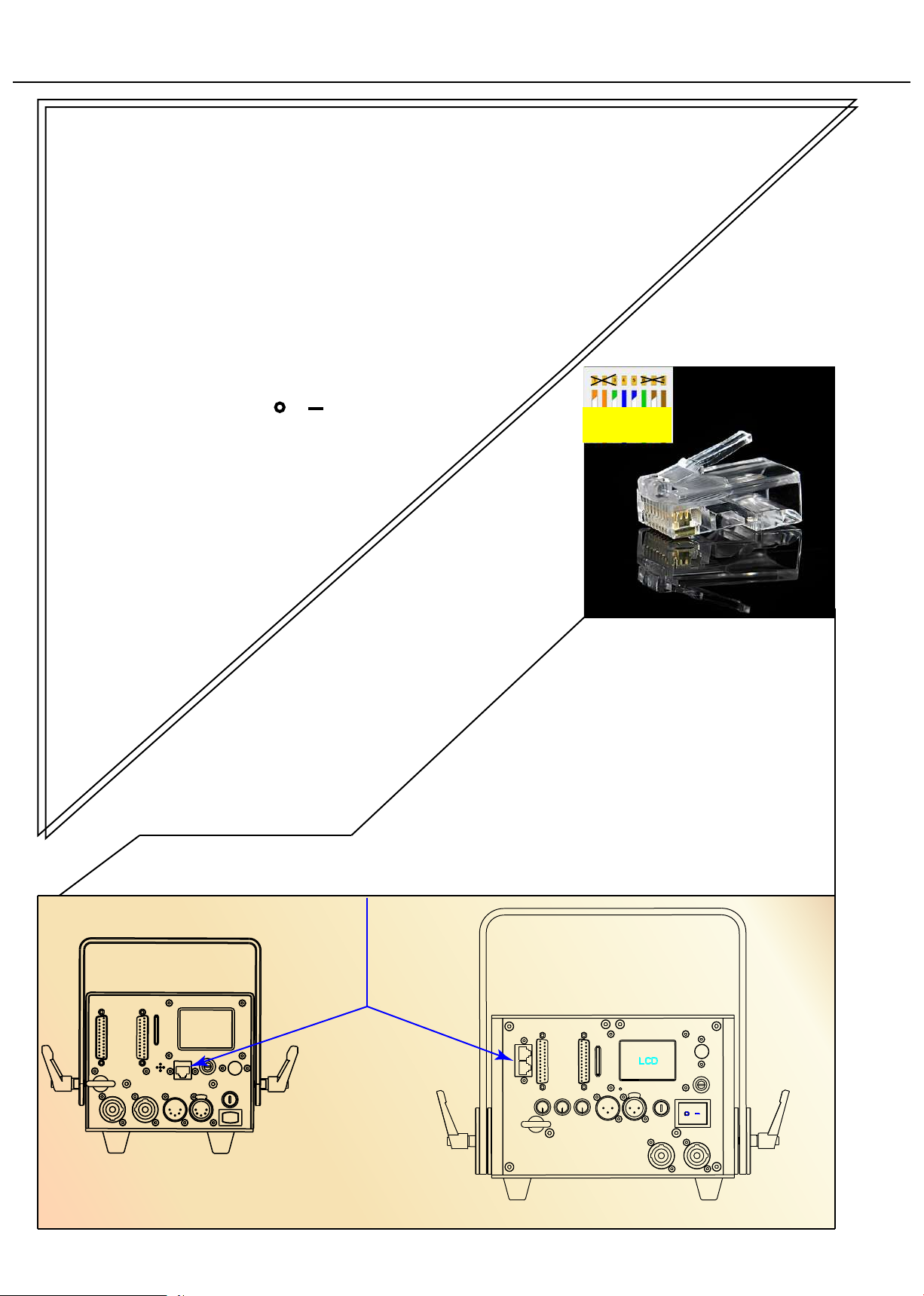
3. Use one of the the included INTERLOCK connectors to insert into the INTERLOCK posion
on the backplate of the device. (2 x RJ45 connectors(well made) included in the package
Remark: There are 2 posions for INTERLOCK on the backplate of the devices ≥10W
herein, either one of the posions will work(one only posion needs to be with
INTERLOCK connector inserted if the laser projector will be used alone.
Both INTERLOCK posions will work if user wants to daisy chain 2 or
more laser projectors through E-stop box.
4. Turn on the power switch from to , then the laser device will
start output laser light.
INTERLOCK connector
Only pin4 & pin5
short-circuited
will be workable
9
Single INTERLOCK connecon
at standard PD3 SERIES backpanel
Dual INTERLOCK connecons
at standard PD6 SERIES backpanel
Ce manuel convient aux modèles suivants
12
Table des matières
Manuels Matériel de DJ populaires d'autres marques


thomann
thomann Stairville DJ Lase 40-G MK-III Manuel utilisateur

Eagletone
Eagletone 6 Eyes Flower Manuel utilisateur

EuroLite
EuroLite FLD-1508 Manuel utilisateur

Technical Pro
Technical Pro LG8xSEA Manuel utilisateur

JB Systems
JB Systems Lounge Laser DMX Manuel utilisateur

Lightmaxx
Lightmaxx Vega Halo 90 Manuel utilisateur

Elation
Elation FUZE WASH Z350 Manuel utilisateur

Maverick
Maverick MK3 WASH Manuel utilisateur

Infinity
Infinity TF-260C7 Fresnel Manuel utilisateur

Chauvet
Chauvet EVE E-50Z Manuel utilisateur

Eliminator Lighting
Eliminator Lighting E 138 Manuel utilisateur

EuroLite
EuroLite Mini Multicolor LED Flashing Light SC Manuel utilisateur