Onkyo W800BT Manuel utilisateur

W800BT
USER
MANUAL


1EN
Contents
Contents
1 Important safety instructions 2
Hearing Safety 2
General information 2
2 Onkyo Bluetooth wireless headset3
Box content 3
Other devices 3
Overview of your Bluetooth wireless
headset 3
3 Charge and pair your headset 4
Charge the battery 4
Pair between both sides of the
headset 5
Pair your headset with the
Bluetooth device 5
4 Use your headset 7
Connect the headset to a Bluetooth
device 7
Operate your headset 7
Wear your headset 8
5 Technical data 9
6 Notice 10
Notice of compliance 10
Disposal of your old product and
battery 10
Trademarks 11
7 Frequently asked questions 12

2EN
1 Important
safety
instructions
Hearing Safety
Danger
• To avoid hearing damage, limit the time you use
headphones at high volume and set the volume to
a safe level. The louder the volume, the shorter the
safe listening time is.
Be sure to observe the following guidelines
when using your headset.
• Listen at reasonable volumes for
reasonable periods of time.
• Be careful not to adjust the volume
continuously upwards as your hearing
adapts.
• Do not turn up the volume so high that
you can’t hear what’s around you.
• You should use caution or temporarily
discontinue use in potentially
hazardous situations.
• Excessive sound pressure from
earphones and headphones can cause
hearing loss.
• Using headphones with both
ears covered while driving is not
recommended and may be illegal in
some areas while driving.
• For your safety, avoid distractions
from music or phone calls while in
trac or other potentially dangerous
environments.
General information
To avoid damage or malfunction:
Caution
• Do not expose the headset to excessive heat.
• Do not drop your headset.
• Headset shall not be exposed to dripping or
splashing.
• Do not allow your headset to be submerged in
water.
• Do not use any cleaning agents containing alcohol,
ammonia, benzene, or abrasives.
• If cleaning is required use a soft cloth, if necessary
dampened with a minimum amount of water or
diluted mild soap, to clean the product.
• The integrated battery shall not be exposed to
excessive heat such as sunshine, fire or the like.
• Risk of explosion if battery is replaced by an
incorrect type. Replace only with the same or
equivalent type.
About operating and storage temperatures
and humidity
• Operate or store in a place where
temperature is between -15ºC (5ºF)
and 55ºC (131ºF) (up to 90% relative
humidity.
• Battery life may be shorter in high or
low temperature conditions.

3EN
2 Onkyo
Bluetooth
wireless
headset
Box content
Onkyo Bluetooth wireless headset W800BT
Replaceable rubber ear caps x 2 pairs
Charging case
Quick start guide
Other devices
A mobile phone or electronic device (e.g.
notebook, PDA, Bluetooth adapters, MP3
players etc) which supports Bluetooth and
is compatible to the headset (see 'Technical
data' on page 6).
Overview of your Bluetooth
wireless headset
1
2
4
5
6
3
7
8
9
a On/o, call control button
b LED indicator
c Microphone
d USB cable (for charging)
e Headset charging socket
f Battery indicator
g Battery indicator button
h LED indicator
i On/o button

4EN
3
Charge and pair
your headset
Charge the battery
Note
• Before you use your headset/charging case for
the first time, charge the battery for 5 hours for
optimum battery capacity and lifetime.
• Use only the original USB charging cable to avoid
any damage.
• Finish your call before charging the headset, as
connecting the headset for charging will power the
headset o.
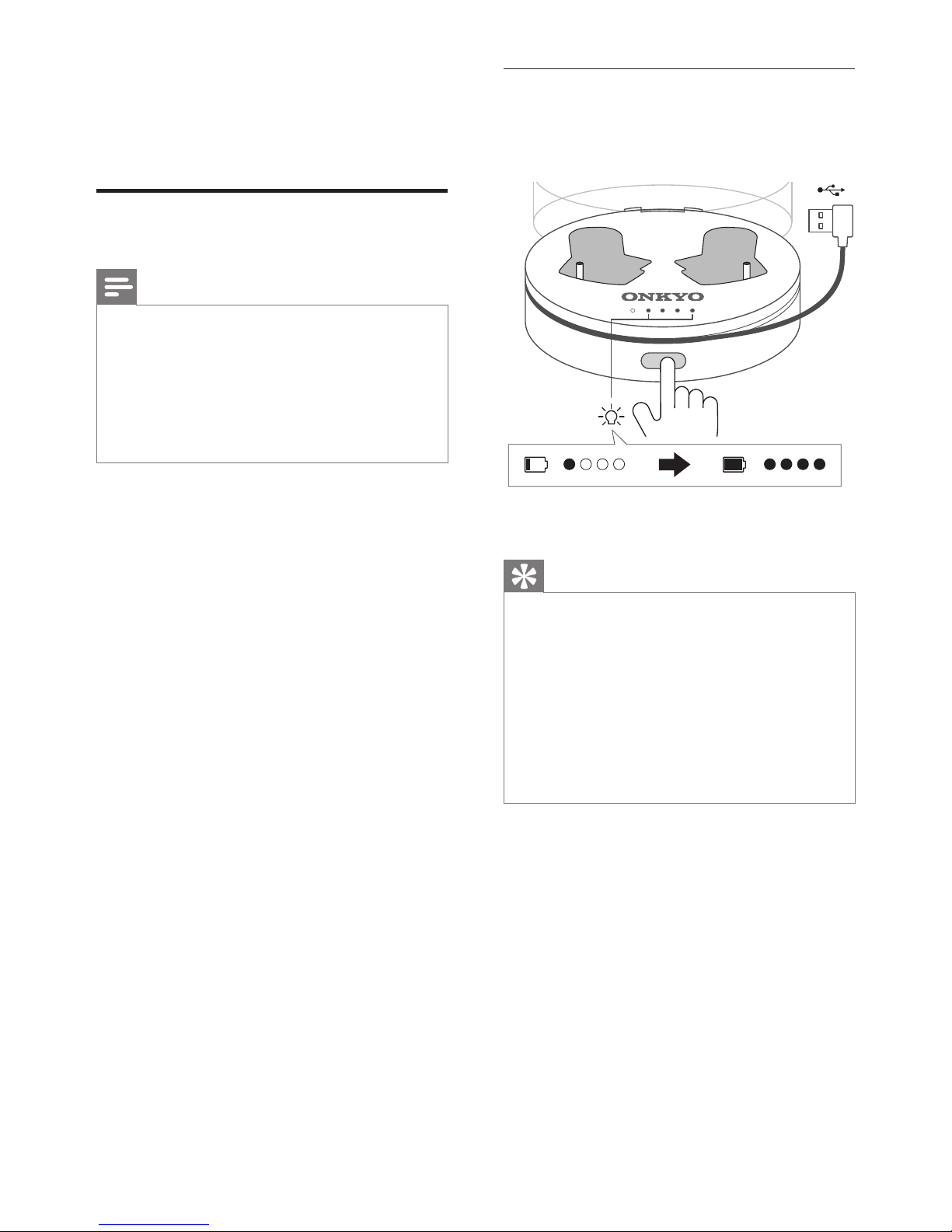
Charging case
Plug the USB cable into the power source.
The charging case starts charging.
Tip
• Normally, a full charge takes 2 hours.
• When the charging case is charging, the battery
indicator keeps flashing until charging is complete.
There are 5 indicator lights. The leftmost LED light
indicates the charging status. The other 4 LED
lights indicate the battery level. Each LED light
indicated 25% battery. When all 4 LED lights are
turned on and stable, the charging case is fully
charged.
• Press the battery indicator button to show the
battery level status.

5EN
Headset
Place the headset on the charging case.
The headset starts charging.
• When the headset is charging, a white
LED light will be displayed.
• When the headset is fully charged, the
white light goes o.
Tip
• Normally, a full charge takes 70 minutes.
Pair between both sides of
the headset
1 Make sure that the headset is fully
charged.
2 Press and hold the power on/o button
on both sides of the headset for 2
seconds.
The white LED light on the left side
of the headset flashes slowly after
pairing with the right side of the
headset.
The white LED light on the right side
of the headset flashes rapidly. The
headset is ready to pair with the
Bluetooth device.
Pair your headset with the
Bluetooth device
1 Turn on the Bluetooth function of your
mobile phone.
2 Pair the headset with the mobile phone.
For detailed information, refer to the
user manual of your mobile phone.
Tip
• The headset stores the last 4 devices in the
memory. If you try to pair more than 4 devices, the
earliest paired device is replaced by the new one.

6EN
The following example shows you how to
pair the headset with your mobile phone.
1 Activate the Bluetooth feature of your
mobile phone, select Onkyo W800BT.
2 Enter the headset password "0000" (4
zeros) if prompted. For those mobile
phones featuring Bluetooth 3.0 or
higher, no need to enter a password.
Onkyo W800BT

7EN
4 Use your
headset
Connect the headset to a
Bluetooth device
1 Turn on your mobile phone/Bluetooth
device.
2 Press and hold the power on/o button
for 2 seconds on both sides of the
headset.
The white LED light on the left side
of the headset flashes slowly after
pairing with the right side of the
headset.
The white LED light on the right side
of the headset flashes rapidly. The
headset is ready to pair with the
Bluetooth device.
The headset is reconnected
to the last connected mobile
phone/Bluetooth device
automatically.
Tip
• If you turn on the mobile phone/Bluetooth device
or activate the Bluetooth feature after turning on
the headset, you have to reconnect the headset and
mobile phone/Bluetooth device manually.
• If your mobile phone/Bluetooth device cannot
reconnect automatically, try to reconnect
manually by clicking the headset's name again
under the Bluetooth setting menu on your mobile
phone/Bluetooth device.
Note
• If the headset fails to connect to any Bluetooth
device within range in 5 minutes, it will switch o
automatically to save the battery life.
Operate your headset
On/o
Task Button Operation
Turn the
headset
on.
On/o,
call control
Press and hold for
2 seconds.
You hear a
power on
signal tone.
Turn the
headset
o.
on/o,
call control
Press and hold for
4 seconds.
The white
LED is on for
2 seconds
and then the
headset is o.
You hear a
power o
signal tone.
Call control
Task Button (right
headset)
Operation
Pick
up/hang
up a call.
On/o,
call control
Press once.
Reject an
incoming
call.
On/o,
call control
Press and
hold for 2
seconds.

8EN
LED indicator status
Headset
status
Right side of
the headset
Left side of the
headset
O/Charging
is complete.
O O
Unconnected
between
both sides of
the headset.
N/A The blue LED
flashes slowly.
Ready for
pairing
between
both sides of
the headset.
The blue
and white
LEDs flashes
rapidly.
The blue and
white LEDs
flashes rapidly.
Pairing
with the
Bluetooth
device.
The white LED
light flashes
rapidly.
N/A
Paired and
ready to use.
The white LED
light flashes
slowly
One short
beep.
The white LED
light flashes
slowly.
During
music
playback.
The blue LED
flashes slowly.
The blue LED
flashes slowly.
When
there is an
incoming
call.
The blue and
white LEDs
flashes slowly
The white LED
flashes slowly.
In a call. The blue LED
is on.
The white LED
flashes slowly.
Charging is
in progress.
The white LED
is on.
The white LED
is on.
Low battery
level.
The white
LED light
flashes twice
for every 10
seconds.
Low
battery
signal tone
for every
minute.
The blue and
white LEDs
flashes rapidly.
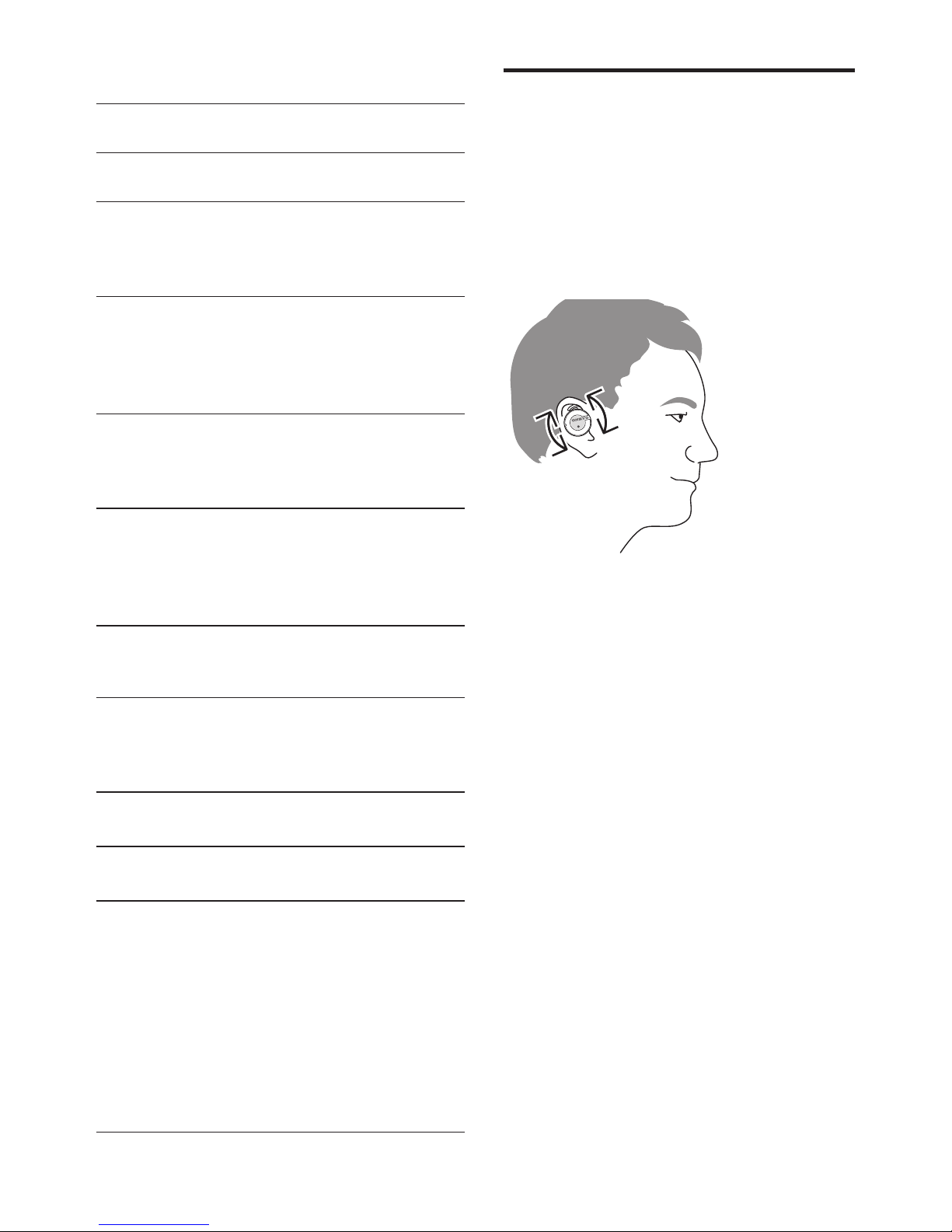
Wear your headset
1 Push your headset inward and rotate it
forward to ensure the winglet is nested
inside the cavity above the ear canal.
2 Rotate your headset forward and
backward accordingly for the best
personal fit.
Autres manuels pour W800BT
2
Table des matières
Autres manuels Onkyo casque