
OneTech 2E-2656 Manuel utilisateur

UHF Reader User Manual
2E-2656
2E-2657

Contents
1. Model Parameter:......................................................................................................................3
2. Model Package: .........................................................................................................................3
3. Wiring Diagram: ......................................................................................................................... 4
3.1 Example with Anson Controller .....................................................................................5
3.2 Connect to Ground:.........................................................................................................5
4. Installation:.................................................................................................................................. 5
4.1 Installation 1 example:....................................................................................................6
4.2 Mounting reader and height adjustment....................................................................... 6
4.3 Reader Installation Angle Adjustment.......................................................................... 7
4.4 Installation Example-Parking Lot...................................................................................7
4.5 Tag position in vehicle ....................................................................................................8
5. Application: .................................................................................................................................9
6. Quick Start for Software......................................................................................................... 9
6.1 Connect reader With PC.................................................................................................9
6.1.1 RS232 Communication......................................................................................10
6.1.2 TCP/IP Communication.....................................................................................10
6.2 Basic Settings:................................................................................................................12
6.2.1 Wiegand Parameter Input Zone:......................................................................12
6.2.2 Basic Parameters Input Zone:..........................................................................12
6.2.3 Freq Parameters Input Zone:............................................................................14
6.2.4 Senior Parameter Input Zone:..........................................................................14
6.2.5 Active Encrypt Function.....................................................................................14
6.2.6 . Get Parameter..................................................................................................17
6.2.7 Set Parameter.....................................................................................................17
6.2.8 Default All..........................................................................................................17
6.2.9 Net Initialize.........................................................................................................17
6.3.10 WIFI Initialize ....................................................................................................17
6.3 Senior Settings...............................................................................................................17
6.4 EPC Read and Write..................................................................................................18
6.5 ISO1800-6B Read and Write..............................................................................................19
7. Notice.........................................................................................................................................20

1. Model Parameter:
Working
Humidity
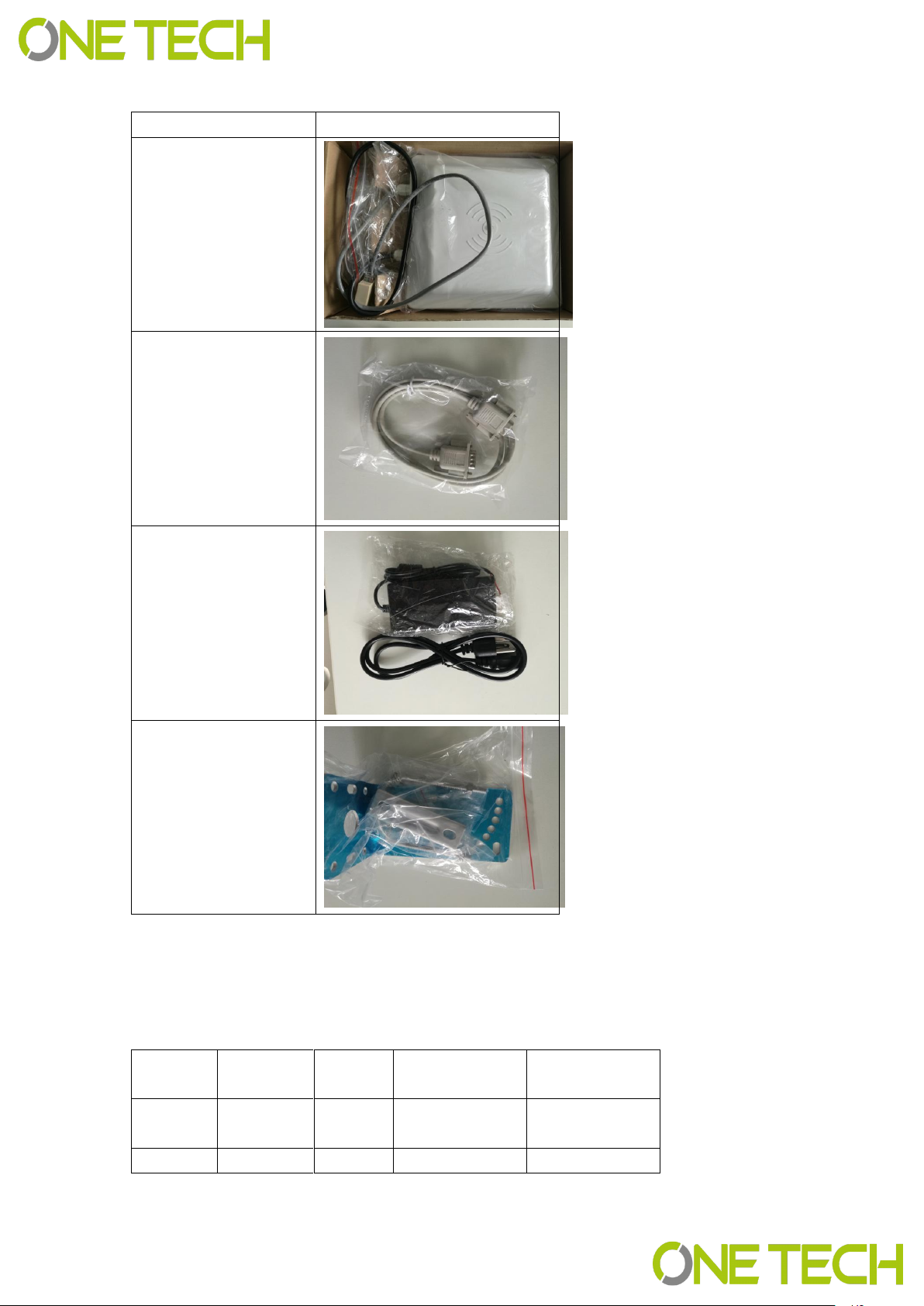
2. Model Package:
In the package include one reader, 1 RS232 Serial port,12V adapter and the antenna
bearer. When you open the box, please check the spare parts, if with any question, please
contact distributor or sales department.
See below picture for the inside package and separate products picture(2E-2656).
Interface RS232/485 RS232/485
Size 227*227*60MM 450*450*70MM
Voltage DC12V/300MA DC12V/300MA
Output Format Wiegand 26/34 Wiegand 26/34
Waterproof IP66 IP66
Related Tag 2E-HFWSPE 2E-HFWSPE
20% -95% 20% -95%
-20℃-+80℃-20℃-+80℃
Model 2E-2656 2E-2657
Picture
1-6m1-15m
Sensing
Distance
Frequency 860-960mhz 860-960mhz
Working
Temperature
Description
Picture
Device
RS232 Serial Port
Cable
12V Adapter
Antenna Bearer
3. Wiring Diagram:
Wire No.
Color
Functio
n
Description
Model
1
Red
DC9-15
V
Positive 2E-2656/57
2 Black GND Negative 2E-2656/57

3.1 Example with Anson Controller
3.2 Connect to Ground:
In case you use the external power supply for the UHF reader, then you must have a
common ground with controller, or will cause unknown problems.
4. Installation:
In general there are two installation ways of UHF reader, see blow picture 1 and 2.
7
2E-2656/57
2E-2656/57
PIN5
8 Grey Trigger / 2E-2656/57
9 Orange 485+ / 2E-2656/57
10 Purple 485- / 2E-2656/57
TCP/IP UHF reader without Grey, orange and purple cable.
4 Green Data0 Wiegand D0
5 Yellow TXD RS232 PIN2
6 Brown RXD RS232 PIN3 2E-2656/57
7 Blue GND RS232 GND
3 White Data1 Wiegand D1
2E-2656/57
2E-2656/57

(1) (2)
Installation 1 will be easy for installation, but distance will be less than installation 2,
installation 2 will be more difficult for installation.
4.1 Installation 1 example:
4.2 Mounting reader and height adjustment
For installation 1, the mounting pole diameter should be 50-60mm, height should be 2.2m,
we suggest to use the stainless steel material(thickness greater than 1.2mm), use the
bearer inside the reader box to fix into pole top, and adjust the height from reader center
position to road according to vehicle type, in general the height is 1.8-2.2m.

For installation 2,the L type mounting pole diameter should be 60-80mm, the cross beam
diameter should be 50-60mmmm, and we suggest to use the stainless steel
material(thickness should be 1.2mm-2mm).Use the bearer inside the reader box to fix into
pole top and adjust the height from reader center position to road according to vehicle
type, in general the height is 3.5-4m.
4.3 Reader Installation Angle Adjustment
See below picture 3 and 4 for reference adjust angle for reader.
3 4
4.4 Installation Example-Parking Lot
Principal to install the reader:
(1)Reader and barrier gate linear distance no go across 1m.
(2)Between reader and tag, no items covered.
(3)Distance between reader and control panel or PC distance we suggest
as closer as possible and install shielded communication cable.
(4)For detailed installation please according to real situation.
Reader close to barrier, and make sure the sensing area can cover the ground sensor,

See below picture.
4.5 Tag position in vehicle
In general, the parking devices are installed in the left side of the lane, then the tag should
be stick in the position of below picture showed.For small vehicle, we suggest A, B and C
position, for big truck or big bus, we suggest D, E and F position. The principal of the tag
position is not cover the eyesight of driver.
Suggest Position: If reader install in left side, then suggest A and E position. If reader
install in the top, then suggest B and F, if reader install in right side, then we suggest C
and D position.
Tag installation when vehicle windshield with metal UV film:
(1)Original UV film: According to European standard, Position B will reserve
2E-2656 is 1-6m, 2E-2657 is 1-15m. And the vehicle speed should less than 15km/h.

120m*70mm space(no contain metal) for RFID stickers. When install the tag, just install in
the B position.
(2)Self-stick UV film: Cut a space 120*70mmm special for RFID stickers.We
suggest B,D or E position.
(3)Use anti-metal tags, install in the car license plate.
(4)Manual hold the RFID card to read.
Correct Hold Card Wrong Hold Card
5. Application:
(1) Transport Control:
(2) Vehicle Management
(3) Parking Management
(4) Access Control Management
(5) Product Anti-fake Detection
(6) Anti-thief Management
6. Quick Start for Software
The UHF reader with software to read and write the tags and cards, as well to adjust the
basic parameter of the reader.
6.1 Connect reader With PC
There are two mode of reader, one is TCP/IP and RS232 communication, the other is
RS232 communication only.

6.1.1 RS232 Communication
There are two client in software package, on is RFIDDemo3203.exe other is
Netconfig.exe. For RS232 communication device, just open RFIDDemo3203.exe
client.See below.
Please ensure serial port of reader connect with PC, and select correct port in PC, then
select baud rate, then click connect.
6.1.2 TCP/IP Communication
For TCP/IP communication, you need open two client, Netconfig.exe and
RFIDDemo3203.exe. Netconfig.exe to get the IP address and port of connected UHF
reader. You can open it by click broadcast.
1.See blow procedure 1, click broadcast to get the IP of uhf reader.
2.And input the detected IP, but make sure that your pc and the address at the same LAN,
be simple, you can ping the IP, see procedure 2.
3.Then click “Connect” to connect the reader.
Ce manuel convient aux modèles suivants
1
Table des matières


