
One Audio STUDIO Wireless C A2 Manuel utilisateur

A2

Specifications
Accessories
Model:
Effective
transmission range:
Play Time:
Charging Time:
Stand-by Time:
Audio Output:
Micro USB charge cable Carry bag
User manual 1.2m straight cable / Extended microphone
Wireless/Wired
≥500H
≈3H
≥30H
A2
≥10m
Bluetooth Version:
Bluetooth Chip:
Bluetooth
Protocols:
Diameter of
driver unit:
Magnet Type:
Sensitivity:
Impedance:
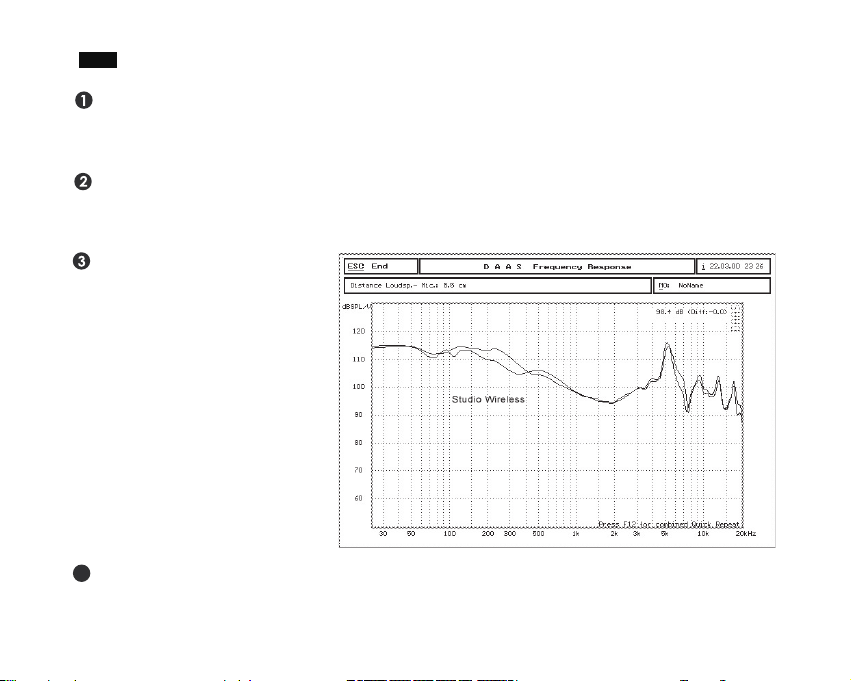
Frequency
Response: 20~20000Hz 32Ω
110±3dB
Neodymium
Ф50mm
HFP/HSP/
A2DP/AVRCP
Bluetooth V4.1
CSR8635
Thank you for choosing Studio Wireless C. Please read this manual carefully before use.
Features
Special ergonomic design. The middle button is lower than the buttons of two sides, which
makes it easy for button identification. Equip a high/low switch to control volume, calls and
music.
The 50mm large neodymium
driver and innovative
technology deliver high
definition sound in new
perfection and reproduces all
your music dynamics and
controlled bass that DJs and
audiophiles need. Bring you
more immersive experience.
30 hours play time in a single charge. The memory-protein ear cushion simulates human skin
texture, ensuring lasting comfort and without extruding your ears if you wear glasses.This
headphones are compatible with iOS, Android or Windows devices.
Pluggable extended MIC. It can be twisted discretionarily picks-up your voice loud & clear and
provide crystal-clear conversations even in noisy environment.This headset can be used mainly
for chatting and music. Let your taste choose your headphones.
4

Instruction
Charging
Connect the headphones to a PC or power adapter with the USB charging cable.
The LED indicator will turn into red whilst charging and will turn blue when it is fully charged.The
first charge may take up to more than 3 hours to complete.
Multiple button
Micro USB charging port 3.5mm jack aux-in
3.5mm jack for extended MIC Extended MIC
Short press
Long press
Volume down/
Previous track
Short press
Long press
Volume up/
Next track
On/Off
Play
Pause
Call/
Answer/
Hang up
LED indicator
81.2 straight cable
9
8
9

Pairing a Wireless Device
Multi Point
Keep the headphones and the mobile phone/music player within 1 meter of each other when
pairing.
Enter pairing mode directly after turn on the headphones.
Turn your iOS, Android or Windows device’s Bluetooth on and select “OneAudio A2” from the
list of found devices.
If asked for a passcode, please enter“0000”and the headphones will be connected to your
device.
After pairing successfully, the LED light will flash blue occasionally, you can then answer the phone
or listen to your music.
The wireless Bluetooth headset connects two devices at the same time. Follow the steps in
“Pairing”, then turn off the Bluetooth on the connected device and repeat the steps with the
second device. After successfully connecting the second device, turn on Bluetooth on the first.
Both devices will now be connected to the headset. Solved the problem of music shuttering in
the first 20 seconds. If you turn off and restart the headphones, only one device will be
reconnected to it automatically. You should connect the other device manually.
Playing Music
Adjusting the volume: Short press “+” or “-” for volume down or volume up. The volume is
completely synchronized with IPhone and most Android devices.The last two gears skip at a time.
Music Selection: Long press “-” or “+” for previous track or next track.
Play/Pause: Press (don’t hold) Play/Pause①to switch between play and pause status.
Note:The controls will not function when charging.

Turn to Wired Mode
How to Rotate (Maximum swivel angle:90°)
Ensure the headphones are switched off during
wired use
Connect the 3.5mm cable into the 3.5mm Aux-in
Connect the other end of the 3.5mm cable into
your device
Note: Inserting 3.5mm cable disables wireless
functions
Call-handling
Siri and Clear Up Memory
Press the Play/Pause①once to answer/end the call. During the call, you can adjust the volume by
using the volume + ③and volume – ② buttons on the headphones.
For Siri, long press ①and hold for one or two seconds until you hear a "Di" prompt tone. Let go
once you hear prompt tone, otherwise the headphones will be turned off.
Clear the paired device memory, please press the volume button ②③at the same time.
left-hand
rotation only
right-hand
rotation only

Power On
Press and hold the On/Off button①to turn the headphones on. The LED light will flash between
blue and red when the headphones are active.
Power Off
How to Fold the Headphones
How to Adjust the Headband
Press and hold the On/Off button①to turn the headphones off. The LED indicator turns off,
indicating that the headphones are off.

What is not Covered
How to Make a Claim
This warranty does not cover defects resulting from improper or unreasonable use or maintenance; failure
to follow operating instructions; accidents; excess moistures; insects; lightning; unauthorized alteration or
modification of original condition; damage caused by inadequate packing or shipping procedures; loss of,
damage to or corruption of stored data; damage caused by use with non-
OneAudio
products; product
that requires modification or adaptation to enable it to operate in any country other than the country for
which it was designed, manufactured, approved and/or authorized, or repair of products damaged by there
modifications; and products purchase form unauthorized dealers.
Please sign up for OneAudio warranty service at www.oneaudio.shop.
OneAudio warrants that this product, for a period of 2 years from the date of retail purchase by the
original end-use purchaser, when delivered to you in new condition, in original package, from an
OneAudio authorized reseller and used in normal conditions, is free from any defects in manufacturing
and workmanship. We will, at our sole option, repair or replace (using new or refurbished replacement
parts) any defective parts within a reasonable period of time and free of charge.
Limited Warranty
In the event damage has occurred to products, you must follow these instructions:
Within two months, contact info@oneaudio.shop with order number in e-commerce website after
you discover a product defect (or should have discovered it, if such product defect was obvious);
In order to get professional solutions of OneAudio, please give a detailed explanation of how the
damage occurred.
Return the products. OneAudio will, at our sole option, repair or replace (using new or refurbished
replacement parts) any defective parts within a reasonable period of time and free of charge.

Troubleshooting
These headphones are passive noise isolating, not active noise cancellation (ANC), it can't cancel
the noise completely but it won't drain the battery and damage the sound.
If you cannot connect the headphones to your device, please try the followings:
1. Ensure that the headphones are charged, switched on, paired with and connected to your
kkdevice.
2. Check the headphones are within 10 meters (30 feet) of your device and there are no
kkobstructions (such as walls or other electronic devices) between the headphones and the
kkdevices.
3. If you receive an intermittent signal, please ensure the headphones are fully charged before
kkcontinuing use.
4. If you don’t use the headphones for longer than 10 minutes whilst no connected to a device,
kkthey will automatically power off to conserve power.
We hope you’ve got everything you need. If anything else, just feel free to contact
available on Facebook,Twitter, YouTube or the other SNS.Thanks for your support!
Other Legal Rights
This limited warranty gives you specific legal rights, and you also may have other rights that vary from
state to state or country to country. Some places do not allow limitations on implied warranties or
the exclusion or limitation of incidental or consequential damages, so the above limitations or
exclusions may not apply to you.

Vielen Dank, dass Sie sich für Studio Wireless C entschieden haben. Bitte lesen Sie
diese Anleitung vor dem Gebrauch sorgfältig durch.
Spezifikationen
Zubehör
Modell:
Effektive
Übertragungsreichweite:
Abspielzeit:
Ladezeit:
Standby-Zeit:
Audioausgang:
Micro-USB-Ladekabel Tragebeutel
Gebrauchseanleitung 1,2m Kabel mit Mikrofon / Erweitertes Mikrofon
Drahtlos/
Verkalbet
≥500H
ca. 3 h
≥30H
A2
≥10m
Bluetooth-Version:
Bluetooth-Chip:
Bluetooth-Protokolle:
Membrandurchmesser:
Magnet-Typ:
Empfindlichkeit:
Impedanz:
Frequenzgang: 20~20000Hz 32Ω
110±3dB
Neodym
Ф50mm
HFP/HSP/
A2DP/AVRCP
Bluetooth V4.1
CSR8635
Table des matières
Langues :


