
Nvidia SHIELD Manuel utilisateur

Contents
Welcome ............................................................................................................................................................... 2
In the Box ............................................................................................................................................................... 3
Charging Your SHIELD Wireless Controller ............................................................................................................ 4
Connecting Your SHIELD Wireless Controller ......................................................................................................... 5
now Your SHIELD Wireless Controller .................................................................................................................. 6
Buttons ............................................................................................................................................................. 6
Microphone ...................................................................................................................................................... 8
Headphone Jack ............................................................................................................................................... 8
Warranty Information ............................................................................................................................................ 9
What Does This Limited Warranty Cover? ......................................................................................................... 9
For How Long?.................................................................................................................................................. 9
What Will NVIDIA Do? ...................................................................................................................................... 9
What Does This Warranty Not Cover? ............................................................................................................... 9
What to Do if You Have a Problem? ................................................................................................................ 10
Limitations of Warranty .................................................................................................................................. 10
Disclaimer of Warranty ................................................................................................................................... 10
Limitation of Liability ...................................................................................................................................... 10
Law and Your Rights ....................................................................................................................................... 11
Binding Arbitration and Class Action/Jury Trial Waiver .................................................................................... 11
Compliance .......................................................................................................................................................... 13

Welcome
SHIELD Wireless Controller is an advanced game controller designed for gamers who want the best experience on
Android. Your SHIELD Wireless Controller uses breakthrough Wi-Fi Direct technology to offer the lowest latency
connectivity plus high-fidelity stereo audio and support for game chat. Designed with console-grade controls and
dedicated buttons for Android and PC gaming, SHIELD Wireless Controller is the best way to play your favorite
Android and PC games.

3
In the Box
Included in the box are the following items:
SHIELD Wireless Controller Micro-USB Cable
WELCOME
Support Guide Quick Start Guide
4
Charging Your SHIELD Wireless Controller
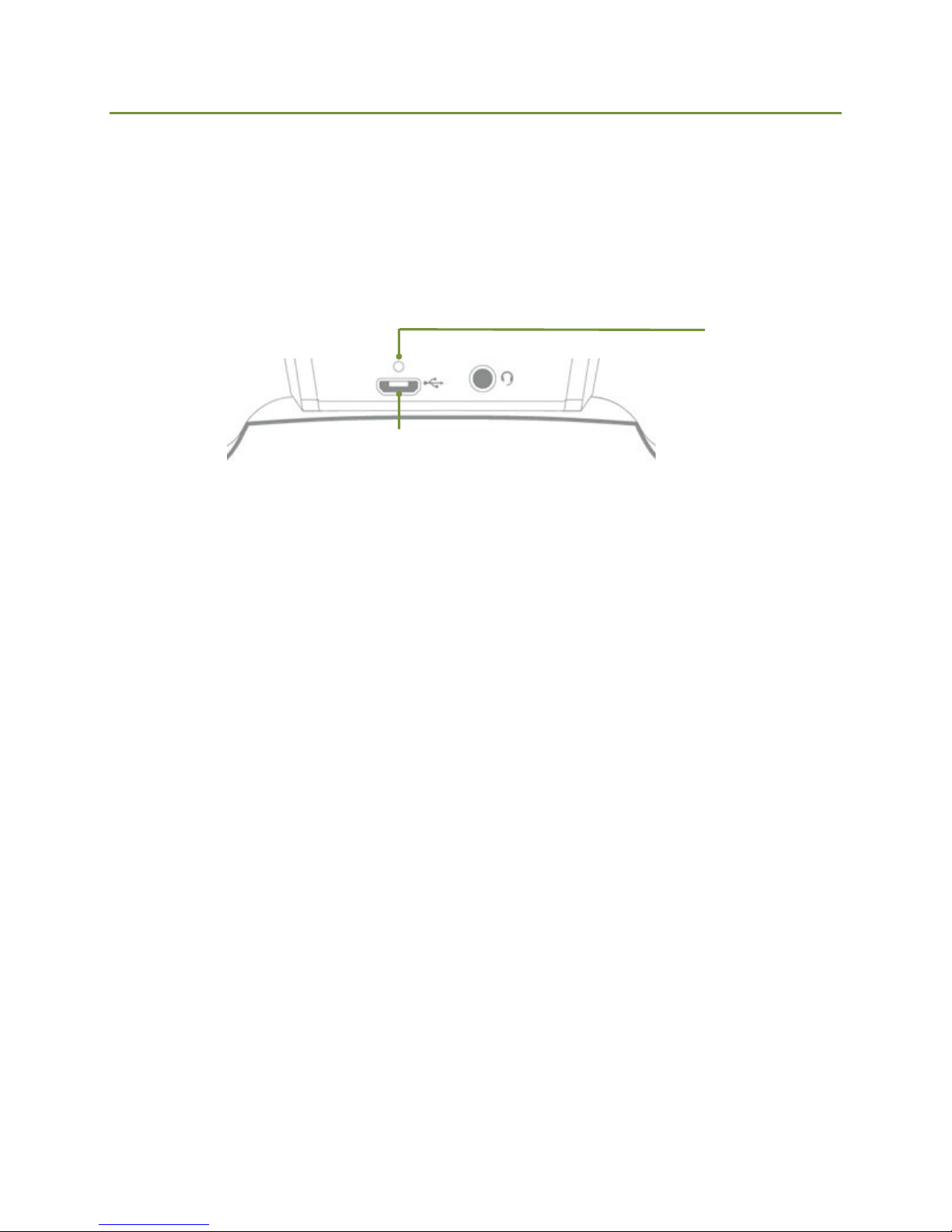
To charge your SHIELD Wireless Controller, connect the included Micro-USB cable to the micro-USB port on the
back of the device. Plug the Type A connector into a powered USB port (USB outlet, USB AC adapter, PC, etc.).
Back of Device
Mi
c
r
o
-
U
S
B
Charge Indicator LED
–– Amber Charging
– Green Charged

5
Connecting Your SHIELD Wireless Controller
To connect your SHIELD Wireless Controller, run the SHIELD Wireless Controller app on your Android device.

6
now Your SHIELD Wireless Controller
Buttons
NVIDIA button. Long press to device ON or OFF. Press to
launch TegraZone.
Home Button. Opens the Android Home screen. Double Press to
view icons of Recent Apps. Long Press to open Google Now.
Start button.
Back. Jumps to the previous screen or activity.
A Button. Activates the selected item in most apps.
B Button. Back or cancel in most apps
X Button
Y Button. Opens Menu in most apps.
Left Stick
Right Stick. Controls the mouse pointer on your screen. Push
the Right Stick to click. You can also use Right Trigger or the A
button.
D-Pad

7
Left Bumper. Navigate to each section in TegraZone.
Left Trigger
Right Bumper Navigate to each section in TegraZone.
Right Trigger

8
Microphone
SHIELD Wireless Controller has a built-in microphone above the NVIDIA button. Hold the Home button or enable
Google Now and activate voice search.
Headphone Jack
SHIELD Wireless Controller has a connection on the back of the device for a headphone/headset (with
microphone).
3.5 mm headphone jack
with microphone support

9
Warranty Information
What Does This Limited Warranty Cover?
This NVIDIA limited warranty covers your SHIELD™ hardware product, along with any accessories received with
the hardware product, (“Warranted Product”) under normal use conditions for manufacturing defects or hardware
component failures in your Warranted Product that is still within warranty. Accessories sold separately are
covered by the applicable warranty accompanying the accessory. This warranty is for the original owner only and
is therefore non-transferable, non-assignable and is voided when the Warranted Product is transferred to another
party.
This warranty gives you specific legal rights and is only valid in the United States and Canada. You may also have
other rights which vary from state to state or province to province.
NOTE: THIS AGREEMENT CONTAINS A BINDING INDIVIDUAL ARBITRATION AND CLASS
ACTION/JURY TRIAL WAIVER PROVISION THAT AFFECTS YOUR RIGHTS UNDER THIS
AGREEMENT. YOU HAVE THE RIGHT TO OPT OUT OF THE BINDING ARBITRATION AND CLASS
ACTION WAIVER PROVISIONS AS DESCRIBED HEREIN.
or How Long?
This NVIDIA warranty applies for one (1) year from the date of purchase of your new Warranted Product
(“Warranty Period”).
What Will NVIDIA Do?
NVIDIA will repair, or if repair is not reasonably possible, replace your defective Warranted Product. Replacement
parts and/or products may include new or refurbished parts or products and are warranted only until the
expiration of the original Warranty Period.
What Does This Warranty Not Cover?
NVIDIA does not guarantee that the operation of the Warranted Product will be uninterrupted or error free.
NVIDIA is not responsible for any interoperability or compatibility issues that may arise when (a) products,
software, or options not supported by NVIDIA are used; (b) configurations not supported, provided or approved
by NVIDIA are used; (c) parts intended for one system are installed in another system of different make or model.
NVIDIA will have no warranty obligation with respect to the following: (a) Warranted Product hardware that has
no defects in materials or workmanship, (b) software, games or applications, (c) cosmetic damage; (d) normal
wear and tear; (e) expendable or consumable parts; (f) defects or damage to the Warranted Product arising from
or related to: (1) any modifications, alterations, tampering, repair, or servicing by any party other than NVIDIA or
its authorized representatives; (2) handling, transit, storage, installation, testing, maintenance, or use not in
accordance with the Warranted Product documentation; (3) abuse, negligence, neglect, accidents, or misuse; (4)
third party software or viruses; or software loss or data loss that may occur during repair or replacement; (5) fire or
spillage of food or liquid, external electrical fault, or any acts of God (such as, but not limited to, lightning), or any
other external factor.
NVIDIA IS NOT RESPONSIBLE FOR DAMAGE TO OR LOSS OF ANY PROGRAMS, DATA, OR REMOVABLE STORAGE MEDIA. NVIDIA IS NOT
RESPONSIBLE FOR THE RESTORATION OR REINSTALLATION OF ANY PROGRAMS OR DATA OTHER THAN SOFTWARE INSTALLED BY NVIDIA
WHEN THE PRODUCT IS MANUFACTURED.
Before returning any Warranted Product for service, it is recommended that you back up data and remove any
confidential, proprietary, or personal information.

10
What to Do if You Have a Problem?
If you are experiencing a problem, or if you believe that your product is defective, please contact the NVIDIA
Customer Care team. We will help you troubleshoot your issue and process a replacement if it is found to be
defective. NVIDIA Customer Care can be reached here, where you can search our knowledgebase for solutions to
common problems or interact with our staff via the "Ask a Question" or "Live Chat" tabs: www.nvidia.com/nvcc.
Limitations of Warranty
This limited warranty applies only to the original purchases of the Warranted Products from a retailer, mail order
operation, or on-line retail store; this warranty will not extend to any person that acquires a Warranted Product on
a used basis.
Your exclusive remedy, and NVIDIA's sole obligation and liability with respect to any defective product, is limited
to the repair or replacement of such product as described in this warranty. NVIDIA may, at its sole discretion, use
new or refurbished parts or units to meet the conditions of the warranty.
Disclaimer of Warranty
EXCEPT AS EXPRESSLY PROVIDED HEREIN AND TO THE MAXIMUM EXTENT PERMITTED BY APPLICABLE
LAW, NVIDIA DISCLAIMS ALL OTHER WARRANTIES WITH RESPECT TO THE PRODUCT, WHETHER EXPRESS,
IMPLIED, STATUTORY OR OTHERWISE, INCLUDING WITHOUT LIMITATION, SATISFACTORY QUALITY,
COURSE OF DEALING, TRADE USAGE OR PRACTICE OR THE WARRANTIES OF MERCHANTABILITY, FITNESS
FOR A PARTICULAR PURPOSE, TITLE, OR NON-INFRINGEMENT OF THIRD PARTY RIGHTS.
FEDERAL LAW, SOME STATES, PROVINCES AND OTHER JURISDICTIONS DO NOT ALLOW EXCLUSIONS OF
CERTAIN IMPLIED WARRANTIES. SOME STATES, PROVINCES AND OTHER JURISDICTIONS DO NOT ALLOW
LIMITATIONS ON HOW LONG AN IMPLIED WARRANTY LASTS, SO SOME OF THE ABOVE LIMITATIONS MAY
NOT APPLY TO YOU.
Limitation of Liability
IN NO EVENT SHALL NVIDIA BE LIABLE FOR INDIRECT, INCIDENTAL, SPECIAL, EXEMPLARY, PUNITIVE, OR
CONSEQUENTIAL DAMAGES OF ANY NATURE INCLUDING, BUT NOT LIMITED TO, LOSS OF PROFITS, DATA,
REVENUE, PRODUCTION, OR USE, BUSINESS INTERRUPTION, OR PROCUREMENT OF SUBSTITUTE GOODS
OR SERVICES ARISING OUT OF OR IN CONNECTION WITH THIS LIMITED WARRANTY, OR THE USE OR
PERFORMANCE OF ANY PRODUCT, WHETHER BASED ON CONTRACT OR TORT, INCLUDING NEGLIGENCE,
OR ANY OTHER LEGAL THEORY, EVEN IF NVIDIA HAS BEEN ADVISED OF THE POSSIBILITY OF SUCH
DAMAGES. NVIDIA'S TOTAL AGGREGATE LIABILITY FOR DAMAGES OF ANY NATURE, REGARDLESS OF
FORM OF ACTION, SHALL IN NO EVENT EXCEED THE AMOUNT PAID BY YOU TO NVIDIA FOR THE PRODUCT
UPON WHICH LIABILITY IS BASED. SOME STATES AND JURISDICTIONS DO NOT ALLOW FOR THE
EXCLUSION OR LIMITATION OF INCIDENTAL OR CONSEQUENTIAL DAMAGES, SO THIS LIMITATION AND
EXCLUSION MAY NOT APPLY TO YOU.
WITHOUT LIMITING THE GENERALITY OF THE ABOVE DISCLAIMERS, NVIDIA DOES NOT WARRANT ANY
SOFTWARE PRODUCTS UNDER THESE TERMS AND CONDITIONS. WARRANTIES, IF ANY, FOR SOFTWARE
ARE CONTAINED IN THE APPLICABLE LICENSE AGREEMENT WHICH ACCOMPANIES THE WARRANTED
PRODUCTS.
NVIDIA RESERVES THE RIGHT TO UNILATERALLY CHANGE ITS WARRANTIES AT ANY TIME, IN ITS SOLE
DISCRETION WITHOUT PRIOR NOTICE. IF MATERIAL CHANGES ARE MADE THEY WILL BE POSTED AT
WWW.NVIDIA.COM/WARRANTY. YOUR CONTINUED USE OF THE WARRANTED PRODUCT WILL SIGNIFY
YOUR ACCEPTANCE OF THESE CHANGES. IF YOU DO NOT ACCEPT MATERIAL CHANGES TO THE
AGREEMENT, CONTACT NVIDIA TO TERMINATE THIS AGREEMENT AND ANY CORRESPONDING
ACCOUNT(S). GOVERNING
Autres manuels pour SHIELD
7
Table des matières


