
NOVOGO A Series Manuel utilisateur

User
Manual

2
Table of Contents
License Agreement 4
Precautions and Notice 6
Checking The Novogo A Series package 7
Identifying The Novogo A Series parts 8
Preparing The Novogo A Series
Preliminary steps
9
9
Installing The Novogo A Series in the car
Installing in your automobile
Removing your Novogo A Series and docking kit
Installation Notes
10
10
11
12
Before You Begin
Calibration
Select Language
13
13
13
Main Menu 14
Navigation
Address
Point Of Interest
Select On Map
Favorites or Recent Destinations
15
16
17
18
19
Home 21
Route Planning 22
Map Screen 23

3
Table of Contents
Settings
User mode
Map information
Route information
Signpost information
Speed limit
Volume
Representation
Touchscreen calibration
Auto mode
Routing options
Itinerary
Time zone
Format
TMC
Home address
Product information
25
25
26
26
27
27
28
28
29
29
30
30
31
31
32
32
Novogo Map Disc
using the novogo map disc
Recover my Map
Switch Language
Backup / Restore
33
33
34
35
36
Safety Notices and Warnings 37
Other Safety Information 38

4
PLEASED READ THIS LICENSE AGREEMENT CAREFULLY BEFORE USING THE PRODUCT ACCOMPANIED WITH THIS DOCUMENT.
BY USING ALL OR ANY PORTION OF THE NOVOGO SOFTWARE AND/OR HARDWARE, YOU ACCEPT ALL THE TERMS OF THIS
AGREEMENT BETWEEN YOU, THE END USER, AND NOVOGO INC.
1) NOVOGO Inc. grants you (Licensee) a limited license (License) to use the NOVOGO Navigation System hardware (Hard-
ware) and software (Software) in the accompanied package acquired with this License. This License is non-exclusive and
non-transferable. Unless otherwise granted by NOVOGO Inc., Licensee may not rent, lease, or lend software to another
person.
2) The License is effective upon, and from the date of, the agreement by Licensee to the terms herein and execution of this
License until the formal release of the licensed product at any place, unless terminated by NOVOGO Inc.
3) Hardware and Software include, but not limited to, NOVOGO GPS Navigator, SD memory card, suction-mount automobile
cradle, Cigarette lighter charger, (optional) remote controller, (optional) carrying case, Map CD/DVD, USB cable, and all
written or electric document from NOVOGO Inc. or its suppliers.
4) Licensee may install the Software on only one computer provided that it is combined with one navigation system. Licensee
may only make one copy of the Software for backup purposes. Downloading the map data and transferring to another
navigation system is explicitly prohibited.
5) The copyrights and other intellectual or proprietary rights to the Software and Hardware are owned by NOVOGO Inc. or
its suppliers. Licensee acknowledges that the Software is the property of NOVOGO Inc. and Licensee is not permitted to
analyze it by decompiling or disassembling (reverse engineering), or to modify it and make software based on the work.
If Licensee needs any information regarding Hardware/Software structure for Licensee’s own purpose, please contact
NOVOGO Inc. at [email protected].
License Agreement

5
6) NOVOGO Inc. reserves the rights to terminate this License Agreement at any time for any reason. Upon termination of
this License Agreement, Licensee shall discontinue using Software and Hardware for any purpose, by any means and in
any form, in whole or in part, unless agreed otherwise by NOVOGO Inc. in written.
7) In addition to the criminal penalties and civil liabilities provided by the Taiwan Copyright Law, Licensee shall be liable for
any damages and losses caused to NOVOGO Inc. in accordance with this License Agreement if Licensee uses the Software
and/or Hardware in breach of any terms in this License.
8) The License is subject to Law of the Republic of China and Taiwan Taipei District Court is the only competent court for
disputes related to this License and the use of NOVOGO Hardware and/or Software.
License Agreement

6
Precautions and Notices
1) The Li-ion battery can not be used above 50'C / 120'F, please do not operate the navigator under high temperature
and use the specified cigarette lighter charger only.
2) When you get off the car, do not leave the Novogo Navigator on the dashboard that is subject to direct sunlight. The
overheating of the battery can cause malfunction and/or danger.
3) If the battery is running out of power or have not been used after a long period of time, it may need to be charged
for 3~5 minutes before you can turn it on.
4) Novogo provides one year warranty of the GPS Navigator and 6 months warranty of the battery. For any warranty
issues or technical supports, please contact with your dealer or visit our website www.novogo.com for more details.
5) GPS is operated by the United States government, which is solely responsible for the performance of GPS. Any change to
the GPS system can affect the accuracy of all GPS equipments.
6) GPS satellite signals cannot pass through solid materials (except glass). When you are inside a tunnel or building, GPS
signals will not be available.
7) A minimum of 3 GPS satellite signals is needed to determine current position. Signal reception can be affected by situa-
tions such as bad weather or dense overhead obstacles (e.g. trees and tall buildings).
8) Other wireless devices in the vehicle might interfere with the reception of satellite signals and cause the reception to be
unstable.
9) A docking kit is needed when using the device in a car. Be sure to place the device in an appropriate place, so as not to
obstruct the driver’s view, and avoid the deployment in front of airbags.
0) Use this product prudently. The product is intended to be used only as a navigation aid. It is not for
precise measurement of direction, distance, location or topography.
1) The calculated route is for reference only. It is the user’s responsibility to follow the traffic signs and local regulations
along the roads.
2) For your own safety, do not operate the Novogo Navigator while driving.
1
1
1

7
Checking The Novogo A Series Package
1 3
9
2
4
Novogo A series Navigator
Docking Station
Car Holder
Cigarette Lighter Charger
Mini USB Cable
Quick User Guide
Hardware Installation Guide
Novogo Map CD / DVD
Warranty Card
SD Memory Card with Map Data pre-loaded
1
2
3
4
5
6
7
8
9
10
5
7 8 10
6

8
1
2
3
External 2nd GPS
antenna connecter
Audio jack
DC input
4
5
6
7
8
9
10
11
Zoom in
Zoom out
3.5 inch touch screen TFT LCD
Main menu
GPS status / Save current position
Repeat voice instructions
Volume down
Volume up
12
13
14
15
16
Power switch
SD memory card slot
Mini USB port
Hard on/off switch
Reset / Switch language
17
18
Stylus
Speaker
Identifying The Novogo A Series parts
1
18
17
14
13
16
15
2
3
4
5
6
7 8 9 11
12
10

9
Preparing The Novogo A Series
Connect the Novogo A series
with the cigarette lighter charg-
er in the car.
Insert the SD memory card
with map data pre-loaded
Expose your Novogo un-
der open sky for GPS signal
reception. (It may take few
minutes to receive the GPS
signal when first time turning
on the navigator. And the
reception can be affected
by bad weather, overhead
obstacles and reflective car
window tint)
Switch on the power and
let the fun begin…
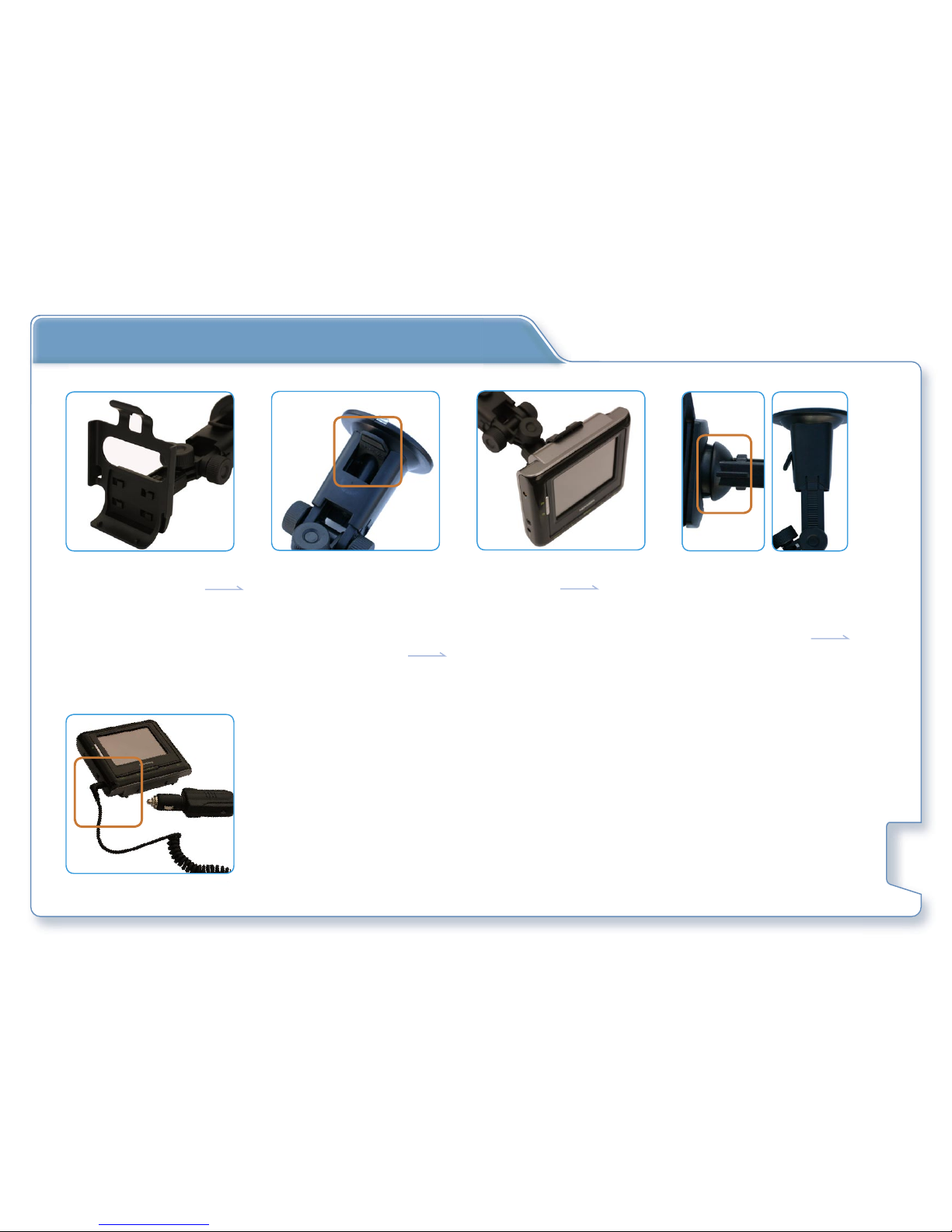
10
5) Plug in the cigarette lighter charger and connect
the other end to the DC input on A series
1) Assemble the Docking Sta-
tion with Car Holder
2) Attach the suction-mount
Car Holder to an area that
will not obstruct your driv-
ing view and push the tab
towards the windshield to
lock the suction cup
3) Clip the A series with Dock-
ing Station
4) Adjust the viewing angle
by (1) Stretch the arm,
(2) Loosen the horizontal
screw or (3) Loosen the
360 degree screw.
Installing The Novogo A Series in the car
Table des matières
Autres manuels NOVOGO GPS


