Nokia Lumia 2520 Manuel utilisateur

User Guide

Nokia Lumia 2520: Safety
1
Safety
Read these simple guidelines. Not following them may be dangerous or
illegal.
KEEP YOUR DEVICE DRY
Your device is not water-resistant. Keep it dry.
GLASS PARTS
The device screen is made of glass. This glass can break
if the device is dropped on a hard surface or receives
a substantial impact. If the glass breaks, do not touch
the glass parts of the device or attempt to remove the
broken glass from the device. Stop using the device until
the glass is replaced by qualied service personnel.
PROTECT YOUR HEARING
To prevent possible hearing damage, do not listen at
high volume levels for long periods. Exercise caution
when holding your device near your ear while the
speakerphone is in use.
SAR
This device meets RF exposure guidelines when used in
the normal use position, in direct contact with the body.
The specic maximum SAR values can be found in the
Certication Information (SAR) section of this user guide.
For more info, go to www.sar-tick.com.
TURN OFF IN RESTRICTED AREAS
Turn the device o when mobile phone use is not
allowed or when it may cause interference or danger,
for example, in aircraft, in hospitals or near medical
equipment, fuel, chemicals, or blasting areas. Obey all
instructions in restricted areas.
ROAD SAFETY COMES FIRST
Obey all local laws. Always keep your hands free to
operate the vehicle while driving. Your rst consideration
while driving should be road safety.
INTERFERENCE
All wireless devices may be susceptible to interference,
which could aect performance.
QUALIFIED SERVICE
Only qualied personnel may install or repair this
product.
BATTERIES, CHARGERS, AND OTHER
ACCESSORIES
Use only batteries, chargers, and other accessories
approved for use with this device. Do not connect
incompatible products.

Contents
Safety.................................................1
Get started....................................... 4
Keys and parts................................................................. 5
First start-up...................................................................6
Lock the screen .............................................................10
Antenna locations ......................................................... 11
Basics ...............................................12
Personalize your tablet................................................. 18
Take a screenshot..........................................................20
Extend your battery life................................................20
Save on data costs......................................................... 21
Text input ......................................................................22
Search your tablet.........................................................24
SkyDrive ........................................................................24
Nokia account................................................................26
People & messaging.......................27
Contacts......................................................................... 27
Social networks .............................................................28
Mail.................................................................................29
Camera............................................ 33
Take a photo.................................................................. 33
Record a video............................................................... 34
Photos hub..................................................................... 34
Maps & navigation..........................37
Turn location services on.............................................. 37
HERE Maps..................................................................... 37
Positioning methods ..................................................... 41
Internet ........................................... 42
Dene how your tablet connects to the web...............42
Web browser ..................................................................42
Close all network connections......................................44

Entertainment................................ 45
Watch & Listen ..............................................................45
Get started with the Nokia Music app .........................46
Windows Store............................................................... 47
Games ............................................................................49
Oce............................................... 50
Microsoft Oce ............................................................50
Calendar.........................................................................52
Device management
& connectivity................................ 53
Keep your tablet up to date ......................................... 53
Bluetooth .......................................................................54
NFC.................................................................................55
Memory and storage .....................................................56
Security.......................................................................... 57
Access codes..................................................................58
Troubleshooting and support...... 59
Product and safety information..60
Take care of your device ...............................................60
About Digital Rights Management ...............................60
Battery and charger info............................................... 61
Additional safety information...................................... 61
Nokia Care .....................................................................64
Copyrights and other notices .......................................64

Nokia Lumia 2520: Get started
4
Chapter 1
Get started
Windows Button
Speaker
HDMI Port
SIM/microSD
Card Tray LED indicator light
for front camera
Front camera
USB 3.0 Port
Speaker
Volume Key
Power/Lock key
MicrophoneMicrophone

Nokia Lumia 2520: Get started
5
Chapter 1
Keys and parts
Some of the accessories mentioned in
this user guide may be sold separately.
NFC Area
Rear Camera
Microphone
Charging Port
Keyboard Dock
Connector
Headset Jack

Nokia Lumia 2520: Get started
6
Chapter 1
First start-up
Learn how to get your new tablet up and running.
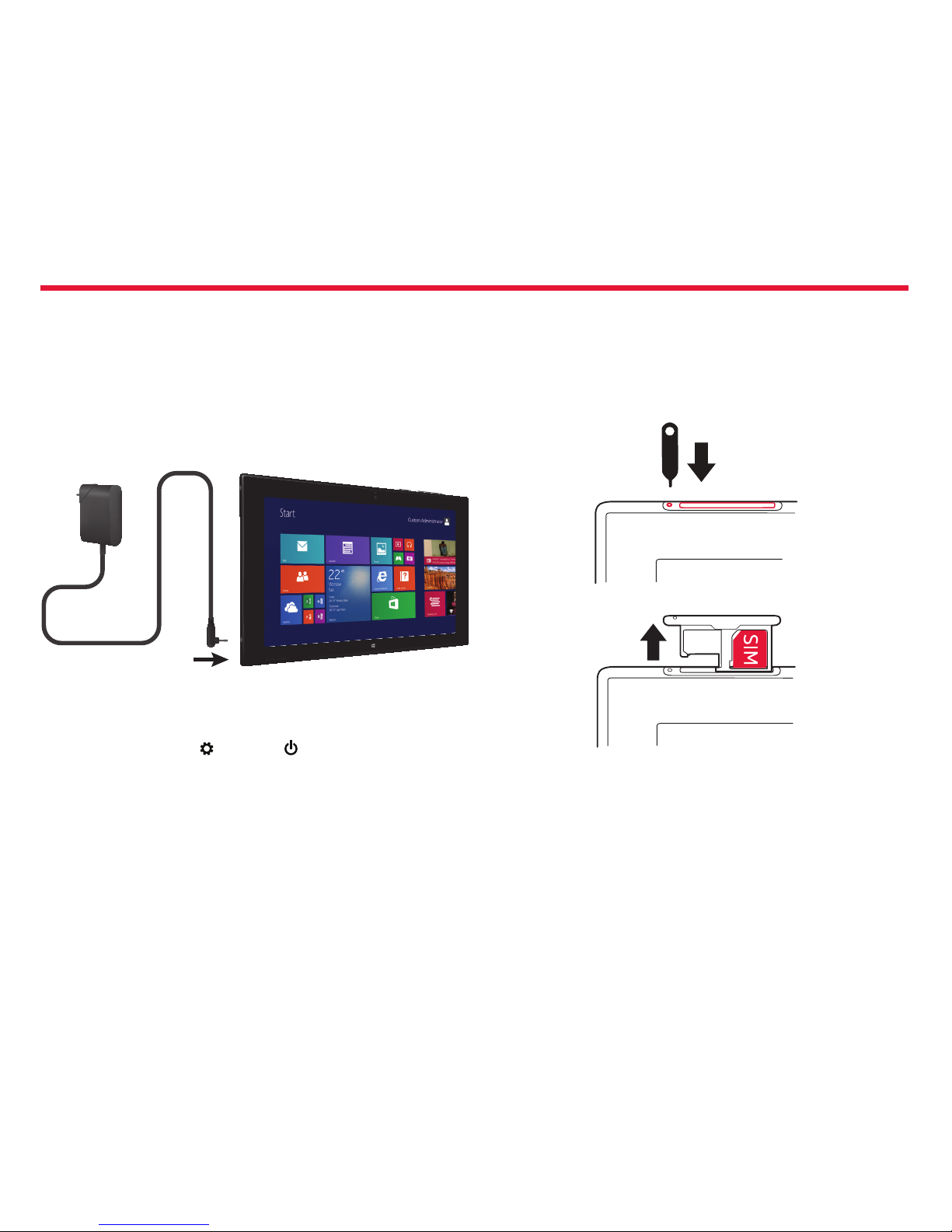
Step 1: Charge the Tablet
Before turning on your tablet, charge it fully. Be sure to use the charger
that came with yourtablet.
Plug the charger into a wall outlet. Then connect it to your tablet. A
green light on the charger will show your tablet is charging.
Step 2. Turning Your Tablet On/O
To turn your tablet on, press the Power/Lock Key.
To turn your tablet o, tap Settings > Power > Shut down.
Optional: Remove the SIM Card
Your tablet came with the SIM card already installed. If you need to
replace the SIM card:
1. Turn o the tablet.
2. Use the SIM door key to unlock the SIM/microSD card tray. Push the
key into the hole untilthe tray is released.
3. Pull out the tray and carefully remove the old SIM card.

Nokia Lumia 2520: Get started
7
Chapter 1
4. Place the new SIM card in the tray, underneath the notch on the
right side, with the contact area face down, and slide the tray back
into the tablet.
Your tablet uses a micro-SIM card, also known as a mini-UICC card.
Important:
This device is designed to be used with a mini-UICC SIM card,
also known as a micro-SIM card only. A micro-SIM card is
smaller than the standard SIM card. Use of incompatible SIM
cards, or use of SIM card adapters, may damage the card or
the device, and may corrupt data stored on the card.
Installing a microSD card
1. Turn o the tablet.
2. Use the SIM door key to unlock the SIM/microSD card tray. Push the
key into the hole until the tray is released.
3. Pull out the tray.
4. Place the card in the tray on the left side, with the contact area face
down, and slide the tray back into the tablet.

Nokia Lumia 2520: Get started
8
Chapter 1
Note
Memory Card sold separately.
Use only compatible memory cards approved for use with this device.
Incompatible cards may damage the card and the device and corrupt
data stored on the card.
Some microSD cards may not be compatible with this tablet.
Your tablet supports memory cards with capacity of up to 32 GB.
The tablet must be turned o before inserting the SIM or memory card.
Do not remove the memory card when the tablet is on. Doing so may
damage the memory card and the tablet.
Non-Removable Battery
Your device is equipped with an internal rechargeable battery which
should be replaced only by Nokia or an authorized Nokia repair center.
You should never attempt to open or disassemble this device yourself
and doing so may cause damage that voids your warranty.
Important:
Only qualied personnel or an authorized service
facility should replace the battery. Unauthorized battery
replacement may invalidate your warranty.
Set up your tablet
Make your tablet your own right from the start.
1. Turn your tablet on.
2. To set up and name your tablet, follow the instructions shown on
the screen.
3. Create your Microsoft account, or sign in with your existing
username and password. With a Microsoft account, you can, for
example, get apps from Store or access more Microsoft services,
such as SkyDrive.
Note:
You need an Internet connection. If you don’t have a data
plan, data transmission costs may pile up quickly. For info
about possible data costs, contact your network service
provider.
4. If you can’t connect to the Internet, you can create the account
later.

Nokia Lumia 2520: Get started
9
Chapter 1
Tip:
Forgot your password? You can request it to be sent to you in
a mail or text message.
5. Finally, create a username and, if you want, also a password for your
local user prole on your tablet.
Tip:
You can create several Microsoft accounts, for dierent
family members, for example.When creating an account, tap
Add a child’s account to create an account for your child, with
added features such as Family Safety and reports about your
child’s PC activities.
To change users, tap the username in the top right corner of
the screen. Here you can also change the account picture,
lock the tablet, or sign out.
Example:
To create a Microsoft account later, swipe in from the right
of the screen, and tap Settings > Change PC settings >
Accounts > Other accounts > Add an account. To create
your account on the Internet, go to www.live.com.
Connect the headset to your tablet
Enjoy your favorite music without background disturbance.
Connect the headset to your tablet.
Do not connect products that create an output signal, as this may
damage the device. Do not connect any voltage source to the headset
connector. If you connect an external device or headset, other than
those approved for use with this device, to the headset connector, pay
special attention to volume levels.
Autres manuels pour Lumia 2520
3
Table des matières
Autres manuels Nokia Comprimé

Nokia
Nokia T21 Manuel utilisateur

Nokia
Nokia Lumia 2520 Manuel utilisateur

Nokia
Nokia Lumia 2520 Manuel utilisateur

Nokia
Nokia 770 - 770 Internet Tablet Manuel utilisateur

Nokia
Nokia T20 Manuel utilisateur

Nokia
Nokia 770 - 770 Internet Tablet Manuel utilisateur

Nokia
Nokia 770 - 770 Internet Tablet Mode d’emploi

Nokia
Nokia T10 Manuel utilisateur

Nokia
Nokia N800 - Internet Tablet - OS 2007 Manuel utilisateur

Nokia
Nokia 770 - 770 Internet Tablet Manuel utilisateur